

Filter Image Using Sobel
SUMMARY
Filter Image Using Sobel computes directional gradients of an image using the Sobel operator.
It applies a first-derivative kernel along X (dx) and/or Y (dy) to measure how sharply intensity changes in that direction, giving both edge strength and orientation information — unlike the isotropic filter_image_using_laplacian. It is similar to filter_image_using_scharr, but with a selectable kernel_size (Scharr is fixed at a 3x3 kernel with slightly better rotation invariance).
Use this Skill when you want to compute directional image gradients for edge detection or feature extraction.
The Skill
from telekinesis import pupil

filtered_image = pupil.filter_image_using_sobel(
    image=image,
    output_format="64bit",
    dx=1,
    dy=1,
    kernel_size=9,
    scale=1.0,
    delta=0.0,
    border_type="default",
)Example
Input Image
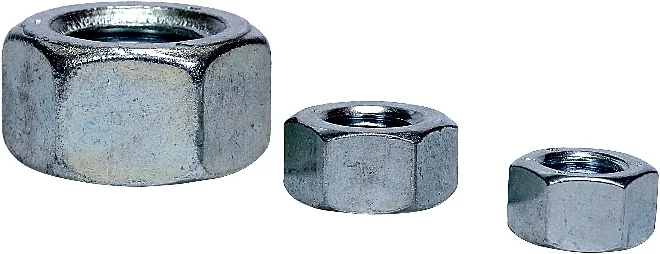
Original grayscale image
Filtered Image
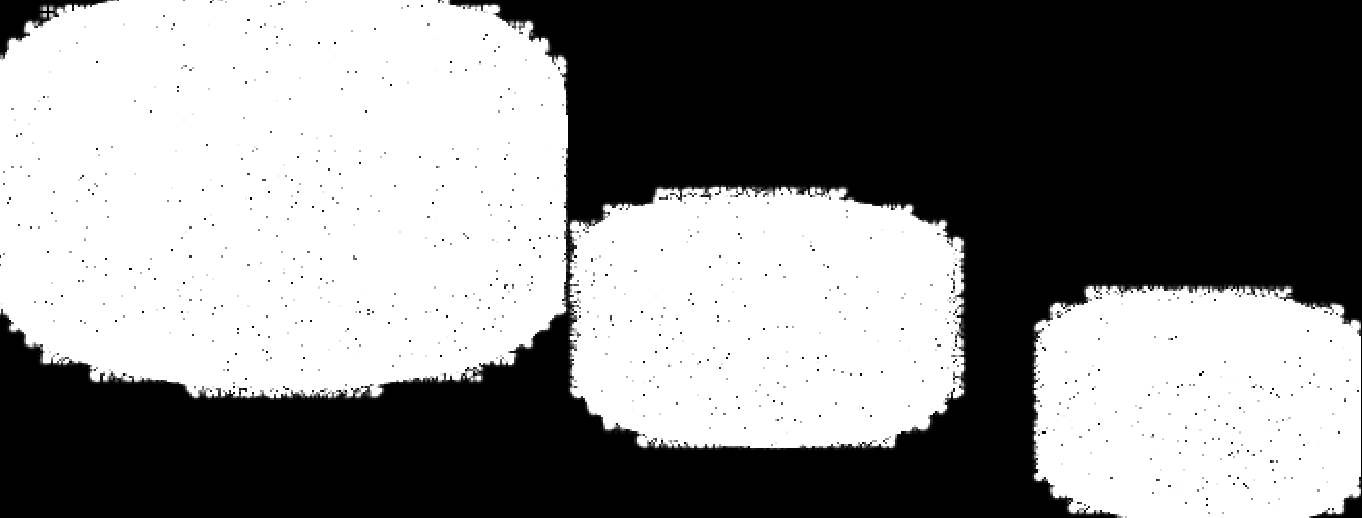
Raw Sobel response with dx=1 and dy=1, which emphasizes fine texture and diagonal intensity changes rather than clean object edges. This behavior is expected for this configuration.
The Code
"""Demonstrates filter_image_using_sobel operation."""

from loguru import logger
import rerun as rr

from telekinesis import pupil, datatypes


def filter_image_using_sobel_example():
    """Applies filter_image_using_sobel operation."""
    # ===================== Load Image ==========================================
    image_url = "https://assets.telekinesis.ai/examples/v1/images/nuts.jpg"
    image = datatypes.Image.from_url(image_url)

    # ===================== Run Skill ==========================================
    filtered_image = pupil.filter_image_using_sobel(
        image=image,
        output_format="64bit",
        dx=1,
        dy=1,
        kernel_size=9,
        scale=1.0,
        delta=0.0,
        border_type="default",
    )

    # ===================== Log ================================================
    logger.success(f"Applied filter_image_using_sobel on {image}")
    logger.success(f"Result: {filtered_image}")

    # ===================== Visualization  (Optional) ======================
    rr.init("filter_image_using_sobel_example", spawn=True)
    datatypes.visualize(image, entity_path="1-Original")
    datatypes.visualize(filtered_image, entity_path="2-Filtered")

if __name__ == "__main__":
    filter_image_using_sobel_example()
Runnable examples are available in the Telekinesis examples repository.
Follow the README in that repository to set up the environment, run this specific example with:
cd telekinesis-examples
python examples/image_processing/filter_image_using_sobel.py
Parameter Configuration
| Parameter | Type | Default | Description |
|---|---|---|---|
image | datatypes.Image | np.ndarray | required | The input image to filter. Recommended to be grayscale, shape (H, W) |
dx | datatypes.Int | int | 1 | Order of the derivative in the X direction: 0 (none), 1 (first derivative/edges), 2 (second derivative) |
dy | datatypes.Int | int | 0 | Order of the derivative in the Y direction: 0, 1, or 2 |
kernel_size | datatypes.Int | int | 3 | Size of the Sobel kernel. Must be one of 1, 3, 5, 7, 9 |
scale | datatypes.Float | float | int | 1.0 | Scale factor applied to the computed derivative values |
delta | datatypes.Float | float | int | 0.0 | Offset added to the output |
output_format | datatypes.String | str | "same as input" | Output bit depth: "same as input", "8bit", "16bitS", "16bitU", "32bit", "64bit". Signed/float formats preserve negative gradient values; "8bit"/"16bitU" clip them |
border_type | datatypes.String | str | "default" | Border handling mode: "default", "constant", "replicate", "reflect", "reflect 101" |
Returns
| Type | Description |
|---|---|
datatypes.Image | The gradient response, same (H, W) as the input, in the dtype specified by output_format |
Raises
| Exception | Condition |
|---|---|
TypeError | A parameter's value does not match its expected type (see the Parameter Configuration table above) |
ValueError | kernel_size is not one of 1, 3, 5, 7, 9, or output_format/border_type is not one of the supported options |
ConfigurationError | The TELEKINESIS_API_KEY environment variable is not set |
SerializationError | The request input failed to serialize, the response was not returned as an Arrow stream, or the response failed to deserialize |
RequestTimeoutError | The request to the Pupil service timed out |
TransportError | A network failure occurred before a response was received |
ClientError | The Pupil service rejected the request due to invalid or malformed input (HTTP 400/422), an unrecognized endpoint (HTTP 404), or another unexpected 4xx response |
AuthenticationError | The API key was rejected as invalid or expired (HTTP 401) |
AuthenticationServiceError | The authentication service returned an invalid response, was temporarily unavailable, or timed out (HTTP 502/503/504) |
ServerError | The Pupil service returned a 5xx or otherwise unexpected error response |
How to Tune the Parameters
The filter_image_using_sobel Skill exposes seven parameters that control which derivative is computed, at what scale, and how the response is represented.
dx
- Controls: The order of the derivative computed along the X axis.
- Default:
1 - Options:
0(no X derivative),1(first derivative, standard edge detection),2(second derivative) - Use
dx=1, dy=0to isolate horizontal-intensity-change (vertical) edges
dy
- Controls: The order of the derivative computed along the Y axis.
- Default:
0 - Options:
0,1,2 - Use
dx=0, dy=1to isolate vertical-intensity-change (horizontal) edges
kernel_size
- Controls: The spatial extent of the Sobel kernel.
- Units: Pixels
- Default:
3 - Increase → detects larger-scale edges, more compute
- Decrease → finer edge detail
- Typical range: must be one of
1, 3, 5, 7, 9; use3for standard edge detection,5-7for larger features
scale
- Controls: A multiplier applied to the raw gradient values.
- Default:
1.0 - Increase → amplifies edge responses
- Decrease → more subtle edge responses
- Typical range: 0.1-10.0
delta
- Controls: A constant offset added to every output pixel.
- Default:
0.0 - Typical range: -128.0 to 128.0. Use
0.0for numerical processing; add an offset for 8-bit visualization
output_format
- Controls: The numerical bit depth/precision of the returned gradient response.
- Default:
"same as input" - Options:
same as input– keeps the input dtype; may clip negative gradient values8bit– unsigned 8-bit; clips negative gradient values16bitS– signed 16-bit; preserves negative gradient values16bitU– unsigned 16-bit32bit/64bit– float; preserves negative gradient values and precision
border_type
- Controls: How pixels beyond the image boundary are synthesized when the kernel extends past the edge.
- Default:
"default" - Options:
default– library default (same asreflect 101)constant– pads with a fixed valuereplicate– repeats the edge pixelreflect– mirrors without repeating the edge pixelreflect 101– mirrors with the edge pixel repeated, avoiding dark borders
TIP
Best practice: Compute dx=1, dy=0 and dx=0, dy=1 separately and combine them as magnitude = sqrt(Gx^2 + Gy^2) when you need a direction-agnostic edge magnitude; use a signed/float output_format for that computation so negative gradient values aren't clipped first.
Where to Use the Skill
Common pipelines include:
- Directional edge detection – Detect edges with associated orientation information
- Gradient-based feature extraction – Compute image gradients as input to downstream feature descriptors
- Image sharpening – Enhance edges using gradient magnitude
- Pre-processing for flow/keypoint pipelines – Supply spatial gradients to optical-flow or corner-detection steps
Alternative Skills
| Skill | vs. Filter Image Using Sobel |
|---|---|
| filter_image_using_scharr | Fixed 3x3 kernel with better rotation invariance and accuracy. Use Sobel when a configurable kernel_size is needed. |
| filter_image_using_laplacian | Computes an isotropic second-derivative response instead of a directional first-derivative gradient. |
| filter_image_using_gaussian_blur | Common pre-processing step to reduce noise before computing gradients. |
When Not to Use the Skill
Do not use Filter Image Using Sobel when:
- You need the most accurate, rotation-invariant gradient at a small fixed kernel (use
filter_image_using_scharrinstead) - You need omnidirectional edge strength without orientation (use
filter_image_using_laplacianinstead) - The input hasn't been denoised (pre-smooth with
filter_image_using_gaussian_blurfirst, since gradients amplify noise) - You need thin, connected edge contours rather than a raw per-pixel gradient response (post-process with thresholding or a dedicated contour/edge-linking step)