

Filter Image Using Gabor
SUMMARY
Filter Image Using Gabor applies an oriented Gabor kernel to detect texture at a specific orientation and scale.
A Gabor kernel combines a Gaussian envelope with a sinusoidal wave, so it responds strongly to periodic patterns aligned with orientation and wavelength and weakly to everything else — useful for fingerprint ridges, fabric weave, wood grain, or any directional texture. Because a single call only probes one orientation, sweep orientation across multiple angles (e.g. 0, 45, 90, 135 degrees) and combine the responses when the dominant texture direction is unknown.
Use this Skill when you want to detect oriented textures or features at a specific scale and angle.
The Skill
from telekinesis import pupil

filtered_image = pupil.filter_image_using_gabor(
    image=image,
    kernel_size=5,
    standard_deviation=5.0,
    orientation=90.0,
    wavelength=5.0,
    aspect_ratio=0.5,
    phase_offset=90.0,
    output_format="8bit",
)Example
Input Image
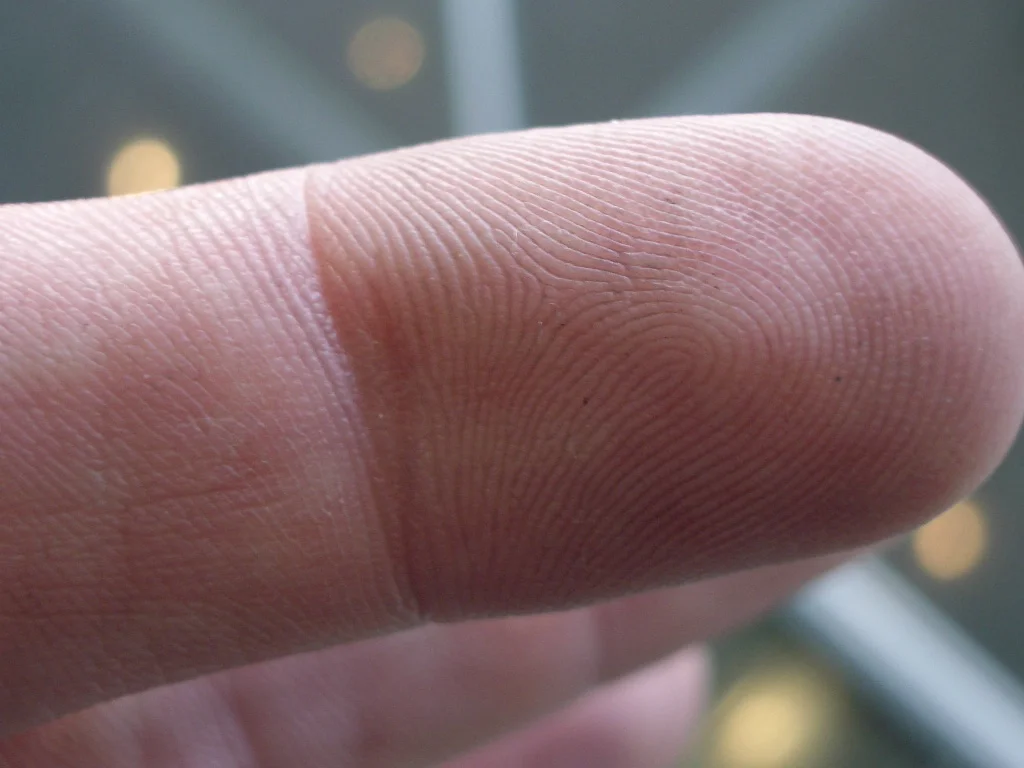
Original fingerprint image
Filtered Image
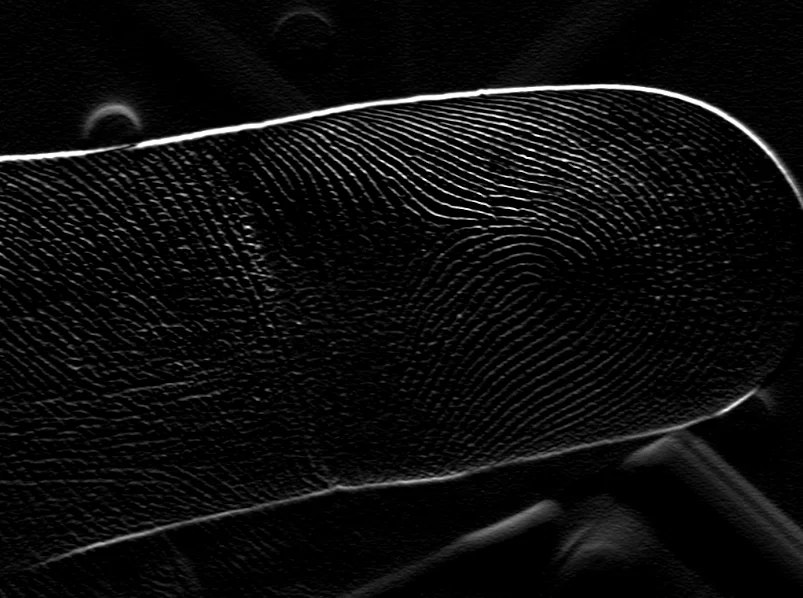
Gabor response with orientation=90.0, wavelength=5.0, highlighting ridges at the target orientation
The Code
"""Demonstrates filter_image_using_gabor operation."""

from loguru import logger
import rerun as rr

from telekinesis import pupil, datatypes


def filter_image_using_gabor_example():
    """Applies filter_image_using_gabor operation."""
    # ===================== Load Image ==========================================
    image_url = "https://assets.telekinesis.ai/examples/v1/images/finger_print.jpg"
    image = datatypes.Image.from_url(image_url)

    # ===================== Run Skill ==========================================
    filtered_image = pupil.filter_image_using_gabor(
        image=image,
        kernel_size=5,
        standard_deviation=5.0,
        orientation=90.0,
        wavelength=5.0,
        aspect_ratio=0.5,
        phase_offset=90.0,
        output_format="8bit",
    )

    # ===================== Log ================================================
    logger.success(f"Applied filter_image_using_gabor on {image}")
    logger.success(f"Result: {filtered_image}")

    # ===================== Visualization  (Optional) ======================
    rr.init("filter_image_using_gabor_example", spawn=True)
    datatypes.visualize(image, entity_path="1-Original")
    datatypes.visualize(filtered_image, entity_path="2-Filtered")

if __name__ == "__main__":
    filter_image_using_gabor_example()
Runnable examples are available in the Telekinesis examples repository.
Follow the README in that repository to set up the environment, run this specific example with:
cd telekinesis-examples
python examples/image_processing/filter_image_using_gabor.py
Parameter Configuration
| Parameter | Type | Default | Description |
|---|---|---|---|
image | datatypes.Image | np.ndarray | required | Input image, recommended grayscale, shape (H, W) |
kernel_size | datatypes.Int | int | 19 | Size of the Gabor kernel, in pixels. Must be odd. Typically 5 * standard_deviation + 1 |
standard_deviation | datatypes.Float | float | int | 3.0 | Standard deviation of the Gaussian envelope, in pixels |
orientation | datatypes.Float | float | int | 0.0 | Orientation of the filter, in degrees (0 is horizontal, 90 is vertical) |
wavelength | datatypes.Float | float | int | 6.0 | Wavelength of the sinusoidal component, in pixels |
aspect_ratio | datatypes.Float | float | int | 0.5 | Aspect ratio of the filter (width/height); 1.0 is circular, < 1.0 is elongated |
phase_offset | datatypes.Float | float | int | 90.0 | Phase offset of the sinusoidal component, in degrees |
delta | datatypes.Float | float | int | 0.0 | Offset added to the output |
output_format | datatypes.String | str | "same as input" | Output bit depth: "same as input", "8bit", "16bitS", "16bitU", "32bit", "64bit". Must be compatible with the input dtype |
border_type | datatypes.String | str | "default" | Border handling mode: "default", "constant", "replicate", "reflect", "reflect 101" |
Returns
| Type | Description |
|---|---|
datatypes.Image | Same (H, W)/(H, W, C) as image, containing the Gabor filter response per pixel (higher values indicate a stronger match to the target orientation/wavelength), in the dtype specified by output_format |
Raises
| Exception | Condition |
|---|---|
TypeError | A parameter's value does not match its expected type (see the Parameter Configuration table above) |
ValueError | kernel_size is not odd, or output_format/border_type is not one of the supported options |
ConfigurationError | The TELEKINESIS_API_KEY environment variable is not set |
SerializationError | The request input failed to serialize, the response was not returned as an Arrow stream, or the response failed to deserialize |
RequestTimeoutError | The request to the Pupil service timed out |
TransportError | A network failure occurred before a response was received |
ClientError | The Pupil service rejected the request due to invalid or malformed input (HTTP 400/422), an unrecognized endpoint (HTTP 404), or another unexpected 4xx response |
AuthenticationError | The API key was rejected as invalid or expired (HTTP 401) |
AuthenticationServiceError | The authentication service returned an invalid response, was temporarily unavailable, or timed out (HTTP 502/503/504) |
ServerError | The Pupil service returned a 5xx or otherwise unexpected error response |
How to Tune the Parameters
The filter_image_using_gabor Skill exposes the kernel's geometry (size, envelope width, aspect ratio) and its wave characteristics (orientation, wavelength, phase).
kernel_size
- Controls: The spatial extent of the kernel.
- Units: Pixels
- Default:
19 - Increase → captures larger features, slower
- Decrease → captures finer textures, faster
- Typical range: 5-51 (5-15 fine textures, 15-31 medium, 31-51 coarse)
standard_deviation
- Controls: The width of the Gaussian envelope that localizes the sinusoid.
- Units: Pixels
- Default:
3.0 - Increase → wider filter, more spatial averaging
- Decrease → more localized response
- Typical range: 1.0-20.0
orientation
- Controls: The angle of the texture the filter responds to.
- Units: Degrees (0 horizontal, 90 vertical)
- Default:
0.0 - Typical range: 0.0-180.0 — sweep multiple orientations for full texture coverage
wavelength
- Controls: The spatial period of the sinusoidal component.
- Units: Pixels
- Default:
6.0 - Increase → responds to coarser, more widely spaced features
- Decrease → responds to finer features
- Typical range: 2.0-50.0
aspect_ratio
- Controls: The ellipticity of the Gaussian envelope.
- Default:
0.5 - Increase → (toward 1.0) more circular support
- Decrease → more elongated support along the orientation axis
- Typical range: 0.1-1.0
phase_offset
- Controls: The phase of the sinusoidal component, which shifts the filter between edge-like and ridge-like response.
- Units: Degrees
- Default:
90.0 - Typical range: 0.0-360.0
delta
- Controls: A constant offset added to every output pixel.
- Default:
0.0 - Typical range: -128.0 to 128.0
output_format
- Controls: The output bit depth.
- Default:
"same as input" - Options:
"same as input","8bit","16bitS","16bitU","32bit","64bit"
border_type
- Controls: How pixels beyond the image border are synthesized near edges.
- Default:
"default" - Options:
"default","constant","replicate","reflect","reflect 101"
TIP
Best practice: Set kernel_size to roughly 5 * standard_deviation + 1, and run the filter at several orientation values (e.g. 0, 45, 90, 135 degrees) at the same wavelength/standard_deviation, then take the max or sum of the responses to build an orientation-invariant texture descriptor.
Where to Use the Skill
Common pipelines include:
- Fingerprint ridge enhancement – Isolate ridge orientation before minutiae extraction
- Texture segmentation – Separate regions by dominant texture orientation/frequency
- Fabric/surface inspection – Detect weave direction or periodic surface defects
- Feature extraction for classification – Build multi-orientation Gabor filter banks as descriptors
Alternative Skills
| Skill | vs. Filter Image Using Gabor |
|---|---|
| filter_image_using_sobel | Detects generic edges, not orientation-specific periodic texture; use Sobel for simple edges, Gabor for textured/periodic patterns. |
| filter_image_using_frangi | Targets tubular/vessel-like structures via eigenvalue analysis rather than oriented sinusoidal texture. |
| filter_image_using_gaussian_blur | A denoising pre-processing step; Gabor is the feature-extraction step that typically follows it. |
When Not to Use the Skill
Do not use Filter Image Using Gabor when:
- You only need simple edge detection (use
filter_image_using_sobelorfilter_image_using_scharrinstead) - The texture has no dominant orientation or periodicity (a single Gabor response won't capture random texture well)
- You need very fast processing (evaluating a kernel per orientation/scale is comparatively expensive)
- You don't know the target orientation and can't afford to sweep multiple angles (a single call only probes one orientation)