

Filter Point Cloud Using Viewpoint Visibility
SUMMARY
Filter Point Cloud Using Viewpoint Visibility keeps only the points that would actually be visible from a given camera position.
It removes points that are either occluded — blocked from viewpoint by other points — or simply too far away, beyond visibility_radius. This is useful for simulating what a sensor at a given position would actually see, e.g. to compare a rendered or synthetic view of a mesh against a real scan, or to discard points a robot's camera couldn't have actually observed from where it was positioned.
Use this Skill when you want to restrict a point cloud to what a specific camera or sensor position could actually observe, accounting for both occlusion and range.
The Skill
from telekinesis import vitreous

filtered_point_cloud = vitreous.filter_point_cloud_using_viewpoint_visibility(
    point_cloud=point_cloud,
    viewpoint=[100, -500, 250.0],
    visibility_radius=100000.0,
)Data Transfer Notice
There is no longer a fixed limit of 1 million points per request. However, very large datasets may result in slower data transfer and processing times. We are continuously optimizing performance as part of our beta program, with ongoing improvements to enhance speed and reliability.
Example
Note: The viewpoint must be defined in the same coordinate frame as the point cloud. If the cloud is centered, adjust the viewpoint accordingly. The visibility_radius should be larger than the scene's bounds (same units as the point cloud).
Input Point Cloud (Overview)
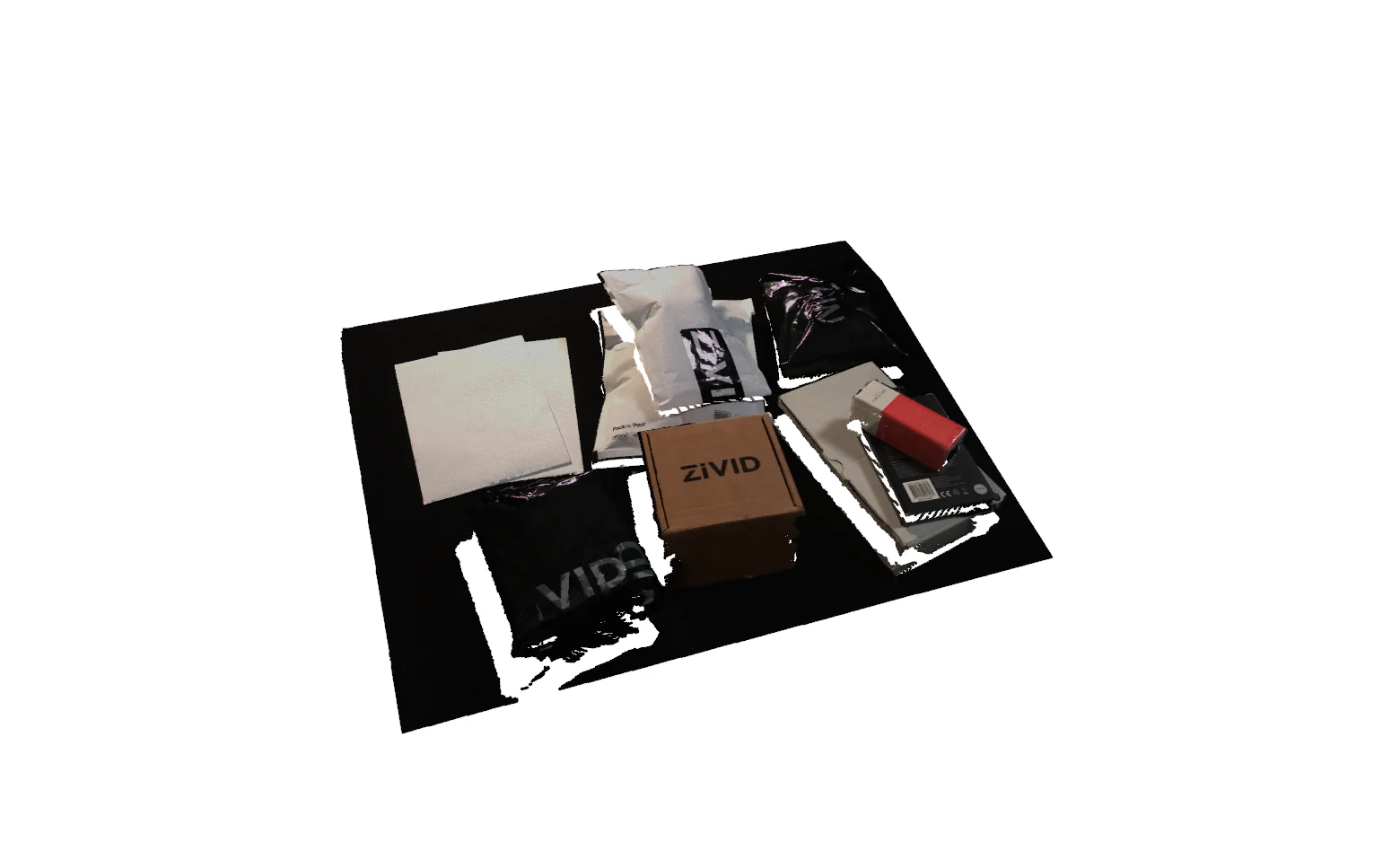
The raw, centered point cloud visualized from a zoomed-out viewpoint. The red marker indicates the camera position used for visibility filtering.
Filtered Result (Same Perspective as #1)
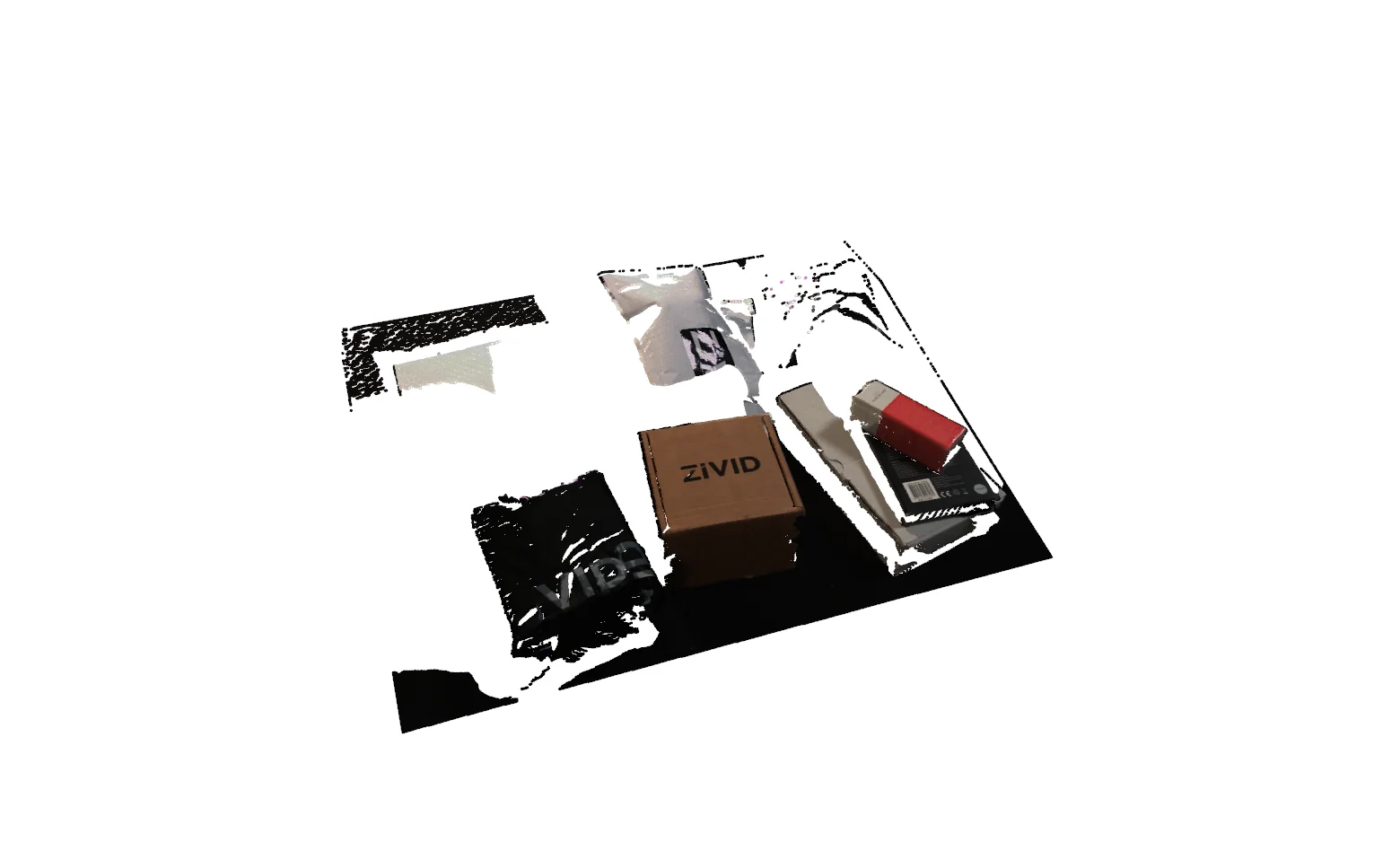
The resulting point cloud after removing hidden or occluded points. The camera perspective matches the overview in the first image, allowing a direct before/after comparison.
Camera View (What the Filter 'Sees')
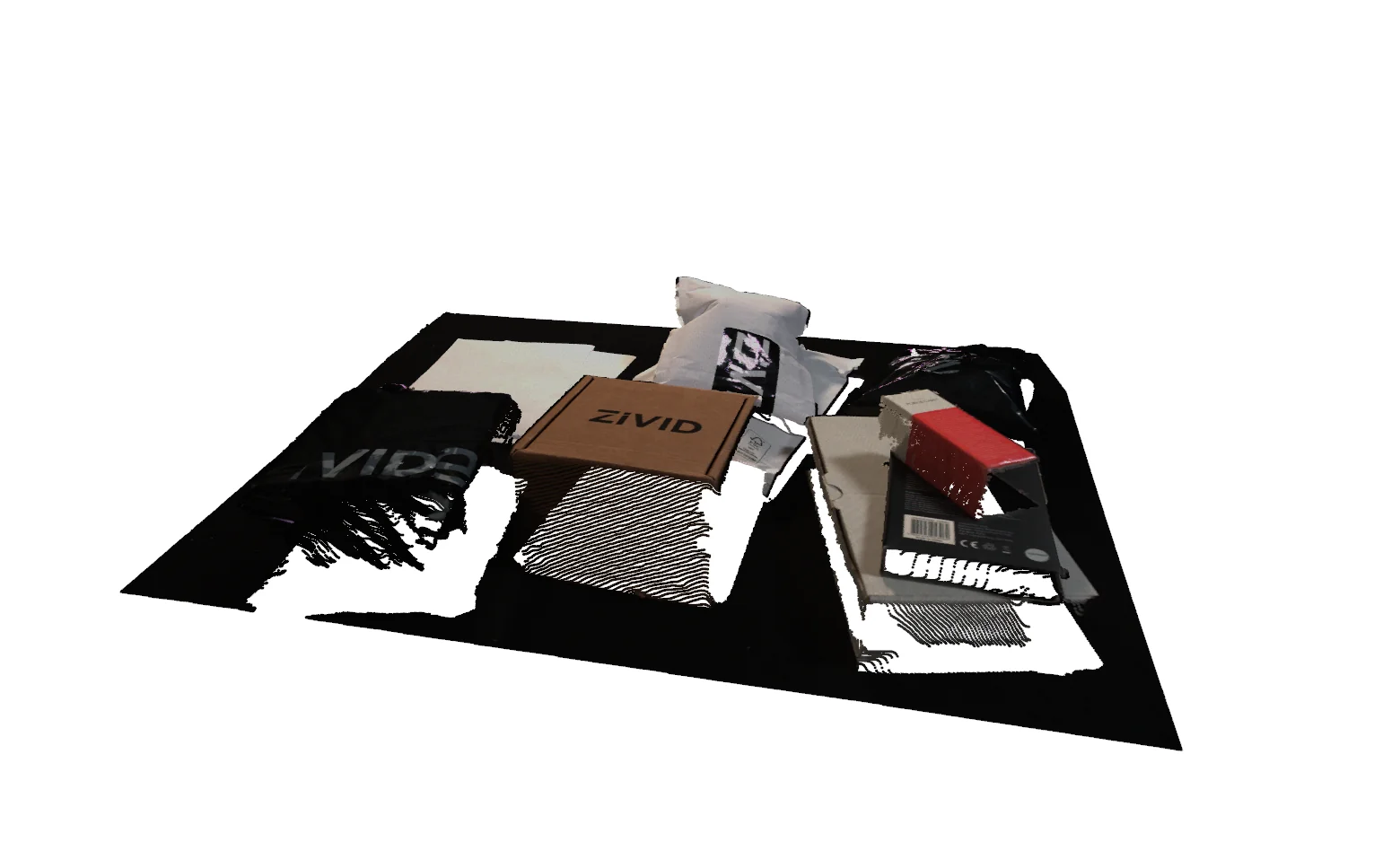
The point cloud rendered from the exact filtering viewpoint. Only points directly visible from this position will be retained. All occluded points are removed by the algorithm.
The Code
"""
Demonstrates filtering points based on visibility from a camera viewpoint.
"""

from loguru import logger
import rerun as rr

from telekinesis import vitreous, datatypes


def filter_point_cloud_using_viewpoint_visibility_example():
    """
    Filters points based on visibility from a camera viewpoint.

    Removes points that are occluded or outside the visibility range from
    a specified camera position.
    """
    # ===================== Load Data ==========================================
    point_cloud_url = "https://assets.telekinesis.ai/examples/v1/point_clouds/zivid_parcels_04_preprocessed.ply"
    point_cloud = datatypes.PointCloud.from_url(url=point_cloud_url, use_cache=True)

    # ===================== Run Skill ==========================================
    filtered_point_cloud = vitreous.filter_point_cloud_using_viewpoint_visibility(
        viewpoint=[100, -500, 250.0],
        visibility_radius=100000.0,
        point_cloud=point_cloud,
    )

    # ===================== Log ================================================
    logger.success(f"Filtered {point_cloud} using viewpoint visibility")
    logger.success(f"Results: {filtered_point_cloud}")
    logger.info(
        f"Filtered point cloud positions shape: {filtered_point_cloud.positions.shape}"
    )
    logger.info(
        f"Filtered point cloud has normals shape: "
        f"{filtered_point_cloud.normals.shape if filtered_point_cloud.has_normals else None}"
    )
    logger.info(
        f"Filtered point cloud has colors shape: "
        f"{filtered_point_cloud.colors.shape if filtered_point_cloud.has_colors else None}"
    )

    # ===================== Visualization  (Optional) ===========================
    rr.init("filter_point_cloud_using_viewpoint_visibility_example", spawn=True)
    datatypes.visualize(point_cloud, entity_path="/1-input_point_cloud")
    datatypes.visualize(filtered_point_cloud, entity_path="/2-filtered_point_cloud")


if __name__ == "__main__":
    filter_point_cloud_using_viewpoint_visibility_example()
Runnable examples are available in the Telekinesis examples repository.
Follow the README in that repository to set up the environment, run this specific example with:
cd telekinesis-examples
python examples/point_cloud/filter_point_cloud_using_viewpoint_visibility.py
Parameter Configuration
| Parameter | Type | Default | Description |
|---|---|---|---|
point_cloud | datatypes.PointCloud | required | The point cloud to filter |
viewpoint | datatypes.Point3D | np.ndarray | list[float] | required | The 3D point [x, y, z] of the camera/viewpoint in the point cloud's coordinate frame |
visibility_radius | datatypes.Float | float | int | required | The maximum distance from viewpoint, in the point cloud's coordinate units, at which a point is still considered visible; points beyond it are removed regardless of occlusion. Must be > 0 |
Returns
| Type | Description |
|---|---|
datatypes.PointCloud | A point cloud containing only the points visible from viewpoint; returns an empty datatypes.PointCloud if none are. Use .positions for the surviving (N, 3) position array and len(...) for the point count. |
Raises
| Exception | Condition |
|---|---|
TypeError | A parameter's value does not match its expected type (see the Parameter Configuration table above), or (for a list viewpoint) it contains a non-numeric element |
ValueError | viewpoint does not have exactly 3 elements, or visibility_radius is not > 0 |
ConfigurationError | The TELEKINESIS_API_KEY environment variable is not set |
SerializationError | The request input failed to serialize, the response was not returned as an Arrow stream, or the response failed to deserialize |
RequestTimeoutError | The request to the Vitreous service timed out |
TransportError | A network failure occurred before a response was received |
ClientError | The Vitreous service rejected the request due to invalid or malformed input (HTTP 400/422), an unrecognized endpoint (HTTP 404), or another unexpected 4xx response |
AuthenticationError | The API key was rejected as invalid or expired (HTTP 401) |
AuthenticationServiceError | The authentication service returned an invalid response, was temporarily unavailable, or timed out (HTTP 502/503/504) |
ServerError | The Vitreous service returned a 5xx or otherwise unexpected error response |
How to Tune the Parameters
The filter_point_cloud_using_viewpoint_visibility Skill exposes two parameters that together define the position and range of the simulated sensor.
viewpoint
- Controls: The 3D point
[x, y, z]that points are tested for visibility from. - Units: The point cloud's coordinate units (commonly meters), in the point cloud's coordinate frame
- Default: required — no default
- Set it to the real camera or sensor position at the time the point cloud was captured
- If the point cloud has been re-centered or transformed since capture, the viewpoint must be transformed to match, or visibility results will be wrong
visibility_radius
- Controls: The maximum distance from
viewpointat which a point can still count as visible; points beyond it are removed regardless of occlusion. - Units: The point cloud's coordinate units (commonly meters), must be
> 0 - Default: required — no default
- Increase → expands the visible region, keeping more distant points
- Decrease → restricts visibility to a smaller region around the viewpoint
- Typical range: 0.1–100 meters, depending on scene scale — use 0.1–1.0 for close-range scanning, 1.0–10.0 for room-scale, 10.0–100.0 for large scenes
TIP
Set viewpoint to the actual sensor position at capture time, and set visibility_radius comfortably larger than the farthest point you want to keep in the scene — an undersized radius silently drops valid points regardless of whether they were actually occluded.
Where to Use the Skill
Common pipelines include:
- Sensor simulation – predicting what a camera at a candidate position would actually capture, before moving a real sensor there
- Occlusion-aware perception – limiting a robot's model of the world to points its own camera could actually have observed
- Synthetic-vs-real comparison – filtering a rendered mesh's point cloud down to the same visible set as a corresponding real scan
- Next-best-view planning – evaluating candidate viewpoints by how much of a scene each one would actually reveal
Alternative Skills
There is no other Vitreous skill that performs occlusion-aware, viewpoint-based visibility filtering — its docstring does not cross-reference an alternative. If you instead want to filter by absolute distance from a point regardless of occlusion, or by a spatial region, look at the plane- and box-based filtering skills instead.
When Not to Use the Skill
Do not use Filter Point Cloud Using Viewpoint Visibility when:
- You don't know the real camera position – an incorrect
viewpointproduces a visibility result that doesn't correspond to any real sensor view - The point cloud's coordinate frame doesn't match the viewpoint's – e.g. the cloud has been re-centered since capture; transform one to match the other first
- You need every point regardless of occlusion – this Skill explicitly removes occluded and out-of-range points
visibility_radiuscan't be sized reliably – if the scene's true extent isn't known, an undersized radius will drop valid points outright