

Calculate Mask Centroid
SUMMARY
Calculate Mask Centroid computes the centroid of non-zero pixels in a binary mask.
The centroid (cx, cy) is the center of mass of all non-zero pixels in mask, computed in pixel coordinates. It accepts a raw np.ndarray or a SegmentationImage directly — passing a SegmentationImage preserves its label-code semantics. mask must contain at least one non-zero pixel.
Use this Skill when you want to get the center point of a mask, e.g. as a pick point or tracking anchor.
The Skill
from telekinesis import pupil

centroid = pupil.calculate_mask_centroid(mask=mask)Example
Input Mask
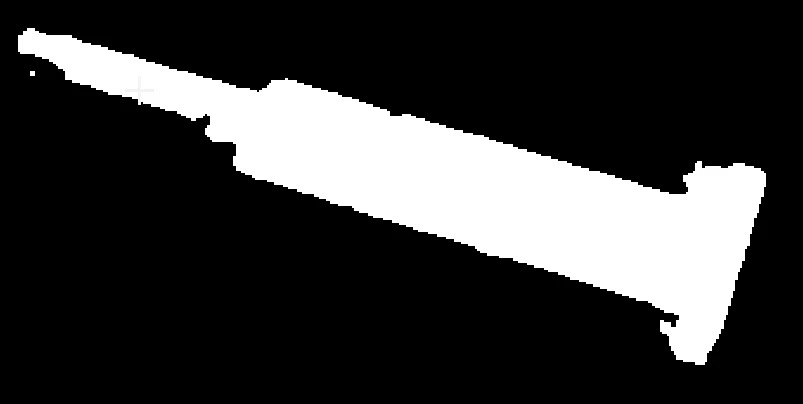
Binary mask of the object
Result
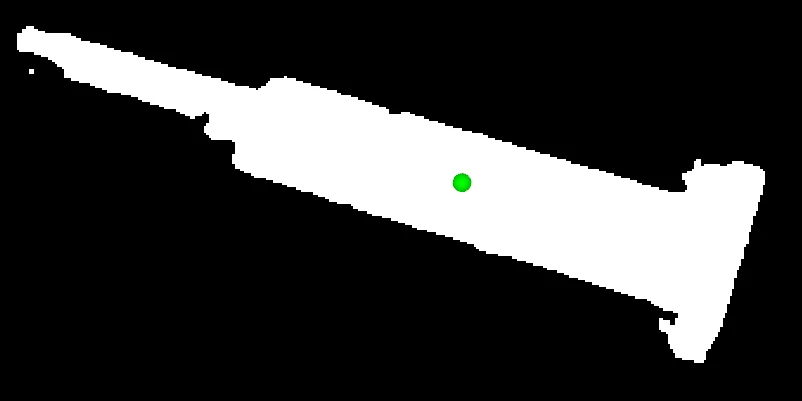
Mask overlaid with the computed centroid
The Code
"""Demonstrates centroid calculation on a binary mask."""

from loguru import logger
import rerun as rr

from telekinesis import pupil, datatypes, cornea


def calculate_mask_centroid_example():
    """Computes the centroid of a binary mask."""
    # ===================== Load Image ==========================================
    image_url = "https://assets.telekinesis.ai/examples/v1/images/metal_part_mask.png"
    image = datatypes.Image.from_url(image_url)
    mask = cornea.segment_image_using_otsu_threshold(image=image)

    # ===================== Run Skill ==========================================
    centroid = pupil.calculate_mask_centroid(mask=mask)

    # ===================== Log ================================================
    logger.success(f"Calculated centroid of {image}")
    logger.success(f"Result: {centroid}")

    # ===================== Visualization  (Optional) ======================
    rr.init("calculate_mask_centroid_example", spawn=True)
    datatypes.visualize(mask, centroid, entity_path="/masked_image", label="Centroid")

if __name__ == "__main__":
    calculate_mask_centroid_example()
Runnable examples are available in the Telekinesis examples repository.
Follow the README in that repository to set up the environment, run this specific example with:
cd telekinesis-examples
python examples/image_processing/calculate_mask_centroid.py
Parameter Configuration
| Parameter | Type | Default | Description |
|---|---|---|---|
mask | datatypes.SegmentationImage | np.ndarray | required | The input binary mask, shape (H, W) or (H, W, C) (e.g. a mask saved as an RGB/RGBA PNG), with non-zero values marking the region of interest. Pass a datatypes.SegmentationImage directly if you already have segmentation label output — this keeps label-code semantics instead of downgrading to a plain Image; a SegmentationImage is always single-channel, shape (H, W) |
Returns
| Type | Description |
|---|---|
datatypes.Position2D | The centroid [cx, cy] in pixel coordinates. Access the raw (2,) array via .data |
Raises
| Exception | Condition |
|---|---|
TypeError | mask has an invalid type |
ValueError | mask has no non-zero pixels |
ConfigurationError | The TELEKINESIS_API_KEY environment variable is not set |
SerializationError | The request input failed to serialize, the response was not returned as an Arrow stream, or the response failed to deserialize |
RequestTimeoutError | The request to the Pupil service timed out |
TransportError | A network failure occurred before a response was received |
ClientError | The Pupil service rejected the request due to invalid or malformed input (HTTP 400/422), an unrecognized endpoint (HTTP 404), or another unexpected 4xx response |
AuthenticationError | The API key was rejected as invalid or expired (HTTP 401) |
AuthenticationServiceError | The authentication service returned an invalid response, was temporarily unavailable, or timed out (HTTP 502/503/504) |
ServerError | The Pupil service returned a 5xx or otherwise unexpected error response |
How to Tune the Parameters
calculate_mask_centroid has no tunable parameters. The one requirement on the input is that mask contains at least one non-zero pixel — an all-zero mask raises ValueError before any request is sent.
TIP
Best practice: Check that a mask isn't empty (e.g. mask.to_numpy().any()) before calling this Skill in an automated pipeline, so an empty detection produces a handled branch instead of an exception.
Where to Use the Skill
Common pipelines include:
- Grasp point selection – Use the centroid of a segmented object as a candidate pick point
- Object tracking – Track an object's center of mass across frames
- Alignment checks – Compare a mask's centroid against an expected position
Alternative Skills
| Skill | vs. Calculate Mask Centroid |
|---|---|
| calculate_mask_pca | Returns the same centroid plus principal-axis eigenvectors/eigenvalues and orientation angle; use it when you also need the object's orientation. |
When Not to Use the Skill
Do not use Calculate Mask Centroid when:
maskmay be empty (an all-zero mask raisesValueError; verify the mask has foreground pixels first)- You also need the object's orientation or principal axes (use
calculate_mask_pcainstead, which returns the centroid plus eigenvectors/eigenvalues) - The mask contains multiple disconnected objects and you need one centroid per object (separate the objects first, e.g. by cropping per-instance masks, since this Skill returns a single centroid over all non-zero pixels)