

Segment Image Using Laplacian Threshold
SUMMARY
Segment Image Using Laplacian Threshold segments an image's edge-rich regions using the Laplacian operator.
It applies the Laplacian operator — a second-derivative edge detector sensitive to intensity changes in any direction — and thresholds the result to separate high-detail/edge-rich regions from smooth ones. Unlike segment_image_using_threshold or segment_image_using_otsu_threshold, which threshold on raw intensity, this thresholds on local edge strength. There are no tunable parameters.
Use this Skill when you want to isolate textured or detailed regions (e.g. engraved text, scratches, fine mechanical parts) rather than bright or dark ones.
The Skill
from telekinesis import cornea

segmented_image = cornea.segment_image_using_laplacian_threshold(image=image)Example
Input Image
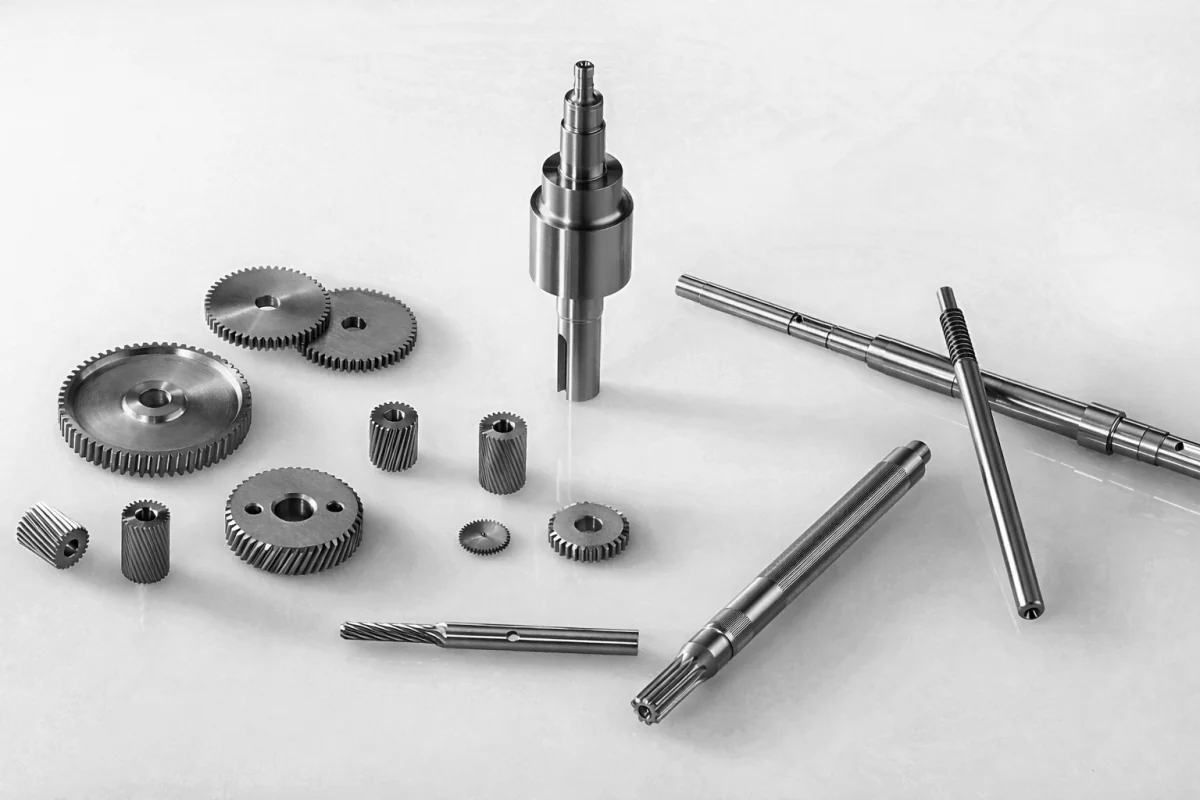
Original image for Laplacian threshold segmentation
Output Image
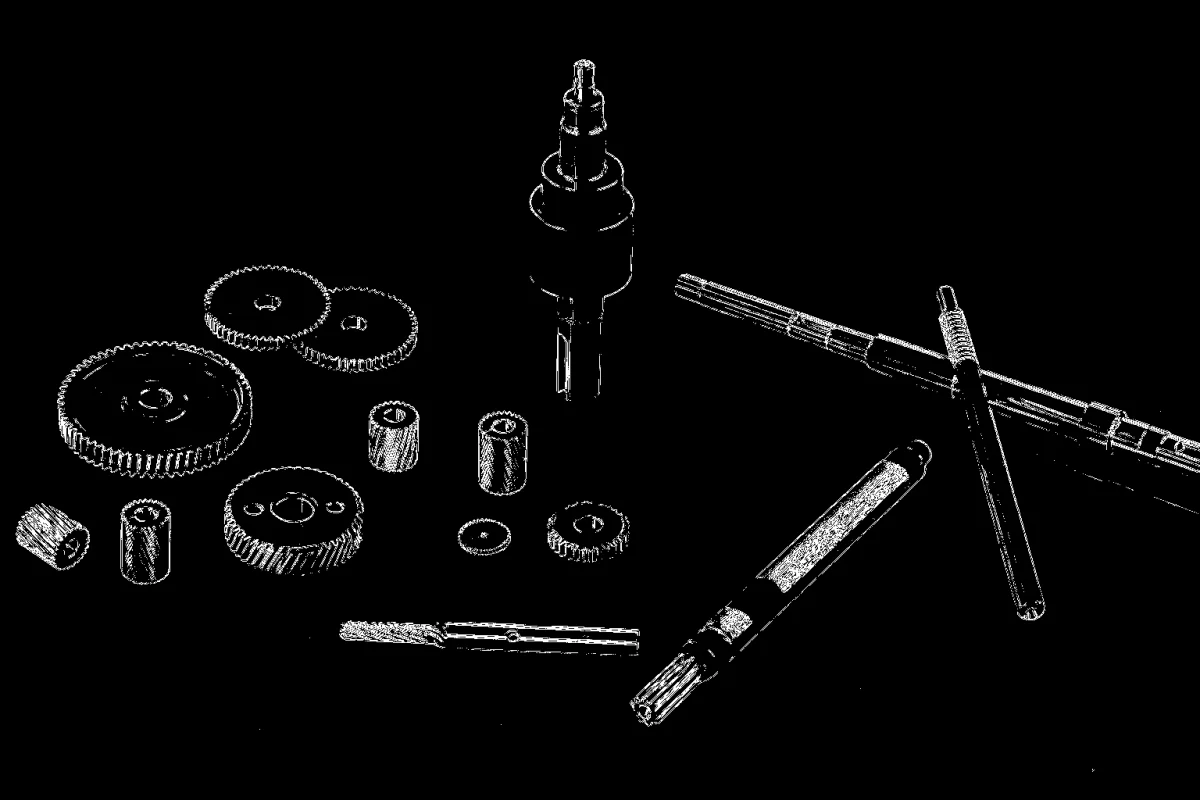
Segmented image using Laplacian-based edge detection
The Code
"""
Demonstrates Laplacian threshold segmentation.
"""

from loguru import logger
import rerun as rr
import rerun.blueprint as rrb

from telekinesis import cornea, datatypes

def segment_image_using_laplacian_threshold_example():
    """Uses the Laplacian operator to segment edge-rich areas."""
    # ===================== Load Image ==========================================
    image_url = "https://assets.telekinesis.ai/examples/v1/images/mechanical_parts_gray.png"
    image = datatypes.Image.from_url(url=image_url)

    # ===================== Run Skill ==========================================
    segmented_image = cornea.segment_image_using_laplacian_threshold(image=image)

    # ===================== Log ================================================
    logger.success(f"Segmented {image} using the Laplacian threshold method.")
    logger.success(f"Results: {segmented_image}")
    logger.info(f"Segmented image label codes: {segmented_image.label_codes}")
    logger.info(f"Segmented image number of labels: {segmented_image.number_of_labels}")
    logger.info(f"Segmented image shape: {segmented_image.shape}")
    logger.info(f"Segmented image dtype: {segmented_image.dtype}")

    # ===================== Visualization  (Optional) ======================
    rr.init("segment_image_using_laplacian_threshold_example", spawn=True)
    blueprint = rrb.Horizontal(
        rrb.Spatial2DView(origin="/input_image", name="Input"),
        rrb.Spatial2DView(origin="/segmented_image", name="Output"),
    )
    rr.send_blueprint(blueprint)
    datatypes.visualize(image, entity_path="/input_image")
    datatypes.visualize(segmented_image, entity_path="/segmented_image")


if __name__ == "__main__":
    segment_image_using_laplacian_threshold_example()
Runnable examples are available in the Telekinesis examples repository.
Follow the README in that repository to set up the environment, run this specific example with:
cd telekinesis-examples
python examples/segmentation/segment_image_using_laplacian_threshold.py
Parameter Configuration
| Parameter | Type | Default | Description |
|---|---|---|---|
image | datatypes.Image | np.ndarray | required | Input image to segment, shape (H, W) or (H, W, 3) |
Returns
| Type | Description |
|---|---|
datatypes.SegmentationImage | A per-pixel label map, shape (H, W), where edge-rich and smooth pixels are assigned distinct labels. Use .data for the raw label array, .label_codes for the sorted array of unique ids present, .number_of_labels for how many distinct labels were found, and .shape/.dtype for its size and label dtype. |
Raises
| Exception | Condition |
|---|---|
TypeError | A parameter's value does not match its expected type (see the Parameter Configuration table above) |
ConfigurationError | The TELEKINESIS_API_KEY environment variable is not set |
SerializationError | The request input failed to serialize, the response was not returned as an Arrow stream, or the response failed to deserialize |
RequestTimeoutError | The request to the Cornea service timed out |
TransportError | A network failure occurred before a response was received |
ClientError | The Cornea service rejected the request due to invalid or malformed input (HTTP 400/422), an unrecognized endpoint (HTTP 404), or another unexpected 4xx response |
AuthenticationError | The API key was rejected as invalid or expired (HTTP 401) |
AuthenticationServiceError | The authentication service returned an invalid response, was temporarily unavailable, or timed out (HTTP 502/503/504) |
ServerError | The Cornea service returned a 5xx or otherwise unexpected error response |
How to Tune the Parameters
segment_image_using_laplacian_threshold takes only image — there is nothing to tune. It applies a fixed second-derivative (Laplacian) edge operator and thresholds the result, so the same edge-strength criterion is used every time; there is no threshold value, block size, or comparison mode to choose.
If you need to isolate regions by raw pixel intensity instead of local edge strength, use segment_image_using_threshold (manual value) or segment_image_using_otsu_threshold/segment_image_using_yen_threshold (automatic value) instead.
Where to Use the Skill
Common pipelines include:
- Textured/detailed region detection – Picking out engraved text, scratches, or fine mechanical parts by their edge density rather than brightness
- Object boundary detection – Finding where high-frequency edge content marks object outlines
- Quality control – Flagging edge-rich defects (scratches, cracks, tool marks) that a plain intensity threshold would miss
- Shape analysis – Isolating fine detail ahead of
filter_segments_by_area/filter_segments_by_mask
Alternative Skills
| Skill | vs. Segment Image Using Laplacian Threshold |
|---|---|
| segment_image_using_threshold | Thresholds on raw pixel intensity with a manually chosen value, rather than on local edge strength. Use Laplacian threshold for textured/detailed regions, manual threshold for known bright/dark regions. |
| segment_image_using_otsu_threshold | Also thresholds on raw intensity, but picks the value automatically. Use Otsu for intensity-based segmentation, Laplacian threshold for edge-based segmentation. |
| segment_image_using_yen_threshold | Same intensity-vs-edge distinction as Otsu, with a different automatic-threshold criterion. |
| segment_image_using_adaptive_threshold | Thresholds raw intensity per local neighborhood rather than edge strength. Use adaptive threshold for uneven lighting, Laplacian threshold for edge-rich texture. |
When Not to Use the Skill
Do not use Segment Image Using Laplacian Threshold when:
- You need intensity-based segmentation — this Skill separates by edge strength, not brightness; use
segment_image_using_threshold,segment_image_using_otsu_threshold, orsegment_image_using_yen_thresholdinstead. - The image is noisy — the Laplacian operator is a second derivative and amplifies noise along with real edges, which can produce spurious edge-rich labels.
TIP
Because the Laplacian responds to edges in any direction, it's well suited to picking out fine, directionless texture (engravings, scratches, fine parts) that a single global or per-neighborhood intensity threshold would treat as indistinguishable from their surroundings.