

Detect Objects Using QWEN
SUMMARY
Detect Objects Using QWEN detects objects in images using the QWEN Vision Language Model (VLM).
QWEN is a vision-language model that can locate objects in an image from a plain list of object names, without a fixed class list or model retraining. It uses multimodal understanding to interpret both the image and the requested object names.
Use this Skill when you want to detect objects by name, using natural object descriptions instead of a fixed category list.
The Skill
from telekinesis import retina

detection_results, categories = retina.detect_objects_using_qwen(
    image=image,
    objects=["person"],
)Example
Input Image

Original image for QWEN object detection
Detected Objects
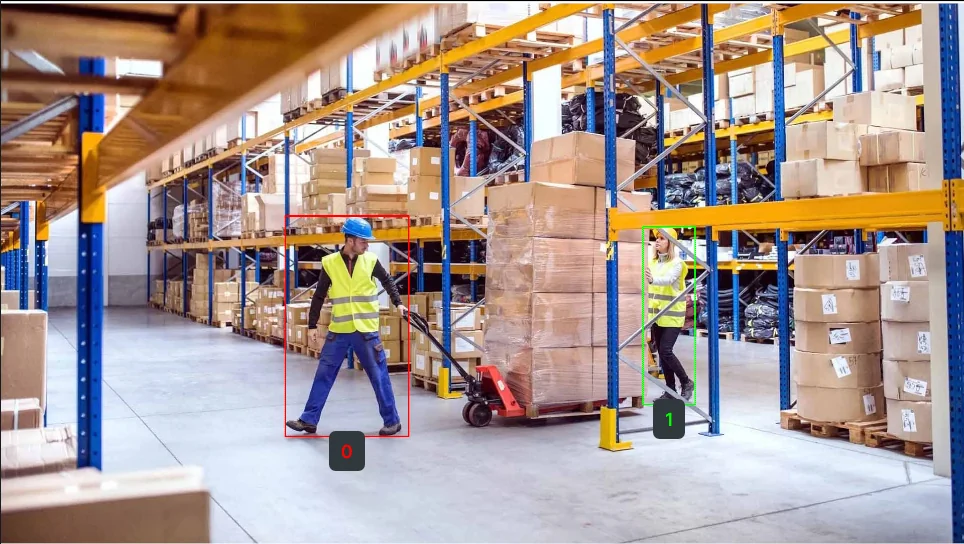
Detected objects with bounding boxes using QWEN
The Code
"""
Detect objects using QWEN VLM.
"""

from loguru import logger
import rerun as rr

from telekinesis import retina, datatypes


def detect_objects_using_qwen_example():
    """
    Detect objects using QWEN VLM.

    Requires the input objects to be defined to detect objects in an image and
    returns object detections using datatype `COCOObjectDetectionDetectionResults`.
    """
    # ===================== Load Image ==========================================
    image_url = "https://assets.telekinesis.ai/examples/v1/images/warehouse_1.jpg"
    image = datatypes.Image.from_url(url=image_url)

    # ===================== Run Skill ==========================================
    detection_results, categories = retina.detect_objects_using_qwen(
        image=image,
        objects=["person"],
    )

    # ===================== Log ================================================
    logger.success(f"Detected objects in {image} using QWEN VLM.")
    logger.success(f"Results: {detection_results}")

    logger.info(f"All detected object bounding boxes: {detection_results.bboxes}")
    logger.info(f"All detected object scores: {detection_results.scores}")
    logger.info(f"All detected object category IDs: {detection_results.category_ids}")

    # Indexed object is of type `COCOObjectDetectionResult`
    logger.info(f"Detected object at index 0: {detection_results[0]}")
    logger.info(f"Detected object at index 0 bounding box: {detection_results[0].bbox}")
    logger.info(f"Detected object at index 0 score: {detection_results[0].score}")
    logger.info(
        f"Detected object at index 0 category ID: {detection_results[0].category_id}"
    )
    logger.info(
        f"Detected object at index 0 category name: {categories[detection_results[0].category_id]}"
    )

    # ===================== Visualization  (Optional) ======================
    rr.init("detect_objects_using_qwen_example", spawn=True)
    datatypes.visualize(image, entity_path="/image/")
    datatypes.visualize(detection_results, entity_path="/image/overlayed_detections")


if __name__ == "__main__":
    detect_objects_using_qwen_example()
Runnable examples are available in the Telekinesis examples repository.
Follow the README in that repository to set up the environment, run this specific example with:
cd telekinesis-examples
python examples/detection/detect_objects_using_qwen.py
Parameter Configuration
QWEN takes only two inputs — there are no confidence thresholds to tune; filtering happens inside the model itself.
| Parameter | Type | Default | Description |
|---|---|---|---|
image | datatypes.Image | np.ndarray | list | required | Input image. Supported shapes are (H, W), (H, W, 1), or (H, W, 3) — 4-channel (alpha) images are not supported |
objects | list[datatypes.String | str] | required | List of object names to detect (for example, ["person", "forklift"]). Internally joined into a single comma-separated string sent to the model — avoid commas inside an individual object name |
Returns
| Type | Description |
|---|---|
tuple[datatypes.COCOObjectDetectionResults, datatypes.Categories] | A (detections, categories) pair. detections holds the COCO-style results — access the grouped arrays via .bboxes (shape (N, 4), [x, y, w, h]), .scores (shape (N,)), and .category_ids (shape (N,)), or index a single detection with detections[i] to get its .bbox, .score, and .category_id. categories holds the object names you supplied — index it by category id (e.g. categories[detections[0].category_id]) to get a Category with a .name. |
Raises
| Exception | Condition |
|---|---|
TypeError | A parameter's value does not match its expected type (see the Parameter Configuration table above) |
ValueError | image has an unsupported shape, or objects is empty or contains an empty/whitespace-only string |
ConfigurationError | The TELEKINESIS_API_KEY environment variable is not set |
SerializationError | The request input failed to serialize, the response was not returned as an Arrow stream, or the response failed to deserialize |
RequestTimeoutError | The request to the Retina service timed out |
TransportError | A network failure occurred before a response was received |
ClientError | The Retina service rejected the request due to invalid or malformed input (HTTP 400/422), an unrecognized endpoint (HTTP 404), or another unexpected 4xx response |
AuthenticationError | The API key was rejected as invalid or expired (HTTP 401) |
AuthenticationServiceError | The authentication service returned an invalid response, was temporarily unavailable, or timed out (HTTP 502/503/504) |
ServerError | The Retina service returned a 5xx or otherwise unexpected error response |
How to Tune the Parameters
There's only one input to tune — objects — since QWEN has no confidence thresholds exposed.
objects
- Controls: Which object names QWEN searches the image for.
- Use specific, singular nouns (
"forklift"rather than"vehicles") — the model matches literally on what you ask for - Add more entries to search for several object types in one call (for example,
["person", "forklift", "pallet"]) - Reword an entry if it returns too many, too few, or the wrong objects — QWEN's accuracy depends on how the request is phrased
TIP
Best practice: Keep each objects entry a short, concrete noun. If detections seem off, try rewording before assuming the object isn't there — QWEN is sensitive to phrasing.
Where to Use the Skill
Common pipelines include:
- Flexible visual search – Finding objects without predefined classes
- Multi-object detection – Detecting several object types in a single pass
- Robotic manipulation – Identifying objects for pick-and-place operations
Alternative Skills
| Skill | vs. Detect Objects Using QWEN |
|---|---|
| detect_objects_using_grounding_dino | Grounding DINO does zero-shot detection from a list of object names with tunable confidence thresholds. Use for similar flexibility with more control; QWEN trades that control for a simpler VLM-based call. |
| detect_objects_using_rfdetr | RF-DETR uses predefined COCO classes. Use for transformer-based fixed-class detection; QWEN for open-ended object names. |
| detect_objects_using_yolox | YOLOX uses predefined COCO classes and is fast. Use for real-time fixed-class detection; QWEN for flexible, named objects. |
When Not to Use the Skill
Do not use Detect Objects Using QWEN when:
- You need real-time performance (QWEN requires GPU and can be slow)
- You have predefined object classes (Use RF-DETR or YOLOX instead)
- You need instance segmentation (QWEN provides bounding boxes, not masks)
- You're working with very small objects (QWEN may miss small details)
TIP
QWEN is excellent for flexible, name-driven detection but may be slower than specialized detectors. Use it when you need the flexibility of describing objects by name rather than picking from a fixed class list.