

Filter Image Using Scharr
SUMMARY
Filter Image Using Scharr computes a directional gradient response using the Scharr operator.
Scharr is similar to filter_image_using_sobel but uses fixed, optimized 3x3 kernel coefficients that give better rotation invariance and more accurate gradient estimation — there is no kernel_size choice, so use Sobel instead if a larger kernel is needed for coarser edges. Set dx/dy to choose which derivative direction is computed.
Use this Skill when you want to detect edges with a rotation-invariant, first-derivative gradient.
The Skill
from telekinesis import pupil

filtered_image = pupil.filter_image_using_scharr(
    image=image,
    output_format="same as input",
    dx=0,
    dy=1,
    scale=1.0,
    delta=0.0,
    border_type="default",
)Example
Input Image
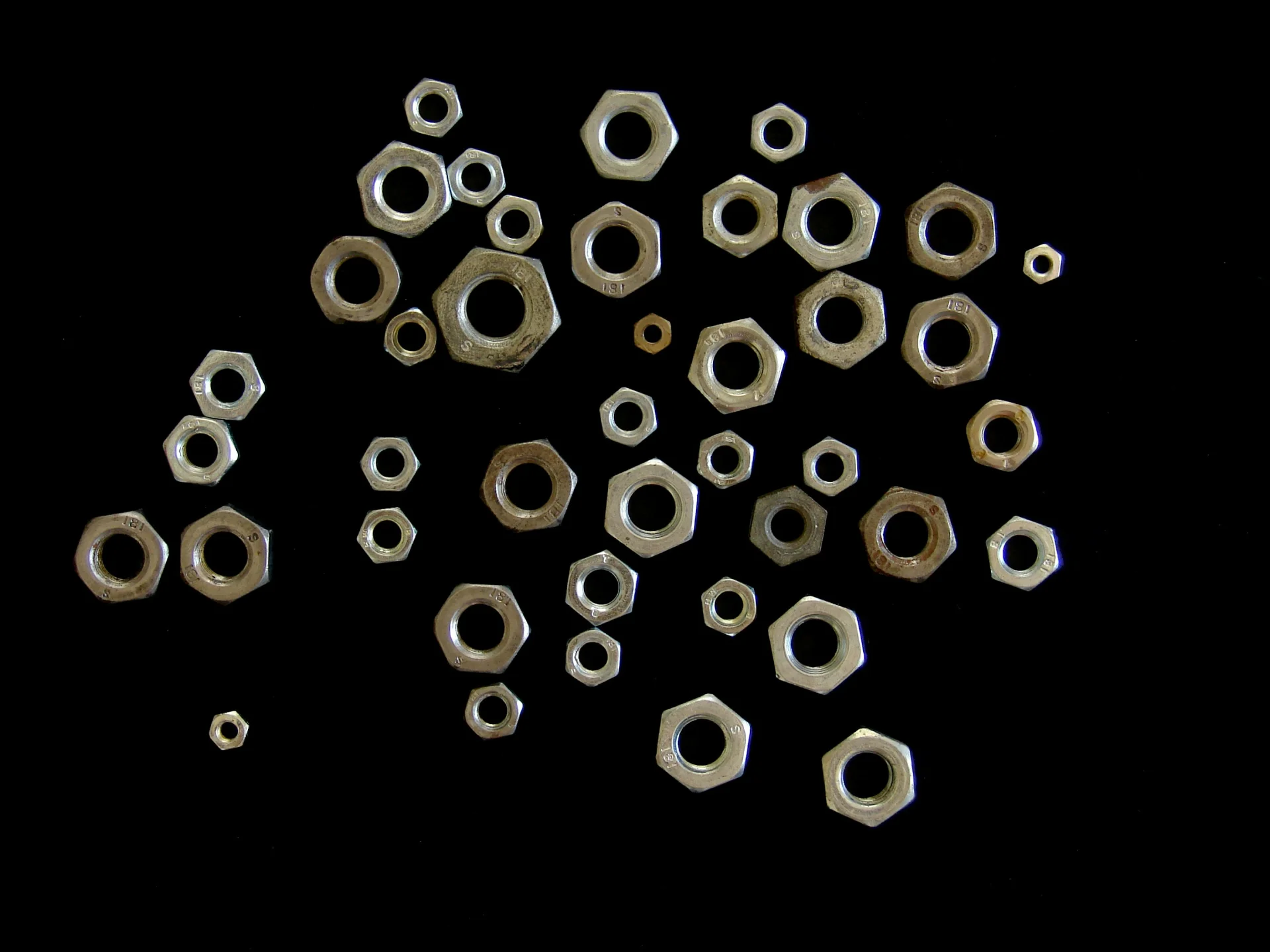
Original image
Filtered Image
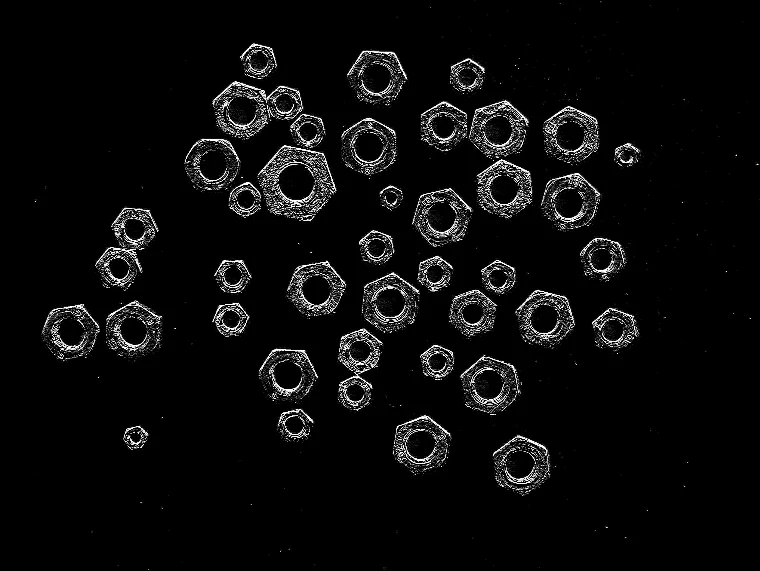
Scharr response with dx=0, dy=1, highlighting horizontal intensity transitions
The Code
"""Demonstrates filter_image_using_scharr operation."""

from loguru import logger
import rerun as rr

from telekinesis import pupil, datatypes


def filter_image_using_scharr_example():
    """Applies filter_image_using_scharr operation."""
    # ===================== Load Image ==========================================
    image_url = "https://assets.telekinesis.ai/examples/v1/images/nuts_scattered.jpg"
    image = datatypes.Image.from_url(image_url)

    # ===================== Run Skill ==========================================
    filtered_image = pupil.filter_image_using_scharr(
        image=image,
        output_format="same as input",
        dx=0,
        dy=1,
        scale=1.0,
        delta=0.0,
        border_type="default",
    )

    # ===================== Log ================================================
    logger.success(f"Applied filter_image_using_scharr on {image}")
    logger.success(f"Result: {filtered_image}")

    # ===================== Visualization  (Optional) ======================
    rr.init("filter_image_using_scharr_example", spawn=True)
    datatypes.visualize(image, entity_path="1-Original")
    datatypes.visualize(filtered_image, entity_path="2-Filtered")

if __name__ == "__main__":
    filter_image_using_scharr_example()
Runnable examples are available in the Telekinesis examples repository.
Follow the README in that repository to set up the environment, run this specific example with:
cd telekinesis-examples
python examples/image_processing/filter_image_using_scharr.py
Parameter Configuration
| Parameter | Type | Default | Description |
|---|---|---|---|
image | datatypes.Image | np.ndarray | required | Input image, recommended grayscale, shape (H, W) |
dx | datatypes.Int | int | 1 | Order of the derivative in the X direction. 1 detects vertical edges (horizontal gradient); typical values are 0 or 1 |
dy | datatypes.Int | int | 0 | Order of the derivative in the Y direction. 1 detects horizontal edges (vertical gradient); typical values are 0 or 1 |
scale | datatypes.Float | float | int | 1.0 | Scale factor applied to the computed derivative values |
delta | datatypes.Float | float | int | 0.0 | Offset added to the output |
output_format | datatypes.String | str | "same as input" | Output bit depth: "same as input", "8bit", "16bitS", "16bitU", "32bit", "64bit". Must be compatible with the input dtype |
border_type | datatypes.String | str | "default" | Border handling mode: "default", "constant", "replicate", "reflect", "reflect 101" |
Returns
| Type | Description |
|---|---|
datatypes.Image | Same (H, W) as image, containing the first-derivative gradient response per pixel, in the dtype specified by output_format |
Raises
| Exception | Condition |
|---|---|
TypeError | A parameter's value does not match its expected type (see the Parameter Configuration table above) |
ValueError | output_format or border_type is not one of the supported options |
ConfigurationError | The TELEKINESIS_API_KEY environment variable is not set |
SerializationError | The request input failed to serialize, the response was not returned as an Arrow stream, or the response failed to deserialize |
RequestTimeoutError | The request to the Pupil service timed out |
TransportError | A network failure occurred before a response was received |
ClientError | The Pupil service rejected the request due to invalid or malformed input (HTTP 400/422), an unrecognized endpoint (HTTP 404), or another unexpected 4xx response |
AuthenticationError | The API key was rejected as invalid or expired (HTTP 401) |
AuthenticationServiceError | The authentication service returned an invalid response, was temporarily unavailable, or timed out (HTTP 502/503/504) |
ServerError | The Pupil service returned a 5xx or otherwise unexpected error response |
How to Tune the Parameters
The filter_image_using_scharr Skill exposes derivative direction, output scaling, and output/border handling.
dx
- Controls: Whether the X-direction derivative is computed.
- Default:
1 - Options:
1– compute horizontal gradient (detects vertical edges)0– skip X direction
- Typical range:
0or1
dy
- Controls: Whether the Y-direction derivative is computed.
- Default:
0 - Options:
1– compute vertical gradient (detects horizontal edges)0– skip Y direction
- Typical range:
0or1
scale
- Controls: The amplification of the computed gradient values.
- Default:
1.0 - Increase → stronger edge response
- Decrease → more subtle edge response
- Typical range: 0.1-10.0
delta
- Controls: A constant offset added to every output pixel, useful for shifting values into a visualizable range.
- Default:
0.0 - Typical range: -128.0 to 128.0
output_format
- Controls: The output bit depth and sign.
- Default:
"same as input" - Options:
"same as input"– keeps the input dtype; may clip negative gradient values"8bit"– unsigned 8-bit; clips negative gradient values"16bitS"– signed 16-bit; preserves negative gradient values"16bitU"– unsigned 16-bit"32bit"– 32-bit float; preserves negative values and precision"64bit"– 64-bit float; highest precision, most memory
border_type
- Controls: How pixels beyond the image border are synthesized when computing the gradient near edges.
- Default:
"default" - Options:
"default"– same as"reflect 101""constant"– pads with a constant value"replicate"– repeats the edge pixel"reflect"– reflects without repeating the edge pixel"reflect 101"– reflects with the edge pixel repeated
TIP
Best practice: Compute the X (dx=1, dy=0) and Y (dx=0, dy=1) responses in two separate calls, then combine them downstream as sqrt(Gx**2 + Gy**2) for a full gradient magnitude — a single call only returns one direction. Use output_format="32bit" or "64bit" if you need to preserve negative values for that computation.
Where to Use the Skill
Common pipelines include:
- Directional edge detection – Isolate vertical or horizontal intensity transitions before shape analysis
- Gradient magnitude computation – Combine separate X/Y Scharr calls for accurate edge strength maps
- Optical flow / feature extraction – Supply accurate, rotation-invariant gradients to downstream descriptors
- Pre-processing for contour/Hough detection – Sharpen directional structure before
retinaedge-based detectors
Alternative Skills
| Skill | vs. Filter Image Using Scharr |
|---|---|
| filter_image_using_sobel | Same first-derivative gradient concept but with a selectable kernel_size; Scharr is fixed at 3x3 with better rotation invariance. |
| filter_image_using_laplacian | Computes an isotropic second derivative instead of a directional first derivative; use for omnidirectional edges. |
| filter_image_using_gaussian_blur | A denoising pre-processing step to run before Scharr when the input is noisy, since first-derivative filters amplify noise. |
When Not to Use the Skill
Do not use Filter Image Using Scharr when:
- You need a tunable kernel size (fixed at 3x3; use
filter_image_using_sobelinstead) - You need omnidirectional edge strength in one call (use
filter_image_using_laplacian, or combine two Scharr calls) - The input is noisy (first-derivative filters amplify noise; smooth first with
filter_image_using_gaussian_blur) - You need texture/orientation response rather than a raw gradient (use
filter_image_using_gabor)