

Rotate Image
SUMMARY
Rotate Image rotates an image by an angle in degrees around its center.
A positive angle rotates counter-clockwise. keep_image_size controls whether the output stays the same size as the input (cropping corners that rotate outside the original frame) or expands to fit the entire rotated content without cropping.
Use this Skill when you want to rotate an image by a given angle around its center.
The Skill
from telekinesis import pupil

filtered_image = pupil.rotate_image(
    image=image,
    angle_in_deg=10,
    interpolation_method="linear",
    keep_image_size=True,
)Example
Input Image
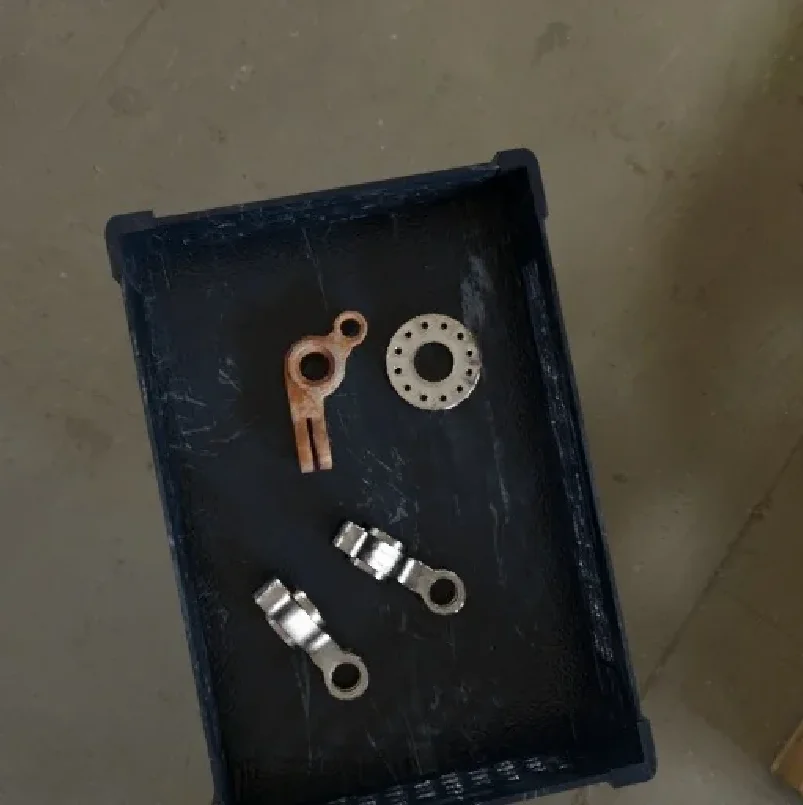
Original image
Rotated Image
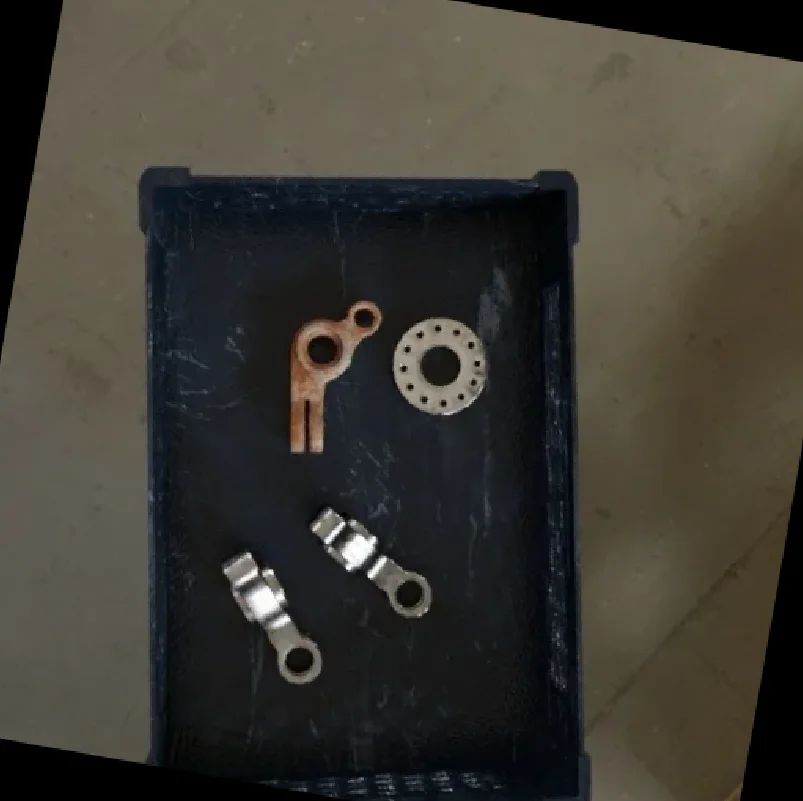
Rotated by 10 degrees, keep_image_size=True
The Code
"""Demonstrates rotate_image operation."""

from loguru import logger
import rerun as rr

from telekinesis import pupil, datatypes


def rotate_image_example():
    """Applies rotate_image operation."""
    # ===================== Load Image ==========================================
    image_url = "https://assets.telekinesis.ai/examples/v1/images/synthetic_data_bin.jpg"
    image = datatypes.Image.from_url(image_url)

    # ===================== Run Skill ==========================================
    filtered_image = pupil.rotate_image(
        image=image,
        angle_in_deg=10,
        interpolation_method="linear",
        keep_image_size=True,
    )

    # ===================== Log ================================================
    logger.success(f"Applied rotate_image on {image}")
    logger.success(f"Result: {filtered_image}")

    # ===================== Visualization  (Optional) ======================
    rr.init("rotate_image_example", spawn=True)
    datatypes.visualize(image, entity_path="1-Original")
    datatypes.visualize(filtered_image, entity_path="2-Rotated")

if __name__ == "__main__":
    rotate_image_example()
Runnable examples are available in the Telekinesis examples repository.
Follow the README in that repository to set up the environment, run this specific example with:
cd telekinesis-examples
python examples/image_processing/rotate_image.py
Parameter Configuration
| Parameter | Type | Default | Description |
|---|---|---|---|
image | datatypes.Image | np.ndarray | required | The input image to rotate, shape (H, W) or (H, W, C) |
angle_in_deg | datatypes.Float | float | int | required | Rotation angle in degrees; positive values rotate counter-clockwise |
interpolation_method | datatypes.String | str | "linear" | Interpolation method: nearest, linear, cubic, area, lanczos4, linear exact, or nearest exact |
keep_image_size | datatypes.Bool | bool | False | If True, output keeps the input's (H, W), cropping any rotated content that falls outside it. If False, the output canvas is expanded to fit the entire rotated image |
Returns
| Type | Description |
|---|---|
datatypes.Image | The rotated image — same shape as image if keep_image_size=True, otherwise larger to fit the full rotated content |
Raises
| Exception | Condition |
|---|---|
TypeError | A parameter's value does not match its expected type (see the Parameter Configuration table above) |
ValueError | interpolation_method is not one of the supported options |
ConfigurationError | The TELEKINESIS_API_KEY environment variable is not set |
SerializationError | The request input failed to serialize, the response was not returned as an Arrow stream, or the response failed to deserialize |
RequestTimeoutError | The request to the Pupil service timed out |
TransportError | A network failure occurred before a response was received |
ClientError | The Pupil service rejected the request due to invalid or malformed input (HTTP 400/422), an unrecognized endpoint (HTTP 404), or another unexpected 4xx response |
AuthenticationError | The API key was rejected as invalid or expired (HTTP 401) |
AuthenticationServiceError | The authentication service returned an invalid response, was temporarily unavailable, or timed out (HTTP 502/503/504) |
ServerError | The Pupil service returned a 5xx or otherwise unexpected error response |
How to Tune the Parameters
The rotate_image Skill exposes the rotation angle, the resampling method, and whether the output canvas grows to fit the rotated content.
angle_in_deg
- Controls: The rotation angle around the image center.
- Units: Degrees
- Default: required, no default
- Increase → more counter-clockwise rotation
- Decrease → more clockwise rotation (use a negative value)
- Typical range: small angles (±5-15°) for augmentation, larger or arbitrary angles for orientation correction
interpolation_method
- Controls: How pixel values are resampled at the rotated positions.
- Default:
"linear" - Options:
nearest/nearest exact– fastest, blocky; use for masks/labels, not photographic contentlinear– good quality/speed trade-off for typical images and small rotationscubic– sharper than linear, slowerarea– best when rotation is combined with shrinkinglanczos4– highest quality, slower; can ring near sharp edgeslinear exact– linear with stricter, more deterministic rounding
keep_image_size
- Controls: Whether the output canvas matches the input size or expands to hold the whole rotated image.
- Default:
False - Options:
True– output stays(H, W)of the input; corners of the rotated content are cropped awayFalse– output canvas expands so no rotated content is lost
TIP
Best practice: Use keep_image_size=True when a pipeline downstream expects a fixed shape and can tolerate lost corners. Use keep_image_size=False when no content can be discarded (e.g. before further geometric analysis), and crop or pad afterward if a fixed size is still required.
Where to Use the Skill
Common pipelines include:
- Data augmentation – Generate randomly rotated training samples
- Orientation correction – Straighten a tilted part or scene before downstream detection/segmentation
- Multi-view synthesis – Produce rotated views of the same scene for template matching or pose estimation
Alternative Skills
| Skill | vs. Rotate Image |
|---|---|
| translate_image | Shifts the image by a pixel offset instead of rotating it; combine both for full 2D augmentation. |
| resize_image_with_aspect_fit | Use after rotation to bring an expanded (keep_image_size=False) output back to a fixed target size. |
| crop_image_center | Use after rotation to crop the expanded canvas back down to a fixed size instead of relying on keep_image_size=True. |
When Not to Use the Skill
Do not use Rotate Image when:
- You need perspective/affine correction beyond a pure rotation (this Skill only rotates around the center; use a full affine/perspective warp instead)
- You need alignment driven by detected features (detect the reference feature first, e.g. with a Retina detector, then compute the angle to pass in)
- The angle is 0 or a multiple of 360 (no visible effect; skip the call)
- Corners must never be lost and you cannot tolerate a larger output canvas (use
keep_image_size=Falseand then explicitly crop/pad to your target size)