

Crop Image Using Bounding Boxes
SUMMARY
Crop Image Using Bounding Boxes crops one image into multiple rectangular regions in a single call.
It takes a list of [x, y, width, height] boxes and returns one cropped Image per box, in the same order, packaged as a datatypes.ImageBatch. strict_bounds controls whether boxes must lie fully inside the image, and retain_coordinates controls whether each crop keeps its original (x, y) offset so it can be re-projected back onto the source image later.
Use this Skill when you want to extract several rectangular regions of interest from one image at once.
The Skill
from telekinesis import pupil

cropped_images = pupil.crop_image_using_bounding_boxes(
    image=image,
    bounding_boxes=bounding_boxes,
    retain_coordinates=True,
)Example
Input Image
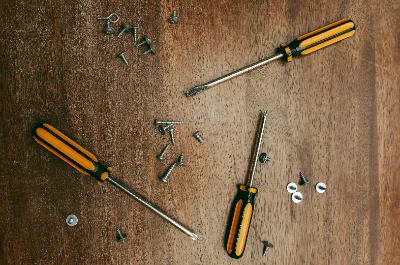
Original image with three bounding boxes
Cropped Image 1
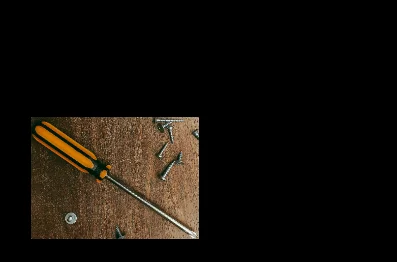
First cropped region
Cropped Image 2
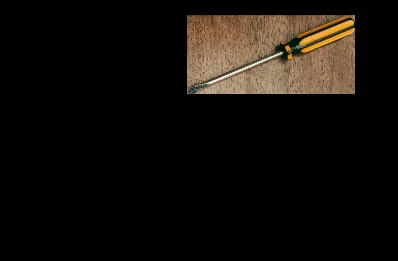
Second cropped region
Cropped Image 3
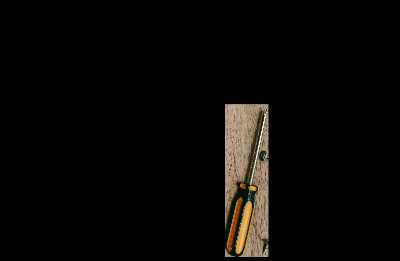
Third cropped region
The Code
"""Demonstrates cropping an image using multiple bounding boxes."""

from loguru import logger
import rerun as rr

from telekinesis import pupil, datatypes


def crop_image_using_bounding_boxes_example():
    """Crops image using bounding boxes."""
    # ===================== Load Image ==========================================
    image_url = "https://assets.telekinesis.ai/examples/v1/images/driver_screw.png"
    image = datatypes.Image.from_url(image_url)

    # ===================== Run Skill ==========================================
    # Define bounding boxes in the format [x, y, width, height]
    bounding_boxes = [
        [65, 235, 330, 240],
        [370, 35, 330, 155],
        [445, 210, 85, 300],
    ]

    cropped_images = pupil.crop_image_using_bounding_boxes(
        image=image,
        bounding_boxes=bounding_boxes,
        retain_coordinates=True,
    )

    # ===================== Log ================================================
    logger.success(f"Cropped {image} using bounding boxes")
    logger.success(f"Result: {cropped_images} into {len(cropped_images)} regions")

    # ===================== Visualization  (Optional) ======================
    rr.init("crop_image_using_bounding_boxes_example", spawn=True)
    datatypes.visualize(image, entity_path="1-Original")
    for i, cropped_image in enumerate(cropped_images):
        datatypes.visualize(cropped_image, entity_path=f"{i + 2}-Crop {i + 1}")

if __name__ == "__main__":
    crop_image_using_bounding_boxes_example()
Runnable examples are available in the Telekinesis examples repository.
Follow the README in that repository to set up the environment, run this specific example with:
cd telekinesis-examples
python examples/image_processing/crop_image_using_bounding_boxes.py
Parameter Configuration
| Parameter | Type | Default | Description |
|---|---|---|---|
image | datatypes.Image | np.ndarray | required | The input image to crop, shape (H, W) or (H, W, C) |
bounding_boxes | datatypes.Boxes2D | np.ndarray | list | required | The boxes to crop, each row [x, y, width, height] in pixel coordinates, shape (N, 4) |
retain_coordinates | datatypes.Bool | bool | False | If True, each cropped Image keeps its original (x, y) offset metadata from the source image instead of being re-based to (0, 0). Useful when re-projecting crop results back onto the source image |
strict_bounds | datatypes.Bool | bool | False | Whether to strictly enforce that every box lies fully within the image bounds, rather than allowing boxes that extend past the edges |
Returns
| Type | Description |
|---|---|
datatypes.ImageBatch | One cropped Image per row in bounding_boxes, in the same order. Call .to_list() for a plain list[datatypes.Image], or index/iterate the batch directly |
Raises
| Exception | Condition |
|---|---|
TypeError | Any parameter has an invalid type |
ConfigurationError | The TELEKINESIS_API_KEY environment variable is not set |
SerializationError | The request input failed to serialize, the response was not returned as an Arrow stream, or the response failed to deserialize |
RequestTimeoutError | The request to the Pupil service timed out |
TransportError | A network failure occurred before a response was received |
ClientError | The Pupil service rejected the request due to invalid or malformed input (HTTP 400/422), an unrecognized endpoint (HTTP 404), or another unexpected 4xx response |
AuthenticationError | The API key was rejected as invalid or expired (HTTP 401) |
AuthenticationServiceError | The authentication service returned an invalid response, was temporarily unavailable, or timed out (HTTP 502/503/504) |
ServerError | The Pupil service returned a 5xx or otherwise unexpected error response |
How to Tune the Parameters
The crop_image_using_bounding_boxes Skill exposes the boxes to crop plus two flags controlling coordinate metadata and boundary handling.
bounding_boxes
- Controls: Which regions are cropped, and how many crops are returned (one per row).
- Units: Pixels,
[x, y, width, height]per box - Default: required, no default
- Supply boxes from a prior detection Skill, a manual annotation, or any other source of regions of interest.
retain_coordinates
- Controls: Whether each output crop remembers its original
(x, y)position in the source image. - Default:
False - Options:
True– keep the original offset metadata, needed to map crop-local results (e.g. a detection found inside a crop) back onto the source imageFalse– re-base each crop to(0, 0), simplest when crops are processed independently
strict_bounds
- Controls: Whether boxes are allowed to extend past the image edges.
- Default:
False - Options:
False– boxes extending past the edges are clipped against the image boundary rather than failingTrue– enforce that every box lies fully inside the image
TIP
Best practice: Set retain_coordinates=True whenever you need to relate a result computed on a crop (e.g. a detection or a centroid) back to the original image's coordinate system.
Where to Use the Skill
Common pipelines include:
- Detection follow-up – Crop each detected bounding box for per-object classification or measurement
- Region-of-interest extraction – Pull several known regions out of a fixed camera view in one call
- Batch preprocessing – Produce a batch of sub-images to feed downstream, one per box
Alternative Skills
| Skill | vs. Crop Image Using Bounding Boxes |
|---|---|
| crop_image_center | Crops a single, fixed-size region centered on the image, rather than one or more arbitrary boxes |
| crop_image_using_polygon | Crops a single non-rectangular region defined by polygon vertices, rather than axis-aligned boxes |
When Not to Use the Skill
Do not use Crop Image Using Bounding Boxes when:
- The region isn't axis-aligned or rectangular (use
crop_image_using_polygoninstead) - You only need a single centered crop (
crop_image_centeris simpler for that case) - You don't have box coordinates yet (run a detection Skill first to obtain
bounding_boxes)