

Filter Image Using Morphological Erode
SUMMARY
Filter Image Using Morphological Erode applies erosion to shrink bright regions and remove small noise.
Erosion replaces each pixel with the minimum value found in its neighborhood, as defined by the structuring element (kernel_size/kernel_shape) — this removes pixels from object boundaries, eliminating small bright spots and shrinking objects overall. It is the inverse of filter_image_using_morphological_dilate; if the goal is denoising while preserving object size, use filter_image_using_morphological_open (erosion then dilation) instead of calling erosion alone.
Use this Skill when you want to shrink bright objects and remove small bright noise from a binary or grayscale image.
The Skill
from telekinesis import pupil

filtered_image = pupil.filter_image_using_morphological_erode(
    image=image,
    kernel_size=5,
    kernel_shape="ellipse",
    iterations=10,
    border_type="default",
)Example
Input Image
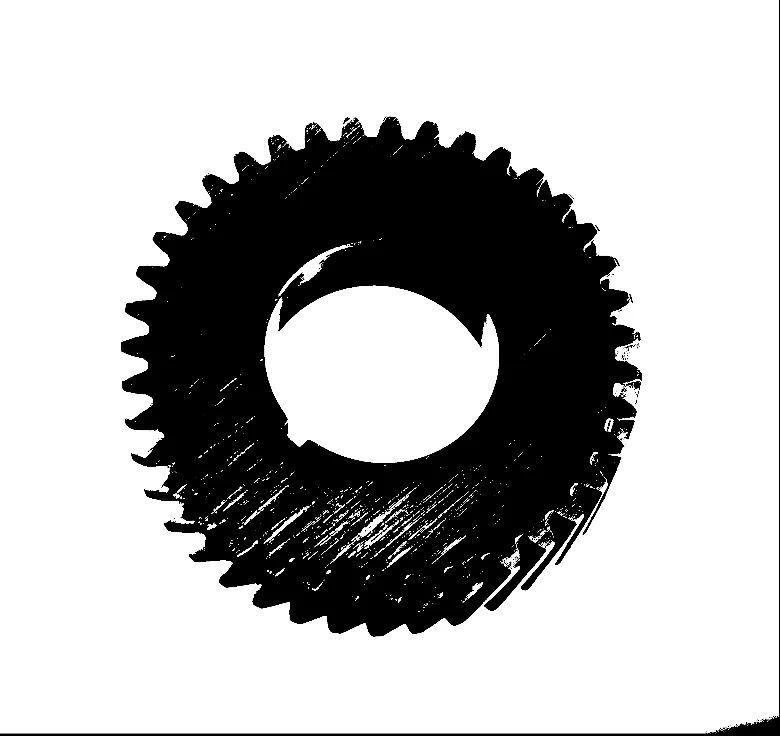
Original image with textured surface and small bright noise
Eroded Image
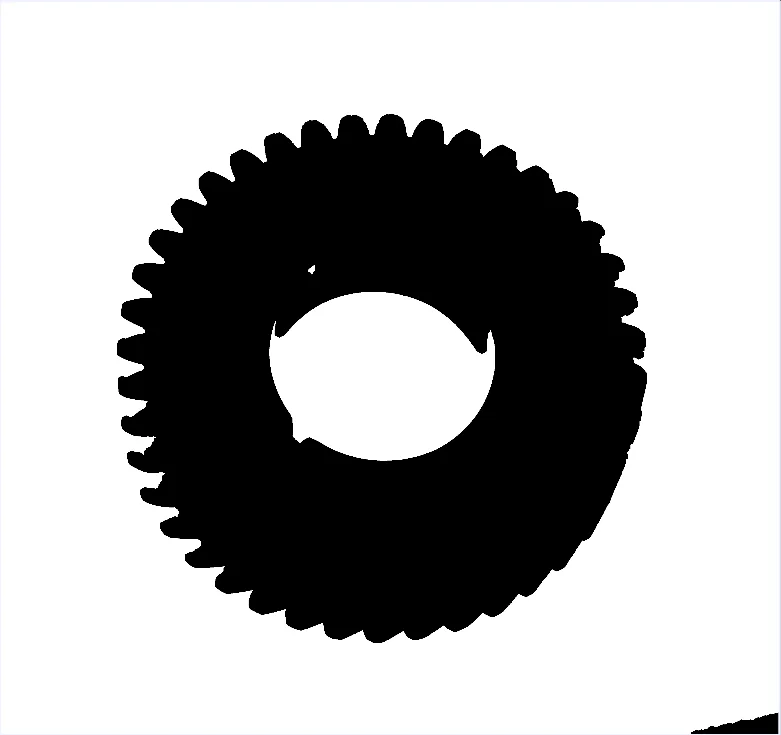
Eroded image — small bright features removed, objects shrunk
The Code
"""Demonstrates morphological erosion to shrink bright regions and remove small noise."""

from loguru import logger
import rerun as rr

from telekinesis import pupil, datatypes


def filter_image_using_morphological_erode_example():
    """Applies erosion to shrink bright regions and remove small noise."""
    # ===================== Load Image ==========================================
    image_url = "https://assets.telekinesis.ai/examples/v1/images/gear_with_texture.jpg"
    image = datatypes.Image.from_url(image_url).to_grayscale()

    # ===================== Run Skill ==========================================
    filtered_image = pupil.filter_image_using_morphological_erode(
        image=image,
        kernel_size=5,
        kernel_shape="ellipse",
        iterations=10,
        border_type="default",
    )

    # ===================== Log ================================================
    logger.success(f"Applied erosion morphological operation on {image}")
    logger.success(f"Result: {filtered_image}")

    # ===================== Visualization  (Optional) ======================
    rr.init("filter_image_using_morphological_erode_example", spawn=True)
    datatypes.visualize(image, entity_path="1-Original")
    datatypes.visualize(filtered_image, entity_path="2-Eroded")

if __name__ == "__main__":
    filter_image_using_morphological_erode_example()
Runnable examples are available in the Telekinesis examples repository.
Follow the README in that repository to set up the environment, run this specific example with:
cd telekinesis-examples
python examples/image_processing/filter_image_using_morphological_erode.py
Parameter Configuration
| Parameter | Type | Default | Description |
|---|---|---|---|
image | datatypes.Image | np.ndarray | required | Input image to process, recommended to be a binary image/mask, shape (H, W) |
kernel_size | datatypes.Int | int | 3 | Size of the structuring element, in pixels |
kernel_shape | datatypes.String | str | "ellipse" | Shape of the structuring element: ellipse, rectangle, cross, or diamond |
iterations | datatypes.Int | int | 1 | Number of times erosion is applied sequentially |
border_type | datatypes.String | str | "default" | Border handling mode: default, constant, replicate, reflect, or reflect 101 |
border_value | datatypes.Float | float | int | 0.0 | Value used for the "constant" border, only used when border_type is "constant"; can be negative depending on the image dtype |
Returns
| Type | Description |
|---|---|
datatypes.Image | Same shape as image, eroded |
Raises
| Exception | Condition |
|---|---|
TypeError | image, kernel_size, kernel_shape, iterations, border_type, or border_value has an invalid type |
ValueError | kernel_shape or border_type is not one of the supported options |
ConfigurationError | The TELEKINESIS_API_KEY environment variable is not set |
SerializationError | The request input failed to serialize, the response was not returned as an Arrow stream, or the response failed to deserialize |
RequestTimeoutError | The request to the Pupil service timed out |
TransportError | A network failure occurred before a response was received |
ClientError | The Pupil service rejected the request due to invalid or malformed input (HTTP 400/422), an unrecognized endpoint (HTTP 404), or another unexpected 4xx response |
AuthenticationError | The API key was rejected as invalid or expired (HTTP 401) |
AuthenticationServiceError | The authentication service returned an invalid response, was temporarily unavailable, or timed out (HTTP 502/503/504) |
ServerError | The Pupil service returned a 5xx or otherwise unexpected error response |
How to Tune the Parameters
The filter_image_using_morphological_erode Skill exposes the structuring element's size and shape, an iteration count, and border handling.
kernel_size
- Controls: The size of the structuring element used for erosion.
- Units: Pixels
- Default:
3 - Increase → removes larger bright features and shrinks objects more
- Decrease → less aggressive erosion
- Typical range: 3-15 (use 3-5 for small noise, 5-9 for moderate features, 9-15 for large features)
kernel_shape
- Controls: The geometric shape of the structuring element.
- Default:
"ellipse" - Options:
ellipse– smooth, isotropic erosion; the default for most casesrectangle– axis-aligned, isotropic in rows/columnscross– thinner, directionally sensitive to line-like structuresdiamond– symmetric along diagonals
iterations
- Controls: How many times erosion is applied sequentially.
- Units: Count
- Default:
1 - Increase → compounds the erosion effect
- Decrease → less erosion
- Typical range: 1-10
border_type
- Controls: How pixels near image edges are handled when the structuring element extends past the boundary.
- Default:
"default" - Options:
default– same asreflect 101, the library's default for most operationsconstant– pads withborder_valuereplicate– replicates the edge pixelreflect– reflects without repeating the edge pixelreflect 101– reflects with the edge pixel repeated, often best for avoiding dark borders
TIP
Best practice: Start with kernel_size=3 and iterations=1. If small noise remains, increase kernel_size slightly rather than stacking more iterations — either compounds similarly, but a larger kernel is easier to reason about and reverse with a matching dilation.
Where to Use the Skill
Common pipelines include:
- Binary image cleanup – Remove small noise spots left over from thresholding
- Object separation – Break thin connections between touching objects
- Feature removal – Strip out features smaller than the structuring element before analysis
- Segmentation preprocessing – Clean a mask before feeding it into shape or contour analysis
Alternative Skills
| Skill | vs. Filter Image Using Morphological Erode |
|---|---|
| filter_image_using_morphological_dilate | The inverse operation — expands bright regions instead of shrinking them. |
| filter_image_using_morphological_open | Erosion followed by dilation. Use this instead of erosion alone when the goal is removing small noise while keeping objects at their original size. |
| filter_image_using_median_blur | Removes noise on grayscale images without a binary structuring-element model. Use erosion for binary masks, median blur for grayscale noise. |
When Not to Use the Skill
Do not use Filter Image Using Morphological Erode when:
- Object size must be preserved (use
filter_image_using_morphological_openinstead, which dilates back after eroding) - The input is grayscale noise rather than a binary mask (use
filter_image_using_median_blurorfilter_image_using_gaussian_blurinstead) - You want to fill holes instead of removing features (use
filter_image_using_morphological_dilateorfilter_image_using_morphological_closeinstead) - Fine details in the mask matter (erosion removes anything smaller than the structuring element)