

Segment Image Using YCrCb
SUMMARY
Segment Image Using YCrCb segments an image by thresholding it in YCrCb color space.
The image is converted to YCrCb (Y = luma/brightness, Cr/Cb = red/blue chrominance) and only the pixels whose [Y, Cr, Cb] values fall within the inclusive [lower_bound, upper_bound] range are kept. Because brightness (Y) is separated from color (Cr, Cb), the chrominance range for a given color — most notably skin tone — stays fairly consistent across different lighting conditions.
Use this Skill when you want to segment objects by chrominance, such as skin-tone ranges, in a way that holds up across brightness changes.
The Skill
from telekinesis import cornea

segmented_image = cornea.segment_image_using_ycrcb(
    image=image,
    lower_bound=(0, 133, 77),
    upper_bound=(255, 173, 127),
)Example
Input Image
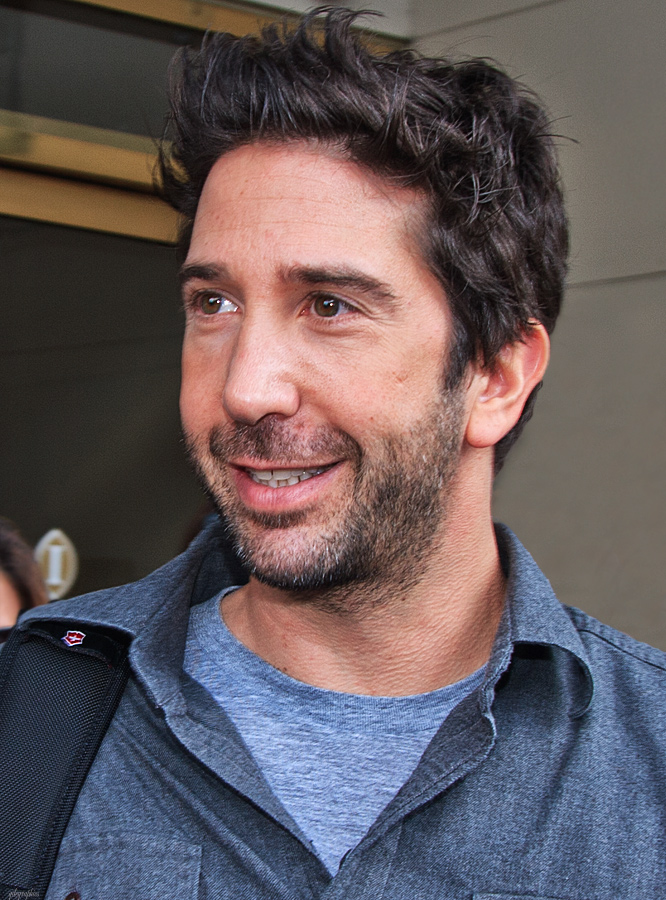
Original image for YCrCb color segmentation
Output Image
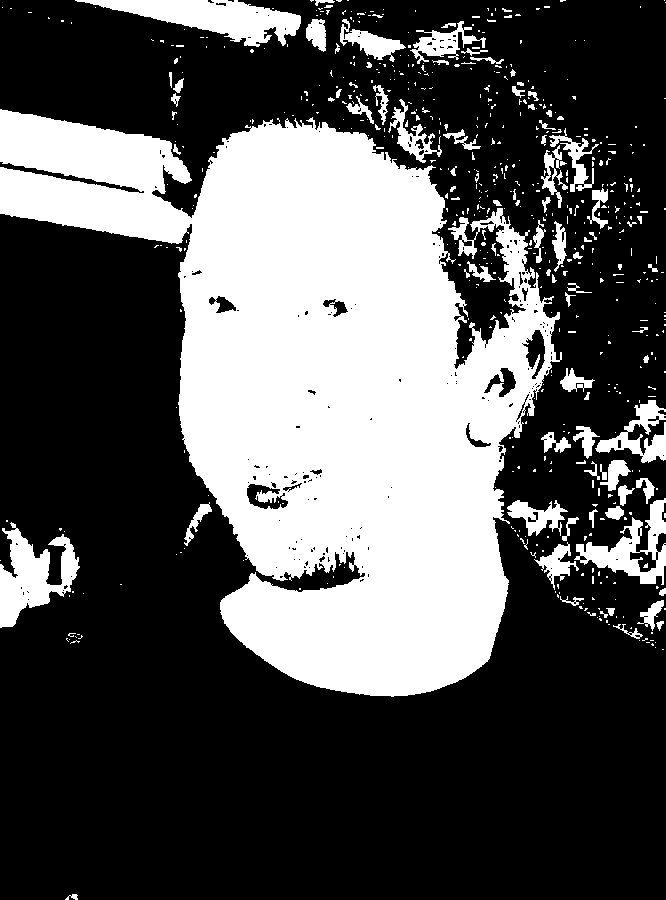
Segmented image by YCrCb color range
The Code
"""
Demonstrates YCrCb color space segmentation.
"""

from loguru import logger
import rerun as rr
import rerun.blueprint as rrb

from telekinesis import cornea, datatypes

def segment_image_using_ycrcb_example():
    """Segments an image using YCrCb color space range."""
    # ===================== Load Image ==========================================
    image_url = "https://assets.telekinesis.ai/examples/v1/images/David_Schwimmer.jpg"
    image = datatypes.Image.from_url(url=image_url)

    # ===================== Run Skill ==========================================
    segmented_image = cornea.segment_image_using_ycrcb(
        image=image, lower_bound=(0, 133, 77), upper_bound=(255, 173, 127)
    )

    # ===================== Log ================================================
    logger.success(f"Segmented {image} using YCrCb color space range.")
    logger.success(f"Results: {segmented_image}")
    logger.info(f"Segmented image label codes: {segmented_image.label_codes}")
    logger.info(f"Segmented image number of labels: {segmented_image.number_of_labels}")
    logger.info(f"Segmented image shape: {segmented_image.shape}")
    logger.info(f"Segmented image dtype: {segmented_image.dtype}")

    # ===================== Visualization  (Optional) ======================
    rr.init("segment_image_using_ycrcb_example", spawn=True)
    blueprint = rrb.Horizontal(
        rrb.Spatial2DView(origin="/input_image", name="Input"),
        rrb.Spatial2DView(origin="/segmented_image", name="Output"),
    )
    rr.send_blueprint(blueprint)
    datatypes.visualize(image, entity_path="/input_image")
    datatypes.visualize(segmented_image, entity_path="/segmented_image")


if __name__ == "__main__":
    segment_image_using_ycrcb_example()
Runnable examples are available in the Telekinesis examples repository.
Follow the README in that repository to set up the environment, run this specific example with:
cd telekinesis-examples
python examples/segmentation/segment_image_using_ycrcb.py
Parameter Configuration
These parameters control the input image and the inclusive YCrCb range used to decide which pixels are marked as foreground.
| Parameter | Type | Default | Description |
|---|---|---|---|
image | datatypes.Image | np.ndarray | required | Input image to segment, shape (H, W, 3) |
lower_bound | list[int] | tuple[int] | [0, 133, 77] | Inclusive lower [Y, Cr, Cb] bound (a typical skin-tone lower bound) |
upper_bound | list[int] | tuple[int] | [255, 173, 127] | Inclusive upper [Y, Cr, Cb] bound (a typical skin-tone upper bound) |
Returns
| Type | Description |
|---|---|
datatypes.SegmentationImage | A per-pixel label map, shape (H, W), where 0 marks pixels outside the YCrCb range and 1 marks pixels inside it. Use .data for the raw label array, .label_codes for the sorted array of unique ids present, .number_of_labels for how many distinct labels were found, and .shape/.dtype for its size and label dtype. |
Raises
| Exception | Condition |
|---|---|
TypeError | A parameter's value does not match its expected type (see the Parameter Configuration table above) |
ValueError | image is not shape (H, W, 3), lower_bound or upper_bound does not have exactly 3 elements, or any channel is outside [0, 255] |
ConfigurationError | The TELEKINESIS_API_KEY environment variable is not set |
SerializationError | The request input failed to serialize, the response was not returned as an Arrow stream, or the response failed to deserialize |
RequestTimeoutError | The request to the Cornea service timed out |
TransportError | A network failure occurred before a response was received |
ClientError | The Cornea service rejected the request due to invalid or malformed input (HTTP 400/422), an unrecognized endpoint (HTTP 404), or another unexpected 4xx response |
AuthenticationError | The API key was rejected as invalid or expired (HTTP 401) |
AuthenticationServiceError | The authentication service returned an invalid response, was temporarily unavailable, or timed out (HTTP 502/503/504) |
ServerError | The Cornea service returned a 5xx or otherwise unexpected error response |
How to Tune the Parameters
The segment_image_using_ycrcb skill exposes two parameters that together define the accepted YCrCb range.
In general, a narrower range increases precision by excluding more unrelated pixels, while a wider range is more forgiving of variation in the target color but risks including background pixels that happen to fall inside it.
lower_bound
- Controls: The inclusive lower
[Y, Cr, Cb]bound; a pixel is excluded if any of its channels falls below the corresponding bound. - Units: Each channel on a 0–255 scale.
Yis luma/brightness;Cr/Cbare red/blue chrominance, roughly centered near 128. - Default:
[0, 133, 77](a typical skin-tone lower bound) - Keep
Ylow (near0) so the full brightness range stays included and the chrominance range remains valid across lighting - Narrow
Cr/Cbto tighten the accepted chrominance band around the target color - Typical range:
Y0–255;Cr/Cb0–255, tightened around values sampled from the target color
upper_bound
- Controls: The inclusive upper
[Y, Cr, Cb]bound; a pixel is excluded if any of its channels exceeds the corresponding bound. - Units: Same as
lower_bound. - Default:
[255, 173, 127](a typical skin-tone upper bound) - Keep
Yhigh (near255) so the full brightness range stays included - Narrow
Cr/Cbto tighten the accepted chrominance band around the target color - Typical range:
Y0–255;Cr/Cb0–255, tightened around values sampled from the target color
TIP
Because Y spans its full range by default, adapting these bounds to a new target color mainly means narrowing or shifting Cr/Cb; changing Y mostly affects how much of the brightness range is retained, not which colors are matched.
Where to Use the Skill
Common pipelines include:
- Skin-tone detection – e.g. locating a person's face or hands in a scene
- Face-detection preprocessing – producing a coarse region-of-interest mask before a dedicated face detector
- Human presence / human-robot interaction – detecting a person in frame using a consistent chrominance range
- Any color-range task that needs to hold up as brightness changes – since
Yis separated fromCr/Cb
Alternative Skills
| Skill | vs. Segment Image Using YCrCb |
|---|---|
| segment_image_using_hsv | HSV is a general-purpose color space built around hue. Use HSV for general color-based segmentation; use YCrCb when the target is specifically skin-tone-like chrominance. |
| segment_image_using_lab | LAB is perceptually uniform across all colors rather than tuned to a specific range. Use LAB for perceptually-driven bounds in general; use YCrCb for the skin-tone-style chrominance ranges its defaults are built around. |
When Not to Use the Skill
Do not use Segment Image Using YCrCb when:
- The target isn't skin-tone-like in chrominance – the default bounds won't apply, and a general-purpose color space is a better starting point
- You need general-purpose color segmentation – HSV is more directly suited
- Color is not a distinguishing feature of the target – consider a non-color-based segmentation skill instead
TIP
The default bounds [0, 133, 77] to [255, 173, 127] are tuned for skin tones. For any other target color, sample a few known pixels in YCrCb and build the bounds from their Cr/Cb values rather than reusing the defaults.