

Convert Image Color Space
SUMMARY
Convert Image Color Space converts an image from one color space to another.
It re-encodes the same image content into a different color representation — RGB, BGR, HSV, GRAY, LAB, YCRCB, XYZ, RGBA, or BGRA — so it matches what a downstream Skill expects. The channel count of image must match source_color_space (1 channel for GRAY, 3 for RGB/BGR/HSV/LAB/YCRCB/XYZ, 4 for RGBA/BGRA), and the output's channel count matches target_color_space.
Use this Skill when you want to convert an image into the color space a downstream Skill requires.
The Skill
from telekinesis import pupil

filtered_image = pupil.convert_image_color_space(
    image=image,
    source_color_space="RGB",
    target_color_space="GRAY",
)Example
Input Image
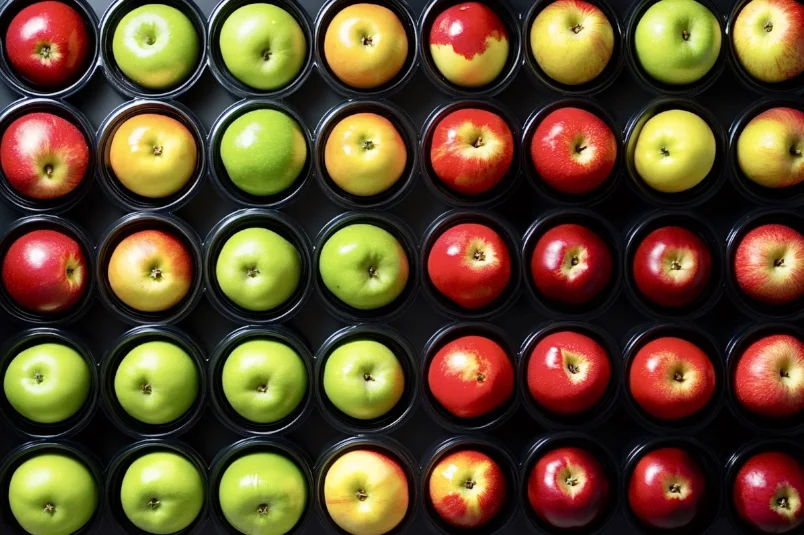
Original RGB image
Converted Image
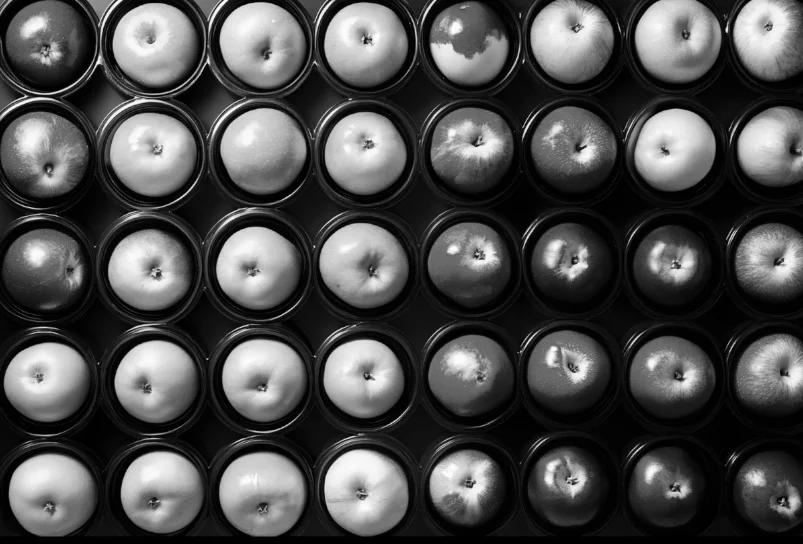
Image converted from RGB to grayscale
The Code
"""Demonstrates convert_image_color_space operation."""

from loguru import logger
import rerun as rr

from telekinesis import pupil, datatypes


def convert_image_color_space_example():
    """Applies convert_image_color_space operation."""
    # ===================== Load Image ==========================================
    image_url = "https://assets.telekinesis.ai/examples/v1/images/apples_black_container.jpg"
    image = datatypes.Image.from_url(image_url)

    # ===================== Run Skill ==========================================
    filtered_image = pupil.convert_image_color_space(
        image=image,
    source_color_space="RGB",
    target_color_space="GRAY",
    )

    # ===================== Log ================================================
    logger.success(f"Applied convert_image_color_space on {image}")
    logger.success(f"Result: {filtered_image}")

    # ===================== Visualization  (Optional) ======================
    rr.init("convert_image_color_space_example", spawn=True)
    datatypes.visualize(image, entity_path="1-Original")
    datatypes.visualize(filtered_image, entity_path="2-Filtered")

if __name__ == "__main__":
    convert_image_color_space_example()
Runnable examples are available in the Telekinesis examples repository.
Follow the README in that repository to set up the environment, run this specific example with:
cd telekinesis-examples
python examples/image_processing/convert_image_color_space.py
Parameter Configuration
| Parameter | Type | Default | Description |
|---|---|---|---|
image | datatypes.Image | np.ndarray | required | The input image to convert, shape (H, W) or (H, W, C). Channel count must match source_color_space (1 for GRAY, 3 for RGB/BGR/HSV/LAB/YCRCB/XYZ, 4 for RGBA/BGRA) |
source_color_space | datatypes.String | str | required | The color space image is currently in. Options: RGB, BGR, HSV, GRAY, LAB, YCRCB, XYZ, RGBA, BGRA |
target_color_space | datatypes.String | str | required | The color space to convert image into. Options: same set as source_color_space |
Returns
| Type | Description |
|---|---|
datatypes.Image | The converted image, in target_color_space. Shape is (H, W) if target_color_space is GRAY, otherwise (H, W, C) |
Raises
| Exception | Condition |
|---|---|
TypeError | Any parameter has an invalid type |
ValueError | source_color_space or target_color_space is not one of the supported color spaces, or image's channel count does not match what source_color_space requires |
ConfigurationError | The TELEKINESIS_API_KEY environment variable is not set |
SerializationError | The request input failed to serialize, the response was not returned as an Arrow stream, or the response failed to deserialize |
RequestTimeoutError | The request to the Pupil service timed out |
TransportError | A network failure occurred before a response was received |
ClientError | The Pupil service rejected the request due to invalid or malformed input (HTTP 400/422), an unrecognized endpoint (HTTP 404), or another unexpected 4xx response |
AuthenticationError | The API key was rejected as invalid or expired (HTTP 401) |
AuthenticationServiceError | The authentication service returned an invalid response, was temporarily unavailable, or timed out (HTTP 502/503/504) |
ServerError | The Pupil service returned a 5xx or otherwise unexpected error response |
How to Tune the Parameters
The convert_image_color_space Skill has two required parameters that together define the conversion; there is no numeric tuning involved.
source_color_space
- Controls: How
image's existing channels are interpreted. - Options:
RGB,BGR,HSV,GRAY,LAB,YCRCB,XYZ,RGBA,BGRA - Must match the actual channel layout of
image. A wrong-but-channel-compatible value (e.g.RGBinstead ofBGRon a 3-channel image) does not raise an error — it silently reinterprets the channels and produces wrong colors.
target_color_space
- Controls: The color space of the returned image.
- Options: same nine options as
source_color_space - Pick based on what the next Skill in the pipeline expects:
GRAYfor edge/contour detectors,HSVfor color-based segmentation or thresholding,RGBA/BGRAwhen an alpha channel is needed for compositing.
TIP
Best practice: Track which color space each image is in as it moves through a pipeline (based on how it was loaded and any prior conversions) rather than assuming a default — an incorrect source_color_space with a compatible channel count fails silently instead of raising an error.
Where to Use the Skill
Common pipelines include:
- Color-based segmentation – Convert to
HSVbefore thresholding or segmenting by hue - Edge/contour detection – Convert to
GRAYbefore an edge- or contour-based detector - Alpha compositing – Convert to
RGBA/BGRAbefore blending withoverlay_images_using_weighted_overlay - Cross-library or display compatibility – Convert between
RGBandBGRto match what a downstream tool or display expects
Alternative Skills
| Skill | vs. Convert Image Color Space |
|---|---|
| normalize_image_intensity | Rescales pixel intensity values within the current color space, rather than changing how channels are represented — often used after this Skill, not instead of it |
| split_image_into_channels | Splits an already color-space-converted image into separate single-channel images, e.g. to threshold one HSV channel independently |
| merge_image_from_channels | Reassembles separate channels back into one image — the inverse of splitting, not of color-space conversion |
When Not to Use the Skill
Do not use Convert Image Color Space when:
- The image is already in the target color space (the conversion is a wasted round-trip with no effect)
- You need to change pixel intensity or contrast, not channel representation (use
normalize_image_intensityor a contrast-enhancement Skill instead) image's channel count doesn't matchsource_color_space(fix the input orsource_color_spacefirst — a compatible-but-wrong channel count converts without raising an error, producing incorrect colors)- You're working with a single-channel mask or label map rather than a color image (there's nothing to convert; use it directly)