

Crop Image Using Polygon
SUMMARY
Crop Image Using Polygon masks an image to an arbitrary polygon-shaped region of interest.
It builds a mask from polygon_vertices (connected in order, with the last vertex joined back to the first) and zeroes out every pixel outside the polygon; pixels inside are left unchanged. The output keeps the same shape as the input — it is not cropped down to the polygon's bounding box — unlike crop_image_using_bounding_boxes, which extracts axis-aligned rectangles.
Use this Skill when you want to isolate a non-rectangular region of interest defined by polygon vertices.
The Skill
from telekinesis import pupil

cropped_image = pupil.crop_image_using_polygon(
    image=image,
    polygon_vertices=polygon_vertices,
)Example
Input Image
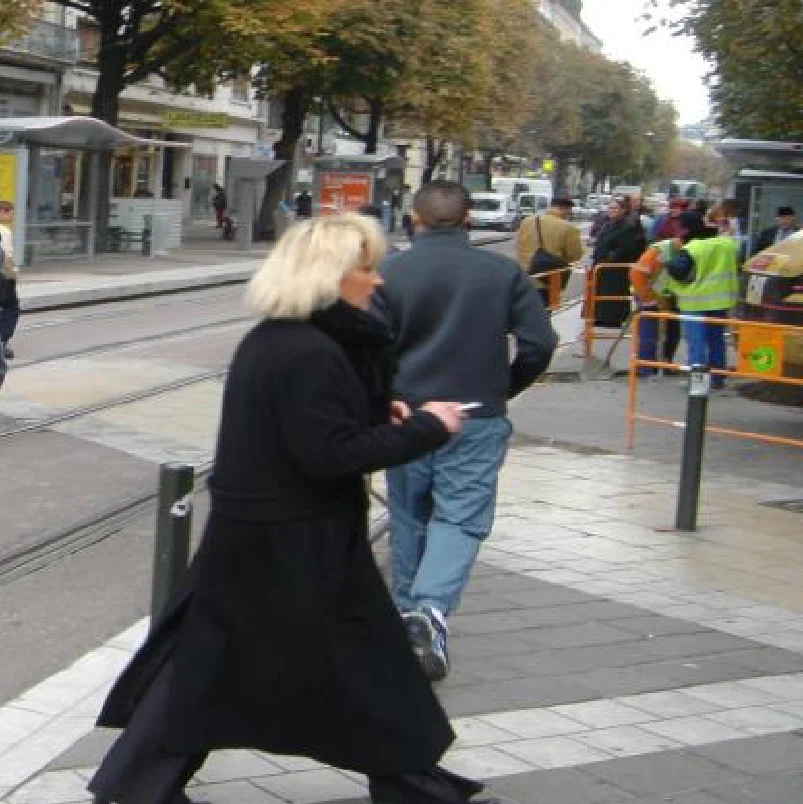
Original image
Masked Image
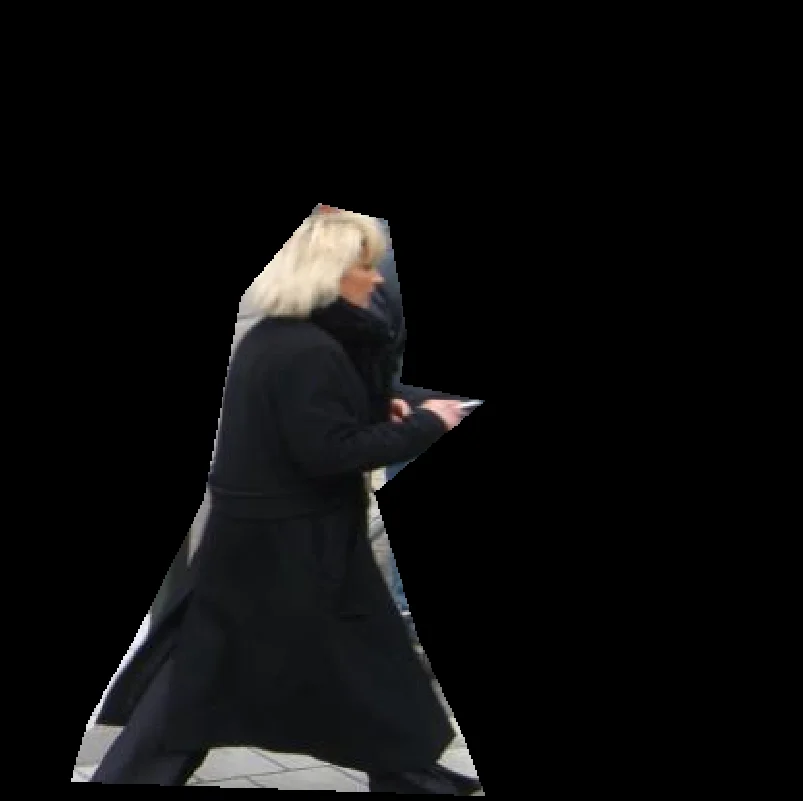
Same size as the input; pixels outside the polygon are zeroed out
The Code
"""Demonstrates cropping an image using a polygon mask."""

from loguru import logger
import rerun as rr

from telekinesis import pupil, datatypes


def crop_image_using_polygon_example():
    """Crops image using a polygon mask."""
    # ===================== Load Image ==========================================
    image_url = "https://assets.telekinesis.ai/examples/v1/images/pedestrians.jpg"
    image = datatypes.Image.from_url(image_url)

    # ===================== Run Skill ==========================================
    # Define polygon vertices in the format [[x1, y1], [x2, y2], ..., [xn, yn]]
    polygon_vertices = [
        [37, 404],
        [46, 373],
        [74, 323],
        [106, 258],
        [125, 154],
        [165, 106],
        [200, 115],
        [210, 173],
        [206, 199],
        [250, 208],
        [193, 255],
        [216, 331],
        [240, 383],
        [250, 411],
    ]

    filtered_image = pupil.crop_image_using_polygon(
        image=image,
        polygon_vertices=polygon_vertices,
    )

    # ===================== Log ================================================
    logger.success(f"Cropped {image} using polygon")
    logger.success(f"Result: {filtered_image}")

    # ===================== Visualization  (Optional) ======================
    rr.init("crop_image_using_polygon_example", spawn=True)
    datatypes.visualize(image, entity_path="1-Original")
    datatypes.visualize(filtered_image, entity_path="2-Cropped")

if __name__ == "__main__":
    crop_image_using_polygon_example()
Runnable examples are available in the Telekinesis examples repository.
Follow the README in that repository to set up the environment, run this specific example with:
cd telekinesis-examples
python examples/image_processing/crop_image_using_polygon.py
Parameter Configuration
| Parameter | Type | Default | Description |
|---|---|---|---|
image | datatypes.Image | np.ndarray | required | The input image to crop, shape (H, W) or (H, W, C) |
polygon_vertices | datatypes.Array | np.ndarray | list | required | The polygon boundary, as (x, y) vertices in pixel coordinates, in order, shape (N, 2) with at least 3 vertices. Not necessarily closed — the first and last vertices are connected automatically |
Returns
| Type | Description |
|---|---|
datatypes.Image | Same shape as image, with every pixel outside the polygon zeroed out (black) and pixels inside left unchanged. The output is not cropped to the polygon's bounding box |
Raises
| Exception | Condition |
|---|---|
TypeError | Any parameter has an invalid type |
ValueError | polygon_vertices is not shape (N, 2) with at least 3 vertices, or contains NaN/inf |
ConfigurationError | The TELEKINESIS_API_KEY environment variable is not set |
SerializationError | The request input failed to serialize, the response was not returned as an Arrow stream, or the response failed to deserialize |
RequestTimeoutError | The request to the Pupil service timed out |
TransportError | A network failure occurred before a response was received |
ClientError | The Pupil service rejected the request due to invalid or malformed input (HTTP 400/422), an unrecognized endpoint (HTTP 404), or another unexpected 4xx response |
AuthenticationError | The API key was rejected as invalid or expired (HTTP 401) |
AuthenticationServiceError | The authentication service returned an invalid response, was temporarily unavailable, or timed out (HTTP 502/503/504) |
ServerError | The Pupil service returned a 5xx or otherwise unexpected error response |
How to Tune the Parameters
The crop_image_using_polygon Skill has a single parameter: the polygon boundary itself.
polygon_vertices
- Controls: The exact shape of the region kept from
image; everything outside is zeroed. - Units: Pixels,
(x, y)per vertex - Default: required, no default
- More vertices let you approximate a curved or highly irregular boundary. List them in a single consistent order (clockwise or counter-clockwise) around the boundary — a self-intersecting or out-of-order vertex list describes the wrong shape.
TIP
Because the output image keeps the full input size, a downstream step that assumes a tight crop (e.g. measuring object size from image dimensions) needs a follow-up crop_image_using_bounding_boxes call — this Skill only zeroes pixels, it doesn't resize.
Where to Use the Skill
Common pipelines include:
- Irregular ROI isolation – Mask out everything except a person, part, or region traced by a contour or annotation
- Post-segmentation masking – Apply a polygon derived from
retina.detect_contoursor a manual annotation to isolate one object for further processing - Redaction-style masking – Zero out everything outside an approved region before further processing or display
Alternative Skills
| Skill | vs. Crop Image Using Polygon |
|---|---|
| crop_image_using_bounding_boxes | Crops one or more axis-aligned rectangles and shrinks the output to each box's size, instead of masking an irregular region at full image size |
| crop_image_center | Crops a single fixed-size rectangle centered on the image, rather than an arbitrary polygon |
| bitwise_and_images | A lower-level building block: mask any region (not just a polygon) by combining image with a precomputed binary mask via bitwise AND |
When Not to Use the Skill
Do not use Crop Image Using Polygon when:
- The region is a simple axis-aligned rectangle (use
crop_image_using_bounding_boxes— it's simpler and also shrinks the output to the region's size) - You need the output resized to the region's bounding box (this Skill keeps the full input size; follow it with a bounding-box crop if you need a tight crop)
- You already have an arbitrary binary mask rather than polygon vertices (use
bitwise_and_imagesto apply it directly) - The polygon vertices are unordered or self-intersecting (fix the vertex ordering first — the connected boundary will not match the intended shape)