

Detect Objects Using RF-DETR
SUMMARY
Detect Objects Using RF-DETR detects objects using RF-DETR and returns COCO-style detection results with category ids from the COCO 80-class label set.
This Skill is designed for transformer-based object detection in scenarios where global context understanding is beneficial, such as dense object scenes or complex warehouse environments. For example, detecting overlapping boxes, pallets, or workers in cluttered industrial layouts.
Use this Skill when you want to detect and label objects using COCO 80-class categories with a modern transformer-based detection architecture.
The Skill
from telekinesis import retina

detection_results = retina.detect_objects_using_rfdetr(
    image=image,
    score_threshold=0.5,
)Example
Input Image

Original image
Detected Objects
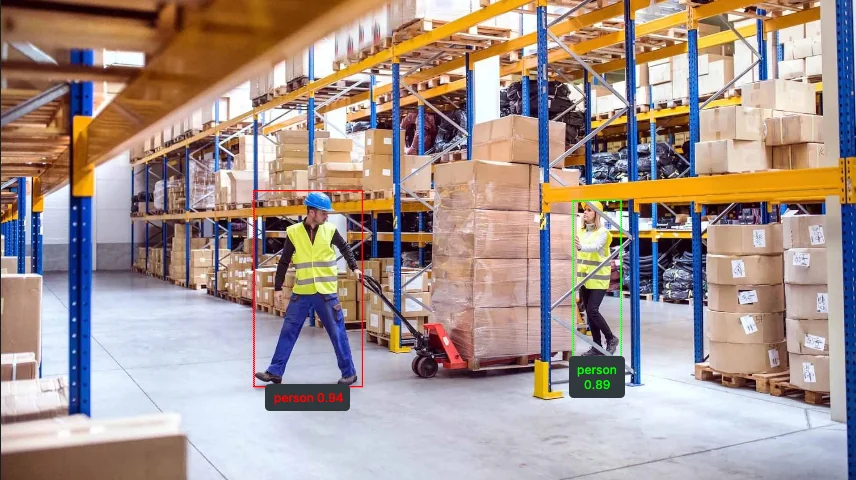
Detected persons with bounding boxes, labels and scores.
The Code
"""
Detect objects using RF-DETR.

Runs RF-DETR object detection on an image and returns COCO-like annotations
with category names from the COCO 80-class label set.

The annotations and categories are used for visualization overlays.
"""

from loguru import logger
import rerun as rr

from telekinesis import retina, constants, datatypes


def detect_objects_using_rfdetr_example():
    """
    Detect objects using RF-DETR.

    Runs RF-DETR object detection on an image and returns object detections using datatype
    `COCOObjectDetectionResults`.
    """
    # ===================== Load Image ==========================================
    image_url = "https://assets.telekinesis.ai/examples/v1/images/warehouse_1.jpg"
    image = datatypes.Image.from_url(url=image_url)

    # ===================== Run Skill ==========================================
    detection_results = retina.detect_objects_using_rfdetr(
        image=image,
        score_threshold=0.5,
    )

    # ===================== Log ================================================
    logger.success(f"Detected objects in {image} using RF-DETR.")
    logger.success(f"Results: {detection_results}")

    categories = constants.get_coco_categories(model="rfdetr")
    logger.info(f"RF-DETR categories: {categories}")

    logger.info(f"All detected object bounding boxes: {detection_results.bboxes}")
    logger.info(f"All detected object scores: {detection_results.scores}")
    logger.info(f"All detected object category IDs: {detection_results.category_ids}")

    # Indexed object is of type the single `COCOObjectDetectionResult`
    logger.info(f"Detected object at index 0: {detection_results[0]}")
    logger.info(f"Detected object at index 0 bounding box: {detection_results[0].bbox}")
    logger.info(f"Detected object at index 0 score: {detection_results[0].score}")
    logger.info(
        f"Detected object at index 0 category ID: {detection_results[0].category_id}"
    )
    logger.info(
        f"Detected object at index 0 category name: {categories[detection_results[0].category_id]}"
    )

    # ===================== Visualization  (Optional) ======================
    rr.init("detect_objects_using_rfdetr_example", spawn=True)
    datatypes.visualize(image, entity_path="/image")
    datatypes.visualize(detection_results, entity_path="/image/overlayed_detections")


if __name__ == "__main__":
    detect_objects_using_rfdetr_example()
Runnable examples are available in the Telekinesis examples repository.
Follow the README in that repository to set up the environment, run this specific example with:
cd telekinesis-examples
python examples/detection/detect_objects_using_rfdetr.py
Parameter Configuration
| Parameter | Type | Default | Description |
|---|---|---|---|
image | datatypes.Image | np.ndarray | list | required | Input image. Supported shapes are (H, W), (H, W, 1), or (H, W, 3) — 4-channel (alpha) images are not supported |
score_threshold | datatypes.Float | float | int | 0.5 | Minimum confidence score required for a detection to be returned |
INFO
detect_objects_using_rfdetr returns detections only — it does not return category names. Look up names separately with constants.get_coco_categories(model="rfdetr"), indexed by category_id.
RF-DETR predicts the original, sparse COCO category ids (1–90, skipping ~10 numbers), not contiguous positions. get_coco_categories(model="rfdetr") returns a dense table padded so that position i always holds the category whose COCO id is i — so indexing it directly as categories[category_id] is safe.
Returns
| Type | Description |
|---|---|
datatypes.COCOObjectDetectionResults | The detected objects. Access the grouped arrays via .bboxes (shape (N, 4), [x, y, w, h]), .scores (shape (N,)), and .category_ids (shape (N,)), or index a single detection with detections[i] to get its .bbox, .score, and .category_id. |
Raises
| Exception | Condition |
|---|---|
TypeError | A parameter's value does not match its expected type (see the Parameter Configuration table above) |
ValueError | image has an unsupported shape, or score_threshold is outside the valid 0.0–1.0 range |
ConfigurationError | The TELEKINESIS_API_KEY environment variable is not set |
SerializationError | The request input failed to serialize, the response was not returned as an Arrow stream, or the response failed to deserialize |
RequestTimeoutError | The request to the Retina service timed out |
TransportError | A network failure occurred before a response was received |
ClientError | The Retina service rejected the request due to invalid or malformed input (HTTP 400/422), an unrecognized endpoint (HTTP 404), or another unexpected 4xx response |
AuthenticationError | The API key was rejected as invalid or expired (HTTP 401) |
AuthenticationServiceError | The authentication service returned an invalid response, was temporarily unavailable, or timed out (HTTP 502/503/504) |
ServerError | The Retina service returned a 5xx or otherwise unexpected error response |
How to Tune the Parameters
RF-DETR has one tunable parameter.
score_threshold
- Controls: The minimum confidence score required for a detection to be returned.
- Default:
0.5 - Increase → fewer, higher-confidence detections (reduces false positives)
- Decrease → more detections kept, including lower-confidence ones (improves recall for small, partially occluded, or hard-to-detect objects)
- Typical range:
0.3–0.7
TIP
Best practice: Start with score_threshold=0.5. Raise it if you see too many false positives; lower it if true objects are being missed.
Where to Use the Skill
Common pipelines include:
- Warehouse and logistics monitoring – Detecting pallets, boxes, people, and equipment for operational visibility
- Quality inspection and compliance checks – Verifying object presence/absence and category-level correctness
Alternative Skills
| Skill | vs. Detect Objects Using RF-DETR |
|---|---|
| detect_objects_using_yolox | Use YOLOX when you need speed and real-time performance. |
| detect_objects_using_qwen / detect_objects_using_grounding_dino | Use these when the objects you need aren't in the fixed 80-class COCO set that RF-DETR is trained on. |
When Not to Use the Skill
Do not use Detect Objects Using RF-DETR when:
- GPU memory is limited (transformer-based models typically consume more GPU memory than CNN-based detectors)
- Real-time performance is required (RF-DETR may be too slow compared to YOLO-style detectors)
- Running on edge devices or resource-constrained systems