

Filter Image Using Morphological Dilate
SUMMARY
Filter Image Using Morphological Dilate applies dilation to expand bright regions and fill holes.
Dilation replaces each pixel with the maximum value found in its neighborhood, as defined by the structuring element (kernel_size/kernel_shape) — this adds pixels to object boundaries, filling small gaps and expanding objects overall. It is the inverse of filter_image_using_morphological_erode; if the goal is filling small holes/gaps while preserving overall object size, use filter_image_using_morphological_close (dilation then erosion) instead of calling dilation alone.
Use this Skill when you want to expand bright objects and fill small gaps or holes in a binary or grayscale image.
The Skill
from telekinesis import pupil

filtered_image = pupil.filter_image_using_morphological_dilate(
    image=image,
    kernel_size=5,
    kernel_shape="ellipse",
    iterations=5,
    border_type="constant",
    border_value=0,
)Example
Input Image

Original image with gaps and thin objects
Dilated Image
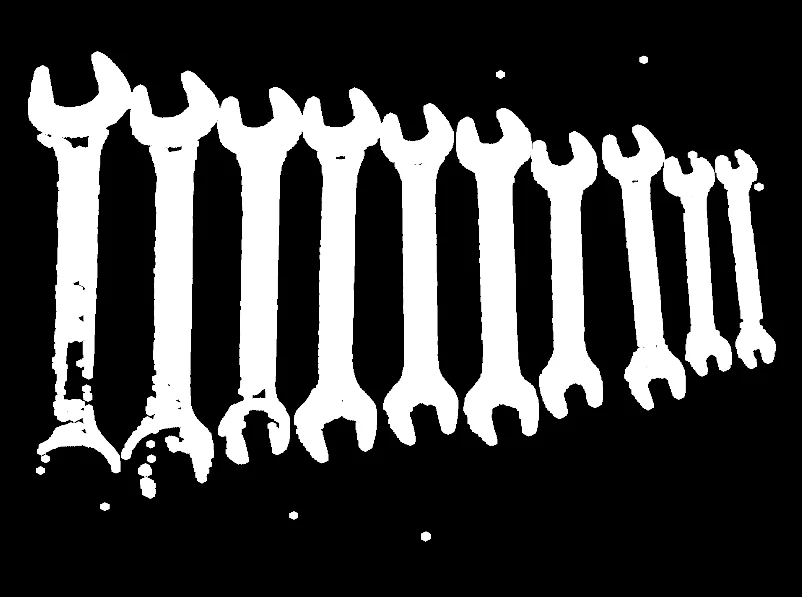
Dilated image — gaps filled, objects expanded
The Code
"""Demonstrates morphological dilation to expand bright regions and fill holes."""

from loguru import logger
import rerun as rr

from telekinesis import pupil, datatypes


def filter_image_using_morphological_dilate_example():
    """Applies dilation to expand bright regions and fill holes."""
    # ===================== Load Image ==========================================
    image_url = "https://assets.telekinesis.ai/examples/v1/images/spanners_arranged.jpg"
    image = datatypes.Image.from_url(image_url).to_grayscale()

    # ===================== Run Skill ==========================================
    filtered_image = pupil.filter_image_using_morphological_dilate(
        image=image,
        kernel_size=5,
        kernel_shape="ellipse",
        iterations=5,
        border_type="constant",
        border_value=0,
    )

    # ===================== Log ================================================
    logger.success(f"Applied dilation morphological operation on {image}")
    logger.success(f"Result: {filtered_image}")

    # ===================== Visualization  (Optional) ======================
    rr.init("filter_image_using_morphological_dilate_example", spawn=True)
    datatypes.visualize(image, entity_path="1-Original")
    datatypes.visualize(filtered_image, entity_path="2-Dilated")

if __name__ == "__main__":
    filter_image_using_morphological_dilate_example()
Runnable examples are available in the Telekinesis examples repository.
Follow the README in that repository to set up the environment, run this specific example with:
cd telekinesis-examples
python examples/image_processing/filter_image_using_morphological_dilate.py
Parameter Configuration
| Parameter | Type | Default | Description |
|---|---|---|---|
image | datatypes.Image | np.ndarray | required | Input image to process, recommended to be a binary image/mask, shape (H, W) |
kernel_size | datatypes.Int | int | 3 | Size of the structuring element, in pixels |
kernel_shape | datatypes.String | str | "ellipse" | Shape of the structuring element: ellipse, rectangle, cross, or diamond |
iterations | datatypes.Int | int | 1 | Number of times dilation is applied sequentially |
border_type | datatypes.String | str | "default" | Border handling mode: default, constant, replicate, reflect, or reflect 101 |
border_value | datatypes.Float | float | int | 0.0 | Value used for the "constant" border, only used when border_type is "constant"; can be negative depending on the image dtype |
Returns
| Type | Description |
|---|---|
datatypes.Image | Same shape as image, dilated |
Raises
| Exception | Condition |
|---|---|
TypeError | image, kernel_size, kernel_shape, iterations, border_type, or border_value has an invalid type |
ValueError | kernel_shape or border_type is not one of the supported options |
ConfigurationError | The TELEKINESIS_API_KEY environment variable is not set |
SerializationError | The request input failed to serialize, the response was not returned as an Arrow stream, or the response failed to deserialize |
RequestTimeoutError | The request to the Pupil service timed out |
TransportError | A network failure occurred before a response was received |
ClientError | The Pupil service rejected the request due to invalid or malformed input (HTTP 400/422), an unrecognized endpoint (HTTP 404), or another unexpected 4xx response |
AuthenticationError | The API key was rejected as invalid or expired (HTTP 401) |
AuthenticationServiceError | The authentication service returned an invalid response, was temporarily unavailable, or timed out (HTTP 502/503/504) |
ServerError | The Pupil service returned a 5xx or otherwise unexpected error response |
How to Tune the Parameters
The filter_image_using_morphological_dilate Skill exposes the structuring element's size and shape, an iteration count, and border handling.
kernel_size
- Controls: The size of the structuring element used for dilation.
- Units: Pixels
- Default:
3 - Increase → expands objects more and fills larger gaps
- Decrease → less aggressive expansion
- Typical range: 3-15 (use 3-5 for subtle expansion, 5-9 for moderate gaps, 9-15 for large holes)
kernel_shape
- Controls: The geometric shape of the structuring element.
- Default:
"ellipse" - Options:
ellipse– smooth, isotropic dilation; the default for most casesrectangle– axis-aligned, isotropic in rows/columnscross– thinner, directionally sensitive to line-like structuresdiamond– symmetric along diagonals
iterations
- Controls: How many times dilation is applied sequentially.
- Units: Count
- Default:
1 - Increase → expands objects more and fills larger gaps
- Decrease → less expansion
- Typical range: 1-10
border_type
- Controls: How pixels near image edges are handled when the structuring element extends past the boundary.
- Default:
"default" - Options:
default– same asreflect 101, the library's default for most operationsconstant– pads withborder_valuereplicate– replicates the edge pixelreflect– reflects without repeating the edge pixelreflect 101– reflects with the edge pixel repeated, often best for avoiding dark borders
TIP
Best practice: When pairing dilation with a prior erosion to restore object size, match kernel_size and iterations between the two calls, or use filter_image_using_morphological_close directly instead of chaining them yourself.
Where to Use the Skill
Common pipelines include:
- Gap filling – Connect broken line segments or object parts
- Mask expansion – Grow a region of interest before combining it with other masks
- Feature enhancement – Make thin features (wires, cracks) more visible for downstream detection
- Object connection – Join nearby objects that should be treated as one
Alternative Skills
| Skill | vs. Filter Image Using Morphological Dilate |
|---|---|
| filter_image_using_morphological_erode | The inverse operation — shrinks bright regions instead of expanding them. |
| filter_image_using_morphological_close | Dilation followed by erosion. Use this instead of dilation alone when the goal is filling small holes/gaps while keeping objects at their original size. |
When Not to Use the Skill
Do not use Filter Image Using Morphological Dilate when:
- Object boundaries must stay accurate (dilation expands them outward, biasing size/shape measurements)
- Objects are already close together or touching (dilation can merge them into one region)
- Object size must be preserved while still filling holes (use
filter_image_using_morphological_closeinstead) - You need to remove noise rather than fill it in (use
filter_image_using_morphological_erodeorfilter_image_using_morphological_openinstead)