

Detect Contours
SUMMARY
Detect Contours detects object outlines using a contour-based detector.
Contour detection extracts continuous boundary curves from edges in an image to describe object shape. It works best when object boundaries are clear and contrast well with the background.
Use this Skill when you want to extract object contours for shape analysis.
The Skill
from telekinesis import retina

contours = retina.detect_contours(
    image=image,
    retrieval_mode="retrieve_list",
    approx_method="chain_approximate_simple",
    min_area=200,
    max_area=100000,
)Example
Input Image
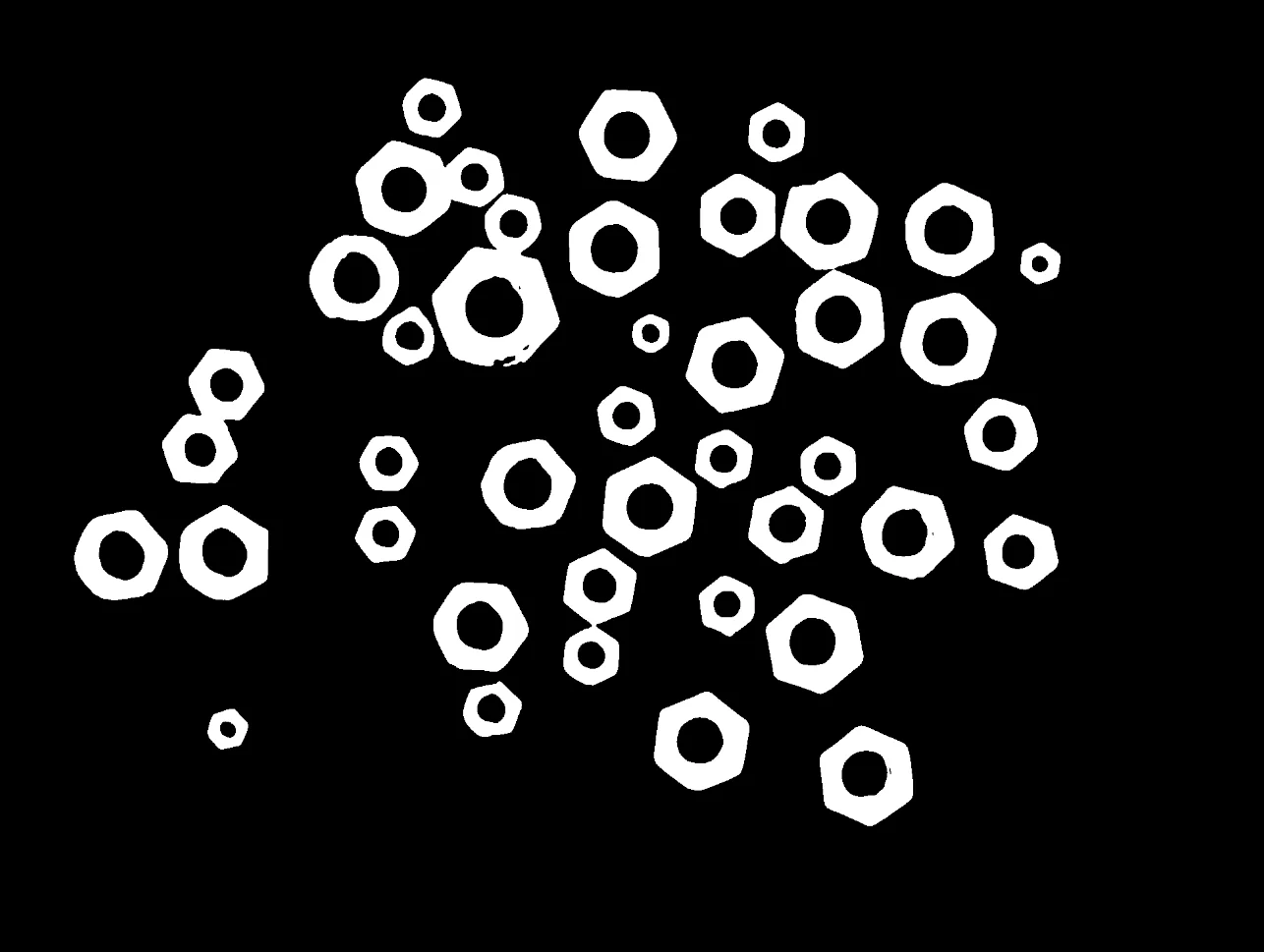
Original binary image
Detected Contours and Bounding Box
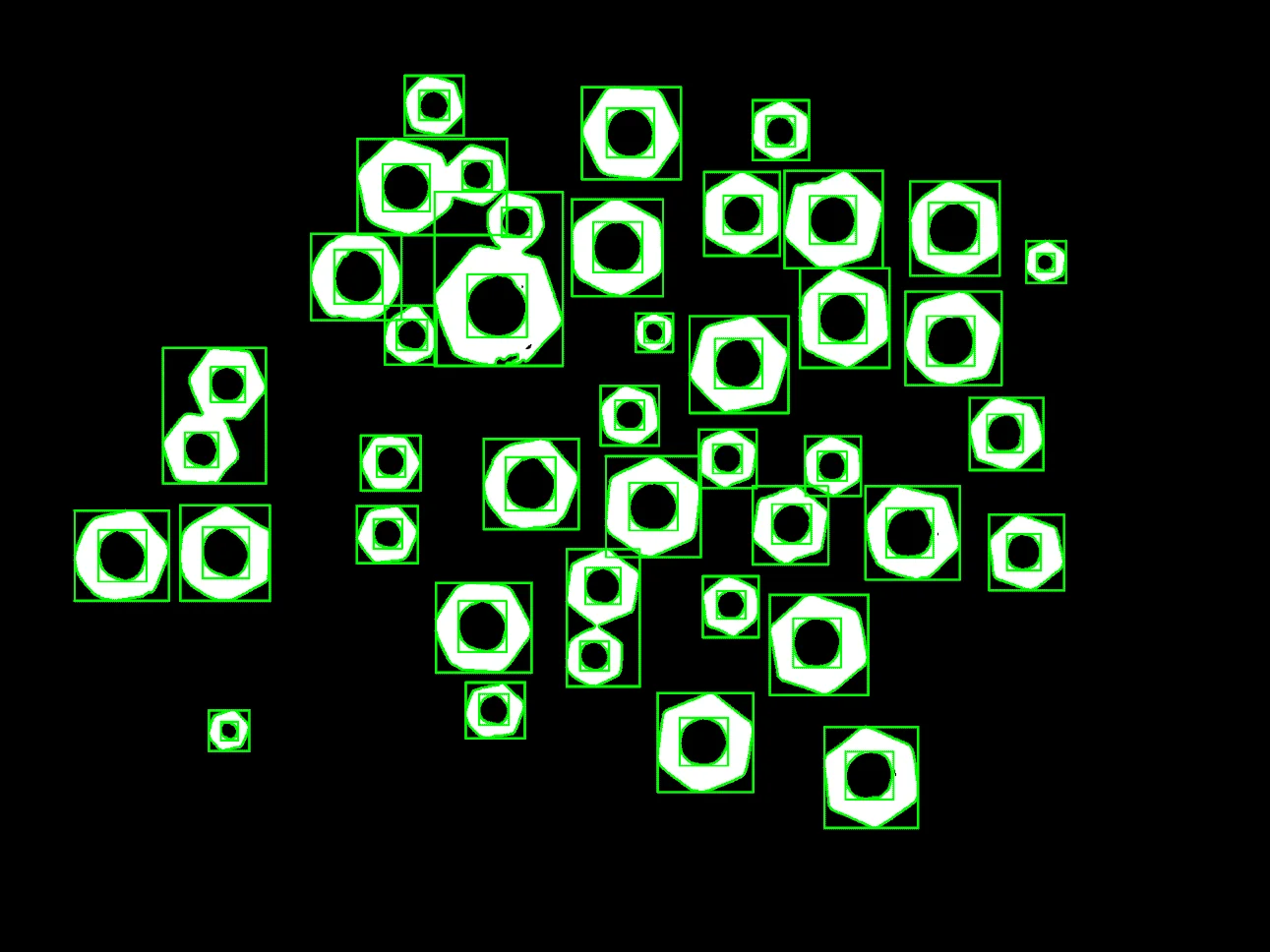
Image overlaid with detected contours and bounding boxes.
The Code
"""
Detect contours using a contour-based detector.
"""

from loguru import logger
import rerun as rr

from telekinesis import retina, datatypes


def detect_contours_example():
    """
    Detect contours using a contour-based detector.

    Extracts contours from the input image and returns contour using datatype `Contours`.
    """
    # ===================== Load Image ==========================================
    image_url = "https://assets.telekinesis.ai/examples/v1/images/nuts_scattered_filtered_gaussian.png"
    image = datatypes.Image.from_url(url=image_url).to_grayscale()

    # ===================== Run Skill ==========================================
    contours = retina.detect_contours(
        image=image,
        retrieval_mode="retrieve_list",
        approx_method="chain_approximate_simple",
        min_area=200,
        max_area=100000,
    )

    # ===================== Log ================================================
    logger.success(f"Detected contours in {image} using contour-based detector.")
    logger.success(f"Results: {contours}")

    logger.info(f"All detected contour points shape: {len(contours.points)}")
    logger.info(f"First detected contour: {contours[0]}")
    logger.info(f"First detected contour points shape: {contours[0].points.shape}")

    # ===================== Visualization  (Optional) ======================
    rr.init("detect_contours_example", spawn=True)
    datatypes.visualize(image, entity_path="/image")
    datatypes.visualize(contours, entity_path="/image/overlayed_contours")


if __name__ == "__main__":
    detect_contours_example()
Runnable examples are available in the Telekinesis examples repository.
Follow the README in that repository to set up the environment, run this specific example with:
cd telekinesis-examples
python examples/detection/detect_contours.py
Parameter Configuration
These parameters are passed directly to the underlying contour detector and control which contours are found, how their boundaries are simplified, and which ones are kept.
| Parameter | Type | Default | Description |
|---|---|---|---|
image | datatypes.Image | np.ndarray | list | required | Input (binary or grayscale) image to process |
retrieval_mode | datatypes.String | str | "retrieve_list" | Contour retrieval strategy: retrieve_external, retrieve_list, retrieve_ccomp, retrieve_tree, or retrieve_floodfill. An unrecognized value raises ValueError |
approx_method | datatypes.String | str | "chain_approximate_simple" | Contour approximation method: chain_approximate_none, chain_approximate_simple, chain_approximate_tc89_l1, or chain_approximate_tc89_kcos. An unrecognized value raises ValueError |
min_area | datatypes.Int | int | 100 | Minimum contour area to keep (pixels^2) |
max_area | datatypes.Int | int | 1000 | Maximum contour area to keep (pixels^2) |
Returns
| Type | Description |
|---|---|
datatypes.Contours | The detected contours, each a variable-length boundary of (x, y) points. Access the grouped list via contours.points (a list of N arrays, each shape (K_i, 2)), or index a single contour with contours[i] to get its .points array of shape (K, 2). |
Raises
| Exception | Condition |
|---|---|
TypeError | A parameter's value does not match its expected type (see the Parameter Configuration table above) |
ValueError | retrieval_mode or approx_method is not one of the supported options, or min_area is not less than max_area |
ConfigurationError | The TELEKINESIS_API_KEY environment variable is not set |
SerializationError | The request input failed to serialize, the response was not returned as an Arrow stream, or the response failed to deserialize |
RequestTimeoutError | The request to the Retina service timed out |
TransportError | A network failure occurred before a response was received |
ClientError | The Retina service rejected the request due to invalid or malformed input (HTTP 400/422), an unrecognized endpoint (HTTP 404), or another unexpected 4xx response |
AuthenticationError | The API key was rejected as invalid or expired (HTTP 401) |
AuthenticationServiceError | The authentication service returned an invalid response, was temporarily unavailable, or timed out (HTTP 502/503/504) |
ServerError | The Retina service returned a 5xx or otherwise unexpected error response |
How to Tune the Parameters
The detect_contours Skill exposes four tunable parameters that control which contours are returned and how closely their boundaries are described.
retrieval_mode
- Controls: Which contours are returned — a flat list, or a hierarchical parent/child structure.
- Default:
"retrieve_list" - Options:
retrieve_list– every contour, with no parent/child relationship computed (the simplest, fastest option when nesting doesn't matter)retrieve_external– only the outermost contour of each object, ignoring holes/nested contoursretrieve_ccomp– every contour, organized into a two-level hierarchy: outer boundaries at the top level, holes inside them as childrenretrieve_tree– every contour, with the full nested hierarchy reconstructed (holes within holes, etc.)retrieve_floodfill– flood-fill-based extraction instead of border following; only meaningful for specially prepared inputs
approx_method
- Controls: How boundary points are simplified when a contour is extracted.
- Default:
"chain_approximate_simple" - Options:
chain_approximate_none– keep every boundary point (most detail, more points)chain_approximate_simple– drop redundant collinear points (fewer points, faster downstream processing)chain_approximate_tc89_l1/chain_approximate_tc89_kcos– Teh-Chin polygonal approximation, simplifies further thanchain_approximate_simplewhile keeping key corner points
min_area
- Controls: The minimum contour area, in pixels^2, required to keep a detection.
- Units: pixels^2
- Default:
100 - Increase → filters out small noise blobs (e.g. specks left over from thresholding)
- Typical range: depends on image resolution and object size
max_area
- Controls: The maximum contour area, in pixels^2, allowed for a detection.
- Units: pixels^2
- Default:
1000 - Decrease → removes large background regions (e.g. the whole image being picked up as one contour) or merged contours
- Typical range: depends on image resolution and object size
TIP
Best practice: Start with min_area tuned to remove noise, keep max_area high, and use chain_approximate_simple for faster processing. Switch to a hierarchical retrieval_mode only when parent/child relationships matter.
Where to Use the Skill
Common pipelines include:
- Object shape analysis – Extracting outlines for shape descriptors and measurements
- Quality inspection – Checking part boundaries, defects, and edge consistency
Alternative Skills
| Skill | vs. Detect Contours |
|---|---|
| detect_circle_using_classic_hough | Use for circular objects with a known radius range; use contours for arbitrary shapes and outlines. |
| detect_objects_using_grounding_dino | Use for semantic object detection; use contours for geometric boundary extraction. |
When Not to Use the Skill
Do not use Detect Contours when:
- Object boundaries are weak or low-contrast (contours will be fragmented or missing)
- Images are heavily textured or noisy (can produce many false contours)
- Objects overlap significantly (contours may merge and lose individual shapes)
- You need sub-pixel boundary precision (contours are returned at pixel resolution)
TIP
Contour detection works best on clean, high-contrast edges. Apply preprocessing (e.g., denoising or thresholding) to improve boundary quality before detection.