

Filter Image Using Sato
SUMMARY
Filter Image Using Sato applies the Sato multi-scale ridge filter to enhance thin linear structures.
The filter evaluates ridge/valley response at multiple scales between scale_start and scale_end and keeps the strongest response per pixel across scales. It has no blobness weighting (alpha), which makes it simpler and faster than filter_image_using_frangi/filter_image_using_hessian, but also less selective against non-tubular structures. It is similar in spirit to filter_image_using_meijering; try Meijering instead if Sato produces too many spurious responses at branch points.
Use this Skill when you want to detect ridges and fine linear structures at multiple scales.
The Skill
from telekinesis import pupil

filtered_image = pupil.filter_image_using_sato(
    image=image,
    scale_start=1,
    scale_end=12,
    scale_step=1,
    detect_black_ridges=False,
    border_type="reflect",
    border_value=0.0,
)Example
Input Image
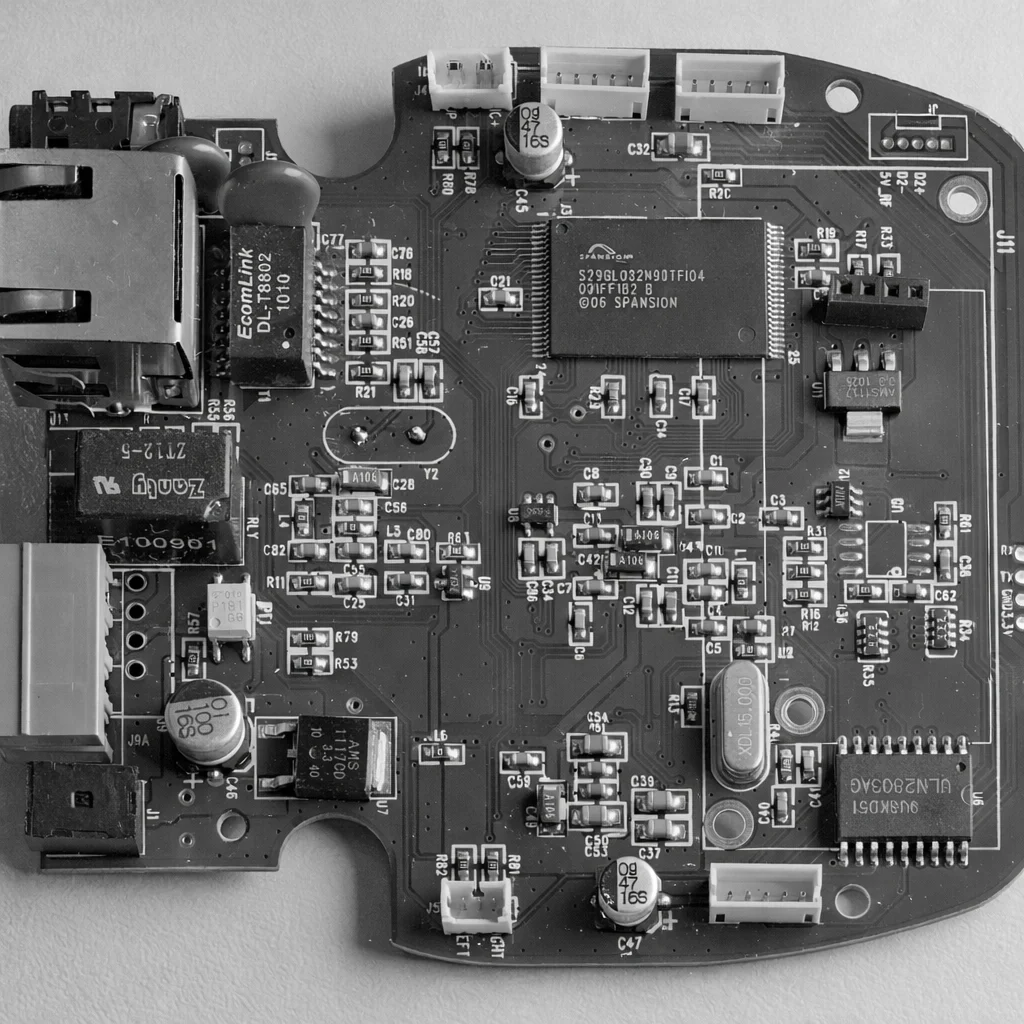
Original grayscale PCB image, normalized to the 0-1 range
Filtered Image
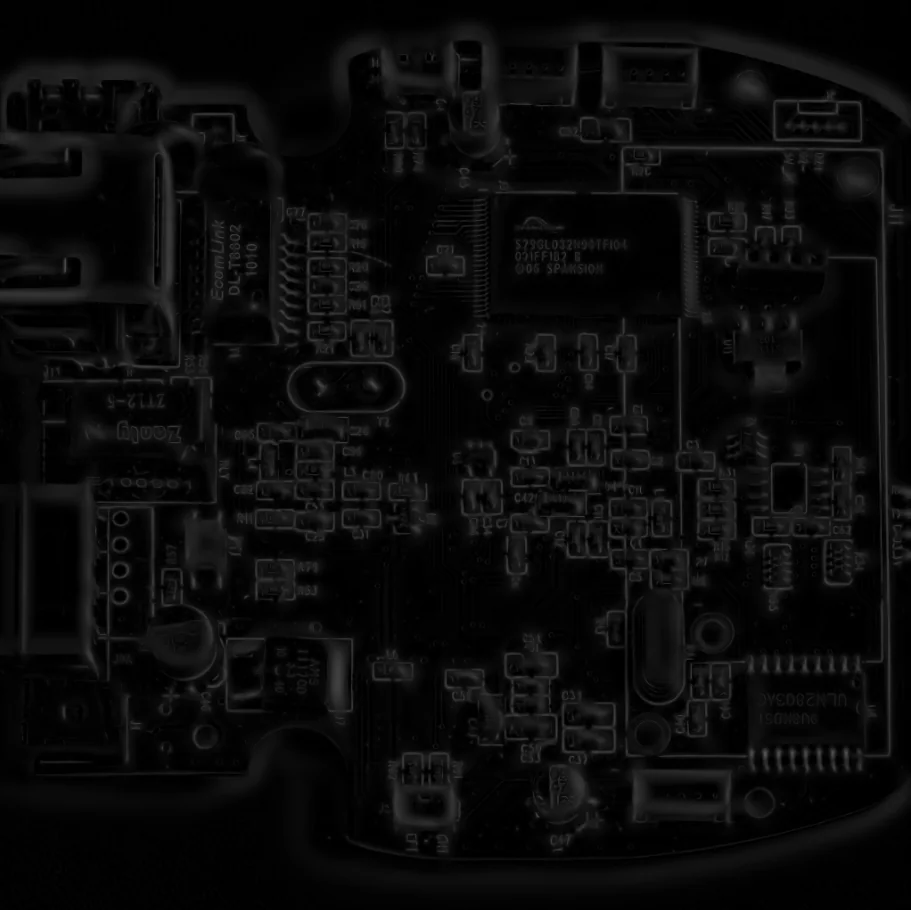
Sato filter highlighting thin, bright ridge-like PCB structures such as traces and IC pins
The Code
"""Demonstrates filter_image_using_sato operation."""

from loguru import logger
import rerun as rr

from telekinesis import pupil, datatypes


def filter_image_using_sato_example():
    """Applies filter_image_using_sato operation."""
    # ===================== Load Image ==========================================
    image_url = "https://assets.telekinesis.ai/examples/v1/images/pcb_top_gray.png"
    image = datatypes.Image.from_url(image_url).to_grayscale()

    # ===================== Run Skill ==========================================
    filtered_image = pupil.filter_image_using_sato(
        image=image,
        scale_start=1,
        scale_end=12,
        scale_step=1,
        detect_black_ridges=False,
        border_type="reflect",
        border_value=0.0,
    )

    # ===================== Log ================================================
    logger.success(f"Applied filter_image_using_sato on {image}")
    logger.success(f"Result: {filtered_image}")

    # ===================== Visualization  (Optional) ======================
    rr.init("filter_image_using_sato_example", spawn=True)
    datatypes.visualize(image, entity_path="1-Original")
    datatypes.visualize(filtered_image, entity_path="2-Filtered")

if __name__ == "__main__":
    filter_image_using_sato_example()
Runnable examples are available in the Telekinesis examples repository.
Follow the README in that repository to set up the environment, run this specific example with:
cd telekinesis-examples
python examples/image_processing/filter_image_using_sato.py
Parameter Configuration
| Parameter | Type | Default | Description |
|---|---|---|---|
image | datatypes.Image | np.ndarray | required | Grayscale input image, shape (H, W), normalized to the 0-1 range. Convert with convert_image_color_space first if starting from a color image |
scale_start | datatypes.Int | int | 1 | Minimum scale (sigma) for structure detection |
scale_end | datatypes.Int | int | 10 | Maximum scale (sigma) for structure detection |
scale_step | datatypes.Int | int | 2 | Step size between scales |
detect_black_ridges | datatypes.Bool | bool | True | Whether to detect dark ridges instead of bright ones |
border_type | datatypes.String | str | "reflect" | Border handling mode: "constant", "reflect", "wrap", "nearest", "mirror" |
border_value | datatypes.Float | float | int | 0.0 | Value used for constant padding, only relevant when border_type="constant" |
Returns
| Type | Description |
|---|---|
datatypes.Image | Same shape as image, with ridge strength per pixel — higher values indicate a stronger ridge/valley |
Raises
| Exception | Condition |
|---|---|
TypeError | A parameter's value does not match its expected type (see the Parameter Configuration table above) |
ValueError | border_type is not one of the supported border modes |
ConfigurationError | The TELEKINESIS_API_KEY environment variable is not set |
SerializationError | The request input failed to serialize, the response was not returned as an Arrow stream, or the response failed to deserialize |
RequestTimeoutError | The request to the Pupil service timed out |
TransportError | A network failure occurred before a response was received |
ClientError | The Pupil service rejected the request due to invalid or malformed input (HTTP 400/422), an unrecognized endpoint (HTTP 404), or another unexpected 4xx response |
AuthenticationError | The API key was rejected as invalid or expired (HTTP 401) |
AuthenticationServiceError | The authentication service returned an invalid response, was temporarily unavailable, or timed out (HTTP 502/503/504) |
ServerError | The Pupil service returned a 5xx or otherwise unexpected error response |
How to Tune the Parameters
The filter_image_using_sato Skill exposes the scale range searched, ridge polarity, and border handling.
scale_start
- Controls: The smallest sigma evaluated, i.e. the thinnest ridge the filter can pick up.
- Units: Pixels (sigma)
- Default:
1 - Increase → ignores very thin ridges
- Decrease → captures the finest linear details
- Typical range: 1-5
scale_end
- Controls: The largest sigma evaluated, i.e. the thickest ridge the filter can pick up.
- Units: Pixels (sigma)
- Default:
10 - Increase → detects wider ridges/fibers, slower
- Decrease → narrower detectable width range, faster
- Typical range: 5-20
scale_step
- Controls: The spacing between evaluated scales.
- Default:
2 - Increase → faster, coarser scale sampling
- Decrease → finer scale resolution, slower
- Typical range: 1-5
detect_black_ridges
- Controls: The polarity of ridge detected.
- Default:
True - Options:
True– detect dark ridges on a bright background (e.g. cracks on a light surface)False– detect bright ridges on a dark background (e.g. traces on a dark PCB)
border_type
- Controls: How pixels beyond the image border are synthesized when computing derivatives near edges.
- Default:
"reflect" - Options:
"reflect"– reflects the image at the border"constant"– pads withborder_value"wrap"– treats the image as periodic"nearest"– extends with the nearest pixel"mirror"– symmetric reflection
border_value
- Controls: The constant fill value used only when
border_type="constant". - Default:
0.0
TIP
Best practice: Set scale_start/scale_end to span the expected ridge widths in pixels, and use scale_step=2 for a good speed/accuracy trade-off. Reach for Sato first for simple ridge detection tasks — switch to filter_image_using_frangi if it produces too many false positives on blob-like or branching structures.
Where to Use the Skill
Common pipelines include:
- PCB trace / fiber inspection – Highlight thin linear structures such as traces, pins, or fibers before contour extraction
- Crack detection – Identify linear surface defects in industrial inspection
- Ridge enhancement – Strengthen fingerprint or terrain ridge continuity
- Fast pre-processing – Use as a cheaper alternative to Frangi/Hessian when blobness weighting isn't needed
Alternative Skills
| Skill | vs. Filter Image Using Sato |
|---|---|
| filter_image_using_frangi | Adds a blobness (alpha) term for more selective vessel detection; use for biological vessels, Sato for general ridges. |
| filter_image_using_hessian | A comparable eigenvalue-based vesselness filter with a Hessian-norm weighting term instead of Sato's simpler formula. |
| filter_image_using_meijering | Tuned for fine branching structures (e.g. neurites); try if Sato over-responds at branch points. |
When Not to Use the Skill
Do not use Filter Image Using Sato when:
- You need simple, fast edge detection (use
filter_image_using_sobelorfilter_image_using_scharrinstead) - You're detecting blob-like structures rather than ridges (Sato has no blobness weighting; use
filter_image_using_frangiinstead) - The structures branch heavily and produce spurious responses (try
filter_image_using_meijering) - The input is noisy (pre-smooth with
filter_image_using_gaussian_blurfirst, since ridge filters amplify noise)