

Segment Image Using Watershed
SUMMARY
Segment Image Using Watershed grows marker seeds outward across an image until they meet at watershed lines, separating touching or overlapping objects.
It treats image as a topographic surface (brighter = higher) and floods it outward from each labeled seed region in markers, growing every region until they meet — the meeting lines become the segment boundaries. This needs good markers to work well: a few pixels per object labeled as seeds, plus one region marked as background/unknown, typically built from thresholding and morphological cleanup. It should also run on an image gradient rather than the raw image, so the watershed lines fall on real edges instead of arbitrary raw-intensity contours. Useful for separating touching or overlapping objects that a single global threshold would merge into one blob (e.g. touching coins or cells).
Use this Skill when you want to separate touching or overlapping objects that a single global threshold would merge into one blob.
The Skill
from telekinesis import cornea

segmented_image = cornea.segment_image_using_watershed(
    image=gradient_image,
    markers=markers,
    connectivity=1,
)Example
Input Image
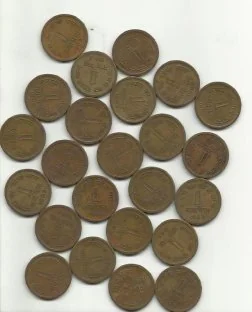
Original image for watershed segmentation
Output Image
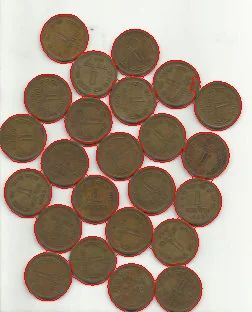
Separated objects using watershed algorithm
The Code
"""Demonstrates watershed segmentation."""

import cv2
import numpy as np
from loguru import logger
import rerun as rr
import rerun.blueprint as rrb

from telekinesis import cornea, datatypes, pupil


def segment_image_using_watershed_example() -> None:
    """Segment an image using marker-controlled watershed."""

    # ===================== Load Image ==========================================
    image_url = (
        "https://assets.telekinesis.ai/examples/v1/images/water_coins.jpg"
    )
    image = datatypes.Image.from_url(url=image_url)
    gray_image = image.to_grayscale()

    # ===================== Build Markers =======================================
    markers = _build_watershed_markers(
        gray_image=gray_image,
        kernel_size=3,
        opening_iterations=2,
        dilate_iterations=3,
        dist_fg_ratio=0.7,
    )

    # ===================== Build Gradient =====================================
    gradient_y = pupil.filter_image_using_sobel(
        image=gray_image,
        dx=0,
        dy=1,
        output_format="32bit",
    ).to_numpy()

    gradient_x = pupil.filter_image_using_sobel(
        image=gray_image,
        dx=1,
        dy=0,
        output_format="32bit",
    ).to_numpy()

    gradient = np.hypot(
        gradient_x.astype(np.float32),
        gradient_y.astype(np.float32),
    )

    gradient_image = datatypes.Image(gradient)

    gradient_normalized = pupil.normalize_image_intensity(
        image=gradient_image,
        alpha=0.0,
        beta=255.0,
        normalization_method="minmax",
        output_format="8bit",
    )

    # ===================== Run Watershed ======================================
    segmented_image = cornea.segment_image_using_watershed(
        image=gradient_normalized,
        markers=markers,
        connectivity=1,
    )

    # ===================== Log ================================================
    logger.success(f"Segmented {image} using watershed.")
    logger.success(f"Result: {segmented_image}")
    logger.info(f"Labels: {segmented_image.label_codes}")
    logger.info(f"Number of labels: {segmented_image.number_of_labels}")

    # ===================== Visualization ======================================
    rr.init("segment_image_using_watershed_example", spawn=True)

    rr.send_blueprint(
        rrb.Horizontal(
            rrb.Spatial2DView(origin="/input", name="Input"),
            rrb.Spatial2DView(origin="/labels", name="Watershed labels"),
        )
    )

    datatypes.visualize(image, entity_path="/input")
    datatypes.visualize(segmented_image, entity_path="/labels")


def _build_watershed_markers(
    *,
    gray_image: datatypes.Image,
    kernel_size: int,
    opening_iterations: int,
    dilate_iterations: int,
    dist_fg_ratio: float,
) -> datatypes.SegmentationImage:
    """Build marker IDs for watershed segmentation."""

    # Cornea Otsu returns 0=background, 1=foreground.
    otsu_mask = cornea.segment_image_using_otsu_threshold(
        image=gray_image,
    )

    # Coins are dark, so invert the Otsu result and convert to 0/255.
    thresholded = datatypes.Image(
        ((1 - otsu_mask.to_numpy()) * 255).astype(np.uint8)
    )

    # Equivalent to cv2.MORPH_OPEN with a square kernel.
    opening = pupil.filter_image_using_morphological_open(
        image=thresholded,
        kernel_size=kernel_size,
        kernel_shape="rectangle",
        iterations=opening_iterations,
        border_type="constant",
        border_value=0,
    )

    sure_background = pupil.filter_image_using_morphological_dilate(
        image=opening,
        kernel_size=kernel_size,
        kernel_shape="rectangle",
        iterations=dilate_iterations,
        border_type="constant",
        border_value=0,
    )

    distance = cv2.distanceTransform(
        opening.to_numpy(),
        cv2.DIST_L2,
        5,
    )
    sure_foreground = (
        distance > dist_fg_ratio * float(distance.max())
    ).astype(np.uint8) * 255
    sure_foreground_image = datatypes.Image(sure_foreground)

    unknown = pupil.bitwise_difference_images(
        image_a=sure_background,
        image_b=sure_foreground_image,
    ).to_numpy()

    _, markers = cv2.connectedComponents(
        sure_foreground,
        connectivity=8,
    )
    markers = markers.astype(np.int32) + 1
    markers[unknown != 0] = 0

    return datatypes.SegmentationImage(markers)


if __name__ == "__main__":
    segment_image_using_watershed_example()
Runnable examples are available in the Telekinesis examples repository.
Follow the README in that repository to set up the environment, run this specific example with:
cd telekinesis-examples
python examples/segmentation/segment_image_using_watershed.py
Parameter Configuration
These parameters supply the surface to flood, the seeds to grow it from, and the neighborhood rule used while growing.
| Parameter | Type | Default | Description |
|---|---|---|---|
image | datatypes.Image | np.ndarray | required | The (typically gradient or intensity) image to flood-fill from the markers, shape (H, W) or (H, W, 3) |
markers | datatypes.SegmentationImage | np.ndarray | required | Seed labels to grow, the same (H, W) size as image. 0 marks unknown/to-be-filled pixels, and each positive integer marks a different seed region (e.g. 1 for background, 2+ for each foreground object) |
connectivity | datatypes.Int | int | 1 | How neighboring pixels are considered connected while growing regions: 1 for 4-connectivity (up/down/left/right), 2 for 8-connectivity (also diagonals) |
Returns
| Type | Description |
|---|---|
datatypes.SegmentationImage | A per-pixel label map, shape (H, W), where each pixel is assigned the label of the seed region it was grown from. Use .data for the raw label array, .label_codes for the sorted array of unique ids present, .number_of_labels for how many regions were found, and .shape/.dtype for its size and label dtype. |
Raises
| Exception | Condition |
|---|---|
TypeError | A parameter's value does not match its expected type (see the Parameter Configuration table above) |
ValueError | markers doesn't share image's (H, W), or connectivity is not 1 or 2 |
ConfigurationError | The TELEKINESIS_API_KEY environment variable is not set |
SerializationError | The request input failed to serialize, the response was not returned as an Arrow stream, or the response failed to deserialize |
RequestTimeoutError | The request to the Cornea service timed out |
TransportError | A network failure occurred before a response was received |
ClientError | The Cornea service rejected the request due to invalid or malformed input (HTTP 400/422), an unrecognized endpoint (HTTP 404), or another unexpected 4xx response |
AuthenticationError | The API key was rejected as invalid or expired (HTTP 401) |
AuthenticationServiceError | The authentication service returned an invalid response, was temporarily unavailable, or timed out (HTTP 502/503/504) |
ServerError | The Cornea service returned a 5xx or otherwise unexpected error response |
How to Tune the Parameters
markers
- Controls: The seed regions that watershed grows outward from; every output pixel inherits the label of whichever seed's flood reaches it first.
- Units: Label image (integer ids), same size as
image - Default: required — no default
- Must match
image's(H, W)exactly, or aValueErroris raised - Build markers from thresholding plus morphological cleanup. The reference example's
_build_watershed_markersdoes this by Otsu-thresholding the image, applying morphological opening to remove speckle noise, running a distance transform on the cleaned mask, and labeling the resulting "sure foreground" blobs into distinct seed ids with connected-component labeling — leaving0for the unknown region between "sure foreground" and "sure background" - Place at least one seed per object you want as its own region, plus one region for the background — markers that are too few or badly placed will merge or split objects incorrectly no matter how good the rest of the pipeline is
connectivity
- Controls: Whether region growth considers only up/down/left/right neighbors (
1) or also diagonal neighbors (2). - Units: Integer,
1or2 - Default:
1 - Increase to
2→ grows more readily across diagonal gaps, at the cost of potentially merging regions that1would keep separate - Keep at
1when objects are close together and you want to preserve fine separations between them - Typical range:
1or2— no other values are valid for a 2D image and any other value raisesValueError
TIP
Build markers from the same image you're segmenting — threshold it, clean the mask with morphological opening to remove speckle noise, then use a distance transform plus connected-component labeling to turn each "sure foreground" blob into its own seed id (see _build_watershed_markers in the reference example) — and run watershed itself on that image's gradient, not its raw pixel values, so the resulting boundaries fall on real edges.
Where to Use the Skill
Common pipelines include:
- Separating touching objects – splitting coins, parts, or cells that a single threshold would merge into one blob
- Cell/particle counting – segmenting individual cells or particles in microscopy or industrial inspection images
- Object counting on a line or tray – counting touching parts before further per-part processing
Alternative Skills
| Skill | vs. Segment Image Using Watershed |
|---|---|
| segment_image_using_flood_fill | Flood fill grows a single region from one seed point by color similarity. Use flood fill for one connected region; use watershed when you need several regions separated at once, each grown from its own marker. |
When Not to Use the Skill
Do not use Segment Image Using Watershed when:
- You don't have (or can't build) good markers — a few seed pixels per object plus a background/unknown region are required; without them the algorithm has nothing to grow from
- Objects are already well-separated — a simpler global or adaptive threshold segments them without the overhead of building markers
- You're tempted to run it directly on the raw image — run watershed on an image gradient instead (e.g. via
pupil.filter_image_using_sobel), so the resulting watershed lines fall on real object edges rather than arbitrary raw-intensity contours