

Normalize Image Intensity
SUMMARY
Normalize Image Intensity rescales an image's pixel intensities using minmax or norm-based normalization.
With normalization_method="minmax" (the default), pixel values are linearly rescaled to fill [alpha, beta]; with "inf", "l1", or "l2", values are instead scaled so the image's L-infinity, L1, or L2 norm equals alpha (beta is ignored in that case). Use it to stretch a low-contrast image to fill the full intensity range — e.g. after filter_image_using_laplacian or filter_image_using_sobel output, or a dim capture — before display or thresholding.
Use this Skill when you want to stretch or rescale pixel intensities to a standard range.
The Skill
from telekinesis import pupil

normalized_image = pupil.normalize_image_intensity(
    image=image,
    alpha=0.0,
    beta=255.0,
    normalization_method="minmax",
    output_format="8bit",
)Example
Input Image
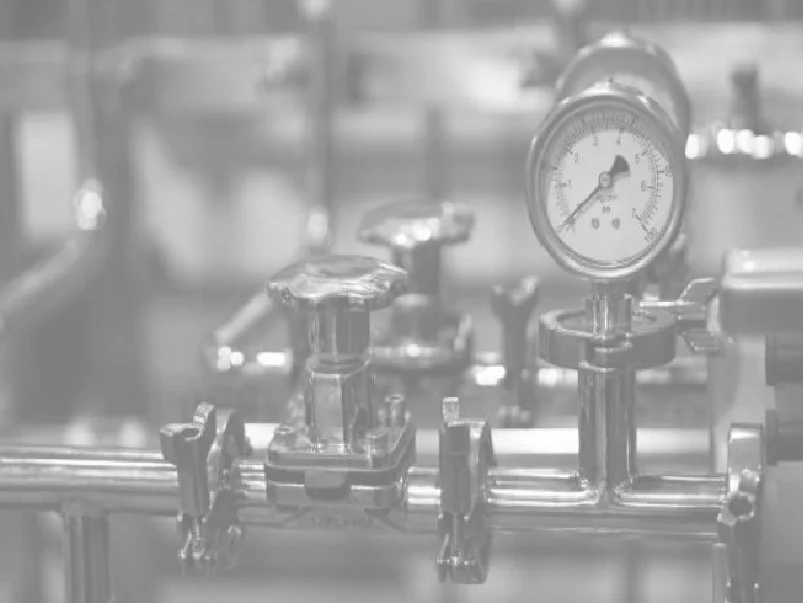
Original low-contrast image
Normalized Image
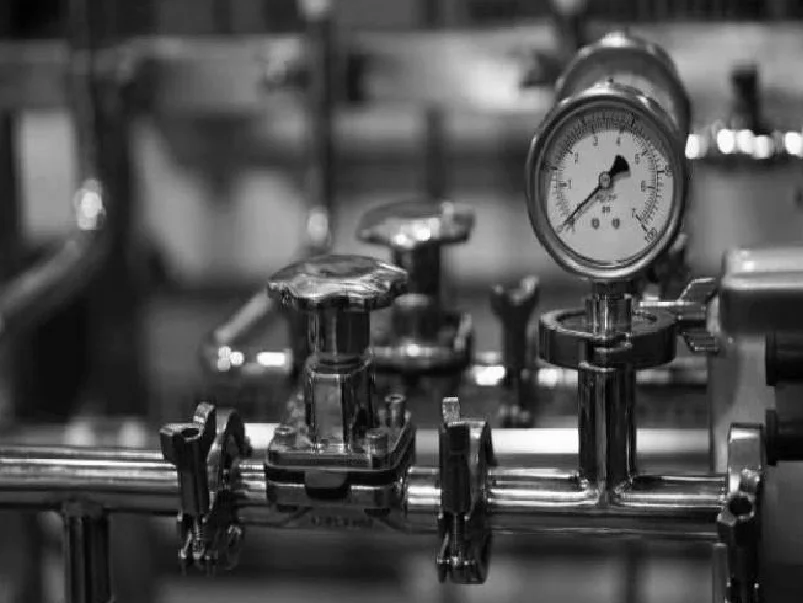
Intensities rescaled to fill the full 0-255 range
The Code
"""Demonstrates normalize_image_intensity operation."""

from loguru import logger
import rerun as rr

from telekinesis import pupil, datatypes


def normalize_image_intensity_example():
    """Applies normalize_image_intensity operation."""
    # ===================== Load Image ==========================================
    image_url = "https://assets.telekinesis.ai/examples/v1/images/gauge_washed.png"
    image = datatypes.Image.from_url(image_url)

    # ===================== Run Skill ==========================================
    filtered_image = pupil.normalize_image_intensity(
        image=image,
        alpha=0.0,
        beta=255.0,
        normalization_method="minmax",
        output_format="8bit",
    )

    # ===================== Log ================================================
    logger.success(f"Applied normalize_image_intensity on {image}")
    logger.success(f"Result: {filtered_image}")

    # ===================== Visualization  (Optional) ======================
    rr.init("normalize_image_intensity_example", spawn=True)
    datatypes.visualize(image, entity_path="1-Original")
    datatypes.visualize(filtered_image, entity_path="2-Normalized")

if __name__ == "__main__":
    normalize_image_intensity_example()
Runnable examples are available in the Telekinesis examples repository.
Follow the README in that repository to set up the environment, run this specific example with:
cd telekinesis-examples
python examples/image_processing/normalize_image_intensity.py
Parameter Configuration
| Parameter | Type | Default | Description |
|---|---|---|---|
image | datatypes.Image | np.ndarray | required | The input image to normalize, shape (H, W) or (H, W, C) |
alpha | datatypes.Float | float | int | 0.0 | For "minmax": the lower bound of the output range. For "inf"/"l1"/"l2": the target norm value |
beta | datatypes.Float | float | int | 255.0 | The upper bound of the output range. Only used for "minmax"; ignored for "inf"/"l1"/"l2" |
normalization_method | datatypes.String | str | "minmax" | Normalization type: minmax, inf, l1, l2 |
output_format | datatypes.String | str | "same as input" | Output bit depth: same as input, 8bit, 16bitS, 16bitU, 32bit, 64bit |
Returns
| Type | Description |
|---|---|
datatypes.Image | Same shape as image, with intensities rescaled per normalization_method |
Raises
| Exception | Condition |
|---|---|
TypeError | Any parameter has an invalid type |
ValueError | normalization_method or output_format is not one of the supported options |
ConfigurationError | The TELEKINESIS_API_KEY environment variable is not set |
SerializationError | The request input failed to serialize, the response was not returned as an Arrow stream, or the response failed to deserialize |
RequestTimeoutError | The request to the Pupil service timed out |
TransportError | A network failure occurred before a response was received |
ClientError | The Pupil service rejected the request due to invalid or malformed input (HTTP 400/422), an unrecognized endpoint (HTTP 404), or another unexpected 4xx response |
AuthenticationError | The API key was rejected as invalid or expired (HTTP 401) |
AuthenticationServiceError | The authentication service returned an invalid response, was temporarily unavailable, or timed out (HTTP 502/503/504) |
ServerError | The Pupil service returned a 5xx or otherwise unexpected error response |
How to Tune the Parameters
The normalize_image_intensity Skill exposes four parameters that control the target range or norm, and the output precision.
normalization_method
- Controls: Which normalization formula is applied.
- Default:
"minmax" - Options:
minmax– linearly rescales values to fill[alpha, beta]; best for general contrast stretchinginf– scales so the maximum absolute value equalsalpha(L-infinity norm); good for peak-based scalingl1– scales so the sum of absolute values equalsalpha(L1 norm); preserves relative magnitude, pair with a wideroutput_formator the result looks blackl2– scales so the Euclidean norm equalsalpha(L2 norm); common for vector normalization, sameoutput_formatcaveat asl1
alpha
- Controls: For
"minmax", the lower bound of the output range; for"inf"/"l1"/"l2", the target norm value. - Units: Intensity value (for
"minmax") or norm units (otherwise) - Default:
0.0 - Typical range:
0.0–255.0for"minmax"
beta
- Controls: For
"minmax", the upper bound of the output range. Ignored for"inf"/"l1"/"l2". - Units: Intensity value
- Default:
255.0 - Typical range:
0.0–255.0
output_format
- Controls: The output bit depth.
- Default:
"same as input" - Options:
same as input– keeps the input dtype8bit– unsigned 8-bit; only safe for"minmax"—"l1"/"l2"output will appear black16bitS/16bitU– signed / unsigned 16-bit32bit– recommended for"l1"/"l2"64bit– highest precision, most memory
TIP
Best practice: Use "minmax" for general contrast stretching. If using "l1" or "l2", set output_format to "32bit" or "64bit" — at "8bit" the normalized values are typically far below 1 and the result will look black.
Where to Use the Skill
Common pipelines include:
- Contrast stretching – Fill the full intensity range of a low-contrast or dim capture before display
- Pre-thresholding – Normalize before a fixed-threshold segmentation step so the threshold value is meaningful across images
- Post-filter cleanup – Rescale the output of edge/gradient filters (e.g.
filter_image_using_laplacian,filter_image_using_sobel), which often produce a narrow or signed intensity range - Multi-image comparison – Bring several images onto the same intensity scale before comparing them
Alternative Skills
| Skill | vs. Normalize Image Intensity |
|---|---|
| enhance_image_using_clahe | Adaptive local contrast enhancement; use it when different regions of the same image are under/over-exposed. Use this Skill for a single global rescale instead. |
| enhance_image_using_auto_gamma_correction | Automatic non-linear brightness correction with no tunable target range. Use this Skill when you need an explicit [alpha, beta] range or a norm-based rescale. |
When Not to Use the Skill
Do not use Normalize Image Intensity when:
- You need adaptive, per-region contrast (use
enhance_image_using_claheinstead) - Absolute intensity values carry meaning downstream (normalization rescales values, discarding the original scale)
- The image is already in the target range (normalizing is a no-op that wastes a request)
- You pick
"l1"/"l2"withoutput_format="8bit"(the result clips to near-black; use"32bit"/"64bit"instead)