

Filter Image Using Median Blur
SUMMARY
Filter Image Using Median Blur replaces each pixel with the median value of its neighborhood to remove impulse noise.
Unlike filter_image_using_blur/filter_image_using_gaussian_blur, which average neighboring pixel values and suit Gaussian-like noise, the median operator is non-linear and discards outlier pixel values entirely — this makes it effective at removing salt-and-pepper (impulse) noise while keeping edges sharper than a comparable linear blur. It exposes a single tunable parameter, kernel_size.
Use this Skill when you want to remove salt-and-pepper noise from an image while preserving edges.
The Skill
from telekinesis import pupil

filtered_image = pupil.filter_image_using_median_blur(image=image, kernel_size=11)Example
Input Image
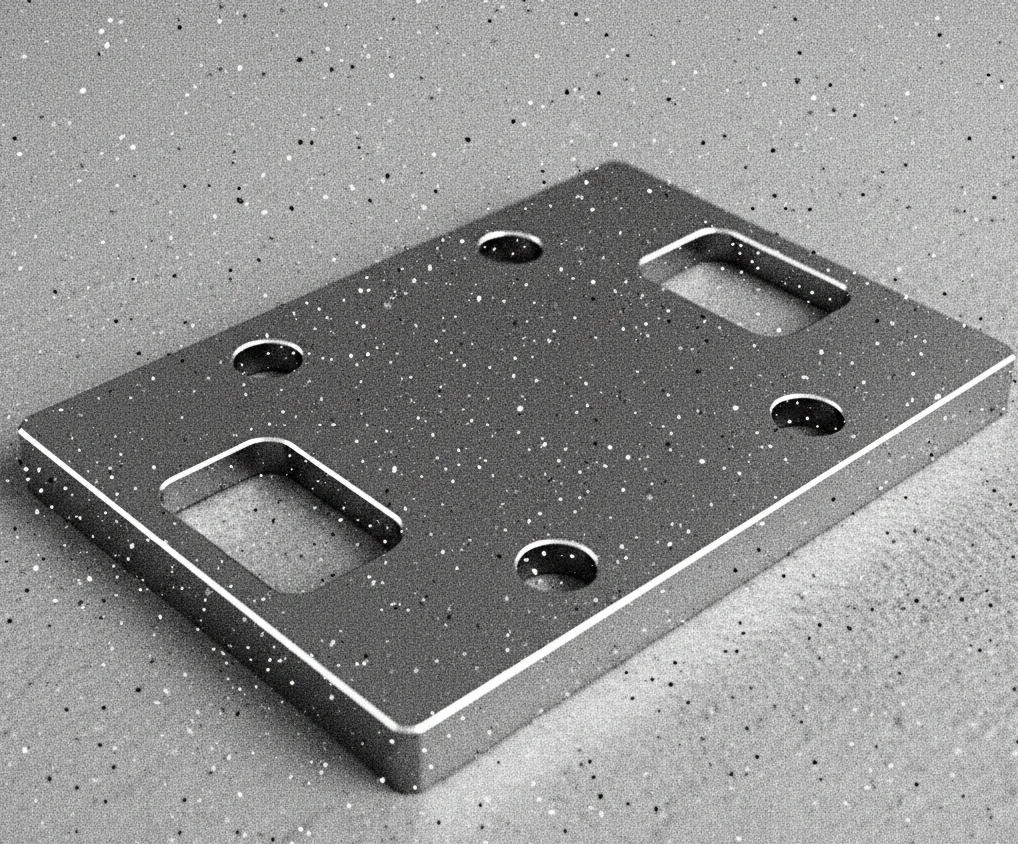
Original image with salt-and-pepper noise
Filtered Image
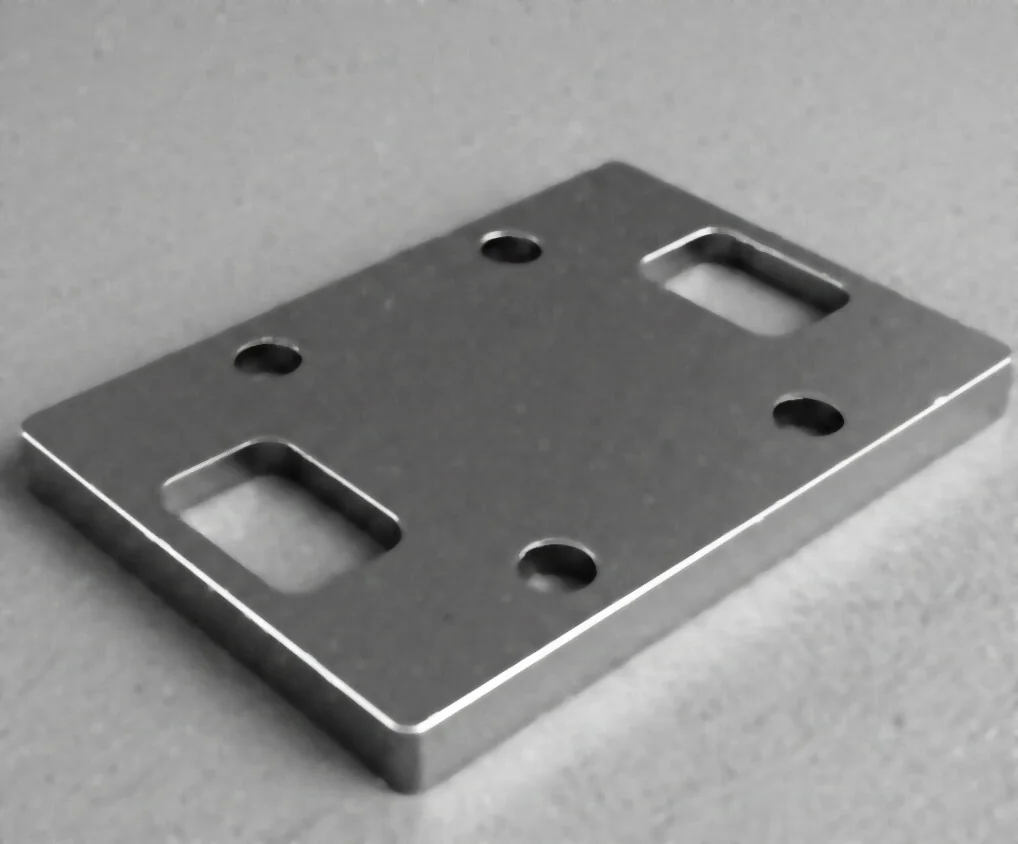
Filtered image with kernel_size=11 - noise removed, edges preserved
The Code
"""Demonstrates filter_image_using_median_blur operation."""

from loguru import logger
import rerun as rr

from telekinesis import pupil, datatypes


def filter_image_using_median_blur_example():
    """Applies filter_image_using_median_blur operation."""
    # ===================== Load Image ==========================================
    image_url = "https://assets.telekinesis.ai/examples/v1/images/flat_mechanical_component.png"
    image = datatypes.Image.from_url(image_url)

    # ===================== Run Skill ==========================================
    filtered_image = pupil.filter_image_using_median_blur(
        image=image,
        kernel_size=11,
    )

    # ===================== Log ================================================
    logger.success(f"Applied filter_image_using_median_blur on {image}")
    logger.success(f"Result: {filtered_image}")

    # ===================== Visualization  (Optional) ======================
    rr.init("filter_image_using_median_blur_example", spawn=True)
    datatypes.visualize(image, entity_path="1-Original")
    datatypes.visualize(filtered_image, entity_path="2-Filtered")

if __name__ == "__main__":
    filter_image_using_median_blur_example()
Runnable examples are available in the Telekinesis examples repository.
Follow the README in that repository to set up the environment, run this specific example with:
cd telekinesis-examples
python examples/image_processing/filter_image_using_median_blur.py
Parameter Configuration
| Parameter | Type | Default | Description |
|---|---|---|---|
image | datatypes.Image | np.ndarray | required | The input image to filter, shape (H, W) or (H, W, C) |
kernel_size | datatypes.Int | int | 3 | Size of the median filter kernel. Must be odd |
Returns
| Type | Description |
|---|---|
datatypes.Image | The denoised image, same shape as the input |
Raises
| Exception | Condition |
|---|---|
TypeError | A parameter's value does not match its expected type (see the Parameter Configuration table above) |
ValueError | kernel_size is not odd |
ConfigurationError | The TELEKINESIS_API_KEY environment variable is not set |
SerializationError | The request input failed to serialize, the response was not returned as an Arrow stream, or the response failed to deserialize |
RequestTimeoutError | The request to the Pupil service timed out |
TransportError | A network failure occurred before a response was received |
ClientError | The Pupil service rejected the request due to invalid or malformed input (HTTP 400/422), an unrecognized endpoint (HTTP 404), or another unexpected 4xx response |
AuthenticationError | The API key was rejected as invalid or expired (HTTP 401) |
AuthenticationServiceError | The authentication service returned an invalid response, was temporarily unavailable, or timed out (HTTP 502/503/504) |
ServerError | The Pupil service returned a 5xx or otherwise unexpected error response |
How to Tune the Parameters
The filter_image_using_median_blur Skill exposes a single parameter that controls the neighborhood size the median is computed over.
kernel_size
- Controls: The size of the neighborhood each pixel's replacement median is computed from.
- Units: Pixels
- Default:
3 - Increase → removes larger noise spots, but may blur fine details and is slower (the underlying operator must sort more pixels)
- Decrease → faster, preserves more detail, but leaves larger noise spots untouched
- Typical range: 3-15. Use 3-5 for small/sparse noise, 5-9 for moderate noise, 9-15 for heavy noise
TIP
Best practice: Start with kernel_size=3 and only increase it if visible noise remains — larger kernels cost more compute and start eroding fine detail along with the noise.
Where to Use the Skill
Common pipelines include:
- Impulse noise removal – Clean up salt-and-pepper noise from sensors or transmission errors
- Preprocessing for segmentation – Remove isolated noise pixels before thresholding or clustering
- Scanned/document image cleanup – Remove scanning artifacts before OCR or layout analysis
- Dead/hot pixel removal – Suppress isolated sensor artifacts before downstream analysis
Alternative Skills
| Skill | vs. Filter Image Using Median Blur |
|---|---|
| filter_image_using_gaussian_blur | Averages neighboring pixels, suited to Gaussian-like noise rather than impulse noise. |
| filter_image_using_bilateral | Edge-preserving for Gaussian-like noise; not designed for salt-and-pepper impulse noise. |
| filter_image_using_morphological_open | Removes small noise blobs on binary/segmented masks; median blur operates directly on grayscale/color intensities. |
When Not to Use the Skill
Do not use Filter Image Using Median Blur when:
- The noise is Gaussian-like rather than impulse noise (use
filter_image_using_gaussian_blurorfilter_image_using_bilateralinstead) - You need the fastest possible smoothing (median blur is slower than linear filters because it sorts neighborhood pixels)
- You need to preserve fine-scale texture (a large
kernel_sizecan erase small texture along with the noise) - You're working on a binary/segmented mask rather than intensities (use
filter_image_using_morphological_openinstead)