

Filter Image Using Morphological Blackhat
SUMMARY
Filter Image Using Morphological Blackhat applies the morphological black-hat transform to an image.
It subtracts the original image from its morphological closing, isolating whatever the closing filled in: dark features/details smaller than the structuring element defined by kernel_size/kernel_shape. This highlights small dark defects, scratches, or holes on an otherwise uniform surface. It is the complementary operation to filter_image_using_morphological_tophat, which highlights small bright features instead.
Use this Skill when you want to extract or enhance small dark features and holes against a larger background.
The Skill
from telekinesis import pupil

filtered_image = pupil.filter_image_using_morphological_blackhat(
    image=image,
    kernel_size=15,
    kernel_shape="ellipse",
    iterations=2,
    border_type="default",
)Example
Input Image
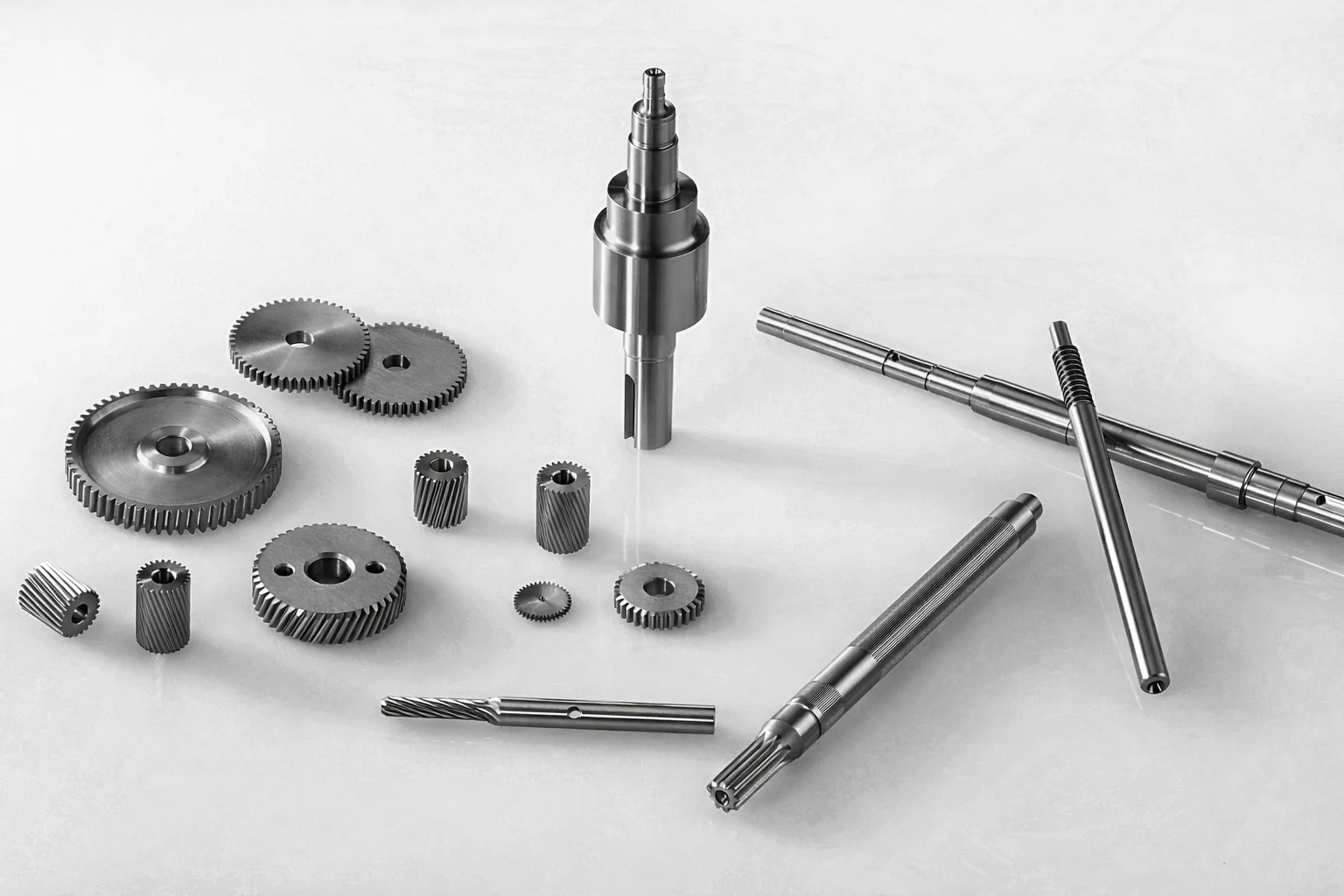
Original image of machined metal parts (gears, shafts, pins) on a light background
Filtered Image
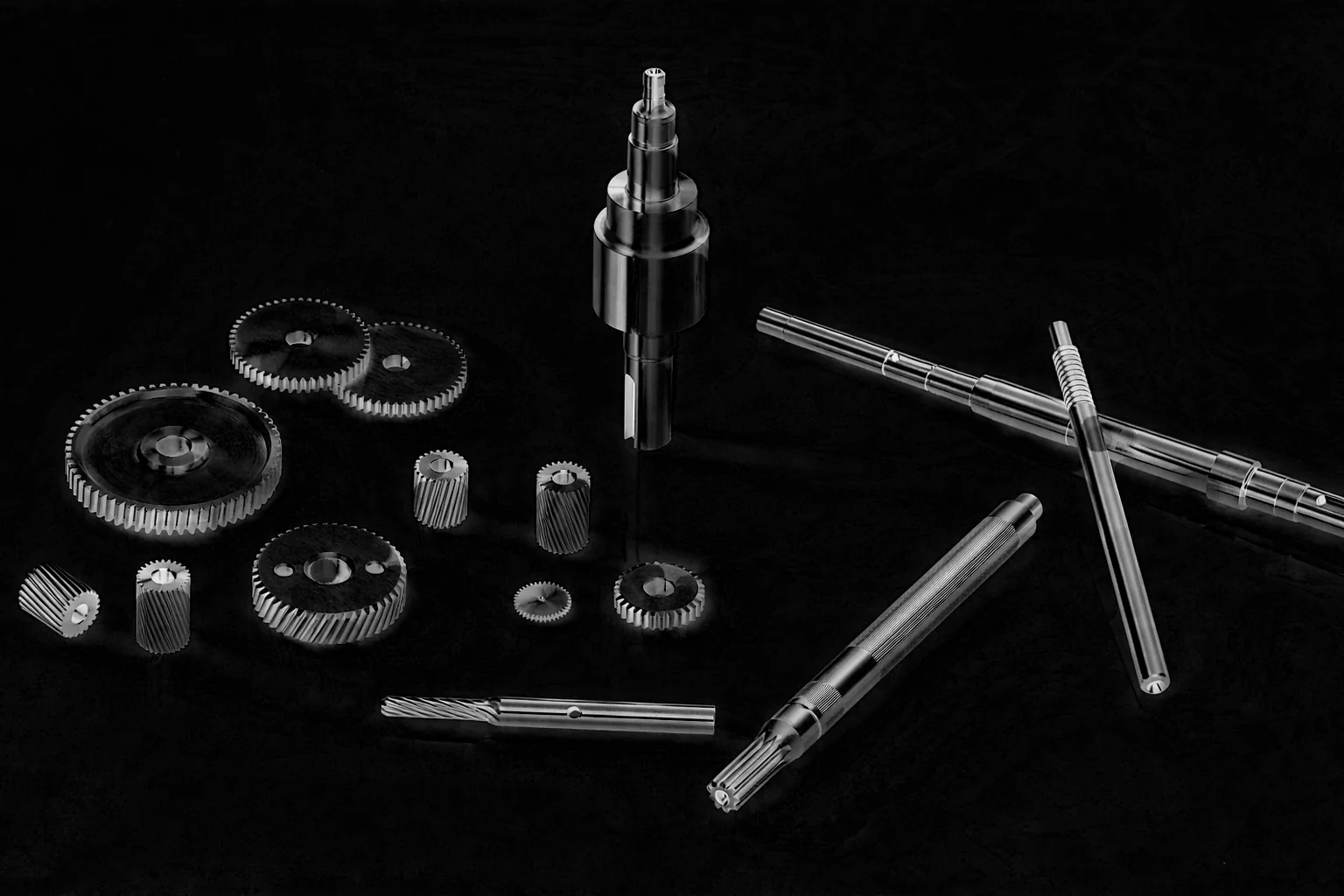
Black-hat result — fine dark details (grooves, edges, teeth gaps) isolated against the surrounding surface
The Code
"""Demonstrates filter_image_using_morphological_blackhat operation."""

from loguru import logger
import rerun as rr

from telekinesis import pupil, datatypes


def filter_image_using_morphological_blackhat_example():
    """Applies filter_image_using_morphological_blackhat operation."""
    # ===================== Load Image ==========================================
    image_url = "https://assets.telekinesis.ai/examples/v1/images/mechanical_parts_gray.png"
    image = datatypes.Image.from_url(image_url).to_grayscale()

    # ===================== Run Skill ==========================================
    filtered_image = pupil.filter_image_using_morphological_blackhat(
        image=image,
        kernel_size=15,
        kernel_shape="ellipse",
        iterations=2,
        border_type="default",
    )

    # ===================== Log ================================================
    logger.success(f"Applied filter_image_using_morphological_blackhat on {image}")
    logger.success(f"Result: {filtered_image}")

    # ===================== Visualization  (Optional) ======================
    rr.init("filter_image_using_morphological_blackhat_example", spawn=True)
    datatypes.visualize(image, entity_path="1-Original")
    datatypes.visualize(filtered_image, entity_path="2-Filtered")

if __name__ == "__main__":
    filter_image_using_morphological_blackhat_example()
Runnable examples are available in the Telekinesis examples repository.
Follow the README in that repository to set up the environment, run this specific example with:
cd telekinesis-examples
python examples/image_processing/filter_image_using_morphological_blackhat.py
Parameter Configuration
| Parameter | Type | Default | Description |
|---|---|---|---|
image | datatypes.Image | np.ndarray | required | The input image to process, shape (H, W). Recommended to use a binary image/mask |
kernel_size | datatypes.Int | int | 3 | The size of the structuring element used for the closing step, in pixels |
kernel_shape | datatypes.String | str | "ellipse" | The shape of the structuring element: ellipse, rectangle, cross, or diamond |
iterations | datatypes.Int | int | 1 | The number of times the black-hat operation is applied |
border_type | datatypes.String | str | "default" | The border handling mode: default, constant, replicate, reflect, or reflect 101 |
border_value | datatypes.Float | float | int | 0.0 | The fill value used only when border_type is "constant"; can be negative depending on the image dtype |
Returns
| Type | Description |
|---|---|
datatypes.Image | Same shape as image, with small dark features highlighted against the background. |
Raises
| Exception | Condition |
|---|---|
TypeError | image, kernel_size, kernel_shape, iterations, border_type, or border_value has an invalid type |
ValueError | kernel_shape or border_type is not one of the supported options |
ConfigurationError | The TELEKINESIS_API_KEY environment variable is not set |
SerializationError | The request input failed to serialize, the response was not returned as an Arrow stream, or the response failed to deserialize |
RequestTimeoutError | The request to the Pupil service timed out |
TransportError | A network failure occurred before a response was received |
ClientError | The Pupil service rejected the request due to invalid or malformed input (HTTP 400/422), an unrecognized endpoint (HTTP 404), or another unexpected 4xx response |
AuthenticationError | The API key was rejected as invalid or expired (HTTP 401) |
AuthenticationServiceError | The authentication service returned an invalid response, was temporarily unavailable, or timed out (HTTP 502/503/504) |
ServerError | The Pupil service returned a 5xx or otherwise unexpected error response |
How to Tune the Parameters
The filter_image_using_morphological_blackhat Skill mirrors top-hat: kernel_size sets the ceiling on what counts as a "small" dark feature—anything smaller than the structuring element is extracted, anything larger is treated as background and suppressed.
kernel_size
- Controls: The size of the structuring element used for the closing step that black-hat subtracts the original from.
- Units: Pixels
- Default:
3 - Increase → extracts larger dark features (cracks, holes)
- Decrease → extracts only the finest dark details
- Typical range: 3-15
kernel_shape
- Controls: The geometric shape of the structuring element.
- Default:
"ellipse" - Options:
ellipse– smooth, isotropic extraction of dark featuresrectangle– axis-aligned, directional along rows/columnscross– emphasizes line-like structuresdiamond– symmetric along diagonals
iterations
- Controls: How many times the underlying closing operation is applied before subtracting.
- Units: Count
- Default:
1 - Increase → isolates progressively larger dark features
- Decrease → preserves only the smallest dark details
- Typical range: 1-10
border_type
- Controls: How pixels are synthesized when the structuring element extends past the image boundary.
- Default:
"default" - Options:
default– reflect 101 padding, suitable for most casesconstant– pads withborder_valuereplicate– repeats the nearest edge pixelreflect– mirrors border pixels without repeating the edgereflect 101– mirror reflection without repeating the edge pixel
TIP
Best practice: Black-hat is the complement of top-hat — use it for dark holes, cracks, or defects on a bright background. Set kernel_size to just above the size of the features you want to extract so the surrounding bright surface is not picked up.
Where to Use the Skill
Common pipelines include:
- Crack/hole detection – Detect fine cracks or pores in bright, otherwise-uniform surfaces
- Defect detection – Find dark surface defects on machined or manufactured parts
- Dark feature enhancement – Enhance dark detail obscured by a bright, varying background
- Preprocessing for thresholding – Isolate dark features before segmentation or measurement
Alternative Skills
| Skill | vs. Filter Image Using Morphological Blackhat |
|---|---|
| filter_image_using_morphological_tophat | Extracts small bright features instead. Use black-hat for dark features on a bright background, top-hat for bright features on a dark background. |
| filter_image_using_morphological_close | Produces the closed image that black-hat subtracts the original from; use directly when you want the filled/closed result rather than the residual. |
| enhance_image_using_clahe | Enhances local contrast adaptively rather than isolating features smaller than a fixed structuring element; use for general contrast correction instead of feature isolation. |
When Not to Use the Skill
Do not use Filter Image Using Morphological Blackhat when:
- You want to extract bright features instead (use
filter_image_using_morphological_tophat) - The features of interest are larger than the background variations (black-hat will suppress them along with the background)
- You need to preserve overall background/illumination information (black-hat discards it by design)
- The background is already uniform (black-hat adds no value over the raw image)