

Detect Circle Using Classic Hough
SUMMARY
Detect Circle Using Classic Hough detects circles using the classic Hough Circle Transform.
Classic Hough circle detection analyzes edge evidence in a grayscale image and votes in
Use this Skill when you want to detect circular objects with interpretable geometric parameters (center and radius).
The Skill
from telekinesis import retina

circles = retina.detect_circle_using_classic_hough(
    image=image,
    inverse_resolution_ratio=1,
    min_distance=50,
    min_radius=40,
    max_radius=60,
    canny_detector_upper_threshold=300,
    accumulator_threshold=30,
)Example
Input Image
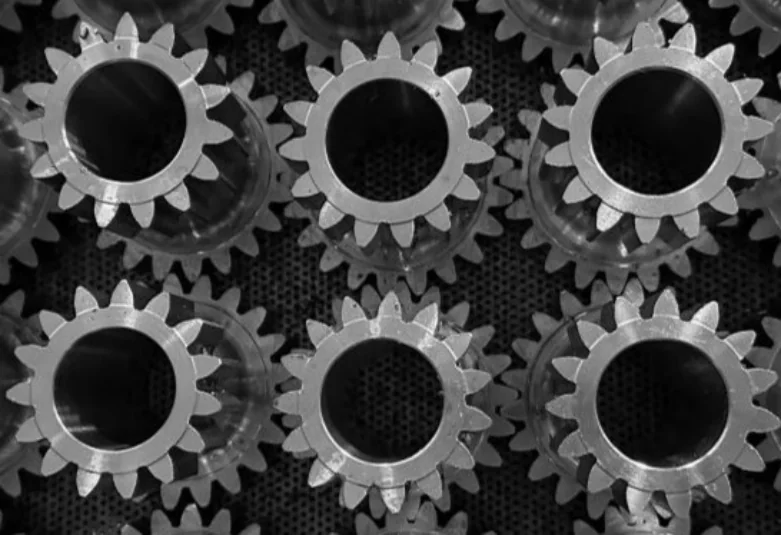
Original grayscale image
Detected Circles and Bounding Box
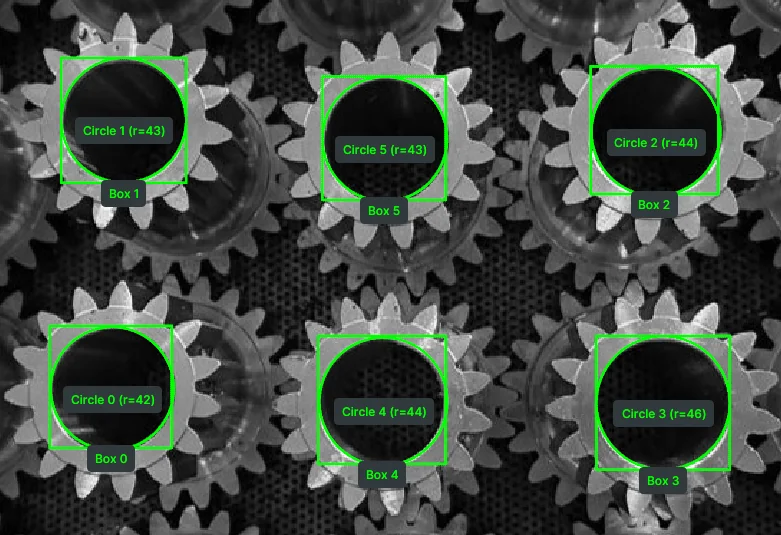
Image overlaid with detected circles, their radii, and bounding boxes.
The Code
"""
Detect circles using the classic Hough Circle Transform.
"""

from loguru import logger
import rerun as rr

from telekinesis import retina, datatypes


def detect_circle_using_classic_hough_example():
    """
    Detect circles using the classic Hough Circle Transform.

    Runs Hough circle detection on a grayscale image and returns circles using datatype `Circles`.
    """
    # ===================== Load Image ==========================================
    image_url = "https://assets.telekinesis.ai/examples/v1/images/metal_gears.jpg"
    image = datatypes.Image.from_url(url=image_url).to_grayscale()

    # ===================== Run Skill ==========================================
    circles = retina.detect_circle_using_classic_hough(
        image=image,
        inverse_resolution_ratio=1,
        min_distance=50,
        min_radius=40,
        max_radius=60,
        canny_detector_upper_threshold=300,
        accumulator_threshold=30,
    )

    # ===================== Log ================================================
    logger.success(f"Detected circles in {image} using classic Hough transform.")
    logger.success(f"Result: {circles}")

    logger.info(f"All detected circle centers shape: {circles.centers.shape}")
    logger.info(f"All detected circle radii shape: {circles.radii.shape}")
    logger.info(f"First detected circle: {circles[0]}")
    logger.info(
        f"First detected circle center: {circles[0].center}, radius: {circles[0].radius}"
    )

    # ===================== Visualization  (Optional) ===========================
    rr.init("classic_hough_circle_detector_example", spawn=True)
    datatypes.visualize(image, entity_path="/image")
    datatypes.visualize(
        circles,
        entity_path="/image/detected-circles",
        label=[f"Circle {i}" for i in range(len(circles))],
    )


if __name__ == "__main__":
    detect_circle_using_classic_hough_example()
Runnable examples are available in the Telekinesis examples repository.
Follow the README in that repository to set up the environment, run this specific example with:
cd telekinesis-examples
python examples/detection/detect_circle_using_classic_hough.py
Parameter Configuration
These parameters are passed directly to the underlying gradient-based Hough circle detector and control both detection sensitivity and the accepted circle geometry.
| Parameter | Type | Default | Description |
|---|---|---|---|
image | datatypes.Image | np.ndarray | list | required | Input (grayscale) image to process |
inverse_resolution_ratio | datatypes.Float | float | int | 1.0 | Inverse ratio of accumulator resolution to image resolution. Increasing reduces accumulator resolution |
min_distance | datatypes.Int | int | 1 | Minimum distance between detected circle centers (pixels) |
min_radius | datatypes.Int | int | 0 | Minimum circle radius to detect (pixels) |
max_radius | datatypes.Int | int | 0 | Maximum circle radius to detect (pixels) |
canny_detector_upper_threshold | datatypes.Int | int | 200 | Upper threshold for the internal Canny edge detector |
accumulator_threshold | datatypes.Int | int | 20 | Accumulator threshold for circle centers. Increasing makes detection stricter (fewer circles) |
Returns
| Type | Description |
|---|---|
datatypes.Circles | The detected circles, each with a center (x, y) and a radius. Access the grouped arrays via circles.centers (shape (N, 2)) and circles.radii (shape (N,)), or index a single circle with circles[i] to get its .center and .radius. |
Raises
| Exception | Condition |
|---|---|
TypeError | A parameter's value does not match its expected type (see the Parameter Configuration table above) |
ValueError | max_radius is non-zero and min_radius is not less than it |
ConfigurationError | The TELEKINESIS_API_KEY environment variable is not set |
SerializationError | The request input failed to serialize, the response was not returned as an Arrow stream, or the response failed to deserialize |
RequestTimeoutError | The request to the Retina service timed out |
TransportError | A network failure occurred before a response was received |
ClientError | The Retina service rejected the request due to invalid or malformed input (HTTP 400/422), an unrecognized endpoint (HTTP 404), or another unexpected 4xx response |
AuthenticationError | The API key was rejected as invalid or expired (HTTP 401) |
AuthenticationServiceError | The authentication service returned an invalid response, was temporarily unavailable, or timed out (HTTP 502/503/504) |
ServerError | The Retina service returned a 5xx or otherwise unexpected error response |
How to Tune the Parameters
The detect_circle_using_classic_hough exposes six parameters that control how sensitive the detector is to circles of different sizes and strengths.
In general, tighter constraints improve precision, while looser constraints can detect more circles but may introduce false positives.
inverse_resolution_ratio
- Controls: The resolution of the accumulator used to search for circle centers, relative to the image resolution.
1.0uses the same resolution as the input image;2.0halves the accumulator's width and height. - Units: Dimensionless
- Default:
1.0 - Increase → faster detection and less memory, but can merge circles that are close together
- Keep at
1for precise, separate centers on small or closely-packed circles - Typical range: 1–2
min_distance
- Controls: The minimum pixel distance allowed between the centers of two detected circles.
- Units: Pixels
- Default:
1 - Set close to the expected circle diameter to stop one true circle from producing several overlapping detections
- Increase → helps prevent multiple detections of the same circle, but too large a value can suppress genuinely distinct neighboring circles
- Decrease → allows circles that are close together to be detected separately
- Typical range: depends on image resolution and expected spacing between objects
min_radius / max_radius
- Controls: The minimum and maximum circle radius, in pixels, that the detector will accept.
- Units: Pixels
- Default:
0/0—min_radius=0means no lower bound;max_radius=0falls back tomax(image_height, image_width)as the upper bound - Narrow the range reduces the search space and can significantly reduce false positives when the expected circle size is known
- Typical range: depends on image resolution and object size
canny_detector_upper_threshold
- Controls: The upper threshold passed to the internal Canny edge detector; the lower threshold is derived automatically as half of this value.
- Units: Canny intensity values
- Default:
200 - Increase → requires stronger edges, yielding fewer but more confident detections
- Decrease → picks up circles with weaker or fainter edges, at the cost of more noise
- Typical range: 50–300
accumulator_threshold
- Controls: How much evidence is required before a circle candidate is accepted.
- Units: Detector votes (integer)
- Default:
20 - Increase → stricter detection — fewer circles, fewer false positives
- Decrease → allows weaker circle candidates through, at the cost of more false positives
- Typical range: 10–100
TIP
Recommended tuning order: Start with inverse_resolution_ratio=1. Set min_radius and max_radius to approximately match the circles you expect. Then adjust accumulator_threshold: increase it if you see false positives, or decrease it if valid circles are being missed.
Where to Use the Skill
Common use cases include:
- Circular object detection – Finding gears, washers, buttons, or other round parts
- Quality inspection – Measuring circle radii for dimensional checks
- Bin picking – Locating circular objects for robotic grasping
- Part counting – Counting circular components on a tray or conveyor
Alternative Skills
| Skill | vs. Detect Circle Using Classic Hough |
|---|---|
| detect_contours | Contours detect arbitrary shapes and outlines. Use contours for non-circular shapes, classic Hough for circles with known radius range. |
| detect_objects_using_grounding_dino | Grounding DINO does semantic object detection with text. Use for object classes by name; use classic Hough for geometric circle detection. |
| detect_objects_using_yolox | YOLOX detects object classes. Use for trained object categories; use classic Hough for parameterized circle geometry. |
When Not to Use the Skill
Do not use Detect Circle Using Classic Hough when:
- Circles are filled blobs without clear edges
- Shapes are elliptical rather than circular
- Image is very noisy - Edge detection may produce excessive false positives; consider denoising or smoothing first.
- You need sub-pixel accuracy - Hough circle detection is designed for detection rather than high-precision circle estimation.
TIP
Classic Hough circle detection works best on a clean grayscale image with strong edge contrast — convert with datatypes.Image.to_grayscale (or pupil.convert_image_color_space) first. If the image is noisy, pre-filter with pupil.filter_image_using_blur or pupil.enhance_image_using_clahe before detection.