

Segment Image Using Otsu Threshold
SUMMARY
Segment Image Using Otsu Threshold segments an image using a single global threshold chosen by Otsu's method.
Otsu's method automatically picks the threshold value that best separates the image's intensity histogram into two classes (foreground/background) by minimizing the variance within each class. There are no parameters to tune.
Use this Skill when you want to automatically segment an image with a clearly bimodal (two-peaked) intensity histogram, without specifying a threshold value.
The Skill
from telekinesis import cornea

segmented_image = cornea.segment_image_using_otsu_threshold(image=image)Example
Input Image
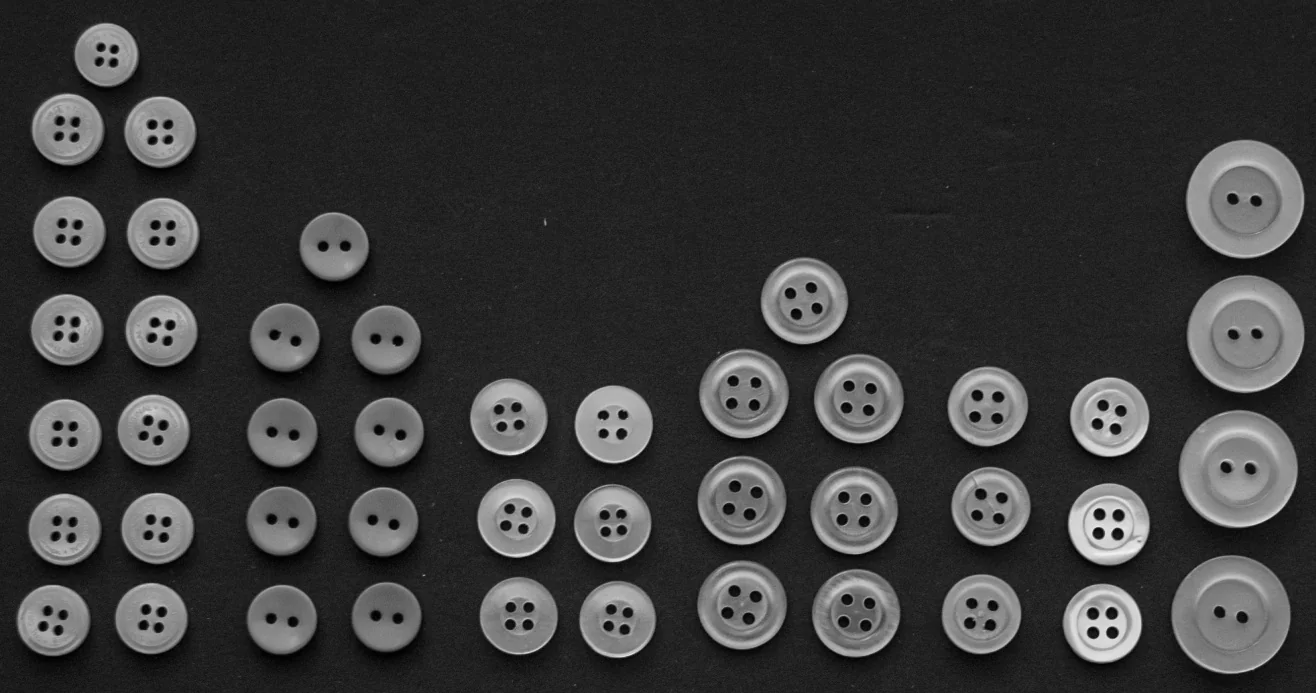
Original image for Otsu threshold segmentation
Output Image
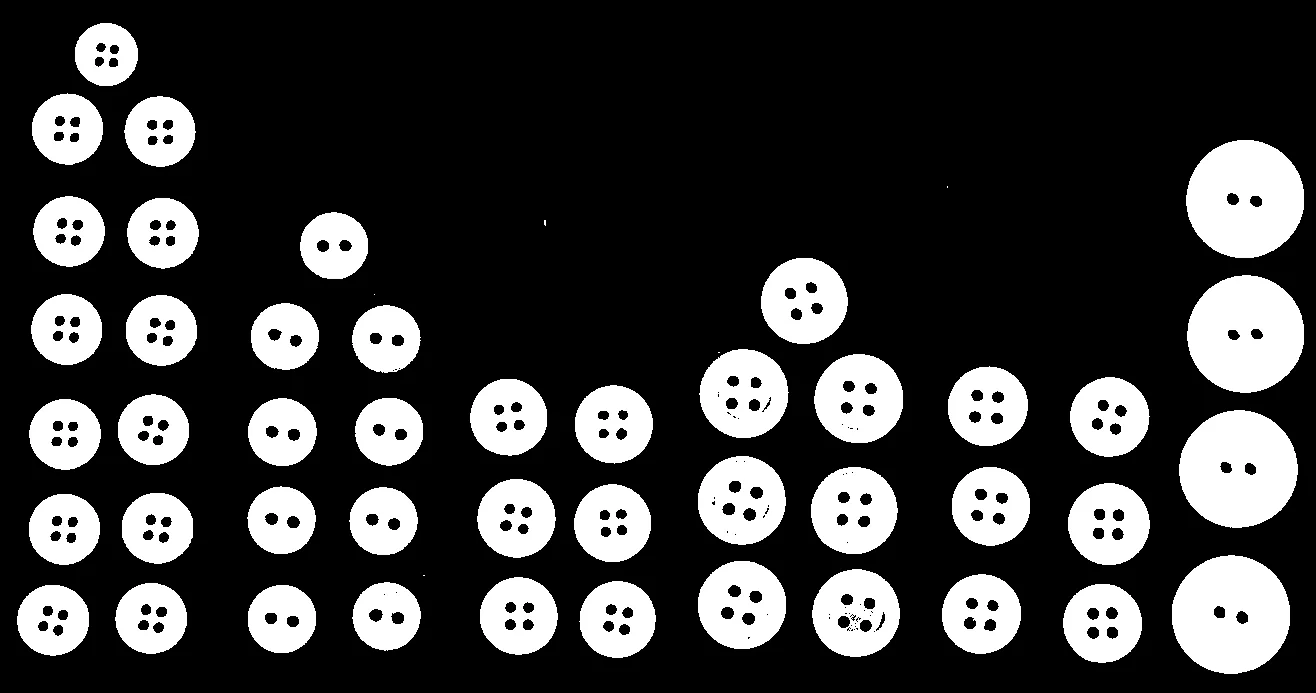
Segmented image using automatic Otsu threshold
The Code
"""
Demonstrates Otsu threshold segmentation.
"""

from loguru import logger
import rerun as rr
import rerun.blueprint as rrb

from telekinesis import cornea, datatypes

def segment_image_using_otsu_threshold_example():
    """Applies Otsu's method to find a global threshold for the image."""
    # ===================== Load Image ==========================================
    image_url = "https://assets.telekinesis.ai/examples/v1/images/buttons_arranged.jpg"
    image = datatypes.Image.from_url(url=image_url)

    # ===================== Run Skill ==========================================
    segmented_image = cornea.segment_image_using_otsu_threshold(image=image)

    # ===================== Log ================================================
    logger.success(f"Segmented {image} using Otsu's threshold method.")
    logger.success(f"Results: {segmented_image}")
    logger.info(f"Segmented image label codes: {segmented_image.label_codes}")
    logger.info(f"Segmented image number of labels: {segmented_image.number_of_labels}")
    logger.info(f"Segmented image shape: {segmented_image.shape}")
    logger.info(f"Segmented image dtype: {segmented_image.dtype}")

    # ===================== Visualization  (Optional) ======================
    rr.init("segment_image_using_otsu_threshold_example", spawn=True)
    blueprint = rrb.Horizontal(
        rrb.Spatial2DView(origin="/input_image", name="Input"),
        rrb.Spatial2DView(origin="/segmented_image", name="Output"),
    )
    rr.send_blueprint(blueprint)
    datatypes.visualize(image, entity_path="/input_image")
    datatypes.visualize(segmented_image, entity_path="/segmented_image")


if __name__ == "__main__":
    segment_image_using_otsu_threshold_example()
Runnable examples are available in the Telekinesis examples repository.
Follow the README in that repository to set up the environment, run this specific example with:
cd telekinesis-examples
python examples/segmentation/segment_image_using_otsu_threshold.py
Parameter Configuration
| Parameter | Type | Default | Description |
|---|---|---|---|
image | datatypes.Image | np.ndarray | required | Input image to segment, shape (H, W) or (H, W, 3) |
Returns
| Type | Description |
|---|---|
datatypes.SegmentationImage | A per-pixel label map, shape (H, W), where pixels above and below the automatically-chosen threshold are assigned distinct labels. Use .data for the raw label array, .label_codes for the sorted array of unique ids present, .number_of_labels for how many distinct labels were found, and .shape/.dtype for its size and label dtype. |
Raises
| Exception | Condition |
|---|---|
TypeError | A parameter's value does not match its expected type (see the Parameter Configuration table above) |
ConfigurationError | The TELEKINESIS_API_KEY environment variable is not set |
SerializationError | The request input failed to serialize, the response was not returned as an Arrow stream, or the response failed to deserialize |
RequestTimeoutError | The request to the Cornea service timed out |
TransportError | A network failure occurred before a response was received |
ClientError | The Cornea service rejected the request due to invalid or malformed input (HTTP 400/422), an unrecognized endpoint (HTTP 404), or another unexpected 4xx response |
AuthenticationError | The API key was rejected as invalid or expired (HTTP 401) |
AuthenticationServiceError | The authentication service returned an invalid response, was temporarily unavailable, or timed out (HTTP 502/503/504) |
ServerError | The Cornea service returned a 5xx or otherwise unexpected error response |
How to Tune the Parameters
segment_image_using_otsu_threshold takes only image — there is nothing to tune. The threshold is chosen automatically by minimizing the within-class intensity variance of the image's histogram, which is exactly the point: it is a quick, parameter-free alternative to segment_image_using_threshold for images with a clear bimodal (two-peaked) intensity histogram.
If the image's histogram isn't cleanly bimodal, segment_image_using_yen_threshold is another automatic, parameter-free method that can work better. If you need explicit control over the threshold value, use segment_image_using_threshold instead.
Where to Use the Skill
Common pipelines include:
- Quick automatic segmentation – When a threshold value isn't known in advance and doesn't need to be tuned by hand
- Bimodal image segmentation – Separating a clearly-lit foreground from background, e.g. parts on a plain conveyor or table
- Document processing – Separating text or print from a uniform background
- Preprocessing – Producing a first-pass mask ahead of
filter_segments_by_area/filter_segments_by_color
Alternative Skills
| Skill | vs. Segment Image Using Otsu Threshold |
|---|---|
| segment_image_using_yen_threshold | Also automatic and parameter-free, but based on an entropy-based criterion instead of variance minimization. Can work better when the histogram isn't cleanly bimodal. |
| segment_image_using_threshold | Uses a manually chosen threshold instead of an automatic one. Prefer manual threshold when you already know a good value for your setup. |
| segment_image_using_adaptive_threshold | Computes a threshold per pixel from its local neighborhood. Prefer this when lighting varies across the image, since Otsu picks one global value. |
| segment_image_using_local_threshold | Also a local/neighborhood method, simpler than adaptive threshold. Same trade-off vs. Otsu as adaptive threshold. |
| segment_image_using_laplacian_threshold | Thresholds on local edge strength rather than raw intensity. Use it to isolate textured or detailed regions instead of bright/dark ones. |
When Not to Use the Skill
Do not use Segment Image Using Otsu Threshold when:
- The image's histogram is not clearly bimodal — Otsu assumes a clean split into two intensity classes; consider
segment_image_using_yen_thresholdinstead. - Lighting varies across the image — a single global threshold cannot adapt to it; use
segment_image_using_adaptive_thresholdorsegment_image_using_local_thresholdinstead. - You already know a good threshold value —
segment_image_using_thresholdgives you direct control without relying on the histogram shape.
TIP
If Otsu's result looks off, try segment_image_using_yen_threshold on the same image — it's a drop-in, equally parameter-free alternative that uses a different statistical criterion and can separate unequal-sized foreground/background regions better.