

Merge Image From Channels
SUMMARY
Merge Image From Channels combines single-channel images into one multi-channel image.
It is the inverse of split_image_into_channels: given a list of single-channel images (or an ImageBatch) that all share the same (H, W), it stacks them, in the order given, into a single (H, W, N) image. Use it to recombine channels after per-channel processing, e.g. filtering only the blue channel and merging it back with the untouched red and green channels.
Use this Skill when you want to recombine single-channel images into one multi-channel image.
The Skill
from telekinesis import pupil

merged_image = pupil.merge_image_from_channels(channels=channel_images)Example
Channel 1
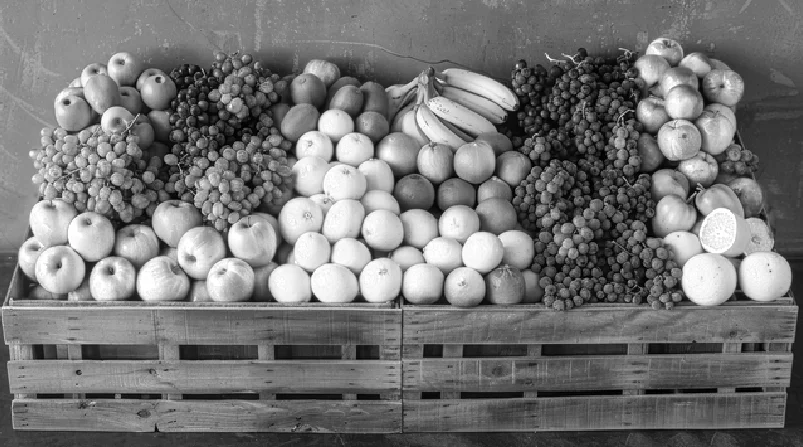
First single-channel input
Channel 2
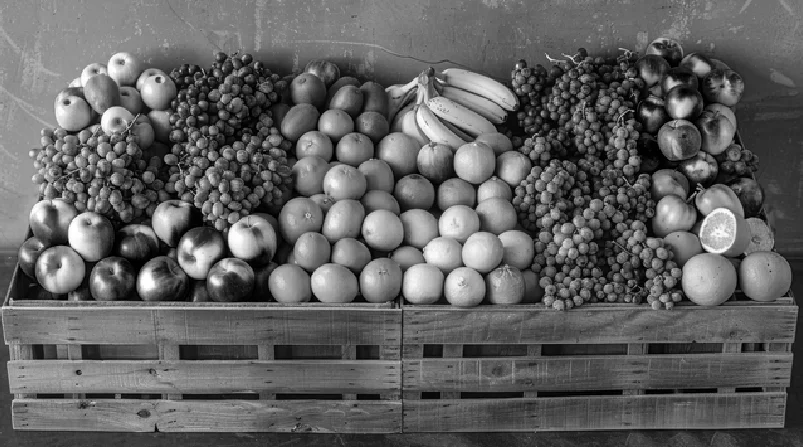
Second single-channel input
Channel 3
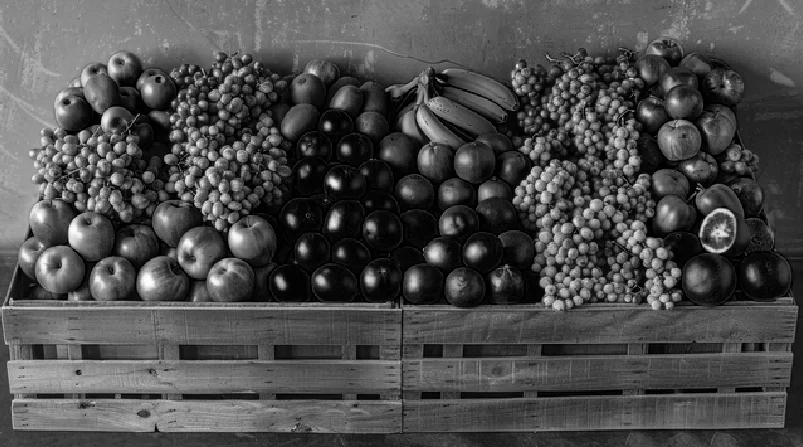
Third single-channel input
Merged Image
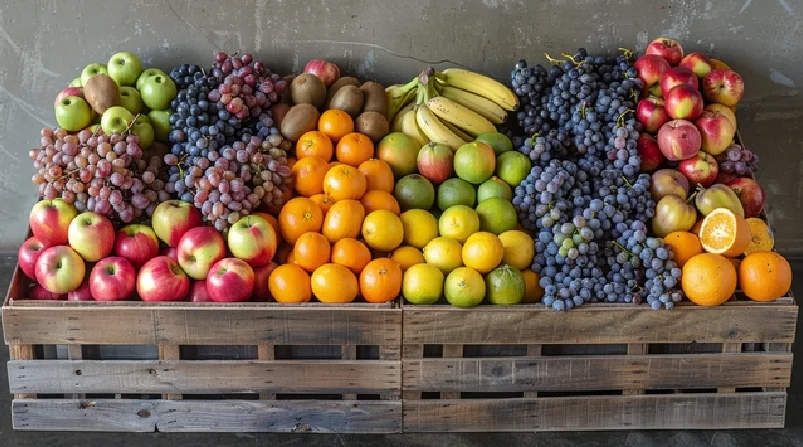
The three channels stacked into one multi-channel image
The Code
"""Demonstrates merging color channels into an image."""

from loguru import logger
import rerun as rr

from telekinesis import pupil, datatypes


def merge_image_from_channels_example():
    """Splits and merges image channels."""
    # ===================== Load Image ==========================================
    image_url = "https://assets.telekinesis.ai/examples/v1/images/fruits_carts.jpg"
    image = datatypes.Image.from_url(image_url)

    # ===================== Run Skill ==========================================
    image_channels = pupil.split_image_into_channels(image=image)
    filtered_image = pupil.merge_image_from_channels(channels=image_channels)

    # ===================== Log ================================================
    logger.success(f"Split and merged channels of {image}")
    logger.success(f"Result: {filtered_image}")

    # ===================== Visualization  (Optional) ======================
    rr.init("merge_image_from_channels_example", spawn=True)
    channel_names = ["Red", "Green", "Blue"]
    for i, channel_image in enumerate(image_channels):
        datatypes.visualize(channel_image, entity_path=f"{i + 1}-{channel_names[i]}")
    datatypes.visualize(filtered_image, entity_path="4-Merged")

if __name__ == "__main__":
    merge_image_from_channels_example()
Runnable examples are available in the Telekinesis examples repository.
Follow the README in that repository to set up the environment, run this specific example with:
cd telekinesis-examples
python examples/image_processing/merge_image_from_channels.py
Parameter Configuration
| Parameter | Type | Default | Description |
|---|---|---|---|
channels | datatypes.ImageBatch | list[datatypes.Image] | list[np.ndarray] | required | The single-channel images to merge, in output-channel order (e.g. [R, G, B] to produce an RGB image). Each channel must be shape (H, W) |
Returns
| Type | Description |
|---|---|
datatypes.Image | Shape (H, W, N), where N = len(channels), containing the input channels stacked in the given order |
Raises
| Exception | Condition |
|---|---|
TypeError | channels is not an ImageBatch/list, or contains an element that isn't an Image/np.ndarray |
ValueError | channels is an empty list, any channel is not shape (H, W), or its elements don't all share the same (height, width) |
ConfigurationError | The TELEKINESIS_API_KEY environment variable is not set |
SerializationError | The request input failed to serialize, the response was not returned as an Arrow stream, or the response failed to deserialize |
RequestTimeoutError | The request to the Pupil service timed out |
TransportError | A network failure occurred before a response was received |
ClientError | The Pupil service rejected the request due to invalid or malformed input (HTTP 400/422), an unrecognized endpoint (HTTP 404), or another unexpected 4xx response |
AuthenticationError | The API key was rejected as invalid or expired (HTTP 401) |
AuthenticationServiceError | The authentication service returned an invalid response, was temporarily unavailable, or timed out (HTTP 502/503/504) |
ServerError | The Pupil service returned a 5xx or otherwise unexpected error response |
How to Tune the Parameters
The merge_image_from_channels Skill takes a single input — the list of channels — so "tuning" it means choosing which images to pass, and in what order.
channels
- Controls: Which single-channel images become the output's channels, and in what order.
- Default: required, no default
- Pass channels in the order your downstream code expects (e.g.
[R, G, B]for RGB,[B, G, R]for BGR). Swapping the order is a cheap way to reinterpret a color image without callingconvert_image_color_space. - All channels must share the same
(H, W)— resize any mismatched channel withresize_imagebefore merging.
TIP
Best practice: Keep channel order symmetric with how the channels were produced (e.g. feed the output of split_image_into_channels straight back in) unless you deliberately want to reorder or swap channels.
Where to Use the Skill
Common pipelines include:
- Per-channel processing – Filter or enhance a single channel (e.g.
filter_image_using_bilateralon just the luminance channel) and recombine with the untouched others - Channel swapping – Reorder channels before merging, e.g. to flip RGB to BGR without a full color-space conversion
- Manual color reconstruction – Rebuild a color image after independently processing each channel
Alternative Skills
| Skill | vs. Merge Image From Channels |
|---|---|
| split_image_into_channels | The inverse operation — splits a multi-channel image into single-channel images. Run it first to get the channels this Skill merges. |
| convert_image_color_space | Converts an entire image between color spaces in one call. Use this Skill instead only when you need per-channel access or custom processing in between. |
When Not to Use the Skill
Do not use Merge Image From Channels when:
- You only need a color-space conversion (use
convert_image_color_spacedirectly instead of split, process, and merge) - The channels have different
(H, W)(resize them to match first, e.g. withresize_image) - You're building an image from scratch rather than recombining existing channels (use
generate_image_with_solid_color) - You don't have per-channel images yet (run
split_image_into_channelsfirst)
TIP
Channel order is not validated against any target color space — merging [B, G, R] channels silently produces a BGR-ordered image. Make sure downstream code expects the ordering you pass in.