

Segment Image Using Adaptive Threshold
SUMMARY
Segment Image Using Adaptive Threshold segments an image by recomputing a threshold for every pixel from its own local neighborhood.
Rather than comparing every pixel against one fixed, image-wide threshold, this method looks at each pixel's block_size x block_size neighborhood and computes a local mean, or a Gaussian-weighted local mean, minus an offset_constant, then compares the pixel against that local value via threshold_type. Because each region of the image gets its own threshold, this copes far better with uneven lighting — a shadow or lighting gradient — than a single global threshold. Compare with segment_image_using_local_threshold for a simpler local-thresholding option with fewer knobs.
Use this Skill when you want to segment images under uneven lighting, shadows, or lighting gradients using a per-pixel adaptive threshold with control over the averaging method and comparison direction.
The Skill
from telekinesis import cornea

segmented_image = cornea.segment_image_using_adaptive_threshold(
    image=image,
    max_value=255,
    adaptive_method="gaussian constant",
    threshold_type="binary",
    block_size=61,
    offset_constant=5,
)Example
Input Image
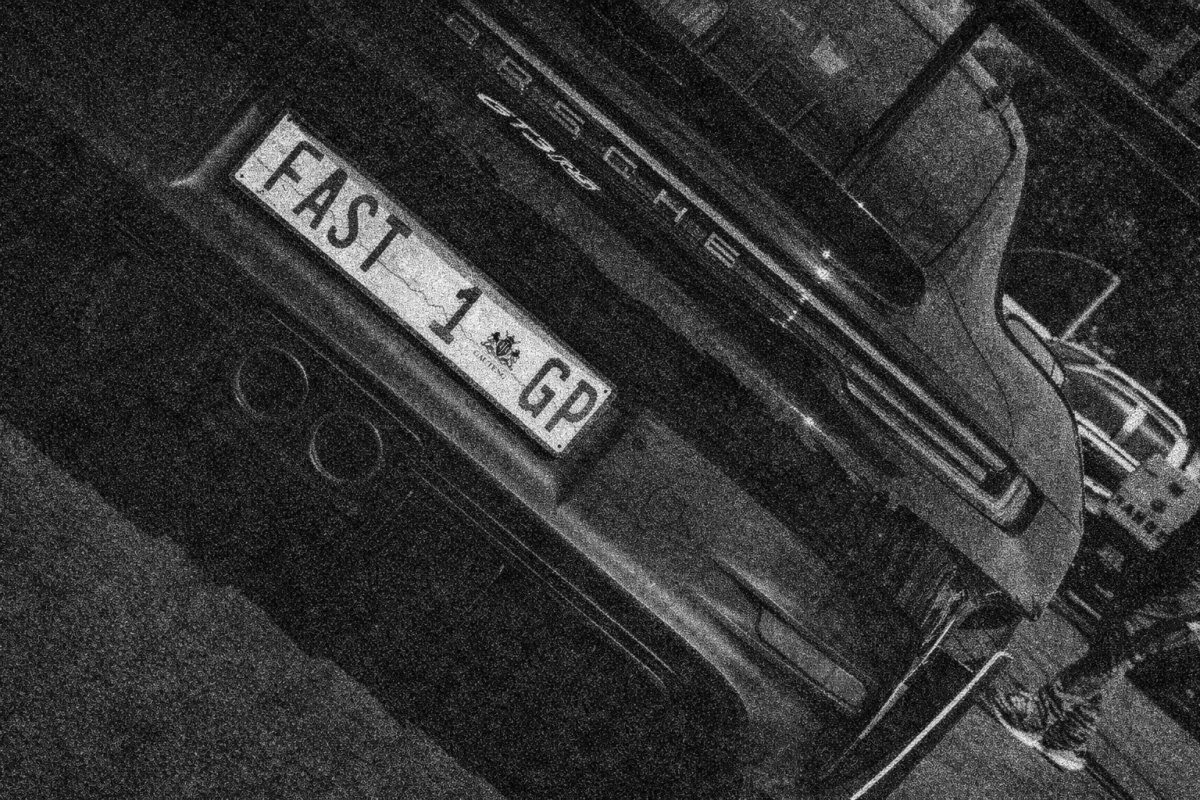
Original image with non-uniform lighting
Output Image
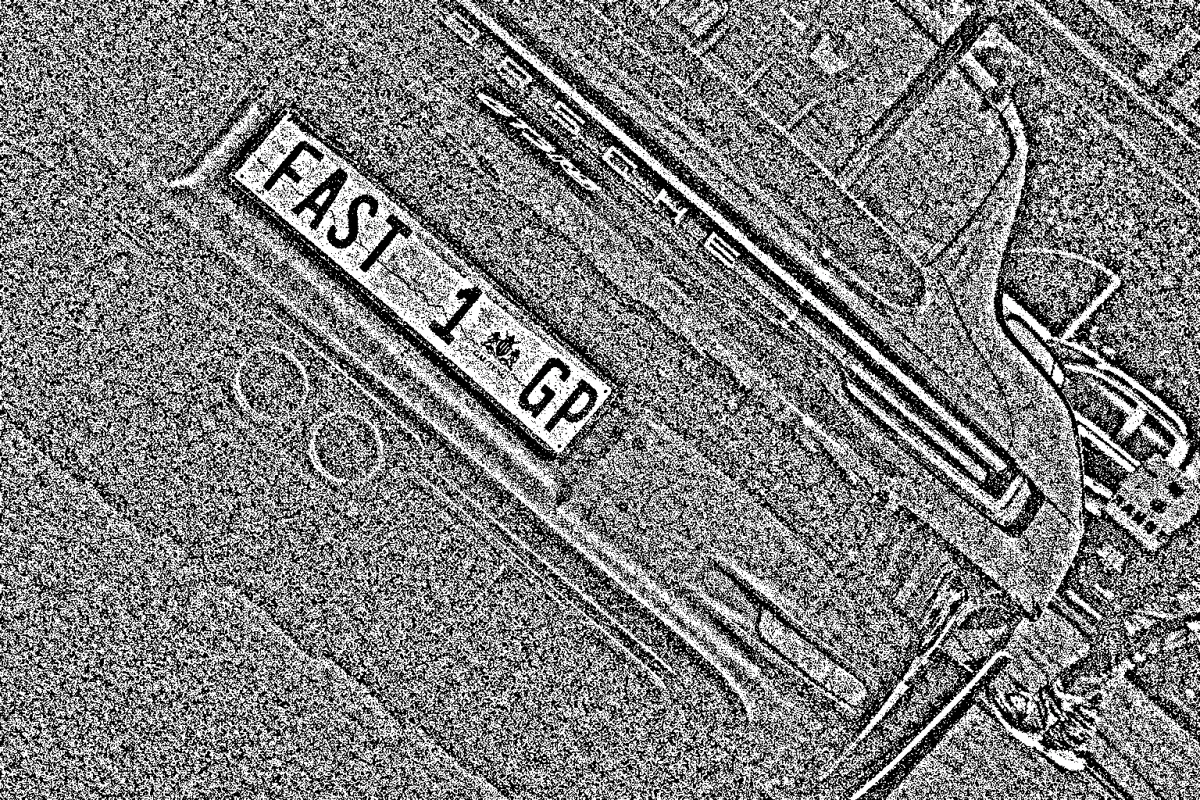
Segmented image using adaptive threshold - handles non-uniform lighting
The Code
"""
Demonstrates adaptive threshold segmentation.
"""

from loguru import logger
import rerun as rr
import rerun.blueprint as rrb

from telekinesis import cornea, datatypes

def segment_image_using_adaptive_threshold_example():
    """Applies adaptive thresholding to segment the image."""
    # ===================== Load Image ==========================================
    image_url = "https://assets.telekinesis.ai/examples/v1/images/car_number_plate.jpg"
    image = datatypes.Image.from_url(url=image_url)

    # ===================== Run Skill ==========================================
    segmented_image = cornea.segment_image_using_adaptive_threshold(
        image=image, max_value=255, adaptive_method="gaussian constant",
        threshold_type="binary", block_size=61, offset_constant=5
    )

    # ===================== Log ================================================
    logger.success(f"Segmented {image} using adaptive thresholding.")
    logger.success(f"Results: {segmented_image}")
    logger.info(f"Segmented image label codes: {segmented_image.label_codes}")
    logger.info(f"Segmented image number of labels: {segmented_image.number_of_labels}")
    logger.info(f"Segmented image shape: {segmented_image.shape}")
    logger.info(f"Segmented image dtype: {segmented_image.dtype}")

    # ===================== Visualization  (Optional) ======================
    rr.init("segment_image_using_adaptive_threshold_example", spawn=True)
    blueprint = rrb.Horizontal(
        rrb.Spatial2DView(origin="/input_image", name="Input"),
        rrb.Spatial2DView(origin="/segmented_image", name="Output"),
    )
    rr.send_blueprint(blueprint)
    datatypes.visualize(image, entity_path="/input_image")
    datatypes.visualize(segmented_image, entity_path="/segmented_image")


if __name__ == "__main__":
    segment_image_using_adaptive_threshold_example()
Runnable examples are available in the Telekinesis examples repository.
Follow the README in that repository to set up the environment, run this specific example with:
cd telekinesis-examples
python examples/segmentation/segment_image_using_adaptive_threshold.py
Parameter Configuration
| Parameter | Type | Default | Description |
|---|---|---|---|
image | datatypes.Image | np.ndarray | required | Input image to segment, shape (H, W) or (H, W, 3) |
max_value | datatypes.Int | int | 255 | Value assigned to pixels that pass the threshold test (see threshold_type) |
adaptive_method | datatypes.String | str | "gaussian constant" | How each pixel's local threshold is computed from its block_size x block_size neighborhood. Literal options: "mean constant", "gaussian constant" |
threshold_type | datatypes.String | str | "binary" | How a pixel's value is compared against its local threshold. Literal options: "binary", "binary_inv" |
block_size | datatypes.Int | int | 11 | Size, in pixels, of the square neighborhood used to compute each pixel's local threshold. Expected to be an odd value greater than 1 |
offset_constant | datatypes.Int | int | 2 | Constant subtracted from the computed local mean (or Gaussian-weighted mean) before comparison |
Returns
| Type | Description |
|---|---|
datatypes.SegmentationImage | A per-pixel label map, shape (H, W), reflecting the local threshold comparison above. Use .data for the raw label array, .label_codes for the sorted array of unique ids present, .number_of_labels for how many distinct labels were found, and .shape/.dtype for its size and label dtype. |
Raises
| Exception | Condition |
|---|---|
TypeError | A parameter's value does not match its expected type (see the Parameter Configuration table above) |
ValueError | adaptive_method/threshold_type is not one of their documented options, or block_size is not odd and greater than 1 |
ConfigurationError | The TELEKINESIS_API_KEY environment variable is not set |
SerializationError | The request input failed to serialize, the response was not returned as an Arrow stream, or the response failed to deserialize |
RequestTimeoutError | The request to the Cornea service timed out |
TransportError | A network failure occurred before a response was received |
ClientError | The Cornea service rejected the request due to invalid or malformed input (HTTP 400/422), an unrecognized endpoint (HTTP 404), or another unexpected 4xx response |
AuthenticationError | The API key was rejected as invalid or expired (HTTP 401) |
AuthenticationServiceError | The authentication service returned an invalid response, was temporarily unavailable, or timed out (HTTP 502/503/504) |
ServerError | The Cornea service returned a 5xx or otherwise unexpected error response |
How to Tune the Parameters
The segment_image_using_adaptive_threshold Skill exposes five parameters, extending segment_image_using_local_threshold's single block_size knob with control over the local-averaging method, the comparison direction, and the output values.
max_value
- Controls: The value written into the output for pixels that pass the
threshold_typetest. - Units: Pixel intensity (typically 0–255 for 8-bit images)
- Default:
255 - Increase → raises the value assigned to passing pixels
- Decrease → lowers the value assigned to passing pixels
- Typical range:
255, matching the default used by the SDK example
adaptive_method
- Controls: How each pixel's local threshold is computed from its
block_sizexblock_sizeneighborhood. - Default:
"gaussian constant"- Options:
"mean constant"— threshold = (neighborhood mean) −offset_constant"gaussian constant"(default) — threshold = (Gaussian-weighted neighborhood mean, giving nearby pixels more influence) −offset_constant; smoother and less noise-sensitive than the plain mean
- Options:
threshold_type
- Controls: How a pixel's value is compared against its local threshold.
- Default:
"binary"- Options:
"binary"(default) — pixels above the threshold becomemax_value, others become 0"binary_inv"— the inverse: pixels above the threshold become 0, others becomemax_value. Use this when the region of interest is darker than its surroundings
- Options:
block_size
- Controls: The size of the square neighborhood used to compute each pixel's local threshold.
- Units: Pixels (odd integer greater than 1)
- Default:
11 - Increase → smoother, more slowly-varying thresholds — better for larger, evenly-lit regions
- Decrease → reacts to finer local lighting changes
- Typical range: depends on image resolution and the scale of the lighting variation you want to cancel out; the SDK example uses
61
offset_constant
- Controls: A constant subtracted from the computed local mean (or Gaussian-weighted mean) before comparison.
- Units: Pixel intensity
- Default:
2 - Increase → stricter threshold — fewer pixels pass (useful for finer text or edge extraction)
- Decrease → (or use a negative value) more permissive threshold — more pixels pass
- Typical range: depends on contrast; the SDK example uses
5
TIP
Match threshold_type to which side of the threshold your region of interest is on: "binary" when it's brighter than its surroundings, "binary_inv" when it's darker. Set block_size large enough to span the lighting variation you want to cancel out, then use offset_constant to make the threshold more or less selective.
Where to Use the Skill
Common pipelines include:
- Document and label imaging under shadows or lighting gradients – e.g. the SDK example's license-plate image, the exact case the docstring calls out as the motivation for local-neighborhood thresholding
- Industrial inspection under uneven illumination – parts lit unevenly across a workspace, where the choice of averaging method affects noise sensitivity
- Pipelines that need an inverted mask – using
threshold_type="binary_inv"to isolate regions of interest that are darker than their surroundings
Alternative Skills
| Skill | vs. Segment Image Using Adaptive Threshold |
|---|---|
| segment_image_using_local_threshold | The simpler of the two — only exposes block_size. Reach for local threshold first; switch to adaptive threshold when you need to choose the local-averaging method (adaptive_method) or an inverted comparison (threshold_type). |
| segment_image_using_threshold | A single, manually chosen global threshold — the simplest possible segmentation. Use it when you already know a good threshold value; use adaptive threshold when lighting varies across the image. |
| segment_image_using_otsu_threshold | Automatically picks one global threshold from the image's intensity histogram — no parameters to tune. Use it for a clear bimodal histogram under uniform lighting; use adaptive threshold when lighting is uneven. |
| segment_image_using_yen_threshold | Another automatic, parameter-free global threshold, based on an entropy criterion rather than Otsu's variance criterion. Use it for histograms with unequal-sized foreground/background regions under uniform lighting; use adaptive threshold when lighting is uneven. |
When Not to Use the Skill
Do not use Segment Image Using Adaptive Threshold when:
- Lighting is already uniform across the image – a single global threshold (
segment_image_using_threshold,segment_image_using_otsu_threshold, orsegment_image_using_yen_threshold) achieves the same result without a neighborhood size or offset to tune - You only need one knob –
segment_image_using_local_thresholdexposes justblock_sizeand is simpler to configure when the extra control over averaging method and threshold direction isn't needed
TIP
segment_image_using_adaptive_threshold is the go-to method for images with shadows, gradients, or other non-uniform lighting conditions that would cause a global threshold to fail — reach for it once segment_image_using_local_threshold's single block_size knob isn't enough.