

Segment Image Using SLIC Superpixel
SUMMARY
Segment Image Using SLIC Superpixel segments an image into compact superpixels using the SLIC algorithm.
Simple Linear Iterative Clustering (SLIC) clusters pixels in color+space using a k-means-like procedure, producing roughly equal-sized, compact (grid-like) superpixels. Compare with segment_image_using_felzenszwalb, which instead produces irregularly-shaped superpixels that adapt more closely to object boundaries — prefer SLIC when you want a predictable, roughly-uniform number/size of superpixels.
Use this Skill when you want to create a predictable, roughly-uniform number of compact superpixels.
The Skill
from telekinesis import cornea

segmented_image = cornea.segment_image_using_slic_superpixel(
    image=image,
    num_segments=2,
    compactness=15.0,
    max_iterations=20,
    sigma=0.0,
    enforce_connectivity=True,
    start_label=1,
)Example
Input Image
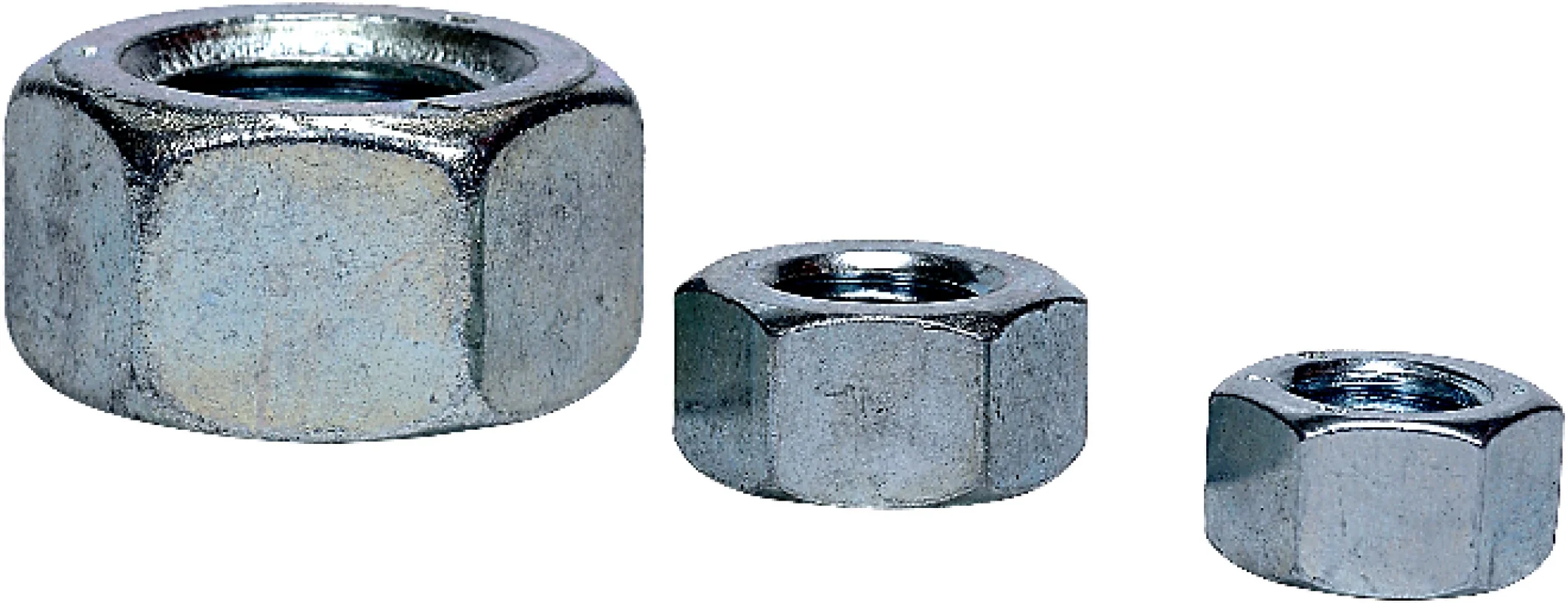
Original image for SLIC superpixel segmentation
Output Image
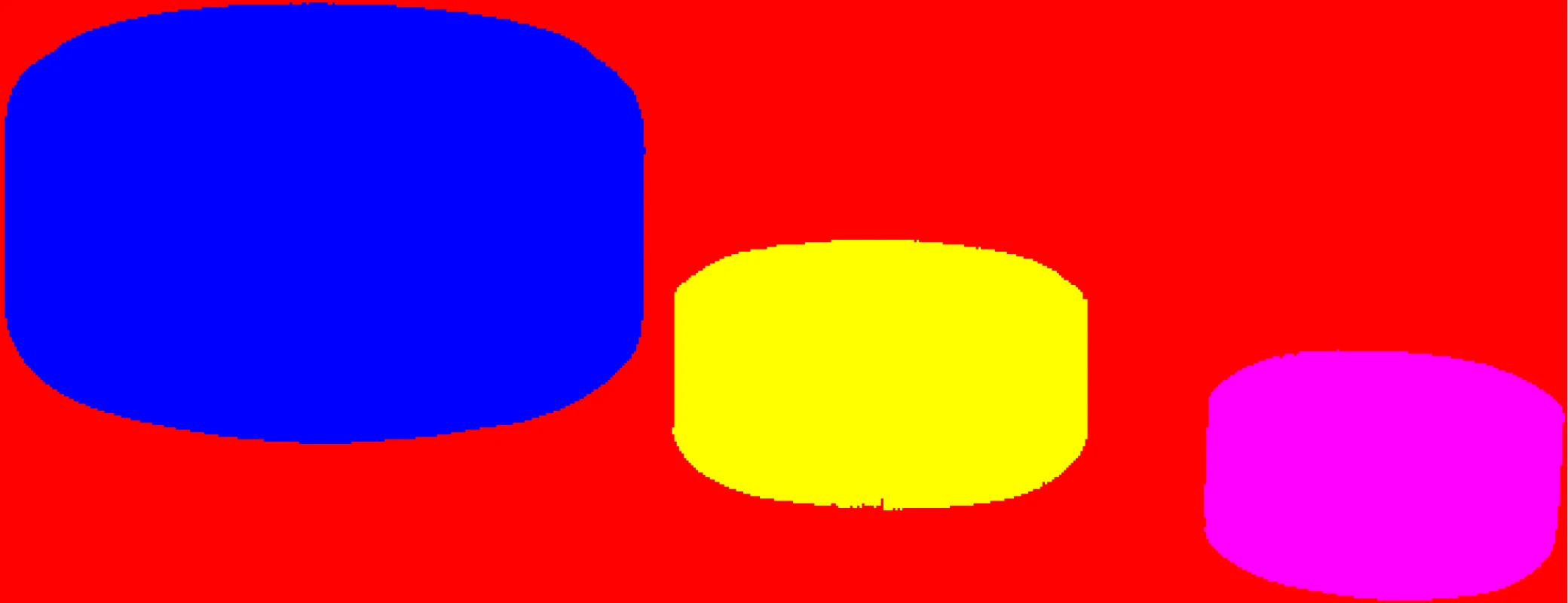
Superpixel segmentation using the SLIC algorithm
The Code
"""
Demonstrates SLIC superpixel segmentation.
"""

from loguru import logger
import rerun as rr
import rerun.blueprint as rrb

from telekinesis import cornea, datatypes


def segment_image_using_slic_superpixel_example():
    """Segments an image into compact superpixels using the SLIC algorithm."""
    # ===================== Load Image ==========================================
    image_url = "https://assets.telekinesis.ai/examples/v1/images/nuts.jpg"
    image = datatypes.Image.from_url(url=image_url)

    # ===================== Run Skill ==========================================
    segmented_image = cornea.segment_image_using_slic_superpixel(
        image=image,
        num_segments=2,
        compactness=15.0,
        max_iterations=20,
        spacing=None,
        convert_to_lab=None,
        enforce_connectivity=True,
        min_size_factor=0.1,
        max_size_factor=150.0,
        use_slic_zero=False,
        start_label=1,
        mask=None,
        channel_axis=-1,
    )

    # ===================== Log ================================================
    logger.success(f"Segmented {image} using the SLIC superpixel algorithm.")
    logger.success(f"Results: {segmented_image}")
    logger.info(f"Segmented image label codes: {segmented_image.label_codes}")
    logger.info(f"Segmented image number of labels: {segmented_image.number_of_labels}")
    logger.info(f"Segmented image shape: {segmented_image.shape}")
    logger.info(f"Segmented image dtype: {segmented_image.dtype}")

    # ===================== Visualization  (Optional) ======================
    rr.init("segment_image_using_slic_superpixel_example", spawn=True)
    blueprint = rrb.Horizontal(
        rrb.Spatial2DView(origin="/input_image", name="Input"),
        rrb.Spatial2DView(origin="/segmented_image", name="Output"),
    )
    rr.send_blueprint(blueprint)
    datatypes.visualize(image, entity_path="/input_image")
    datatypes.visualize(segmented_image, entity_path="/segmented_image")


if __name__ == "__main__":
    segment_image_using_slic_superpixel_example()
Runnable examples are available in the Telekinesis examples repository.
Follow the README in that repository to set up the environment, run this specific example with:
cd telekinesis-examples
python examples/segmentation/segment_image_using_slic_superpixel.py
Parameter Configuration
| Parameter | Type | Default | Description |
|---|---|---|---|
image | datatypes.Image | np.ndarray | required | Input image to segment, shape (H, W, 3) |
num_segments | datatypes.Int | int | 100 | Approximate number of superpixels to generate. The actual count may differ slightly, especially with enforce_connectivity=True |
compactness | datatypes.Float | float | 10.0 | Balances color proximity against spatial proximity when clustering. Higher values weight spatial distance more, producing more square/regular superpixels; lower values let superpixels follow color edges more closely, at the cost of a less regular shape |
max_iterations | datatypes.Int | int | 10 | Maximum number of k-means iterations to run |
sigma | datatypes.Float | float | 0.0 | Standard deviation of the Gaussian smoothing applied to each channel before segmentation. 0.0 disables pre-smoothing |
spacing | list[int] | None | None | Pixel spacing along each of the 2 image axes, as [spacing_y, spacing_x]. Use for non-square pixels (e.g. anisotropic sensors/scans). None uses uniform spacing |
convert_to_lab | datatypes.Bool | bool | None | None | Whether to convert image to LAB color space before clustering. Only applies to 3-channel images. None uses the algorithm's own default (convert when the image is RGB-like) |
enforce_connectivity | datatypes.Bool | bool | True | Whether to postprocess the result so every superpixel is a single spatially-connected region, merging small disconnected fragments into a neighbor |
min_size_factor | datatypes.Float | float | 0.5 | Superpixels smaller than min_size_factor * (image_size / num_segments) are merged into a neighbor when enforce_connectivity=True |
max_size_factor | datatypes.Float | float | 3.0 | Caps how large a merged superpixel may grow, as a multiple of the same expected average size used by min_size_factor |
use_slic_zero | datatypes.Bool | bool | False | Whether to use the "SLIC zero" variant, which adapts compactness per cluster instead of using one fixed value |
start_label | datatypes.Int | int | 1 | Label assigned to the first superpixel; labels increase sequentially from there. Use 0 for zero-based labels |
mask | datatypes.Image | np.ndarray | None | None | Optional region-of-interest mask, shape (H, W) matching image. Pixels outside the non-zero region are excluded from segmentation (labeled 0 in the result). None segments the whole image |
channel_axis | datatypes.Int | int | -1 | Which axis of image holds the color channels. -1 means the last axis, i.e. shape (H, W, C) — the normal layout for a datatypes.Image |
Returns
| Type | Description |
|---|---|
datatypes.SegmentationImage | A per-pixel label map, shape (H, W), where each pixel's value identifies which superpixel it belongs to (or 0 for pixels excluded by mask). Use .data for the raw label array, .label_codes for the sorted array of unique superpixel ids, .number_of_labels for how many superpixels were found, and .shape/.dtype for its size and label dtype. |
Raises
| Exception | Condition |
|---|---|
TypeError | A parameter's value does not match its expected type (see the Parameter Configuration table above) |
ValueError | mask doesn't share image's (H, W), min_size_factor is not positive, or min_size_factor is not less than max_size_factor |
ConfigurationError | The TELEKINESIS_API_KEY environment variable is not set |
SerializationError | The request input failed to serialize, the response was not returned as an Arrow stream, or the response failed to deserialize |
RequestTimeoutError | The request to the Cornea service timed out |
TransportError | A network failure occurred before a response was received |
ClientError | The Cornea service rejected the request due to invalid or malformed input (HTTP 400/422), an unrecognized endpoint (HTTP 404), or another unexpected 4xx response |
AuthenticationError | The API key was rejected as invalid or expired (HTTP 401) |
AuthenticationServiceError | The authentication service returned an invalid response, was temporarily unavailable, or timed out (HTTP 502/503/504) |
ServerError | The Cornea service returned a 5xx or otherwise unexpected error response |
How to Tune the Parameters
The segment_image_using_slic_superpixel Skill exposes twelve tunable parameters. The first three (num_segments, compactness, sigma) have the biggest effect on everyday use; the rest fine-tune convergence, connectivity, and input layout.
num_segments
- Controls: The approximate target number of superpixels.
- Default:
100 - Increase → more, smaller superpixels; decrease → fewer, larger superpixels
compactness
- Controls: The trade-off between spatial regularity and color-edge fidelity during clustering.
- Default:
10.0 - Increase → more square/regular superpixels, less attention to color boundaries
- Decrease → superpixels follow color edges more closely, at the cost of regular shape
- Typical range: 1.0–40.0
max_iterations
- Controls: How many k-means iterations the clustering runs.
- Default:
10 - Increase → better convergence/quality, slower; decrease → faster, potentially less converged
sigma
- Controls: Gaussian smoothing applied per-channel before segmentation.
- Default:
0.0(no smoothing) - Increase → smooths out more noise/fine texture before segmenting
spacing
- Controls: Per-axis pixel spacing
[spacing_y, spacing_x]used when computing spatial distance. - Default:
None(uniform spacing) - Options: Set explicit values only for anisotropic sensors/scans where pixels aren't square
convert_to_lab
- Controls: Whether pixels are converted to LAB color space before clustering.
- Default:
None - Options:
None(algorithm default — convert when the image is RGB-like),True(force LAB for more perceptually meaningful color distances),False(cluster in the original color space). Only applies to 3-channel images
enforce_connectivity
- Controls: Whether disconnected fragments of a superpixel are merged into a neighbor so each label forms one connected region.
- Default:
True - Options:
Truefor connected superpixels (recommended for most downstream uses),Falseto allow disjoint pixels to share a label
min_size_factor
- Controls: The lower size bound (relative to expected average superpixel size) below which a fragment is merged into a neighbor, when
enforce_connectivity=True. - Default:
0.5 - Increase → merges away more small fragments
- Must be positive and less than
max_size_factor(checked client-side, raisingValueErrorotherwise)
max_size_factor
- Controls: The upper bound on merged superpixel size, relative to the same expected average size, when
enforce_connectivity=True. - Default:
3.0 - Decrease → caps merged superpixels to a smaller maximum size
- Must be greater than
min_size_factor(checked client-side, raisingValueErrorotherwise)
use_slic_zero
- Controls: Whether compactness adapts per cluster (SLIC zero) instead of staying fixed.
- Default:
False - Options:
Trueto better handle images mixing flat and highly textured regions,Falsefor standard fixed-compactness SLIC
start_label
- Controls: The id of the first superpixel; subsequent labels increase sequentially.
- Default:
1 - Options:
0for zero-based labels,1(default) for one-based labels
mask
- Controls: Restricts segmentation to a region of interest; pixels outside the non-zero mask region are labeled
0instead of assigned to a superpixel. - Default:
None(segment the whole image) - Options: Pass a
datatypes.Image/np.ndarraymatchingimage's shape (H, W) to exclude a region — it must match exactly, or aValueErroris raised
TIP
Recommended tuning order: Set num_segments for roughly the target superpixel count, then adjust compactness to trade off regularity vs. color-edge fidelity. Leave enforce_connectivity=True and the size-factor/iteration/label parameters at their defaults unless you have a specific need (anisotropic pixels, a region-of-interest mask, or textured images where use_slic_zero=True helps).
Where to Use the Skill
Common pipelines include:
- Superpixel generation – Over-segmenting an image into a predictable, roughly-uniform number of compact regions
- Object proposal generation – Producing regular candidate regions of known approximate size
- Preprocessing for filtering – Pairing with
filter_segments_by_area,filter_segments_by_color, orfilter_segments_by_maskto keep only the superpixels relevant to a downstream task - Region-of-interest processing – Using
maskto limit segmentation to a specific area of the image rather than post-filtering the whole result
Alternative Skills
| Skill | vs. Segment Image Using SLIC Superpixel |
|---|---|
| segment_image_using_felzenszwalb | Produces irregularly-shaped superpixels that adapt to object boundaries, instead of uniform, grid-like ones. Use Felzenszwalb when you want superpixels that follow image content; use SLIC when you want a predictable superpixel count/size. |
| filter_segments_by_area | Not an alternative — a natural next step. Drops superpixels whose pixel area falls outside a chosen range. |
| filter_segments_by_color | Not an alternative — a natural next step. Drops superpixels whose mean intensity falls outside a chosen range. |
| filter_segments_by_mask | Not an alternative — a natural next step. Keeps only the superpixels that overlap a region-of-interest mask. |
When Not to Use the Skill
Do not use Segment Image Using SLIC Superpixel when:
- You need superpixels that closely follow object boundaries — SLIC's compact, roughly-uniform regions trade boundary fidelity for regularity. Use
segment_image_using_felzenszwalbinstead. - You need irregularly-shaped, boundary-respecting regions — high
compactnessvalues in particular push superpixels toward square, grid-like shapes.
TIP
If you only need superpixels within a specific region of the image, pass that region as mask instead of segmenting the whole image and filtering afterward — pixels outside the mask are labeled 0 directly, avoiding wasted computation on irrelevant regions.