

Change Active TCP
SUMMARY
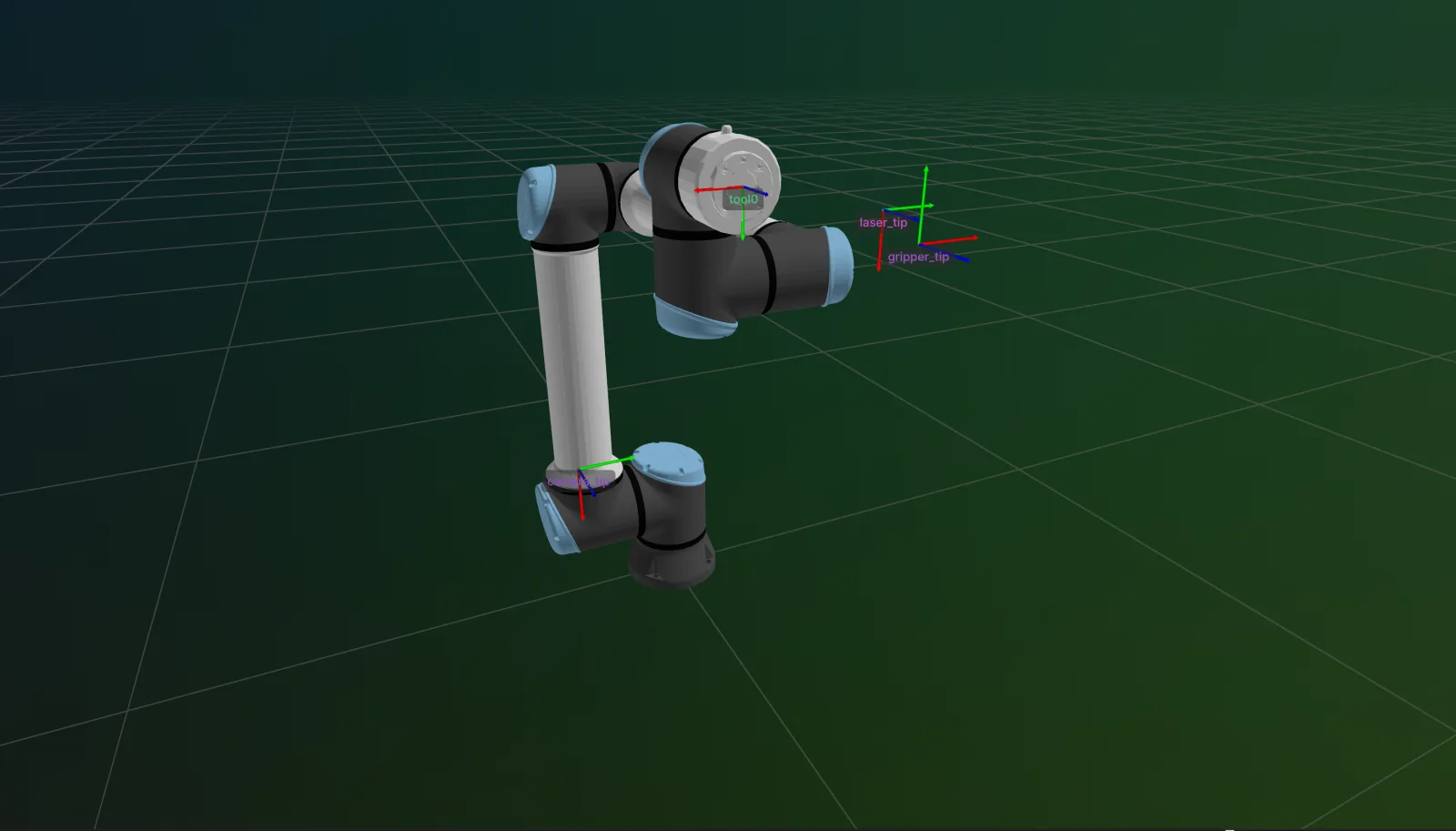
robot.active_tcp is the single place TCP changes are pushed to hardware. Assigning a new TCP name immediately pushes it to the controller when connected; offline, it refreshes the cached commanded pose via forward kinematics instead.
The Skill
python
robot.active_tcp = "my_tcp"The Code
python
"""
Registers several TCP frames and switches the active one.

Supports Universal Robots (UR), Epson, virtual, and Isaac Sim.

Usage:
    python change_active_tcp.py [--ip <ROBOT_IP>] [--prim_path <PRIM_PATH>]
"""

import argparse

from loguru import logger

from telekinesis.synapse.robots.manipulators import universal_robots


def main(ip: str | None, prim_path: str | None) -> None:
    """Change the active TCP and observe it before and after each change."""

    #===================== Create Robot ==========================================
    robot = universal_robots.UniversalRobotsUR10E(name='UR10e')

    # ==================== Visualization (Optional) =============================
    robot.visualize_rerun(live=True)

    try:
        #===================== Connect Robot ==========================================
        if ip:
            robot.connect(ip=ip)
        elif prim_path:
            robot.connect(simulation_prim_path=prim_path)
            robot.set_joint_positions(robot.default_joint_configuration)

        # ==================== Run Skill ============================================
        robot.add_tcp(name="camera_tip",
                      transform=[0.0, 0.0, 0.1, 0.0, 0.0, 0.0],  # 100 mm along Z-axis
                      set_active=True)
        robot.add_tcp(name="gripper_tip",
                      transform=[0.0, 0.0, 0.2, 0.0, 0.0, 0.0],
                      set_active=False)
        robot.add_tcp(name="laser_tip",
                      transform=[0.0, 0.0, 0.3, 0.0, 0.0, 0.0],
                      set_active=False)

        logger.info(f"Active TCP after add_tcp(): {robot.active_tcp}"
                    f" \nActive TCP transform: {robot.get_active_tcp_transform()}"
                    f" \n TCP pose: {robot.get_cartesian_pose()}")

        robot.active_tcp = "gripper_tip"

        logger.info(f"Active TCP after changing active TCP: {robot.active_tcp}"
                    f" \nActive TCP transform: {robot.get_active_tcp_transform()}"
                    f" \n TCP pose: {robot.get_cartesian_pose()}")

        robot.active_tcp = "laser_tip"

        logger.info(f"Active TCP after changing active TCP again: {robot.active_tcp}"
                    f" \nActive TCP transform: {robot.get_active_tcp_transform()}"
                    f" \n TCP pose: {robot.get_cartesian_pose()}")
    except (ConnectionError, OSError) as e:
        logger.error(f"Error occurred: {e}")
    finally:
        robot.disconnect()
        robot.shutdown()


if __name__ == "__main__":
    parser = argparse.ArgumentParser(description="Register several TCPs on the robot and switch the active one.")
    parser.add_argument("--ip", type=str, default=None,
                         help="UR robot IP address for real hardware, e.g. 192.168.1.100")
    parser.add_argument("--prim_path", type=str, default=None,
                         help='Isaac Sim articulation prim path, e.g. "/World/ur10e"')
    args = parser.parse_args()

    main(ip=args.ip, prim_path=args.prim_path)
Running the Example
bash
python change_active_tcp.pybash
python change_active_tcp.py --prim_path /World/ur10ebash
python change_active_tcp.py --ip 192.168.1.100For all options:
bash
python change_active_tcp.py --helpParameter Configuration
| Parameter | Type | Default | Description |
|---|---|---|---|
name | str | required | Name of an already-registered TCP frame to make active. Must already exist (see Get TCPs). |
Returns
| Type | Description |
|---|---|
str | The active_tcp getter returns the name of the currently active TCP frame. |
None | Assigning to active_tcp returns nothing - it is a property setter with a side effect (pushes to hardware when connected). |
Raises
| Exception | Condition |
|---|---|
ValueError | name is not found in the kinematic model's frames |
ConnectionError / OSError | The connection to the physical controller fails or drops while pushing the new active TCP (Universal Robots only) |
Where to Use the Skill
- Tool changes - Switch TCP when a different tool (gripper, sensor, custom end-effector) becomes active on the flange.
- Multi-frame workflows - Register several TCPs up front with Add TCP (e.g.
"camera_tcp","gripper_tcp") and switch between them as a task progresses. - Live re-calibration - Update an existing TCP offset with Update TCP and have the change take effect immediately without a separate push call.
When Not to Use the Skill
- You just need to read the current pose - use Get Cartesian Pose, which already resolves against whichever TCP is currently active.
- You need a one-off pose in a different frame - pass
frame_nameto Forward Kinematics instead of switching the active TCP. - The TCP isn't registered yet - use Add TCP first;
active_tcpcan only be assigned a name that already exists (see Get TCPs to list what's registered).