

Segment Image Using Focus Region
SUMMARY
Segment Image Using Focus Region separates the sharply in-focus parts of an image from the blurred parts.
It estimates local sharpness — how much high-frequency detail and edge content a region has — and labels pixels as "in focus" wherever that sharpness exceeds threshold. This is useful for depth-of-field effects, such as picking the in-focus subject out of a blurred background in a shallow-depth-of-field photo, or flagging out-of-focus regions in a quality-control camera feed.
Use this Skill when you want to separate sharply in-focus pixels from blurred ones based on local sharpness.
The Skill
from telekinesis import cornea

segmented_image = cornea.segment_image_using_focus_region(
    image=image,
    blur_kernel_size=151,
    threshold=5,
)Example
Input Image
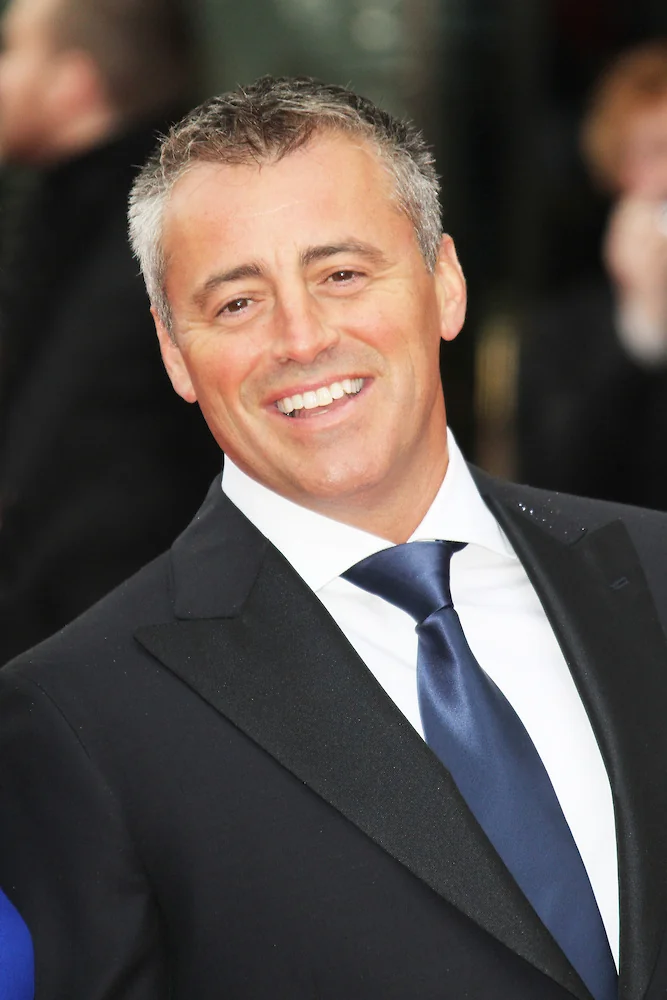
Original image for focus region segmentation
Output Image

In-focus regions segmented from the image
The Code
"""
Demonstrates focus region segmentation.
"""

from loguru import logger
import rerun as rr
import rerun.blueprint as rrb

from telekinesis import cornea, datatypes

def segment_image_using_focus_region_example():
    """Segments the in-focus regions of an image."""
    # ===================== Load Image ==========================================
    image_url = "https://assets.telekinesis.ai/examples/v1/images/matt_leblanc.jpg"
    image = datatypes.Image.from_url(url=image_url)

    # ===================== Run Skill ==========================================
    segmented_image = cornea.segment_image_using_focus_region(
        image=image, blur_kernel_size=151, threshold=5
    )

    # ===================== Log ================================================
    logger.success(f"Segmented {image} using focus region detection.")
    logger.success(f"Results: {segmented_image}")
    logger.info(f"Segmented image label codes: {segmented_image.label_codes}")
    logger.info(f"Segmented image number of labels: {segmented_image.number_of_labels}")
    logger.info(f"Segmented image shape: {segmented_image.shape}")
    logger.info(f"Segmented image dtype: {segmented_image.dtype}")

    # ===================== Visualization  (Optional) ======================
    rr.init("segment_image_using_focus_region_example", spawn=True)
    blueprint = rrb.Horizontal(
        rrb.Spatial2DView(origin="/input_image", name="Input"),
        rrb.Spatial2DView(origin="/segmented_image", name="Output"),
    )
    rr.send_blueprint(blueprint)
    datatypes.visualize(image, entity_path="/input_image")
    datatypes.visualize(segmented_image, entity_path="/segmented_image")


if __name__ == "__main__":
    segment_image_using_focus_region_example()
Runnable examples are available in the Telekinesis examples repository.
Follow the README in that repository to set up the environment, run this specific example with:
cd telekinesis-examples
python examples/segmentation/segment_image_using_focus_region.py
Parameter Configuration
These parameters control the spatial scale at which sharpness is measured and how sharp a region must be to count as in focus.
| Parameter | Type | Default | Description |
|---|---|---|---|
image | datatypes.Image | np.ndarray | required | Input image to segment, shape (H, W) or (H, W, 3) |
blur_kernel_size | datatypes.Int | int | 10 | Size, in pixels, of the smoothing kernel used while estimating local sharpness |
threshold | datatypes.Int | int | 1 | Minimum sharpness value a region must have to be labeled as "in focus" |
Returns
| Type | Description |
|---|---|
datatypes.SegmentationImage | A per-pixel label map, shape (H, W), where in-focus and out-of-focus pixels are each assigned a distinct label. Use .data for the raw label array, .label_codes for the sorted array of unique ids present, .number_of_labels for how many distinct labels were found, and .shape/.dtype for its size and label dtype. |
Raises
| Exception | Condition |
|---|---|
TypeError | A parameter's value does not match its expected type (see the Parameter Configuration table above) |
ConfigurationError | The TELEKINESIS_API_KEY environment variable is not set |
SerializationError | The request input failed to serialize, the response was not returned as an Arrow stream, or the response failed to deserialize |
RequestTimeoutError | The request to the Cornea service timed out |
TransportError | A network failure occurred before a response was received |
ClientError | The Cornea service rejected the request due to invalid or malformed input (HTTP 400/422), an unrecognized endpoint (HTTP 404), or another unexpected 4xx response |
AuthenticationError | The API key was rejected as invalid or expired (HTTP 401) |
AuthenticationServiceError | The authentication service returned an invalid response, was temporarily unavailable, or timed out (HTTP 502/503/504) |
ServerError | The Cornea service returned a 5xx or otherwise unexpected error response |
How to Tune the Parameters
The segment_image_using_focus_region Skill exposes two parameters.
blur_kernel_size
- Controls: The size of the smoothing kernel used while estimating local sharpness.
- Units: Pixels
- Default:
10 - Increase → smooths over a larger neighborhood, giving a coarser, more spatially consistent focus map — useful on higher-resolution images or when many small sharp specks (e.g. sensor noise) should not each count as their own in-focus region
- Decrease → makes the map more sensitive to fine detail, but also to noise
- Typical range: 5-25 for typical photographs; the docstring's own example uses
151on a high-resolution portrait, where a small kernel would mostly pick out noise
threshold
- Controls: The minimum local sharpness value a region must reach to be labeled "in focus".
- Units: Sharpness score (dimensionless)
- Default:
1 - Increase → stricter — only very sharp regions count as in-focus
- Decrease → more lenient — more of the image counts as in-focus
- Typical range: 1-10
TIP
If borderline regions are being mislabeled, adjust blur_kernel_size before threshold — the kernel size sets the spatial scale at which sharpness is measured, which changes what counts as a coherent in-focus region in the first place.
Where to Use the Skill
Common pipelines include:
- Depth-of-field effects – isolating an in-focus subject from a blurred background
- Quality control – flagging out-of-focus frames or regions on a camera feed
- Focus stacking – picking the sharpest regions across a stack of images taken at different focus depths
- Autofocus tuning – using the extent of the in-focus label as feedback for an autofocus routine
Alternative Skills
The docstring for segment_image_using_focus_region does not name a comparable alternative within the Cornea Skill Group — sharpness-based in-focus detection is a distinct mechanism from the color-, threshold-, and box-based segmentation Skills documented elsewhere in this group.
When Not to Use the Skill
Do not use Segment Image Using Focus Region when:
- The whole image is uniformly in or out of focus — there is no sharpness contrast for the Skill to exploit
- You need to segment by color or shape rather than sharpness — use one of the color- or shape-based Cornea Skills instead
- The image itself is noisy — noise looks like high-frequency detail and can be mistaken for genuine sharpness, especially with a small
blur_kernel_size