

Detect Objects Using QWEN
SUMMARY
Detect Objects Using QWEN detects objects in images using the QWEN Vision Language Model (VLM).
QWEN is a powerful vision-language model that can understand natural language descriptions and detect objects in images based on text prompts. It uses advanced multimodal AI to interpret both visual and textual inputs, making it ideal for flexible, prompt-driven object detection.
Use this Skill when you want to detect objects using natural language descriptions or when you need flexible, prompt-driven object detection.
The Skill
from telekinesis import retina

annotations = retina.detect_objects_using_qwen(
    image=image,
    prompt="buttons"
)Example
Input Image

Original image for QWEN object detection
Detected Objects
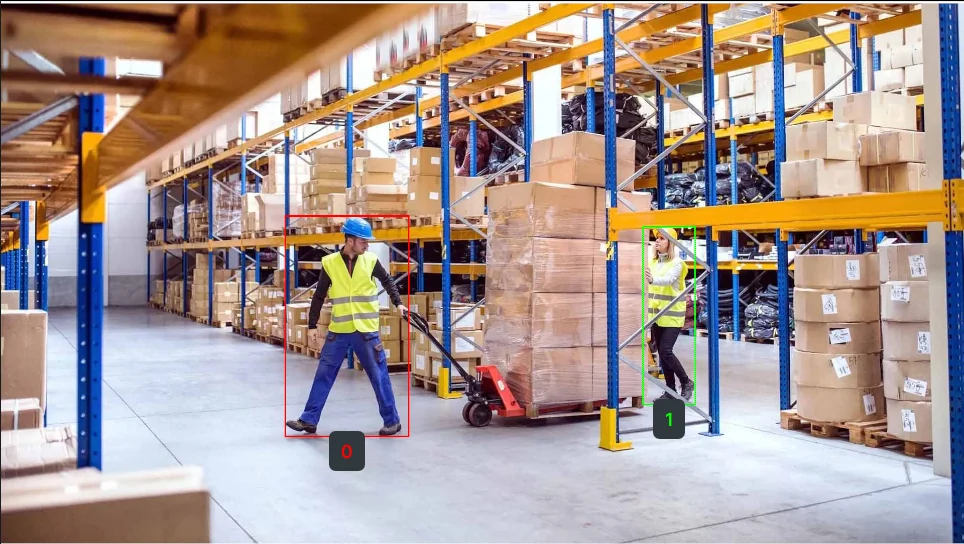
Detected objects with bounding boxes using QWEN
The Code
from telekinesis import retina
from datatypes import io
import pathlib

# Optional for logging
from loguru import logger

DATA_DIR = pathlib.Path("path/to/telekinesis-data")

# Load image
filepath = str(DATA_DIR / "images" / "warehouse_1.jpg")
image = io.load_image(filepath=filepath)
logger.success(f"Loaded image from {filepath}")

# Detect objects using QWEN
annotations = retina.detect_objects_using_qwen(
        image=image,
        prompt="person ."
    )

# Access results
annotations = annotations.to_list()
logger.success(
    f"Applied QWEN object detection on the given image. Detected {len(annotations)} objects."
)
The Explanation of the Code
This example demonstrates how to use the detect_objects_using_qwen Skill to detect objects in an image using natural language descriptions. After importing the necessary modules and setting up optional logging, the image is loaded from a file.
from telekinesis import retina
from datatypes import io
import pathlib

# Optional for logging
from loguru import logger

DATA_DIR = pathlib.Path("path/to/telekinesis-data")

# Load image
filepath = str(DATA_DIR / "images" / "warehouse_1.jpg")
image = io.load_image(filepath=filepath)
logger.success(f"Loaded image from {filepath}")
The Skill detects objects using the QWEN Vision Language Model, which understands both visual content and textual prompts. The prompt parameter accepts natural language descriptions (e.g., "buttons", "all screws", "person, car").
Prompt format
Write prompts as a comma-separated list of object phrases.
For multiple targets, write: persons, pallets, boxes.
# Detect objects using QWEN
annotations = retina.detect_objects_using_qwen(
        image=image,
        prompt="person .",
    )
list_annotations = annotations.to_list()
logger.success(
    f"Applied QWEN object detection on the given image. Detected {len(annotations)} objects."
)
The function returns an ObjectDetectionAnnotations object in COCO-like format. Call .to_list() to get the list of detections.
This Skill is particularly useful in robotics pipelines for prompt-driven object detection, flexible visual search, and manipulation planning, where detecting objects based on natural language descriptions aids in task planning and execution.
Running the Example
Runnable examples are available in the Telekinesis examples repository. Follow the README in that repository to set up the environment. Once set up, you can run this specific example with:
cd telekinesis-examples
python examples/retina_examples.py --example detect_objects_using_qwen
How to Tune the Parameters
The detect_objects_using_qwen Skill has 1 parameter:
prompt (required):
- Natural language description of objects to detect
- Format: String (e.g., "buttons", "person, car", "all screws")
- Use specific terms for better accuracy
- Use comma-separated list for multiple object types
- Use descriptive phrases for complex queries (e.g., "all circular objects")
TIP
Best practice: Use clear, specific descriptions in prompt. The model understands natural language, so you can describe objects in plain English. For better results, be specific about what you're looking for.
Where to Use the Skill
Detect Objects Using QWEN is commonly used in the following pipelines:
- Prompt-driven object detection - Detecting objects based on natural language descriptions
- Flexible visual search - Finding objects without predefined classes
- Multi-object detection - Detecting multiple object types in a single pass
- Robotic manipulation - Identifying objects for pick-and-place operations
Alternative Skills
| Skill | vs. Detect Objects Using QWEN |
|---|---|
| detect_objects_using_grounding_dino | Grounding DINO does zero-shot detection with text prompts. Use for similar flexibility; QWEN uses a VLM for natural language. |
| detect_objects_using_rfdetr | RF-DETR uses predefined COCO classes. Use for transformer-based fixed-class detection; QWEN for prompt-driven detection. |
| detect_objects_using_yolox | YOLOX uses predefined COCO classes and is fast. Use for real-time fixed-class detection; QWEN for flexible prompts. |
When Not to Use the Skill
Do not use Detect Objects Using QWEN when:
- You need real-time performance (QWEN requires GPU and can be slow)
- You have predefined object classes (Use RF-DETR or YOLOX instead)
- You need instance segmentation (QWEN provides bounding boxes, not masks)
- You're working with very small objects (QWEN may miss small details)
TIP
QWEN is excellent for flexible, prompt-driven detection but may be slower than specialized detectors. Use it when you need the flexibility of natural language descriptions.