

Rotate Image
SUMMARY
Rotate Image rotates an image by an angle in degrees.
Rotates the image around its center by the specified angle. Supports keep_image_size to retain original dimensions (with cropped corners) or expand the canvas to fit the rotated image.
Use this Skill when you want to rotate an image by a given angle.
The Skill
from telekinesis import pupil

rotated_image = pupil.rotate_image(
    image=image,
    angle_in_deg=33.0,
    interpolation_method="linear",
    keep_image_size=True,
)Example
Input Image
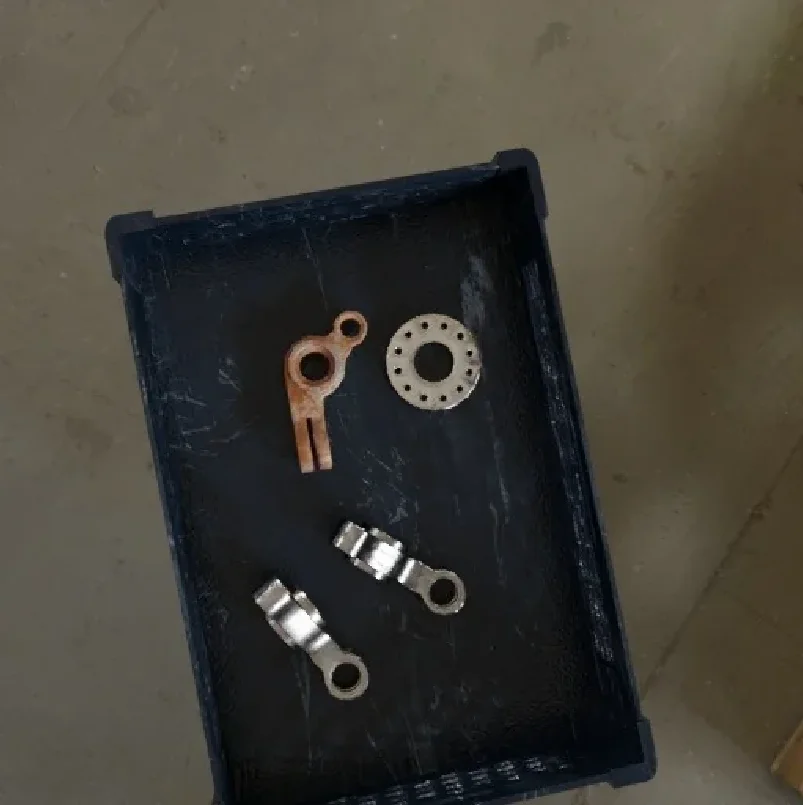
Original image
Rotated Image
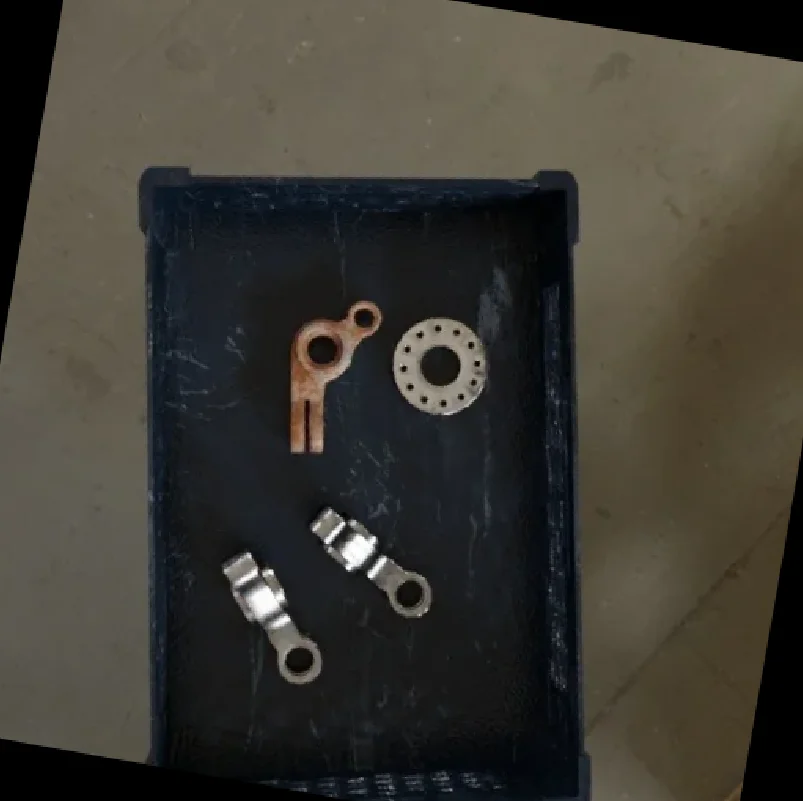
Rotated by 10 degrees
The Code
from telekinesis import pupil
from datatypes import io
import pathlib
from loguru import logger

DATA_DIR = pathlib.Path("path/to/telekinesis-data")

# Load image
filepath = str(DATA_DIR / "images" / "synthetic_data_bin.jpg")
image = io.load_image(filepath=filepath)
logger.success(f"Loaded image from {filepath}")

# Rotate image by angle in degrees
rotated_image = pupil.rotate_image(
    image=image,
    angle_in_deg=10,
    interpolation_method="linear",
    keep_image_size=True
)

# Access results
rotated_image_np = rotated_image.to_numpy()
logger.success("Rotated image. Output shape: {}", rotated_image_np.shape)
The Explanation of the Code
The code begins by importing the necessary modules: pupil for image processing operations, io for data handling, pathlib for path management, and loguru for logging.
from telekinesis import pupil
from datatypes import io
import pathlib
from loguru import logger
Next, an image is loaded from a .jpg file using the io.load_image function.
DATA_DIR = pathlib.Path("path/to/telekinesis-data")

# Load image
filepath = str(DATA_DIR / "images" / "synthetic_data_bin.jpg")
image = io.load_image(filepath=filepath)
The main operation uses the rotate_image Skill from the pupil module. This Skill rotates an image by an angle in degrees around its center. The parameters can be tuned to control rotation angle, interpolation method, and whether to keep image size or expand the canvas depending on the characteristics of the input image.
rotated_image = pupil.rotate_image(
    image=image,
    angle_in_deg=10,
    interpolation_method="linear",
    keep_image_size=True
)
Finally, the rotated image is converted to a NumPy array using to_numpy() for further processing, visualization, or downstream tasks.
rotated_image_np = rotated_image.to_numpy()
logger.success(f"Output image shape: {rotated_image_np.shape}")
This operation is particularly useful in robotics and vision pipelines for data augmentation, alignment, and multi-view generation, where rotating an image by a given angle is required.
Running the Example
Runnable examples are available in the Telekinesis examples repository. Follow the README in that repository to set up the environment. Once set up, you can run this specific example with:
cd telekinesis-examples
python examples/pupil_examples.py --example rotate_image
How to Tune the Parameters
The rotate_image Skill has 3 parameters:
angle_in_deg (no default—required):
- Rotation angle in degrees (positive = counter-clockwise)
- Units: Degrees
- Typical range: -360 to 360
- Use small angles (e.g., ±5–15°) for augmentation; larger for alignment
interpolation_method (default: "linear"):
- The interpolation method for resampling during rotation
- Options: "nearest", "linear", "cubic"
- Use "linear" for most cases; "nearest" for speed; "cubic" for highest quality
keep_image_size (default: False):
- Whether to keep output dimensions equal to input (cropping corners) or expand canvas to fit
- Options: True, False
- Use True for consistent dimensions in pipelines; False when you need the full rotated image without cropping
TIP
Best practice: Use keep_image_size=True for consistent dimensions in pipelines. Use False when you need the full rotated image without cropping.
Where to Use the Skill
Rotate Image is commonly used in the following pipelines:
- Data augmentation - Random rotations for training
- Alignment - Correct orientation before analysis
- Multi-view - Generate rotated views
Related skills to build such a pipeline:
align_image_circle_center: Align by detected circlesresize_image: Resize before or after rotation
When Not to Use the Skill
Do not use Rotate Image when:
- You need perspective correction (Use affine/warp transforms)
- You need to align by features (Use align_image_circle_center or similar)
- Angle is 0 or 360 (No-op; skip for efficiency)