

Segment Image Using YCrCb
SUMMARY
Segment Image Using YCrCb performs YCrCb color space segmentation.
YCrCb (Y, Cr, Cb) is a color space commonly used in video and image compression. It separates luminance (Y) from chrominance (Cr, Cb), making it useful for applications like skin detection, face detection, and other scenarios where chrominance information is more important than absolute color values.
Use this Skill when you want to segment objects based on chrominance information, particularly for skin detection or similar applications.
The Skill
from telekinesis import cornea

result = cornea.segment_image_using_ycrcb(
    image=image,
    lower_bound=(0, 133, 77),
upper_bound=(255, 173, 127))Example
Input Image

Original image for YCrCb color segmentation
Output Image
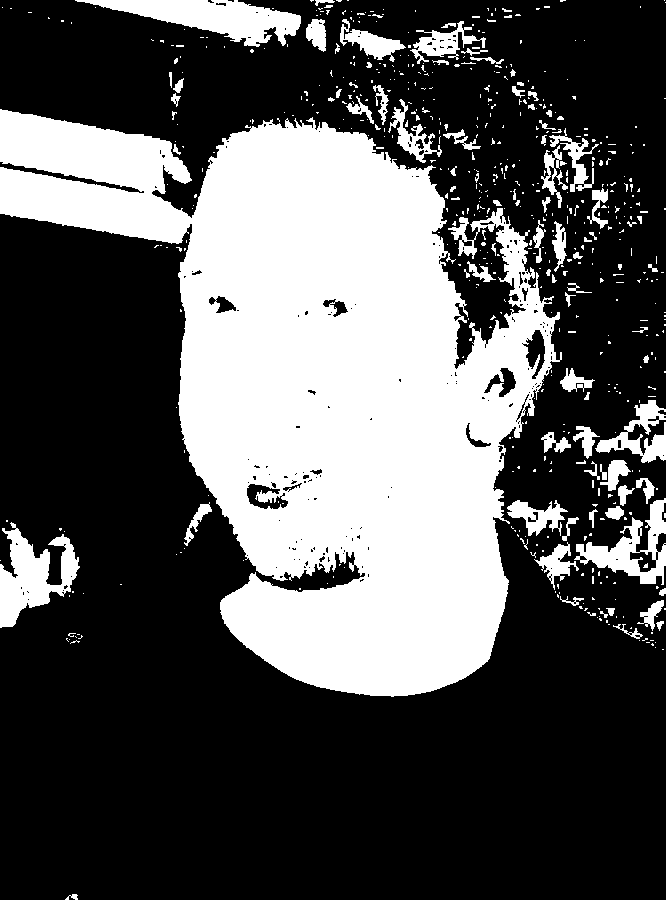
Segmented image by YCrCb color range
The Code
import pathlib

from telekinesis import cornea
from datatypes import io

DATA_DIR = pathlib.Path("path/to/telekinesis-data")

# Load image
filepath = str(DATA_DIR / "images" / "David_Schwimmer.jpg")
image = io.load_image(filepath=filepath)

# Perform YCrCb segmentation
result = cornea.segment_image_using_ycrcb(
    image=image,
    lower_bound=(0, 133, 77),
    upper_bound=(255, 173, 127),
)

# Access results
annotation = result["annotation"].to_dict()
mask = annotation['labeled_mask']
The Explanation of the Code
YCrCb segmentation converts the image to YCrCb color space and identifies pixels within a specified YCrCb range. YCrCb separates:
| Channel | Name | Range | Description |
|---|---|---|---|
| Y | Luminance | 0-255 | Brightness component |
| Cr | Red-difference | 0-255 | Red chrominance (128 = neutral) |
| Cb | Blue-difference | 0-255 | Blue chrominance (128 = neutral) |
The code begins by importing the required modules and loading an image:
import pathlib

from telekinesis import cornea
from datatypes import io

DATA_DIR = pathlib.Path("path/to/telekinesis-data")
filepath = str(DATA_DIR / "images" / "David_Schwimmer.jpg")
image = io.load_image(filepath=filepath)
The YCrCb segmentation parameters are configured. The bounds (0, 133, 77) to (255, 173, 127) are commonly used for skin detection:
result = cornea.segment_image_using_ycrcb(
    image=image,
    lower_bound=(0, 133, 77),
    upper_bound=(255, 173, 127),
)
The function returns a dictionary containing an annotation object in COCO panoptic format. Extract the mask as follows:
annotation = result["annotation"].to_dict()
mask = annotation['labeled_mask']
Running the Example
Runnable examples are available in the Telekinesis examples repository. Follow the README in that repository to set up the environment. Once set up, you can run this specific example with:
cd telekinesis-examples
python examples/cornea_examples.py --example segment_image_using_ycrcb
How to Tune the Parameters
The segment_image_using_ycrcb Skill has 2 parameters:
lower_bound (default: (0, 133, 77)):
- Lower bound for YCrCb range as a tuple
(Y, Cr, Cb) - Units: Y: 0-255, Cr: 0-255, Cb: 0-255
- Default values are optimized for skin detection
- Adjust based on target chrominance characteristics
upper_bound (default: (255, 173, 127)):
- Upper bound for YCrCb range as a tuple
(Y, Cr, Cb) - Units: Y: 0-255, Cr: 0-255, Cb: 0-255
- Default values are optimized for skin detection
- Adjust based on target chrominance characteristics
TIP
Best practice: For skin detection, the default YCrCb ranges work well. For other applications, convert sample colors to YCrCb to determine appropriate bounds.
Where to Use the Skill
Segment Image Using YCrCb is commonly used in the following pipelines:
- Skin detection - Identify human skin regions
- Face detection preprocessing - Segment potential face regions
- Human-robot interaction - Detect human presence
- Video compression applications - Chrominance-based segmentation
Alternative Skills
| Skill | vs. Segment Image Using YCrCb |
|---|---|
| segment_image_using_hsv | HSV is more general-purpose. Use HSV for general color segmentation, YCrCb for skin/chrominance detection. |
| segment_image_using_rgb | RGB is simpler. Use RGB for general color segmentation, YCrCb for chrominance-based applications. |
When Not to Use the Skill
Do not use Segment Image Using YCrCb when:
- You need general color segmentation (Use HSV or RGB instead)
- Color is not a distinguishing feature (Consider other segmentation methods)
TIP
YCrCb is particularly well-suited for skin detection and other applications where chrominance information is more important than absolute color values.