

Filter Image Using Morphological Gradient
SUMMARY
Filter Image Using Morphological Gradient applies morphological gradient for edge detection.
Morphological gradient highlights boundaries by computing the difference between dilation and erosion. This operation extracts object boundaries by subtracting the eroded image from the dilated image, creating an outline of objects. It's particularly effective for extracting edges in binary or grayscale images without being as sensitive to noise as derivative-based edge detectors.
Use this Skill when you want to extract object boundaries using morphological operations.
The Skill
from telekinesis import pupil

filtered_image = pupil.filter_image_using_morphological_gradient(
    image=image,
    kernel_size=5,
    kernel_shape="ellipse",
    iterations=1,
    border_type="default",
)Example
Input Image
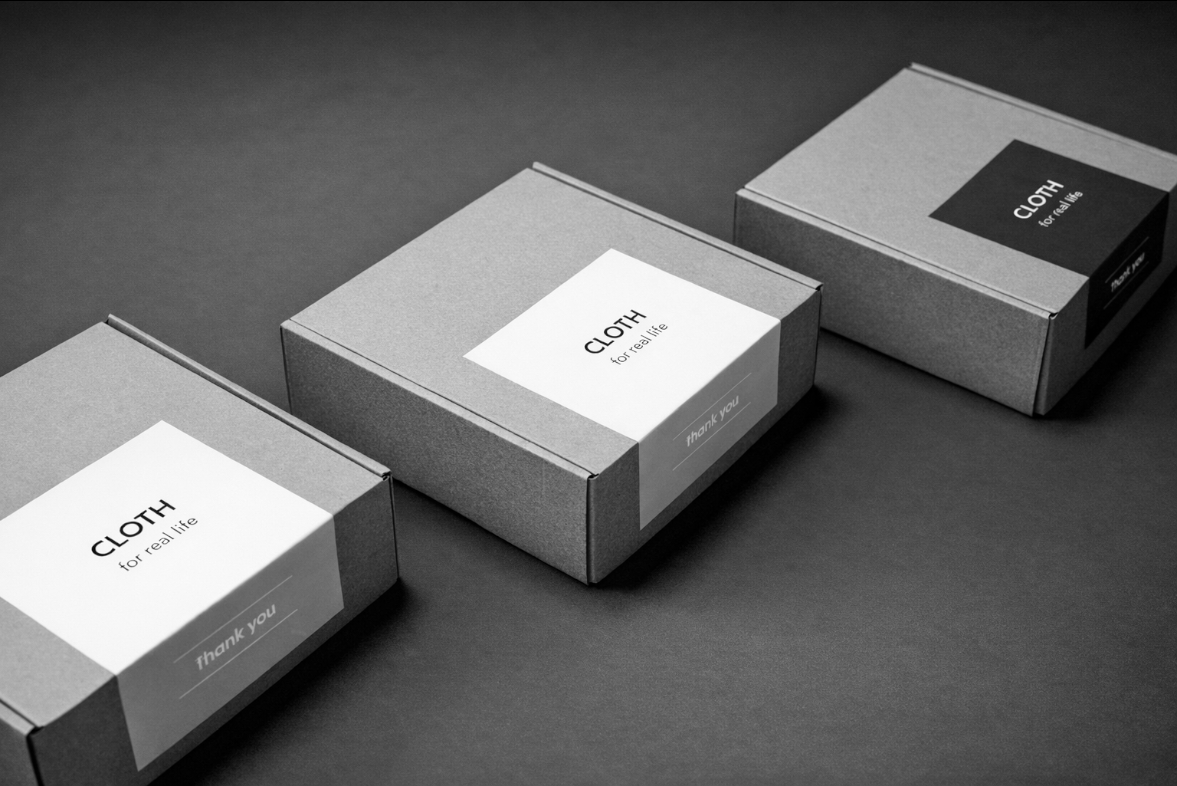
Original grayscale image
Output Image
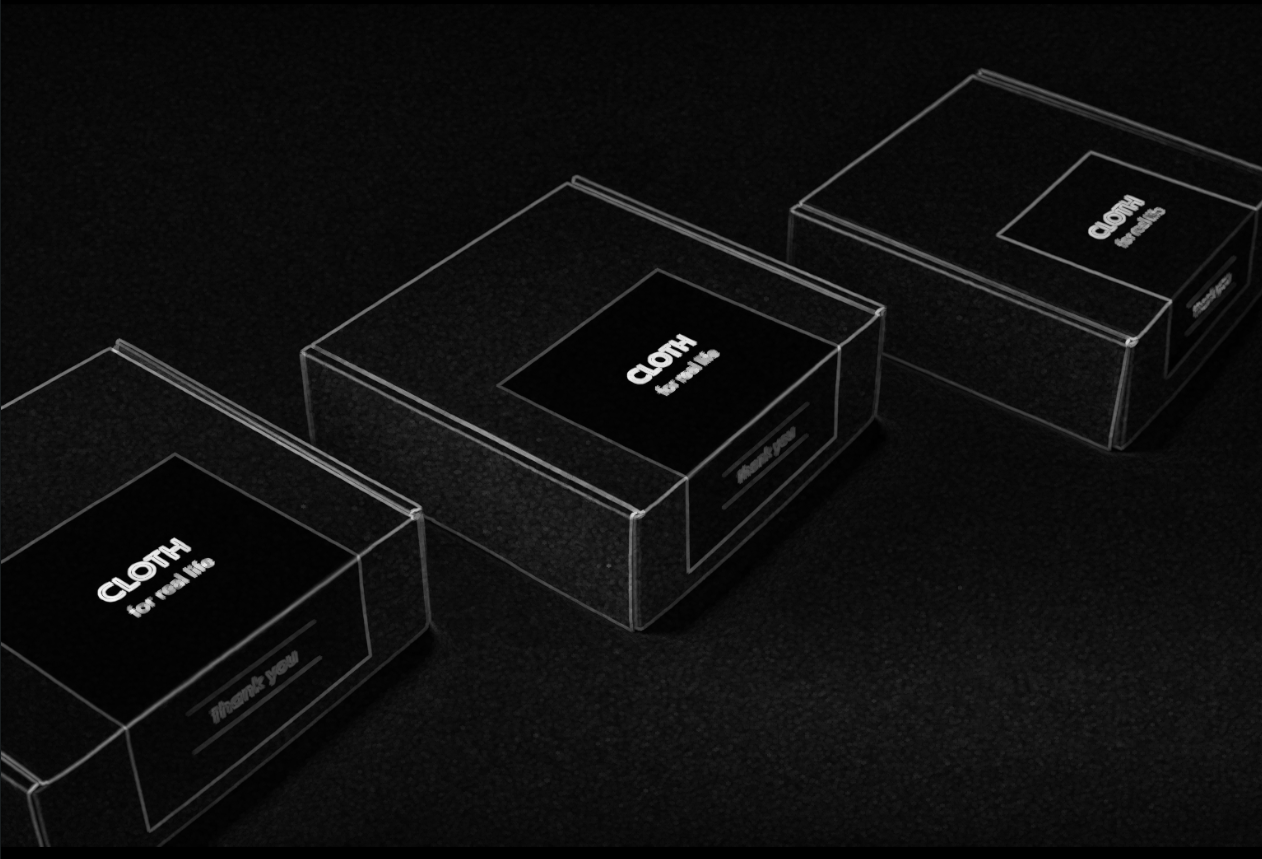
Gradient image showing object boundaries
The Code
from telekinesis import pupil
from datatypes import io, datatypes
import pathlib
from loguru import logger

DATA_DIR = pathlib.Path("path/to/telekinesis-data")

# Load the grayscale image
filepath = str(DATA_DIR / "images" / "cartons_arranged.png")
image = io.load_image(filepath=filepath, as_gray=True)

# Apply morphological gradient
filtered_image = pupil.filter_image_using_morphological_gradient(
    image=image,
    kernel_size=5,
    kernel_shape="ellipse",
    iterations=1,
    border_type="default",
)
logger.success(f"Applied morphological gradient with gradient image shape as {filtered_image.to_numpy().shape}")
The Explanation of the Code
The morphological gradient implementation follows a standard image processing workflow with proper parameter configuration.
First, import the required modules:
from telekinesis import pupil
from datatypes import io, datatypes

import pathlib
from loguru import logger
These imports provide access to the Pupil SDK, type-safe datatypes for both I/O and parameters, path handling utilities, and logging functionality.
Next, prepare your image data:
DATA_DIR = pathlib.Path("path/to/telekinesis-data")
filepath = str(DATA_DIR / "images" / "cartons_arranged.png")
image = io.load_image(filepath=filepath, as_gray=True)
The image is loaded from the data directory using the io module. For morphological gradient operations, the image is loaded as a grayscale image using the as_gray=True parameter, which is suitable for edge extraction via morphological gradient.
Next, the parameters controlling the morphological gradient operation are configured. The morphological gradient computes the difference between dilation and erosion of the image, extracting object boundaries.
kernel_size determines the size of the structuring element used for gradient computation. Larger kernels produce thicker edge maps and are more robust to noise, while smaller kernels produce finer, more detailed edge maps that may be more sensitive to noise.
kernel_shape defines the geometric shape of the structuring element. Common shapes include "ellipse" for smooth, isotropic gradient computation, "rectangle" for axis-aligned operations, and "cross" for directional effects. The shape affects how boundaries are detected and the thickness of the resulting edge map.
iterations controls how many times the gradient operation is applied sequentially. Each iteration enhances the edge response, but multiple iterations may thicken edges excessively. Typically, one iteration is sufficient for most applications.
border_type specifies how pixels near image boundaries are handled during gradient computation, where the structuring element extends beyond the image edges. This affects how edges near borders are detected.
Finally, the morphological gradient is applied using the filter_image_using_morphological_gradient Skill.
filtered_image = pupil.filter_image_using_morphological_gradient(
    image=image,
    kernel_size=5,
    kernel_shape="ellipse",
    iterations=1,
    border_type="default",
)
logger.success(f"Applied morphological gradient with gradient image shape as {filtered_image.to_numpy().shape}")
The morphological gradient computes the difference between dilation and erosion of the image, extracting object boundaries. This creates an edge map showing object boundaries with thickness controlled by kernel_size, making it useful for boundary visualization and edge-based feature extraction that is more robust to noise than derivative-based edge detectors.
Running the Example
Runnable examples are available in the Telekinesis examples repository. Follow the README in that repository to set up the environment. Once set up, you can run this specific example with:
cd telekinesis-examples
python examples/pupil_examples.py --example filter_image_using_morphological_gradient
How to Tune the Parameters
The filter_image_using_morphological_gradient Skill has 4 parameters:
kernel_size (default: 5):
- The size of the structuring element
- Increase to detect thicker edges
- Typical range: 3-15
- Use 3-5 for thin edges, 5-9 for moderate thickness, 9-15 for thick boundaries
TIP
Best practice: Morphological gradient is less sensitive to noise than derivative-based edge detectors like Sobel. Use it when you need robust edge detection on noisy binary or grayscale images.
Where to Use the Skill in a Pipeline
Morphological Gradient is commonly used in the following pipelines:
- Edge detection - Extract boundaries from binary or grayscale images
- Segmentation visualization - Visualize object boundaries
- Feature extraction - Extract edge features for analysis
- Image subtraction - Find differences between images
- Contour detection preparation - Prepare edges for contour finding
A typical pipeline for boundary visualization looks as follows:
# Example pipeline using gradient (parameters omitted).

from telekinesis import pupil
from datatypes import io

# 1. Load surface image
image = io.load_image(filepath=...)

# 2. Segment or threshold
segmented = ...

# 3. Extract boundaries
boundaries = pupil.filter_image_using_morphological_gradient(image=segmented, ...)

# 4. Overlay on original
visualization = ...
Related skills to build such a pipeline:
load_image: Load imagesfilter_image_using_sobel: Alternative gradient-based edge detectionfilter_image_using_laplacian: Second-order edge detectionmorphological_erosion: Component of gradient operation
Alternative Skills
| Skill | vs. Morphological Gradient |
|---|---|
| filter_image_using_sobel | Sobel uses derivatives. Use Sobel for grayscale edge detection with directional information, morphological gradient for binary images or when robustness to noise is important. |
| filter_image_using_laplacian | Laplacian uses second derivatives. Use Laplacian for fine edge details, morphological gradient for thicker, more robust boundaries. |
When Not to Use the Skill
Do not use Morphological Gradient when:
- You need directional edge information (Use Sobel which provides gradient direction)
- You need very thin, precise edges (Use Canny or derivative-based methods)
- You're working with highly textured images (Morphological gradient will highlight all textures)
- You need multi-scale edge detection (Use Laplacian of Gaussian or Canny)