

Filter Point Cloud Using Viewpoint Visibility
SUMMARY
Filter Point Cloud Using Viewpoint Visibility removes points that are not visible from a specified viewpoint, simulating line-of-sight occlusion.
This Skill is useful in industrial, mobile, and humanoid robotics pipelines for focusing on visible surfaces relevant to a sensor or camera. For example, it can filter a table scene in a factory to only points visible to a robot camera, remove occluded obstacles in mobile robot navigation, or limit a humanoid robot's perception to reachable object surfaces. By simulating visibility, robots can process only actionable points, improving efficiency and accuracy.
Use this Skill when you want to exclude occluded points to optimize perception, pose estimation, or planning tasks.
The Skill
from telekinesis import vitreous
import numpy as np

filtered_point_cloud = vitreous.filter_point_cloud_using_viewpoint_visibility(
    point_cloud=point_cloud,
    viewpoint=np.array([0.0, 0.0, 0.0]),
    visibility_radius=10.0,
)Performance Note
Current Data Limits: The system currently supports up to 1 million points per request (approximately 16MB of data). We're actively optimizing data transfer performance as part of our beta program, with improvements rolling out regularly to enhance processing speed.
Example
Note: The viewpoint must be defined in the same coordinate frame as the point cloud. If the cloud is centered, adjust the viewpoint accordingly. The visibility_radius is the size of the spherical projection used by Open3D and should be larger than the scene's bounds (same units as the point cloud).
Input Point Cloud (Overview)
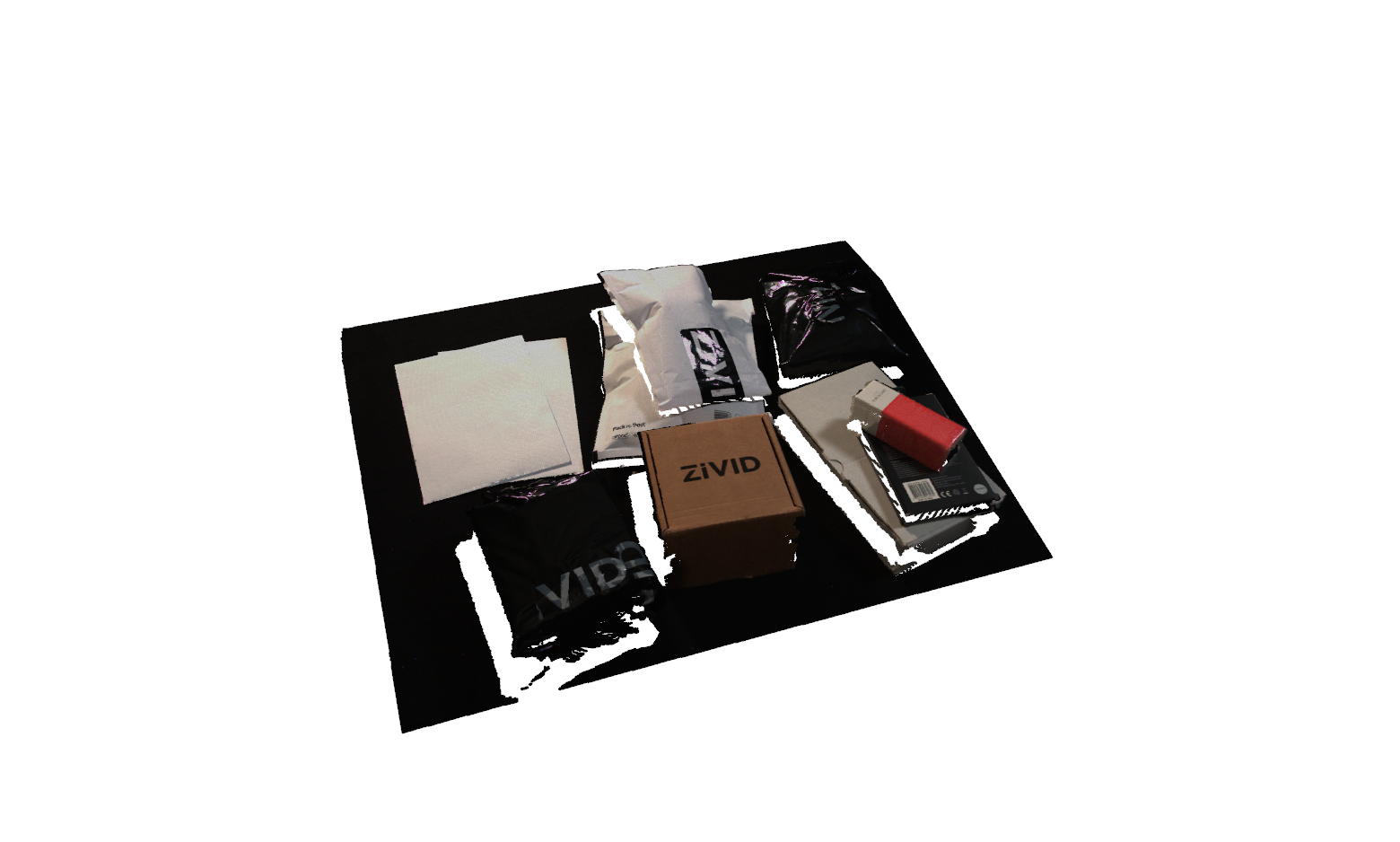
The raw, centered point cloud visualized from a zoomed-out viewpoint. The red marker indicates the camera position used for visibility filtering.
Filtered Result (Same Perspective as #1)
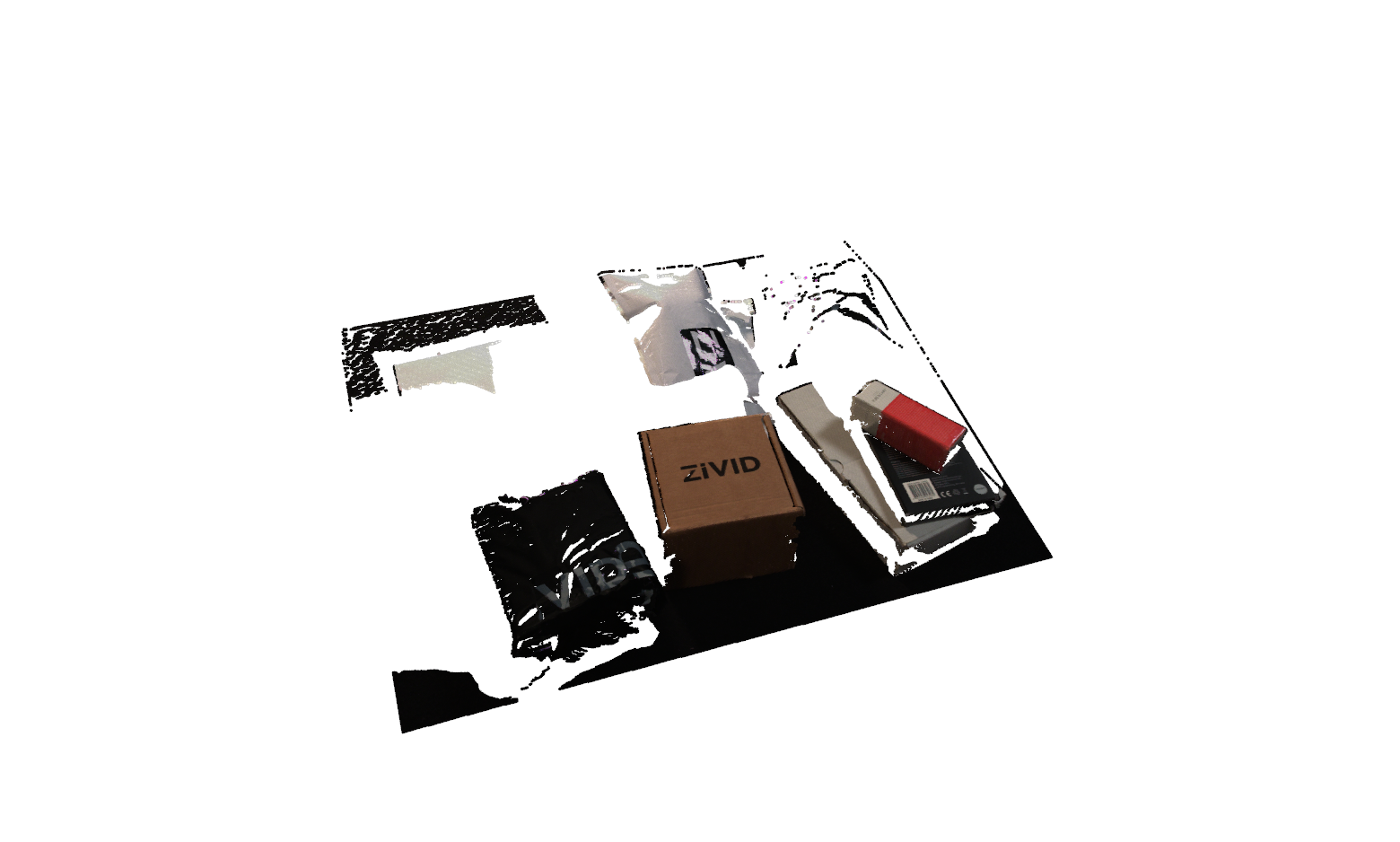
The resulting point cloud after removing hidden or occluded points. The camera perspective matches the overview in the first image, allowing a direct before/after comparison.
Camera View (What the Filter 'Sees')
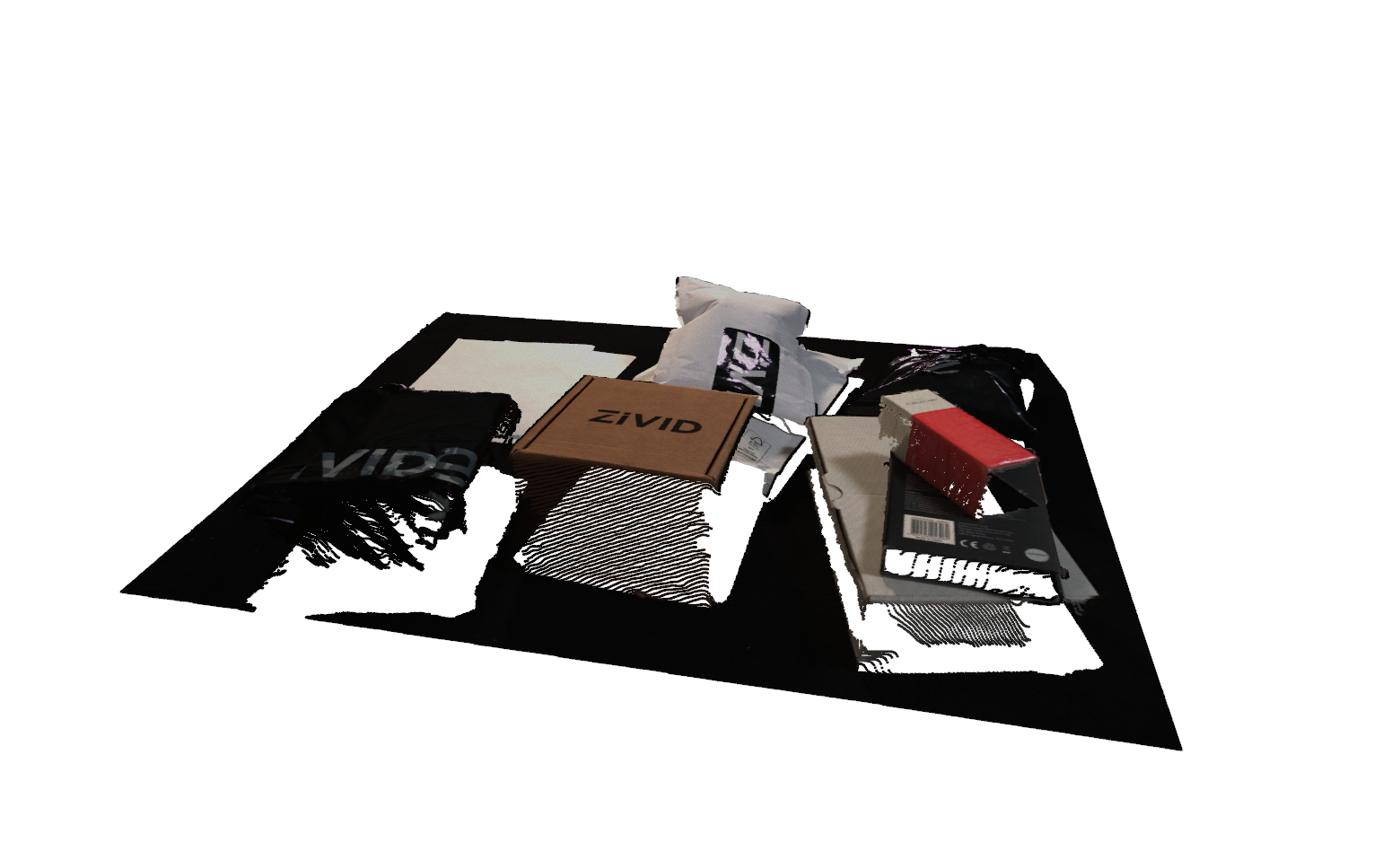
The point cloud rendered from the exact filtering viewpoint. Only points directly visible from this position will be retained. All occluded points are removed by the algorithm.
The Code
from telekinesis import vitreous
from datatypes import datatypes, io
import pathlib

# Optional for logging
from loguru import logger

DATA_DIR = pathlib.Path("path/to/telekinesis-data")

# Load point cloud
filepath = str(DATA_DIR / "point_clouds" / "zivid_parcels_04_preprocessed.ply")
point_cloud = io.load_point_cloud(filepath=filepath)
logger.success(f"Loaded point cloud with {len(point_cloud.positions)} points")

# Execute operation
filtered_point_cloud = vitreous.filter_point_cloud_using_viewpoint_visibility(
  point_cloud=point_cloud,
  viewpoint=[100, -500, 250.0],
  visibility_radius=100000.0,
)
logger.success("Filtered points using viewpoint visibility")
The Explanation of the Code
The code begins by importing the necessary modules: vitreous for point cloud operations, datatypes and io for data handling, pathlib for path management, and loguru for optional logging.
from telekinesis import vitreous
from datatypes import datatypes, io
import pathlib

# Optional for logging
from loguru import logger
Next, a point cloud is loaded from a .ply file, and the total number of points is logged to confirm successful loading.
DATA_DIR = pathlib.Path("path/to/telekinesis-data")

# Load point cloud
filepath = str(DATA_DIR / "point_clouds" / "zivid_parcels_04_preprocessed.ply")
point_cloud = io.load_point_cloud(filepath=filepath)
logger.success(f"Loaded point cloud with {len(point_cloud.positions)} points")
The main operation uses the filter_point_cloud_using_viewpoint_visibility Skill. This Skill filters points based on whether they are visible from a specified viewpoint, simulating a line-of-sight check. Points occluded from the viewpoint are removed, resulting in a point cloud that represents only what would be "seen" from that location. This is especially useful in robotics pipelines for sensor simulation, occlusion-aware perception, or preparing input for detection and registration tasks where only visible points matter.
# Execute operation
filtered_point_cloud = vitreous.filter_point_cloud_using_viewpoint_visibility(
  point_cloud=point_cloud,
  viewpoint=[100, -500, 250.0],
  visibility_radius=100000.0,
)
logger.success("Filtered points using viewpoint visibility")
Running the Example
Runnable examples are available in the Telekinesis examples repository. Follow the README in that repository to set up the environment. Once set up, you can run this specific example with:
cd telekinesis-examples
python examples/vitreous_examples.py --example filter_point_cloud_using_viewpoint_visibility
How to Tune the Parameters
The filter_point_cloud_using_viewpoint_visibility Skill has two parameters that control the visibility filtering:
viewpoint (required):
- The 3D position of the camera/viewpoint in world coordinates
- Units: Uses the same units as your point cloud (e.g., if point cloud is in meters, viewpoint is in meters; if in millimeters, viewpoint is in millimeters)
- Points are tested for visibility from this location
- Set to the camera's position when the point cloud was captured
- Must be defined in the same coordinate frame as the point cloud
visibility_radius (required):
- The maximum distance from the viewpoint to consider points visible
- Units: Uses the same units as your point cloud
- Increase to keep points that are farther away, expanding the visible region
- Decrease to restrict visibility to a smaller region around the viewpoint
- Points beyond this radius are removed
- Should be larger than the scene's bounds
- Typical range: 0.1-100 in point cloud units depending on scene scale
- For close-range scanning, use 0.1-1.0
- For room-scale, use 1.0-10.0
- For large scenes, use 10.0-100.0
TIP
Best practice: Set viewpoint to the actual camera position when the point cloud was captured. Set visibility_radius to be larger than the maximum distance from the viewpoint to any point in the scene you want to consider.
Where to Use the Skill in a Pipeline
Viewpoint visibility filtering is commonly used in the following pipelines:
- Occlusion-aware perception
- Sensor simulation
- Visible surface extraction
- Camera-based filtering
A typical pipeline for occlusion-aware perception looks as follows:
# Example pipeline using viewpoint visibility filtering (parameters omitted).

from telekinesis import vitreous
import numpy as np

# 1. Load point cloud
point_cloud = vitreous.load_point_cloud(...)

# 2. Preprocess: remove outliers and downsample
filtered_cloud = vitreous.filter_point_cloud_using_statistical_outlier_removal(...)
downsampled_cloud = vitreous.filter_point_cloud_using_voxel_downsampling(...)

# 3. Filter based on visibility from camera viewpoint
camera_position = np.array([0.0, 0.0, 1.0])  # Camera position
visible_cloud = vitreous.filter_point_cloud_using_viewpoint_visibility(
    point_cloud=downsampled_cloud,
    viewpoint=camera_position,
    visibility_radius=10.0,
)

# 4. Process the visible point cloud
clusters = vitreous.cluster_point_cloud_using_dbscan(...)
Related skills to build such a pipeline:
filter_point_cloud_using_statistical_outlier_removal: clean input before visibility filteringfilter_point_cloud_using_voxel_downsampling: reduce point cloud density for faster processingcluster_point_cloud_using_dbscan: process visible point clouds
Alternative Skills
There are no direct alternative skills for viewpoint visibility filtering. This Skill is specifically designed for occlusion-aware filtering based on camera viewpoints.
When Not to Use the Skill
Do not use filter point cloud using viewpoint visibility when:
- You don't know the camera position (the viewpoint must be accurately set)
- You need all points regardless of visibility (this filter removes occluded points)
- The coordinate frames don't match (viewpoint must be in the same coordinate frame as the point cloud)
- You need to filter based on other criteria (use other filtering methods like bounding box, plane proximity, etc.)
- The visibility radius is too small (points beyond the radius will be removed even if visible)