

Filter Image Using Scharr
SUMMARY
Filter Image Using Scharr applies Scharr filter for improved edge detection accuracy.
Scharr operator is similar to Sobel but with better rotation invariance and more accurate gradient estimation. This filter uses optimized kernel coefficients that provide superior performance in gradient-based applications, particularly when precise edge orientation is critical and accurate gradients are required for downstream magnitude computation.
Use this Skill when you want to detect edges with high accuracy and rotation invariance.
The Skill
from telekinesis import pupil

gradient_image = pupil.filter_image_using_scharr(
    image=image,
    dx=1,
    dy=0,
    scale=1.0,
    delta=0.0,
    output_format="64bit",
    border_type="default",
)Example
The following images illustrate typical Scharr outputs for individual X and Y gradients, along with a gradient magnitude image derived by combining both directional responses.
Input Image
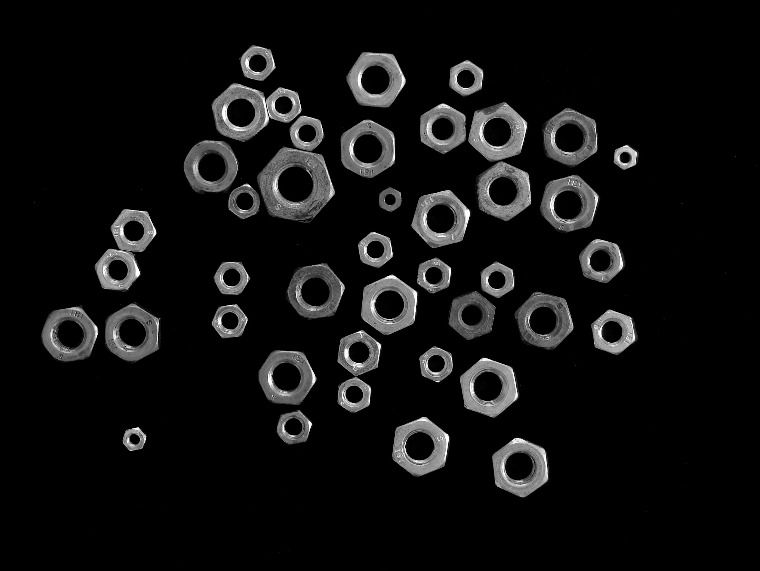
Original grayscale image
Output Image
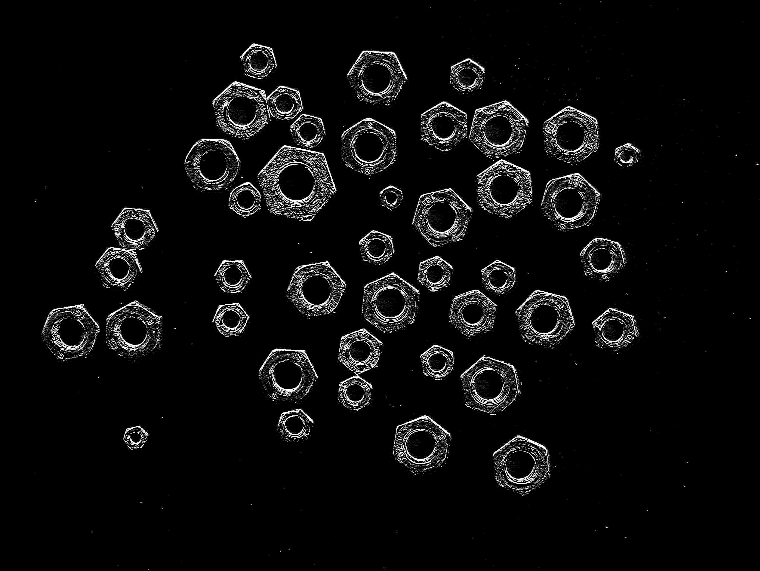
Scharr response with dx=1, dy=0, highlighting vertical intensity transitions
The Code
from telekinesis import pupil
from datatypes import io, datatypes

import pathlib
from loguru import logger

DATA_DIR = pathlib.Path("path/to/telekinesis-data")

# Load the grayscale image
filepath = str(DATA_DIR / "images" / "nuts_scattered.jpg")
image = io.load_image(filepath=filepath, as_gray=True)

# Apply Scharr filter for Y gradient
gradient_image = pupil.filter_image_using_scharr(
    image=image,
    dx=0,
    dy=1,
    scale=1.0,
    delta=0.0,
    output_format="64bit",
    border_type="default",
)
logger.success(f"Applied Scharr filter with gradient image shape as {gradient_image.to_numpy().shape}")
The Explanation of the Code
The Scharr filter computes high-accuracy directional image gradients using optimized convolution kernels that improve rotation invariance compared to Sobel. It is designed for scenarios where precise gradient orientation is important and where accurate gradient values are required for downstream processing such as magnitude computation.
The code starts by importing the required modules. These imports provide access to the Pupil SDK for filtering, filesystem utilities, and optional logging.
from telekinesis import pupil
from datatypes import io, datatypes

import pathlib
from loguru import logger
A data directory is defined and the input image is loaded as a grayscale image. Scharr operates on single-channel intensity images, as it computes spatial derivatives based on intensity changes rather than color information.
DATA_DIR = pathlib.Path("path/to/telekinesis-data")

# Load the grayscale image
filepath = str(DATA_DIR / "images" / "nuts_scattered.jpg")
image = io.load_image(filepath=filepath, as_gray=True)
Next, the Scharr filter parameters are configured. The Scharr operator is an optimized gradient filter that provides better rotational symmetry than the Sobel operator, making it more accurate for edge detection in arbitrary orientations.
dx and dy parameters define the direction of the gradient to compute. Setting dx=1, dy=0 computes the horizontal (X) gradient, while dx=0, dy=1 computes the vertical (Y) gradient. Only first-order derivatives are supported by the Scharr operator, which uses a 3x3 kernel optimized for gradient accuracy.
scale allows scaling of the computed gradient values, and delta adds an optional offset to the output, which can be useful for visualization or adjusting the dynamic range of gradient magnitudes.
output_format controls the numerical precision of the output, affecting how gradient values are represented, and border_type specifies how image borders are handled during convolution, affecting edge detection at image boundaries.
The Scharr filter is then applied using the filter_image_using_scharr Skill. The filter convolves the image with optimized Scharr kernels to compute the requested spatial derivative.
gradient_image = pupil.filter_image_using_scharr(
    image=image,
    dx=0,
    dy=1,
    scale=1.0,
    delta=0.0,
    output_format="64bit",
    border_type="default",
)
logger.success(f"Applied Scharr filter with gradient image shape as {gradient_image.to_numpy().shape}")
The resulting output image represents the gradient response in the specified direction, where stronger values correspond to sharper intensity transitions. The original image remains unchanged.
Running the Example
Runnable examples are available in the Telekinesis examples repository. Follow the README in that repository to set up the environment. Once set up, you can run this specific example with:
cd telekinesis-examples
python examples/pupil_examples.py --example filter_image_using_scharr
How to Tune the Parameters
The filter_image_using_scharr Skill has 6 parameters:
dx (default: 1):
- The order of the derivative in X direction
- Typical values: 0, 1
- Use 1 for horizontal gradients, 0 to ignore X direction
dy (default: 0):
- The order of the derivative in Y direction
- Typical values: 0, 1
- Use 1 for vertical gradients, 0 to ignore Y direction
scale (default: 1.0):
- The scale factor for computed gradient values
- Typical range: 0.1-10.0
delta (default: 0.0):
- The offset added to the output
- Typical range: -128.0 to 128.0
output_format (default: "64bit"):
- The output bit depth
- Options: "8bit", "16bit", "32bit", "64bit"
border_type (default: "default"):
- Border handling mode
- Options: "default", "constant", "replicate", "reflect", "wrap"
TIP
Best practice: Compute both X and Y gradients separately, then combine them for gradient magnitude: magnitude = sqrt(Gx² + Gy²). This provides complete edge information.
Where to Use the Skill in a Pipeline
Filter Using Scharr is commonly used in the following pipelines:
- Precise edge detection - When gradient accuracy is critical
- Optical flow - Accurate spatial gradients for motion estimation
- Feature extraction - High-quality gradients for descriptor computation
- Image registration - Precise gradients for alignment algorithms
- Structure from motion - Accurate edge orientation for 3D reconstruction
A typical pipeline using Scharr gradients looks as follows:
# Example pipeline using Scharr (parameters omitted).

from telekinesis import pupil
from datatypes import io
import numpy as np

# 1. Load frames
image = io.load_image(filepath=...)

# 2. Compute spatial gradients with Scharr
grad_x = pupil.filter_image_using_scharr(image=image, dx=1, dy=0, ...)
grad_y = pupil.filter_image_using_scharr(image=image, dx=0, dy=1, ...)

# 3. Convert gradients to NumPy arrays
grad_x = grad_x.to_numpy()
grad_y = grad_y.to_numpy()

# 4. Compute magnitude
magnitude = np.sqrt(grad_x**2 + grad_y**2)
magnitude = (magnitude / magnitude.max() * 255).astype(np.uint8)

# 5. Solve for downstream processing..
Related skills to build such a pipeline:
load_image: Load imagesfilter_image_using_gaussian_blur: Pre-smooth for noise reductionfilter_image_using_sobel: Faster alternative when accuracy is less critical
Alternative Skills
| Skill | vs. Filter Using Scharr |
|---|---|
| filter_image_using_sobel | Sobel is faster but less accurate. Use Scharr when gradient precision matters, Sobel for standard edge detection. |
| filter_image_using_laplacian | Laplacian computes second derivatives. Use Laplacian for omnidirectional edges, Scharr for precise directional gradients. |
When Not to Use the Skill
Do not use Filter Using Scharr when:
- Speed is more important than accuracy (Use Sobel for faster computation)
- You need omnidirectional edge detection (Use Laplacian instead)
- You're working with very large images in real-time (Consider Sobel for better performance)
- You need second-order derivatives (Use Laplacian for second derivatives)
WARNING
Like Sobel, Scharr is sensitive to noise. Always pre-smooth noisy images with Gaussian blur for best results.