

Filter Image Using Morphological Erosion
SUMMARY
Filter Image Using Morphological Erosion applies erosion to shrink bright regions and remove small noise.
Erosion removes pixels from object boundaries, useful for removing small bright spots and shrinking objects. This morphological operation is fundamental in image processing, particularly for cleaning up binary images, separating touching objects, and removing noise. It works by replacing each pixel with the minimum value in its neighborhood defined by the structuring element.
Use this Skill when you want to remove small bright features and shrink objects.
The Skill
from telekinesis import pupil

filtered_image = pupil.filter_image_using_morphological_erode(
    image=image,
    kernel_size=5,
    kernel_shape="ellipse",
    iterations=1,
    border_type="default",
)Example
Input Image
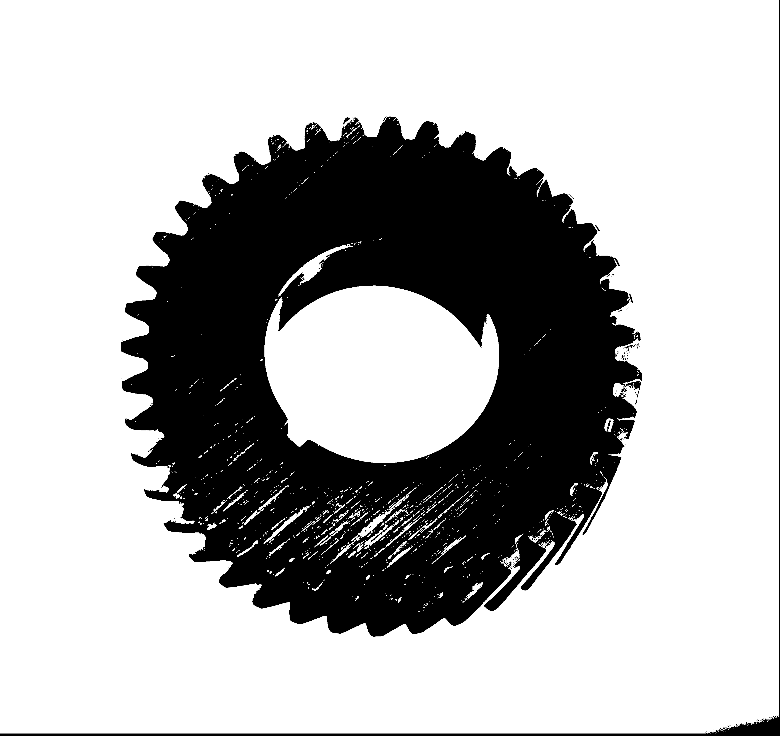
Original grayscale or binary image
Output Image
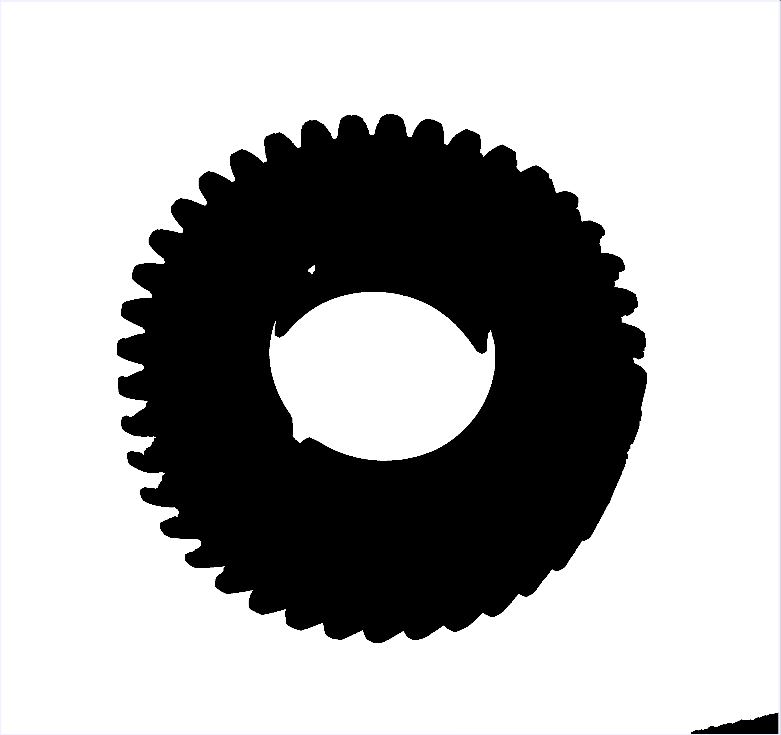
Eroded image with kernel_size=5, kernel_shape="ellipse" - small features removed, objects shrunk
The Code
from telekinesis import pupil
from datatypes import io, datatypes
import pathlib
from loguru import logger

DATA_DIR = pathlib.Path("path/to/telekinesis-data")

# Load the binary image
filepath = str(DATA_DIR / "images" / "gear_with_texture.jpg")
image = io.load_image(filepath=filepath, as_binary=True, binary_method='fixed')

# Apply erosion
filtered_image = pupil.filter_image_using_morphological_erode(
    image=image,
    kernel_size=5,
    kernel_shape="ellipse",
    iterations=10,
    border_type="default",
)
logger.success(f"Applied erosion with eroded image shape as {filtered_image.to_numpy().shape}")
The Explanation of the Code
The morphological erosion implementation follows a standard image processing workflow with proper parameter configuration.
First, import the required modules:
from telekinesis import pupil
from datatypes import io, datatypes
import pathlib
from loguru import logger
These imports provide access to the Pupil SDK, type-safe datatypes for both I/O and parameters, path handling utilities, and logging functionality.
Next, prepare your image data:
DATA_DIR = pathlib.Path("path/to/telekinesis-data")
image = io.load_image(filepath=filepath, as_binary=True, binary_method='fixed')
The image is loaded from the data directory using the io module. For morphological operations, the image is loaded as a binary image using the as_binary=True parameter, which creates a binary mask where erosion can effectively remove small bright features.
Next, the parameters controlling the erosion operation are configured. Erosion shrinks bright regions by replacing each pixel with the minimum value in its neighborhood defined by the structuring element.
kernel_size determines the size of the structuring element used for erosion. Larger kernels remove larger features and create more aggressive shrinking, while smaller kernels preserve more detail but remove only small noise.
kernel_shape defines the geometric shape of the structuring element. Common shapes include "ellipse" for smooth, isotropic erosion, "rectangle" for axis-aligned operations, and "cross" for directional effects. The shape affects how objects shrink and how boundaries are modified.
iterations controls how many times the erosion operation is applied sequentially. Each iteration further shrinks objects, so more iterations result in more aggressive erosion. Multiple iterations can be used to remove progressively larger features or achieve specific size reductions.
border_type specifies how pixels near image boundaries are handled during erosion, where the structuring element extends beyond the image edges. This affects how objects near borders are processed.
Finally, the erosion operation is applied using the filter_image_using_morphological_erode Skill.
filtered_image = pupil.filter_image_using_morphological_erode(
    image=image,
    kernel_size=5,
    kernel_shape="ellipse",
    iterations=10,
    border_type="default",
)
logger.success(f"Applied erosion with eroded image shape as {filtered_image.to_numpy().shape}")
Erosion shrinks bright regions by replacing each pixel with the minimum value in its neighborhood defined by the structuring element. This operation removes small bright spots and noise, separates touching objects, and thins object boundaries, making it fundamental for binary image cleanup and preprocessing for segmentation tasks.
Running the Example
Runnable examples are available in the Telekinesis examples repository. Follow the README in that repository to set up the environment. Once set up, you can run this specific example with:
cd telekinesis-examples
python examples/pupil_examples.py --example filter_image_using_morphological_erode
How to Tune the Parameters
The filter_image_using_morphological_erode Skill has 4 parameters:
kernel_size (default: 5):
- The size of the structuring element
- Increase to remove larger features and shrink objects more
- Decrease for less aggressive erosion
- Typical range: 3-15
- Use 3-5 for small noise, 5-9 for moderate features, 9-15 for large features
kernel_shape (default: "ellipse"):
- The shape of the structuring element
- Options: "ellipse", "rectangle", "cross"
- "ellipse" provides isotropic erosion
- "rectangle" creates rectangular patterns
- "cross" creates plus-sign patterns
- Use "ellipse" for most cases
iterations (default: 1):
- The number of times erosion is applied
- Increase to apply more erosion
- Decrease for less erosion
- Typical range: 1-10
- Each iteration compounds the effect
border_type (default: "default"):
- The border handling mode
- Options: "default", "constant", "replicate", "reflect", "wrap"
TIP
Best practice: Start with kernel_size=5 and iterations=1. If small noise remains, increase kernel_size slightly. If objects become too small, reduce kernel_size or use fewer iterations.
Where to Use the Skill in a Pipeline
Morphological Erosion is commonly used in the following pipelines:
- Binary image cleanup - Remove small noise spots from thresholded images
- Object separation - Break thin connections between touching objects
- Feature removal - Remove features smaller than the structuring element
- Preprocessing for segmentation - Clean images before analysis
- Shape analysis - Simplify object boundaries
A typical pipeline for noise removal looks as follows:
# Example pipeline using erosion (parameters omitted).

from telekinesis import pupil
from datatypes import io

# 1. Load surface image
image = io.load_image(filepath=...)

# 2. Threshold to binary
binary = ...

# 3. Apply erosion to remove small noise
cleaned = pupil.filter_image_using_morphological_erode(image=binary, ...)

# 4. Apply dilation to restore object size
restored = pupil.filter_image_using_morphological_dilate(image=cleaned, ...)
Related skills to build such a pipeline:
load_image: Load imagesfilter_image_usingmorphological_dilate: Expand objects after erosionfilter_image_usingmorphological_open: Combined erosion-dilation operationfilter_image_using_median_blur: Alternative noise removal method
Alternative Skills
| Skill | vs. Morphological Erosion |
|---|---|
| filter_image_using_morphological_open | Opening is erosion followed by dilation. Use opening to remove noise while preserving object size, erosion when you want to shrink objects. |
| filter_image_using_median_blur | Median blur removes noise on grayscale images. Use erosion for binary images, median blur for grayscale. |
When Not to Use the Skill
Do not use Morphological Erosion when:
- You want to preserve object size (Use opening instead, which dilates after eroding)
- You're working with grayscale noise (Use median or Gaussian blur instead)
- You want to fill holes (Use dilation or closing instead)
- You need to preserve fine details (Erosion will remove small features)
WARNING
Erosion shrinks objects. If you erode too much, small objects may disappear entirely. Always follow erosion with dilation if you want to restore object size after noise removal.