

Filter Image Using Gaussian Blur
SUMMARY
Filter Image Using Gaussian Blur applies Gaussian blur for smooth noise reduction.
Gaussian blur uses a Gaussian kernel for weighted averaging, providing natural-looking blur with better edge preservation than simple blur. This is one of the most commonly used filters in computer vision, offering an excellent balance between smoothing effectiveness and visual quality. It's particularly effective for reducing Gaussian noise and preparing images for further processing.
Use this Skill when you want to smoothly reduce noise with natural-looking results.
The Skill
from telekinesis import pupil

blurred_image = pupil.filter_image_using_gaussian_blur(
    image=image,
    kernel_size=7,
    sigma_x=3.0,
    sigma_y=3.0,
    border_type="default",
)Example
Input Image
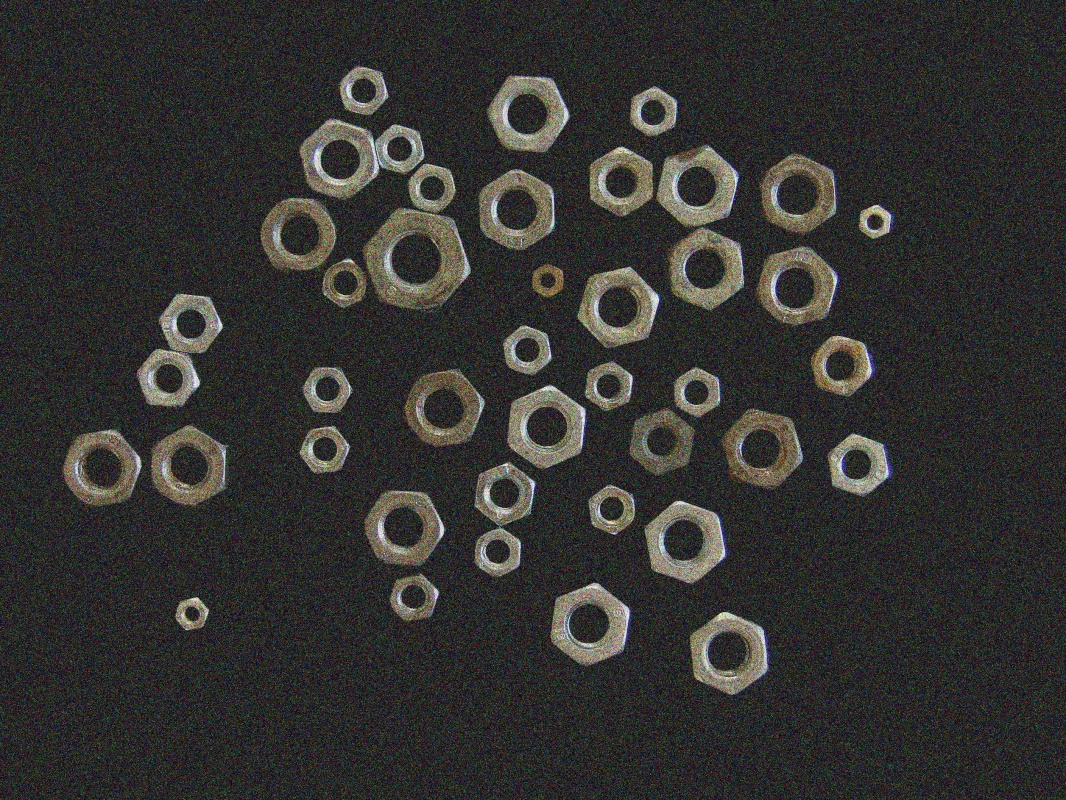
Original image with noise
Output Image
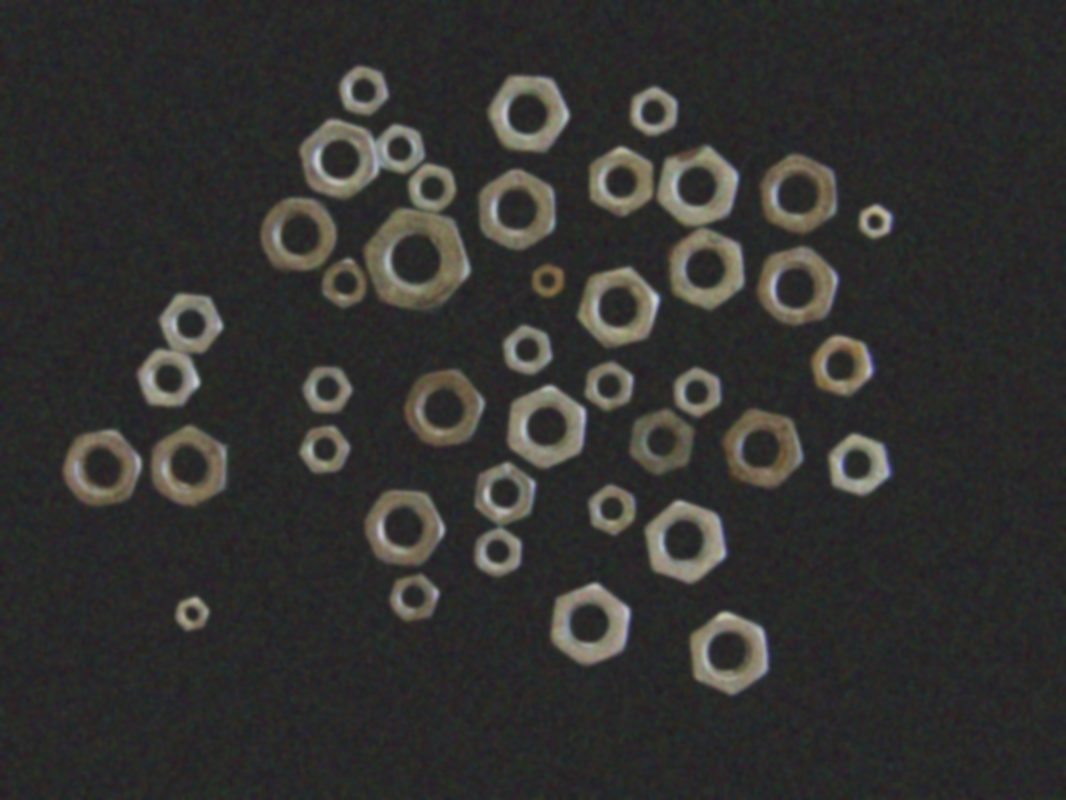
Blurred image with kernel_size=15, sigma_x=3.0, sigma_y=3.0
The Code
from telekinesis import pupil
from datatypes import io, datatypes

import pathlib
from loguru import logger

DATA_DIR = pathlib.Path("path/to/telekinesis-data")

# Load image
filepath = str(DATA_DIR / "images" / "nuts_scattered_noised.png")
image = io.load_image(filepath=filepath)

# Apply Gaussian blur
blurred_image = pupil.filter_image_using_gaussian_blur(
    image=image,
    kernel_size=7,
    sigma_x=3.0,
    sigma_y=3.0,
    border_type="default",
)
logger.success(f"Applied Gaussian blur with blurred image shape as {blurred_image.to_numpy().shape}")
The Explanation of the Code
The Gaussian blur filter performs smooth noise reduction by convolving the image with a Gaussian-weighted kernel. Unlike simple averaging filters, Gaussian blur assigns higher weight to pixels closer to the center of the kernel, producing more natural-looking smoothing while reducing high-frequency noise.
The code begins by importing the required modules. These imports provide access to the Pupil SDK for image filtering operations, image I/O utilities, and optional logging functionality.
from telekinesis import pupil
from datatypes import io, datatypes

import pathlib
from loguru import logger
A data directory is defined, and the input image is loaded from disk using the io.load_image function. The image may be either grayscale (H, W) or color (H, W, C). Gaussian blur supports both formats and applies the blur independently to each channel in color images.
DATA_DIR = pathlib.Path("path/to/telekinesis-data")

# Load image
filepath = str(DATA_DIR / "images" / "nuts_scattered_noised.png")
image = io.load_image(filepath=filepath)
Next, the Gaussian blur parameters are configured. Gaussian blur applies a weighted average using a Gaussian distribution, where pixels closer to the center have higher influence, producing natural-looking smoothing.
kernel_size defines the size of the Gaussian kernel and must be an odd integer to maintain symmetry around the center pixel. Larger kernels produce stronger blur effects but require more computation.
sigma_x and sigma_y control the standard deviation of the Gaussian distribution in the horizontal and vertical directions, respectively. These values determine how strongly pixels at different distances influence the output. When set explicitly, they allow fine-grained control over the blur strength in each direction, enabling anisotropic blur effects.
border_type specifies how pixels near the image boundaries are handled when the kernel extends beyond the image edges, affecting edge behavior in the filtered result.
Finally, the Gaussian blur is applied using the filter_image_using_gaussian_blur Skill. The original image remains unchanged, and a new blurred image is returned as output.
blurred_image = pupil.filter_image_using_gaussian_blur(
    image=image,
    kernel_size=7,
    sigma_x=3.0,
    sigma_y=3.0,
    border_type="default",
)
logger.success(f"Applied Gaussian blur with blurred image shape as {blurred_image.to_numpy().shape}")
This operation produces smooth, visually pleasing blur by reducing noise while avoiding the blocky artifacts associated with simple averaging filters.
Gaussian blur is commonly used as a preprocessing step for edge detection, feature extraction, image pyramids, and general noise reduction tasks.
Running the Example
Runnable examples are available in the Telekinesis examples repository. Follow the README in that repository to set up the environment. Once set up, you can run this specific example with:
cd telekinesis-examples
python examples/pupil_examples.py --example filter_image_using_gaussian_blur
How to Tune the Parameters
The filter_image_using_gaussian_blur Skill has 4 parameters that control the blur characteristics:
kernel_size (default: 15):
- The size of the Gaussian kernel. Must be odd.
- Units: Pixels
- Increase to create more blur and consider more distant pixels
- Decrease for less blur and faster processing
- Typical range: 3-31
- Use 3-7 for light blur, 7-15 for moderate blur, 15-31 for heavy blur
sigma_x (default: 3.0):
- The standard deviation in the X direction
- Units: Pixels (standard deviation)
- Increase to create more horizontal blur
- Decrease to reduce horizontal blur
- When 0, computed automatically from kernel_size
- Typical range: 0.0-10.0
- Use 0.0 for auto-computation, 1.0-3.0 for light blur, 3.0-7.0 for moderate blur, 7.0-10.0 for heavy blur
sigma_y (default: 3.0):
- The standard deviation in the Y direction
- Units: Pixels (standard deviation)
- Increase to create more vertical blur
- Decrease to reduce vertical blur
- When 0, computed automatically from kernel_size
- Typical range: 0.0-10.0
- Use 0.0 for auto-computation, 1.0-3.0 for light blur, 3.0-7.0 for moderate blur, 7.0-10.0 for heavy blur
TIP
Best practice: For isotropic (circular) blur, use equal values for sigma_x and sigma_y. For directional blur (like motion blur), use different values. Set both to 0.0 to let the kernel_size determine the blur automatically.
border_type (default: "default"):
- The border handling mode for pixels near image edges
- Options: "default", "constant", "replicate", "reflect", "wrap"
- "default" uses the library's default behavior
- Use "default" or "reflect" for most cases
Where to Use the Skill in a Pipeline
Filter Using Gaussian Blur is commonly used in the following pipelines:
- Noise reduction - Remove Gaussian noise before analysis
- Pyramid construction - Smooth before downsampling for scale-space analysis
- Edge detection preprocessing - Reduce noise before applying edge detectors
- Feature extraction - Initial smoothing for robust feature detection
- Image enhancement - Create soft-focus effects or reduce fine details
A typical pipeline for edge detection looks as follows:
# Example pipeline using Gaussian blur (parameters omitted).

from telekinesis import pupil
from datatypes import io

# 1. Load the image
image = io.load_image(filepath=...)

# 2. Apply Gaussian blur to reduce noise
smoothed = pupil.filter_image_using_gaussian_blur(image=image, ...)

# 3. Apply edge detection
edges = pupil.filter_image_using_sobel(image=gray, ...)
Related skills to build such a pipeline:
load_image: Load images from diskfilter_image_using_sobel: Detect edges using Sobel operatorfilter_image_using_canny: Detect edges using Canny algorithm (if available)transform_image_using_pyramid_downsampling: Create image pyramids for multi-scale processing
Alternative Skills
| Skill | vs. Filter Using Gaussian Blur |
|---|---|
| filter_image_using_bilateral | Bilateral filter preserves edges better but is slower. Use bilateral when edges are critical, Gaussian when speed and smoothness matter. |
| filter_image_using_blur | Box blur is faster but lower quality. Use Gaussian for better results, box blur only when speed is absolutely critical. |
| filter_image_using_median_blur | Median blur is better for salt-and-pepper noise. Use median for impulse noise, Gaussian for general smoothing. |
When Not to Use the Skill
Do not use Filter Using Gaussian Blur when:
- You need to preserve sharp edges (Use bilateral filter instead)
- You're specifically removing salt-and-pepper noise (Use median blur instead)
- You want the fastest possible smoothing (Use box blur for speed)
- You need directional filtering (Use oriented filters like Gabor instead)
WARNING
Gaussian blur will soften edges. If edge preservation is critical, consider using bilateral filtering instead.