

Detect Circle Using Classic Hough
SUMMARY
Detect Circle Using Classic Hough detects circles using the classic Hough Circle Transform.
Classic Hough circle detection analyzes edge evidence in a grayscale image and votes in
Use this Skill when you want to detect circular objects with interpretable geometric parameters (center and radius).
The Skill
from telekinesis import retina

annotations = retina.detect_circle_using_classic_hough(
    image=image,
    inverse_resolution_ratio=1,
    min_distance=50,
    min_radius=40,
    max_radius=60,
    canny_detector_upper_threshold=300,
    accumulator_threshold=30,
)Example
Input Image
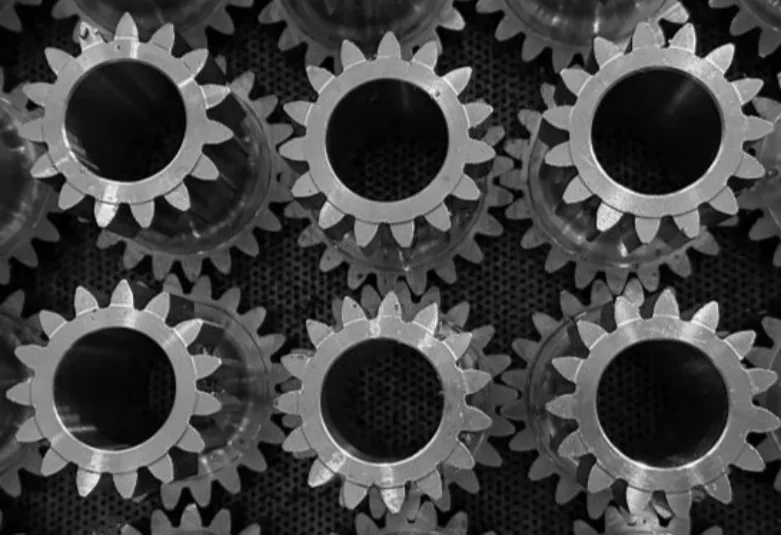
Original grayscale image
Detected Circles and Bounding Box
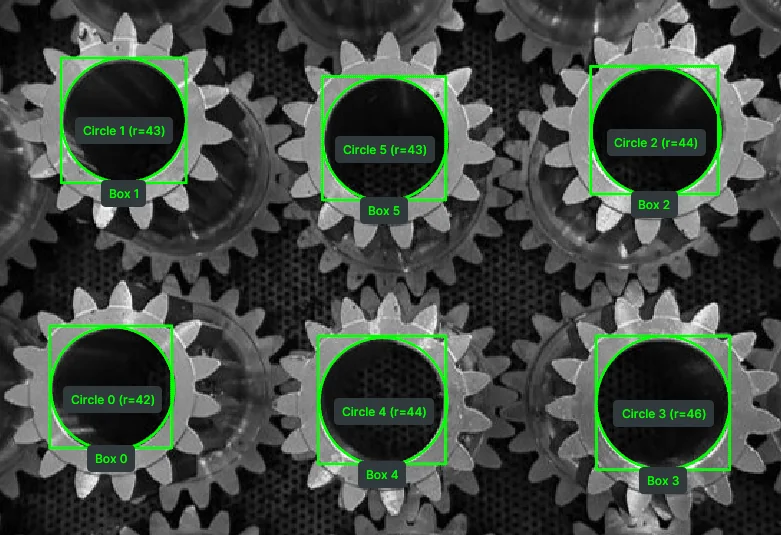
Image overlaid with detected circles, their radii, and bounding boxes.
The Code
from telekinesis import retina
from datatypes import io
import pathlib

# Optional for logging
from loguru import logger

DATA_DIR = pathlib.Path("path/to/telekinesis-data")

# Load image
filepath = str(DATA_DIR / "images" / "metal_gears.jpg")
image = io.load_image(filepath=filepath, as_gray=True)
logger.success(f"Loaded image from {filepath}")

# Detect circles
annotations = retina.detect_circle_using_classic_hough(
    image=image,
    inverse_resolution_ratio=1,
    min_distance=50,
    min_radius=40,
    max_radius=60,
    canny_detector_upper_threshold=300,
    accumulator_threshold=30,
)

# Access results
annotations = annotations.to_list()
logger.success(f"Detected {len(annotations)} circles using classic Hough transform.")
The Explanation of the Code
This example shows how to use the detect_circle_using_classic_hough Skill to quickly detect circles of a grayscale image. The code begins by importing the necessary modules from Telekinesis and Python, and optionally sets up logging with loguru to provide feedback during execution.
from telekinesis import retina
from datatypes import io
import pathlib

# Optional for logging
from loguru import logger
The image is loaded from a .jpg file using io.load_image. The logger immediately reports the path of image loaded, helping confirm the input is correct and ready for processing.
DATA_DIR = pathlib.Path("path/to/telekinesis-data")

# Load image
filepath = str(DATA_DIR / "images" / "metal_gears.jpg")
image = io.load_image(filepath=filepath, as_gray=True)
logger.success(f"Loaded image from {filepath}")
The detection parameters are configured:
imagespecifies the input grayscale imageinverse_resolution_ratiocontrols the accumulator resolution relative to the image resolutionmin_distancesets the minimum distance between detected circle centersmin_radius/max_radiusconstrain the range of detectable circle radiicanny_detector_upper_thresholdsets the upper threshold for the internal Canny edge detectoraccumulator_thresholdcontrols how strict the detection is (higher = fewer circles)
annotations = retina.detect_circle_using_classic_hough(
    image=image,
    inverse_resolution_ratio=1,
    min_distance=50,
    min_radius=40,
    max_radius=60,
    canny_detector_upper_threshold=300,
    accumulator_threshold=30,
)
The function returns a GeometryDetectionAnnotations object in COCO-like format. Call .to_list() to get the list of detected circles. The logger outputs the number of circles detected.
# Access results
annotations = annotations.to_list()
logger.success(f"Detected {len(annotations)} circles using classic Hough transform.")
This workflow focuses on the Skill itself: it provides a fast, parameter-driven approach to circle detection, useful in industrial vision pipelines for locating circular parts, measuring radii, and extracting geometric features for downstream tasks such as quality inspection and robotic bin picking.
Running the Example
Runnable examples are available in the Telekinesis examples repository. Follow the README in that repository to set up the environment. Once set up, you can run this specific example with:
cd telekinesis-examples
python examples/retina_examples.py --example detect_circle_using_classic_hough
How to Tune the Parameters
The detect_circle_using_classic_hough Skill has several tunable parameters. Key ones:
inverse_resolution_ratio :
- Inverse ratio of the accumulator resolution to the image resolution
- Units: Dimensionless
- Set to
1for full-resolution accumulator (most accurate) - Increase to reduce accumulator resolution (faster but less precise)
- Typical range: 1–2
min_distance:
- Minimum distance between detected circle centers
- Units: Pixels
- Increase if circles are being detected too close together (merges duplicates)
- Decrease if closely spaced circles are missed
- Typical range: depends on image resolution and object size
min_radius / max_radius:
- Minimum and maximum circle radius to detect
- Units: Pixels
- Narrow the range when you know the expected circle size to reduce false positives
- Typical range: depends on image resolution and object size
canny_detector_upper_threshold:
- Upper threshold for the internal Canny edge detector
- Units: Intensity (0–255 for 8-bit images)
- Increase to require stronger edges (fewer but more confident detections)
- Decrease to detect circles with weaker edges
- Typical range: 50–300
accumulator_threshold:
- Accumulator threshold for circle center detection
- Units: Votes (integer)
- Increase to make detection stricter (fewer circles, fewer false positives)
- Decrease to allow weaker circle candidates
- Typical range: 10–100
TIP
Best practice: Start with inverse_resolution_ratio=1, set min_radius and max_radius to bracket the expected circle size, then adjust accumulator_threshold to balance precision vs. recall.
Where to Use the Skill
Detect Circle Using Classic Hough is commonly used in the following pipelines:
- Circular object detection – Finding gears, washers, buttons, or other round parts
- Quality inspection – Measuring circle radii for dimensional checks
- Bin picking – Locating circular objects for robotic grasping
- Part counting – Counting circular components on a tray or conveyor
Alternative Skills
| Skill | vs. Detect Circle Using Classic Hough |
|---|---|
| detect_contours | Contours detect arbitrary shapes and outlines. Use contours for non-circular shapes, classic Hough for circles with known radius range. |
| detect_objects_using_grounding_dino | Grounding DINO does semantic object detection with text. Use for object classes by name; use classic Hough for geometric circle detection. |
| detect_objects_using_yolox | YOLOX detects object classes. Use for trained object categories; use classic Hough for parameterized circle geometry. |
When Not to Use the Skill
Do not use Detect Circle Using Classic Hough when:
- Circles are filled blobs without clear edges
- Shapes are elliptical rather than circular
- Image is very noisy (Edge detection may produce too many false positives)
- You need sub-pixel accuracy (Hough transform returns integer-resolution results)
TIP
Classic Hough circle detection works best on grayscale images with strong edge contrast. For best results, apply preprocessing (e.g., Gaussian blur) to reduce noise before detection.