

Filter Image Using Morphological Close
SUMMARY
Filter Image Using Morphological Close applies morphological closing (dilation followed by erosion).
Closing fills small holes and gaps, useful for connecting nearby components while preserving overall shape. This operation first expands objects to close gaps, then shrinks them back to approximately their original size. It's particularly effective for filling holes in objects and connecting closely spaced components without significantly changing their boundaries.
Use this Skill when you want to fill holes and connect nearby objects while maintaining size.
The Skill
from telekinesis import pupil

filtered_image = pupil.filter_image_using_morphological_close(
    image=image,
    kernel_size=5,
    kernel_shape="ellipse",
    iterations=1,
    border_type="default",
)Example
Input Image
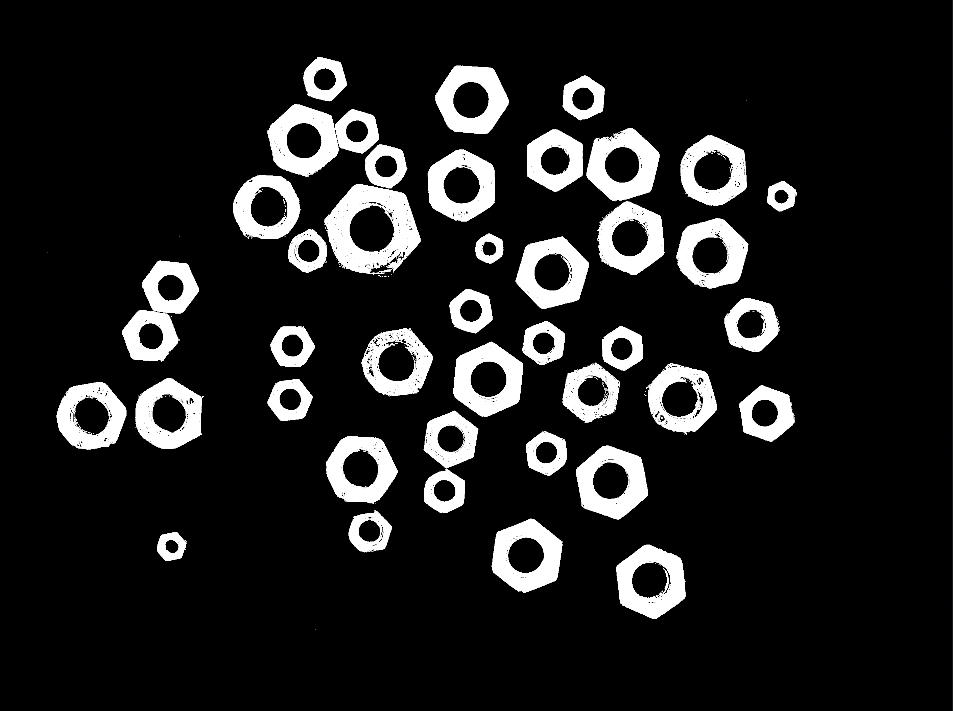
Original image with holes and gaps
Output Image
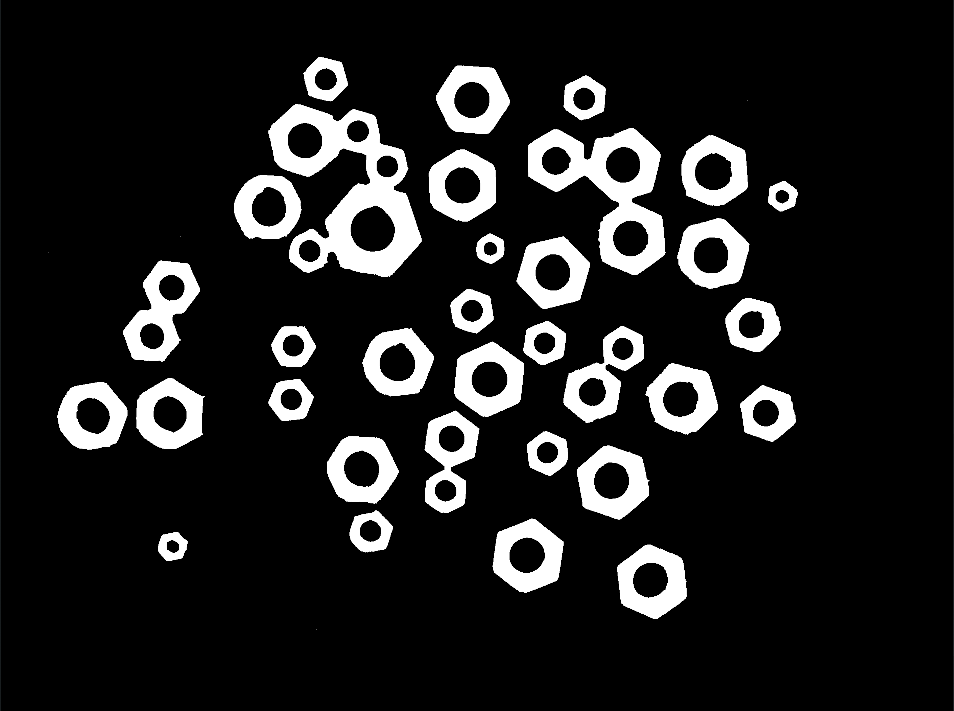
Closed image - holes filled, objects connected
The Code
from telekinesis import pupil
from datatypes import io, datatypes
import pathlib
from loguru import logger

DATA_DIR = pathlib.Path("path/to/telekinesis-data")

# Load the binary image
filepath = str(DATA_DIR / "images" / "nuts_scattered.jpg")
image = io.load_image(filepath=filepath, as_binary=True)

# Apply closing
filtered_image = pupil.filter_image_using_morphological_close(
    image=image,
    kernel_size=5,
    kernel_shape="ellipse",
    iterations=5,
    border_type="default",
)
logger.success(f"Applied closing with closed image shape as {filtered_image.to_numpy().shape}")
The Explanation of the Code
The morphological closing implementation follows a standard image processing workflow with proper parameter configuration.
First, import the required modules:
from telekinesis import pupil
from datatypes import io, datatypes
import pathlib
from loguru import logger
These imports provide access to the Pupil SDK, type-safe datatypes for both I/O and parameters, path handling utilities, and logging functionality.
Next, prepare your image data:
DATA_DIR = pathlib.Path("path/to/telekinesis-data")
filepath = str(DATA_DIR / "images" / "nuts_scattered.jpg")
image = io.load_image(filepath=filepath, as_binary=True)
The image is loaded from the data directory using the io module. For morphological operations, the image is loaded as a binary image using the as_binary=True parameter, which creates a binary mask suitable for morphological processing.
Next, the parameters controlling the closing operation are configured. Closing is a compound operation that first dilates the image to expand bright regions and fill small holes, then erodes back to approximately the original size.
kernel_size determines the size of the structuring element used for closing. Larger kernels fill larger holes and connect more distant components, while smaller kernels only fill small gaps and preserve fine details.
kernel_shape defines the geometric shape of the structuring element. Common shapes include "ellipse" for smooth, isotropic closing, "rectangle" for axis-aligned operations, and "cross" for directional effects. The shape affects how holes are filled and how components are connected.
iterations controls how many times the closing operation (dilation followed by erosion) is applied sequentially. Each iteration fills progressively larger holes and connects more distant components, but may also merge separate objects if they are close enough.
border_type specifies how pixels near image boundaries are handled during closing, where the structuring element extends beyond the image edges. This affects how objects near borders are processed.
Finally, the closing operation is applied using the filter_image_using_morphological_close Skill.
filtered_image = pupil.filter_image_using_morphological_close(
    image=image,
    kernel_size=5,
    kernel_shape="ellipse",
    iterations=5,
    border_type="default",
)
logger.success(f"Applied closing with closed image shape as {filtered_image.to_numpy().shape}")
Closing first dilates the image to expand bright regions and fill small holes, then erodes back to approximately the original size. This fills small holes and connects nearby components without significantly expanding objects, making it useful for mask refinement and object completion in segmentation pipelines.
Running the Example
Runnable examples are available in the Telekinesis examples repository. Follow the README in that repository to set up the environment. Once set up, you can run this specific example with:
cd telekinesis-examples
python examples/pupil_examples.py --example filter_image_using_morphological_close
How to Tune the Parameters
The filter_image_using_morphological_close Skill has 4 parameters:
kernel_size (default: 5):
- The size of the structuring element
- Increase to fill larger holes and connect more distant objects
- Typical range: 3-15
- Use 3-5 for small holes, 5-9 for moderate gaps, 9-15 for large holes
kernel_shape (default: "ellipse"):
- The shape of the structuring element
- Options: "ellipse", "rectangle", "cross"
- Use "ellipse" for isotropic operations
iterations (default: 1):
- The number of times closing is applied
- Typical range: 1-10
border_type (default: "default"):
- The border handling mode
- Options: "default", "constant", "replicate", "reflect", "wrap"
TIP
Best practice: Closing is ideal for filling holes in segmented objects. Choose kernel_size based on the size of holes you want to fill - the kernel should be slightly larger than the holes.
Where to Use the Skill in a Pipeline
Morphological Closing is commonly used in the following pipelines:
- Object segmentation cleanup - Fill holes in detected objects
- Region connection - Connect nearby regions into single objects
- Contour smoothing - Smooth concave boundaries
- Mask refinement - Clean up segmentation masks
- Feature completion - Complete partially detected features
A typical pipeline for segmentation cleanup looks as follows:
# Example pipeline using closing (parameters omitted).

from telekinesis import pupil
from datatypes import io

# 1. Load image
image = io.load_image(filepath=...)
binary = ...

# 2. Apply closing to fill holes
filled = pupil.filter_image_using_morphological_close(image=binary, ...)

# 3. Find contours or analyze objects
contours = ...
Related skills to build such a pipeline:
load_image: Load imagesfilter_image_using_morphological_open: Remove noisefilter_image_usingmorphological_dilate: Expand objectsfilter_image_usingmorphological_erode: Shrink objects
Alternative Skills
| Skill | vs. Morphological Closing |
|---|---|
| filter_image_using_morphological_open | Opening removes noise, closing fills holes. Use opening to remove small objects, closing to fill small holes. |
| filter_image_using_morphological_dilate | Dilation only expands. Use closing when you want to fill holes without permanently expanding objects. |
When Not to Use the Skill
Do not use Morphological Closing when:
- You want to remove noise (Use opening instead)
- You want to separate touching objects (Use erosion or opening)
- Holes are actually important features (Don't fill them)
- You need to preserve all boundary details (Closing will smooth boundaries)
WARNING
Closing will connect objects that are close together. If maintaining object separation is important, use a smaller kernel_size or consider other operations.