

Segment Image Using Watershed
SUMMARY
Segment Image Using Watershed performs watershed segmentation.
Watershed segmentation uses marker images to identify regions and applies the watershed algorithm to separate touching or overlapping objects. This method is particularly effective for separating objects that are close together or touching.
Use this Skill when you want to separate touching or overlapping objects using marker-based segmentation.
The Skill
from telekinesis import cornea

result = cornea.segment_image_using_watershed(
    image=image,
    markers=markers,
connectivity=1)Example
Input Image
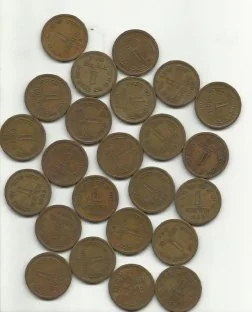
Original image for watershed segmentation
Output Image
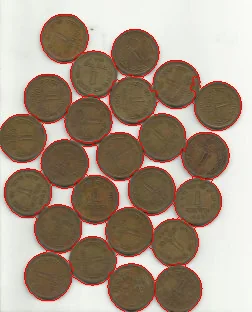
Separated objects using watershed algorithm
The Code
import pathlib

import cv2
import numpy as np
from skimage.filters import sobel

from telekinesis import cornea
from datatypes import datatypes, io

DATA_DIR = pathlib.Path("path/to/telekinesis-data")

def load_markers(*, filepath: str) -> np.ndarray:
    """
    Returns int32 markers array.
    """
    markers = np.load(filepath)
    if markers.dtype != np.int32:
        markers = markers.astype(np.int32)
    return markers

# Load image and marker image
image = io.load_image(filepath=str(DATA_DIR / "images" / "water_coins.jpg"))
image_np = image.to_numpy()

markers_np = load_markers(filepath=str(DATA_DIR / "images" / "water_coins_markers.npy"))
markers = datatypes.Image(image=markers_np, color_model="L")

# Build elevation/gradient image
if image_np.ndim == 3:
    gray = cv2.cvtColor(image_np, cv2.COLOR_RGB2GRAY)
else:
    gray = image_np

gradient = sobel(gray)
gradient_normalized = (
    (gradient - gradient.min()) / (gradient.max() - gradient.min() + 1e-12) * 255
).astype(np.uint8)
gradient_image = datatypes.Image(image=gradient_normalized, color_model="L")

# Perform watershed segmentation
result = cornea.segment_image_using_watershed(
    image=gradient_image,   # elevation image
    markers=markers,        # precomputed markers
    connectivity=1,
)

# Access results
annotation = result["annotation"].to_dict()
mask = annotation["labeled_mask"]
The Explanation of the Code
Watershed segmentation uses a marker image to identify seed regions and applies the watershed algorithm to separate objects. The algorithm treats the image as a topographic surface and floods from markers to separate regions.
The code begins by importing the required modules and loading both the input image and marker image:
import pathlib

import cv2
import numpy as np
from skimage.filters import sobel

from telekinesis import cornea
from datatypes import datatypes, io

DATA_DIR = pathlib.Path("path/to/telekinesis-data")
image = io.load_image(filepath=str(DATA_DIR / "images" / "water_coins.jpg"))
markers_np = np.load(str(DATA_DIR / "images" / "water_coins_markers.npy"))
markers = datatypes.Image(image=markers_np.astype(np.int32), color_model="L")
The watershed segmentation parameters are configured:
markers is a marker image where each unique value represents a different region seed.
connectivity controls the connectivity for the watershed algorithm (1 for 4-connectivity, 2 for 8-connectivity).
result = cornea.segment_image_using_watershed(
    image=image,
    markers=markers,      # Marker image with seed regions
    connectivity=1,       # Connectivity (1 or 2))
)
The function returns a dictionary containing segmentation results in COCO panoptic format.
Running the Example
Runnable examples are available in the Telekinesis examples repository. Follow the README in that repository to set up the environment. Once set up, you can run this specific example with:
cd telekinesis-examples
python examples/cornea_examples.py --example segment_image_using_watershed
How to Tune the Parameters
The segment_image_using_watershed Skill has 2 parameters:
markers (required):
- Marker image with seed regions
- Units: Image object
- Each unique value in the marker image represents a different region
- Markers should be placed at the center of objects to be segmented
connectivity (default: 1):
- Connectivity for watershed algorithm
- Units: Integer (1 or 2)
- 1 for 4-connected (up, down, left, right)
- 2 for 8-connected (includes diagonals)
- Typical: 8 for better separation
TIP
Best practice: Create markers by applying distance transform to binary masks, or by detecting object centers. Each marker should be a unique value, with 0 representing background.
Where to Use the Skill
Segment Image Using Watershed is commonly used in the following pipelines:
- Separating touching objects - When objects are close together
- Cell segmentation - Separating individual cells in microscopy
- Particle analysis - Separating individual particles
- Object counting - Counting objects that are touching
Alternative Skills
| Skill | vs. Segment Image Using Watershed |
|---|---|
| segment_image_using_flood_fill | Flood fill is simpler. Use flood fill for single region, watershed for multiple regions. |
When Not to Use the Skill
Do not use Segment Image Using Watershed when:
- Objects are well-separated (Use simpler segmentation methods)
- You don't have markers (Create markers first or use other methods)
- Speed is critical (Watershed can be slower than simpler methods)
TIP
Watershed is particularly effective for separating objects that are touching or overlapping, such as cells in microscopy or particles in industrial inspection.