

Filter Image Using Morphological Gradient
SUMMARY
Filter Image Using Morphological Gradient applies morphological gradient for edge detection.
Morphological gradient highlights boundaries by computing the difference between dilation and erosion. This operation extracts object boundaries by subtracting the eroded image from the dilated image, creating an outline of objects.
It's particularly effective for extracting edges in binary or grayscale images without being as sensitive to noise as derivative-based edge detectors.
Use this Skill when you want to extract object boundaries using morphological operations.
The Skill
from telekinesis import pupil

filtered_image = pupil.filter_image_using_morphological_gradient(
    image=image,
    kernel_size=5,
    kernel_shape="ellipse",
    iterations=1,
    border_type="default",
)Example
Input Image
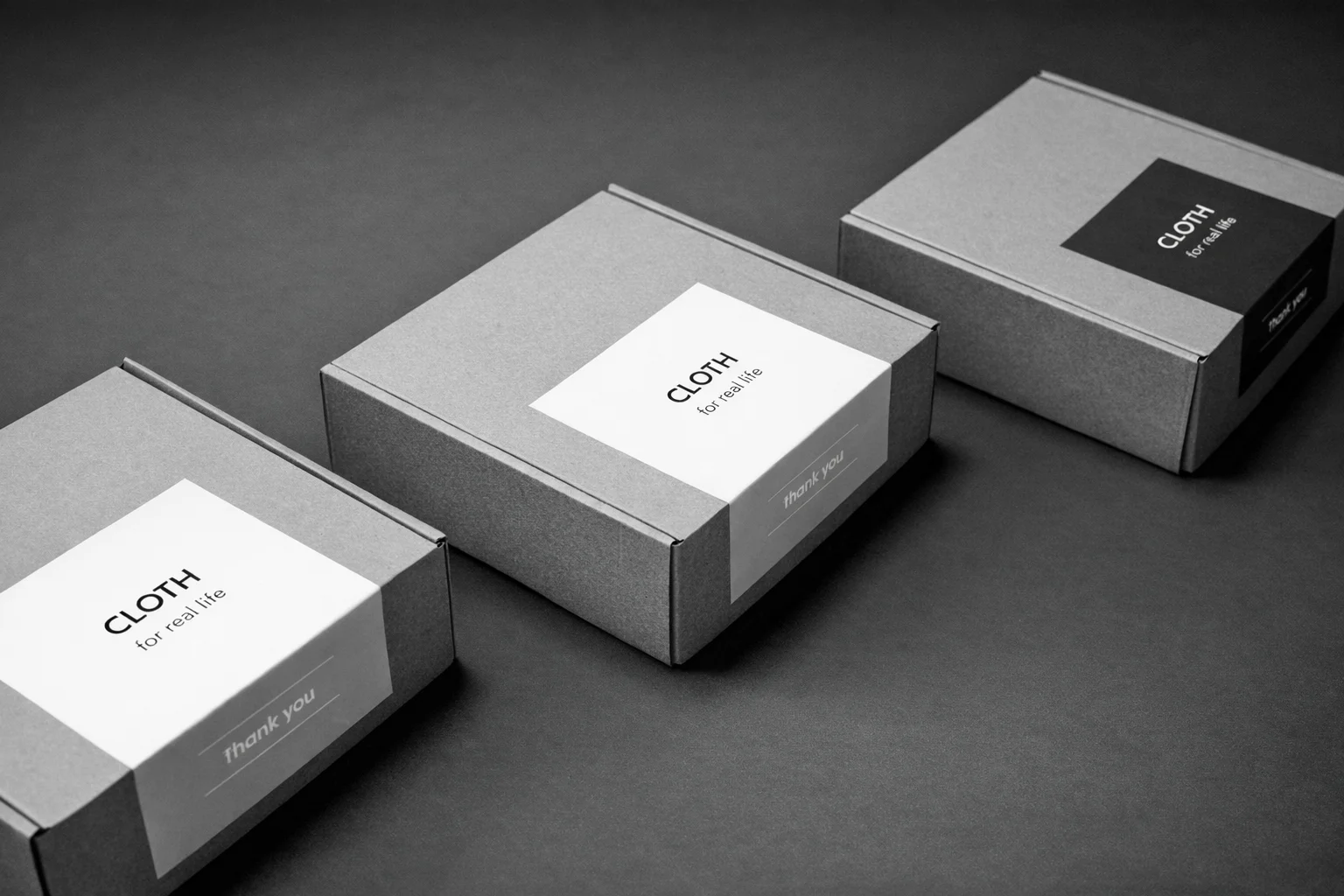
Original grayscale image
Filtered Image
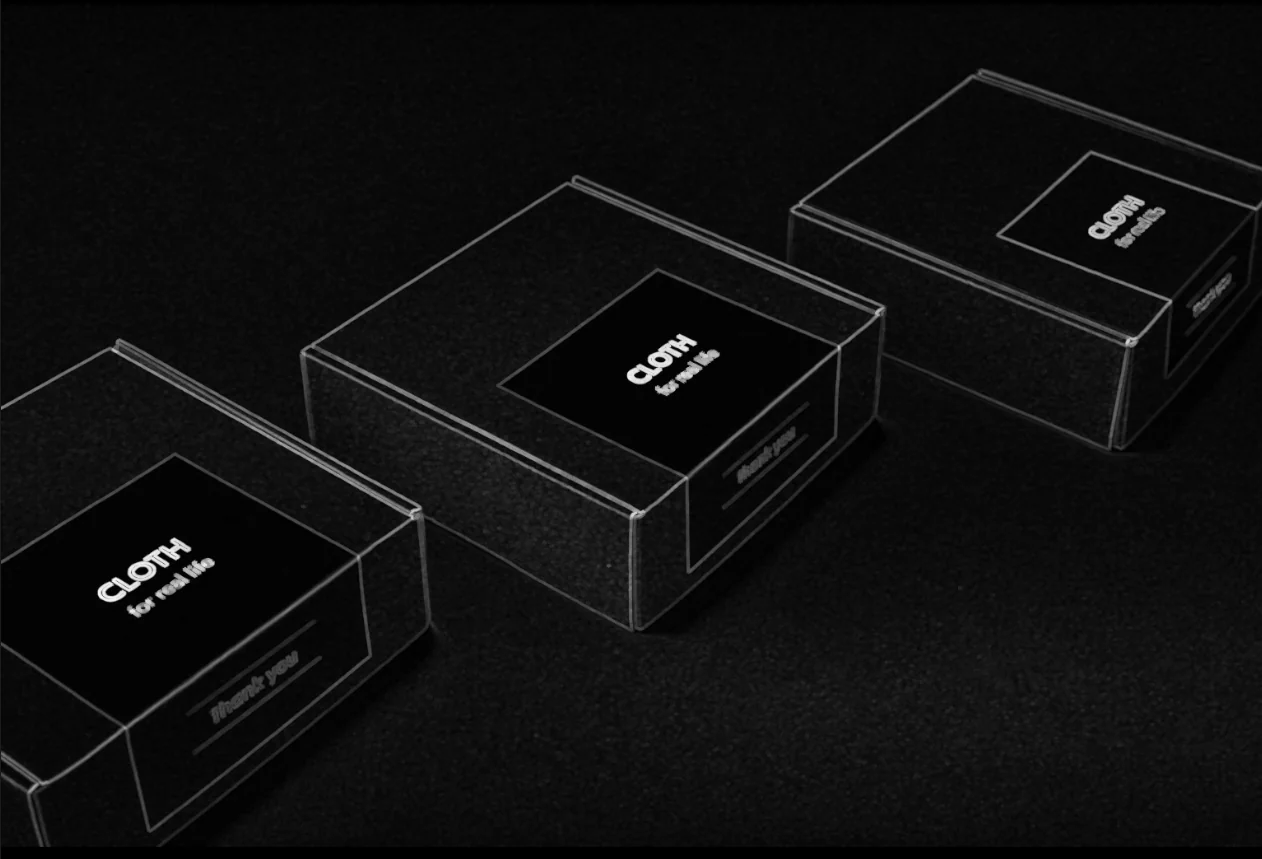
Gradient image showing object boundaries
The Code
from telekinesis import pupil
from datatypes import io
import pathlib
from loguru import logger

DATA_DIR = pathlib.Path("path/to/telekinesis-data")

# Load image
filepath = str(DATA_DIR / "images" / "cartons_arranged.webp")
image = io.load_image(filepath=filepath, as_gray=True)
logger.success(f"Loaded image from {filepath}")

# Apply gradient morphological operation
filtered_image = pupil.filter_image_using_morphological_gradient(
    image=image,
    kernel_size=5,
    kernel_shape="ellipse",
    iterations=1,
    border_type="default",
)

# Access results
filtered_image_np = filtered_image.to_numpy()
logger.success("Applied gradient morphological operation. Output image shape: {}", filtered_image_np.shape)
The Explanation of the Code
The code begins by importing the necessary modules: pupil for image processing operations, io for data handling, pathlib for path management, and loguru for logging.
from telekinesis import pupil
from datatypes import io
import pathlib
from loguru import logger
Next, an image is loaded from a .png file using the io.load_image function. The image is loaded in grayscale mode using as_gray=True, which is appropriate for morphological operations and edge extraction.
DATA_DIR = pathlib.Path("path/to/telekinesis-data")

# Load the grayscale image
filepath = str(DATA_DIR / "images" / "cartons_arranged.webp")
image = io.load_image(filepath=filepath, as_gray=True)
The main operation uses the filter_image_using_morphological_gradient Skill from the pupil module. This Skill computes the morphological gradient, which is defined as the difference between the dilation and erosion of the image. This highlights object boundaries and produces an edge map that emphasizes transitions between foreground and background regions.
The parameters can be tuned to control edge thickness, noise robustness, and border handling depending on the characteristics of the input image.
filtered_image = pupil.filter_image_using_morphological_gradient(
    image=image,
    kernel_size=5,
    kernel_shape="ellipse",
    iterations=1,
    border_type="default",
)
logger.success(f"Applied morphological gradient with gradient image shape as {filtered_image.to_numpy().shape}")
Finally, the filtered image is converted to a NumPy array using to_numpy() for further processing, visualization, or downstream tasks.
filtered_image_np = filtered_image.to_numpy()
logger.success(f"Output image shape: {filtered_image_np.shape}")
This operation is particularly useful in robotics and vision pipelines for boundary extraction, segmentation preprocessing, object detection, and shape analysis, where robust edge information is required.
Running the Example
Runnable examples are available in the Telekinesis examples repository. Follow the README in that repository to set up the environment. Once set up, you can run this specific example with:
cd telekinesis-examples
python examples/pupil_examples.py --example filter_image_using_morphological_gradient
How to Tune the Parameters
The filter_image_using_morphological_gradient Skill has 4 parameters that control edge extraction and boundary thickness:
kernel_size (default: 3): Controls the size of the structuring element used to compute the morphological gradient.
- Units: Pixels
- Increase to get thicker edges and more robustness to noise; Decrease for thinner, finer edge maps
- Typical range: 3–15 (min: 3, max: 15)
- Use 3–5 for thin edges, 5–9 for moderate thickness, 9–15 for thick boundaries
kernel_shape (default: ellipse): Defines the geometric shape of the structuring element used for dilation and erosion.
- Options:
ellipse- Produces smooth, isotropic edge detection (recommended for most cases)rectangle- Detects edges aligned with horizontal and vertical directionscross- Emphasizes orthogonal (vertical/horizontal) structuresdiamond- Approximates circular morphology with sharper diagonal influence
- Use
ellipsefor most cases
iterations (default: 1): Specifies how many times the morphological gradient operation is applied sequentially.
- Units: Count
- Increase to strengthen edge response; Decrease for thinner edges (too many iterations thicken edges excessively)
- Typical range: 1–10 (min: 1, max: 10)
- One iteration is usually sufficient for most applications
border_type (default: default): Determines how image borders are handled when the structuring element extends beyond the image boundary.
- Options:
default- Uses reflect 101 padding (recommended)constant- Pads borders with a constant value (typically zero)replicate- Repeats the nearest edge pixelreflect- Mirrors the border pixelsreflect 101- Mirror reflection without repeating the border pixel
- Use
defaultorreflectfor most cases
TIP
Best practice: Morphological gradient is less sensitive to noise than derivative-based edge detectors like Sobel. Use it when you need robust edge detection on noisy binary or grayscale images.
Where to Use the Skill
Morphological Gradient is commonly used in the following pipelines:
- Edge detection - Extract boundaries from binary or grayscale images
- Segmentation visualization - Visualize object boundaries
- Feature extraction - Extract edge features for analysis
- Image subtraction - Find differences between images
- Contour detection preparation - Prepare edges for contour finding
Related skills to build such a pipeline:
filter_image_using_sobel: Alternative gradient-based edge detectionfilter_image_using_laplacian: Second-order edge detectionmorphological_erosion: Component of gradient operation
Alternative Skills
| Skill | vs. Morphological Gradient |
|---|---|
| filter_image_using_sobel | Sobel uses derivatives. Use Sobel for grayscale edge detection with directional information, morphological gradient for binary images or when robustness to noise is important. |
| filter_image_using_laplacian | Laplacian uses second derivatives. Use Laplacian for fine edge details, morphological gradient for thicker, more robust boundaries. |
When Not to Use the Skill
Do not use Morphological Gradient when:
- You need directional edge information (Use Sobel which provides gradient direction)
- You need very thin, precise edges (Use Canny or derivative-based methods)
- You're working with highly textured images (Morphological gradient will highlight all textures)
- You need multi-scale edge detection (Use Laplacian of Gaussian or Canny)