

Filter Image Using Meijering
SUMMARY
Filter Image Using Meijering applies Meijering filter for neurite detection.
Meijering filter is optimized for detecting neurites and similar branching structures in biomedical images. This specialized filter is designed to enhance fine, branching neural processes and other delicate biological structures. It's particularly effective in neuronal imaging where detecting thin, branching processes is critical for morphological analysis and connectivity studies.
Use this Skill when you want to detect neurites and fine branching structures in biological images.
The Skill
from telekinesis import pupil

neurites = pupil.filter_image_using_meijering(
    image=image,
    scale_start=1,
    scale_end=10,
    scale_step=2,
    detect_black_ridges=True,
    border_type="reflect",
    constant_value=0.0,
)Example
Input Image
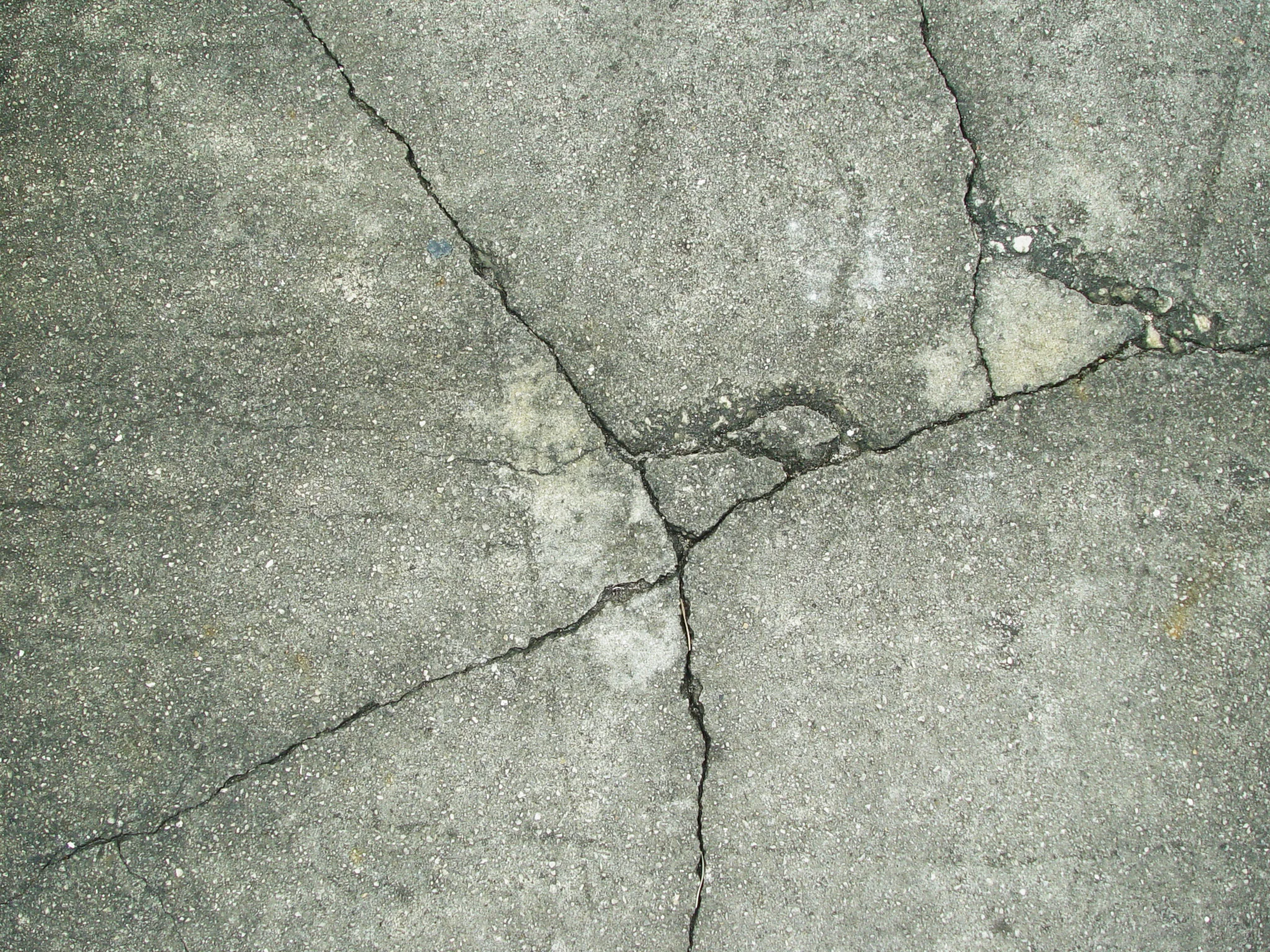
Original grayscale image with branching structures (sidewalk_cracked.jpg, normalized to 0-1 range)
Filtered Image
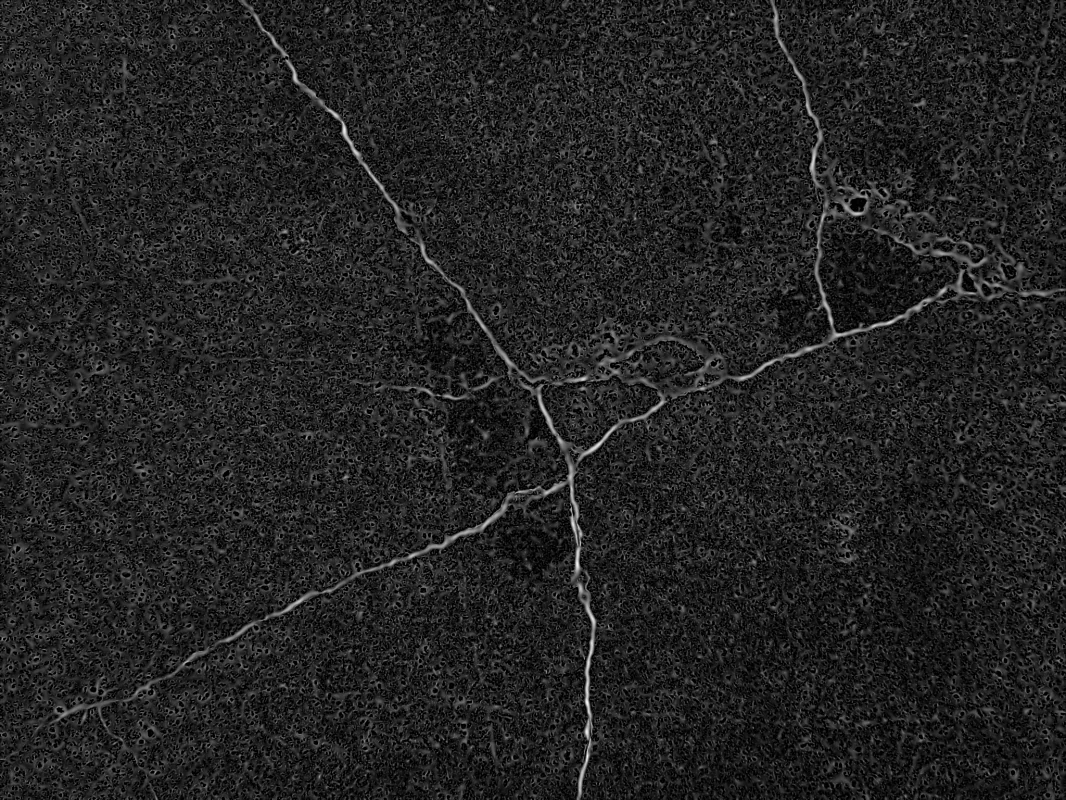
Enhanced image highlighting neurite structures
The Code
from telekinesis import pupil
from datatypes import io
import pathlib
from loguru import logger

DATA_DIR = pathlib.Path("path/to/telekinesis-data")

# Load image
filepath = str(DATA_DIR / "images" / "sidewalk_cracked.jpg")
image = io.load_image(filepath=filepath, as_gray=True)
logger.success(f"Loaded image from {filepath}")

# Apply Meijering filter for neurite detection
filtered_image = pupil.filter_image_using_meijering(
    image=image,
    scale_start=1,
    scale_end=10,
    scale_step=2,
    detect_black_ridges=True,
    border_type="reflect",
    border_value=0.0,
)

# Access results
filtered_image_np = filtered_image.to_numpy()
logger.success("Applied Meijering filter. Filtered output image shape: {}", filtered_image_np.shape)
The Explanation of the Code
The code begins by importing the necessary modules: pupil for image processing operations, io for data handling, pathlib for path management, and loguru for logging.
from telekinesis import pupil
from datatypes import io
import pathlib
from loguru import logger
Next, an image is loaded from a .jpg file using the io.load_image function. The image is loaded in grayscale mode using as_gray=True, which is appropriate for Meijering neurite detection that operates on spatial derivatives.
DATA_DIR = pathlib.Path("path/to/telekinesis-data")

# Load the grayscale image
filepath = str(DATA_DIR / "images" / "sidewalk_cracked.jpg")
image = io.load_image(filepath=filepath, as_gray=True)
The main operation uses the filter_image_using_meijering Skill from the pupil module. This Skill applies the Meijering filter for neurite detection to enhance fine branching structures. The parameters can be tuned to control scale range, ridge polarity, and border handling depending on the characteristics of the input image.
filtered_image = pupil.filter_image_using_meijering(
    image=image,
    scale_start=1,
    scale_end=10,
    scale_step=2,
    detect_black_ridges=True,
    border_type="reflect",
    border_value=0.0,
)
Finally, the filtered image is converted to a NumPy array using to_numpy() for further processing, visualization, or downstream tasks.
filtered_image_np = filtered_image.to_numpy()
logger.success(f"Output image shape: {filtered_image_np.shape}")
This operation is particularly useful in robotics and vision pipelines for neurite detection, morphological analysis, neuronal imaging, and connectivity studies, where enhancing fine branching structures is required.
Running the Example
Runnable examples are available in the Telekinesis examples repository. Follow the README in that repository to set up the environment. Once set up, you can run this specific example with:
cd telekinesis-examples
python examples/pupil_examples.py --example filter_image_using_meijering
How to Tune the Parameters
The filter_image_using_meijering Skill has 6 parameters that control the multi-scale neurite detection:
scale_start (default: 1):
- The minimum scale (sigma) for structure detection
- Units: Sigma (pixels)
- Increase to skip very thin neurites; Decrease to capture finest details
- Typical range: 1–5 (min: 1, max: 5)
- Determines the finest neurite width to detect
scale_end (default: 10):
- The maximum scale (sigma) for structure detection
- Units: Sigma (pixels)
- Increase to detect thicker processes and junctions; Decrease for faster processing
- Typical range: 5–20 (min: 5, max: 20)
- Determines the thickest neurite width to detect. Use 10–20 for cell bodies
scale_step (default: 2):
- The step size between scales
- Units: Sigma steps
- Increase for faster processing; Decrease for finer scale sampling
- Typical range: 1–5 (min: 1, max: 5)
- Use 2 for efficiency, 1 for maximum precision
detect_black_ridges (default: True):
- Whether to detect dark ridges instead of bright
- Set True for dark neurites on bright background; False for bright neurites on dark background
- Use cases: True for phase contrast, False for fluorescence
border_type (default: "reflect"):
- The padding mode for image borders
- Options: "reflect", "constant", "edge", "symmetric", "wrap"
- Use "reflect" for most cases
border_value (default: 0.0):
- The value used for constant padding mode
- Units: Intensity (0–1 normalized)
- Typical range: 0.0–1.0 (min: 0.0, max: 1.0)
- Only used when border_type="constant"
TIP
Best practice: Set scale_start to capture the finest neurites and scale_end to span cell bodies. Use scale_step=2 for good balance.
Where to Use the Skill
Filter Using Meijering is commonly used in the following pipelines:
- Neurite tracing - Detect and trace neuronal processes
- Morphological analysis - Quantify neurite length and branching
- Neural connectivity - Map neural network structures
- Drug screening - Analyze neurite outgrowth in response to compounds
- Developmental biology - Study neural development patterns
Related skills to build such a pipeline:
filter_image_using_gaussian_blur: Pre-smoothfilter_mask_using_blob_thinning: Skeletonize for tracingfilter_image_using_frangi: Alternative for thicker structures
Alternative Skills
| Skill | vs. Filter Using Meijering |
|---|---|
| filter_image_using_frangi | Frangi is for vessels. Use Meijering for fine neurites, Frangi for thicker tubular structures. |
| filter_image_using_sato | Sato is for general ridges. Use Meijering for branching neurites, Sato for non-branching ridges. |
| filter_image_using_hessian | Hessian is simpler. Use Meijering for neurite-specific detection. |
When Not to Use the Skill
Do not use Filter Using Meijering when:
- You're detecting thick vessels or non-branching structures (Use Frangi or Hessian instead)
- You need simple edge detection (Use Sobel or Canny)
- Structures are not neurite-like (Use appropriate filters)
- You need very fast processing (Meijering is computationally expensive)