

Convert Image Color Space
SUMMARY
Convert Image Color Space converts an image between color spaces (e.g., BGR to RGB, RGB to HSV).
Color space conversion enables compatibility with different libraries and algorithms, or prepares images for color-based segmentation. Common conversions include BGR↔RGB for display, RGB↔HSV for hue-based segmentation, and RGB↔RGBA for alpha channel support.
Use this Skill when you want to convert images between color representations.
The Skill
from telekinesis import pupil

converted_image = pupil.convert_image_color_space(
    image=image,
    source_color_space="BGR",
    target_color_space="RGBA",
)Example
Input Image
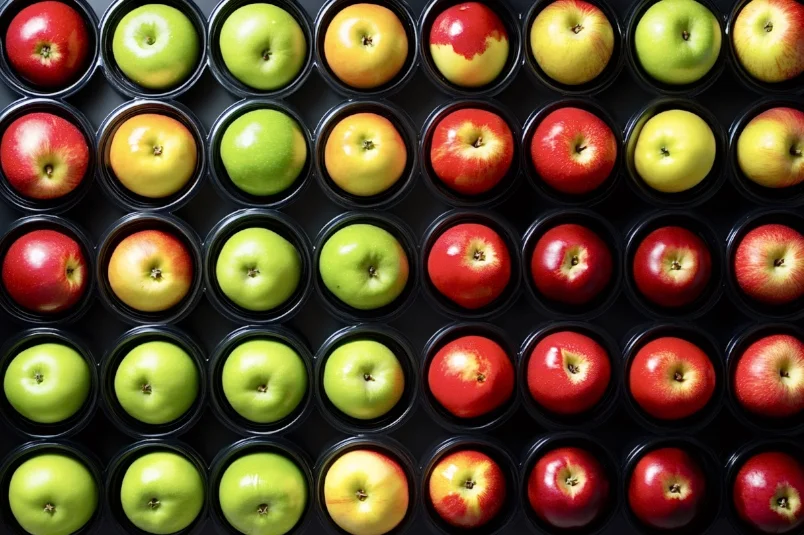
Original image in BGR
Converted Image
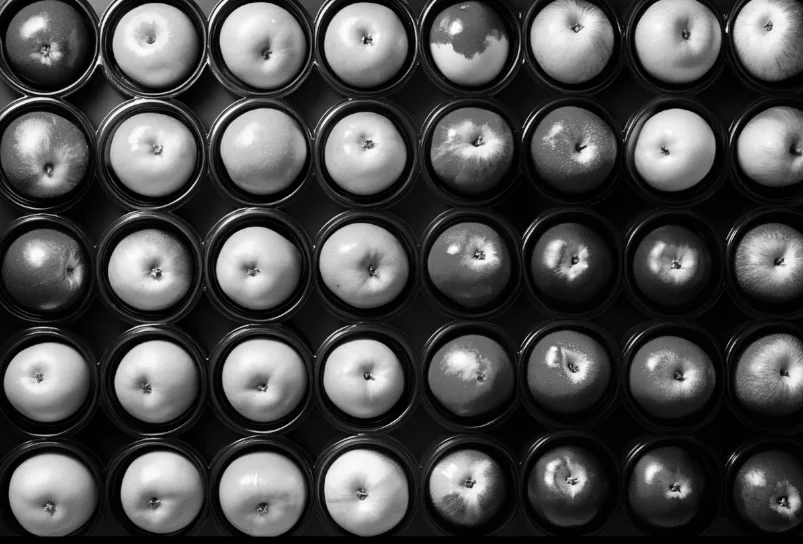
Converted image in RGBA
The Code
from telekinesis import pupil
from datatypes import io
import pathlib
from loguru import logger

DATA_DIR = pathlib.Path("path/to/telekinesis-data")

# Load image
filepath = str(DATA_DIR / "images" / "apples_black_container.jpg")
image = io.load_image(filepath=filepath)
logger.success(f"Loaded image from {filepath}")

# Convert between color spaces
converted_image = pupil.convert_image_color_space(
    image=image,
    source_color_space="RGB",
    target_color_space="GRAY",
)

# Access results
converted_image_np = converted_image.to_numpy()
logger.success("Converted color space. Output image shape: {}", converted_image_np.shape)
The Explanation of the Code
The code begins by importing the necessary modules: pupil for image processing operations, io for data handling, pathlib for path management, and loguru for logging.
from telekinesis import pupil
from datatypes import io
import pathlib
from loguru import logger
Next, an image is loaded from a .jpg file using the io.load_image function. The source color space is typically BGR when loading with OpenCV/io.
DATA_DIR = pathlib.Path("path/to/telekinesis-data")

# Load image
filepath = str(DATA_DIR / "images" / "apples_black_container.jpg")
image = io.load_image(filepath=filepath)
The main operation uses the convert_image_color_space Skill from the pupil module. This Skill transforms pixel values from one color representation to another. Common conversions include BGR→RGB for display, BGR→HSV for segmentation, and BGR→RGBA for alpha blending.
converted_image = pupil.convert_image_color_space(
    image=image,
    source_color_space="RGB",
    target_color_space="GRAY",
)
logger.success("Converted color space. Output image shape: {}", converted_image.to_numpy().shape)
Finally, the converted image is converted to a NumPy array using to_numpy() for further processing or visualization.
converted_image_np = converted_image.to_numpy()
logger.success("Converted color space. Output image shape: {}", converted_image_np.shape)
This operation is particularly useful in robotics and vision pipelines for color segmentation, display, overlay composition, and cross-library compatibility, where color space conversion is required.
Running the Example
Runnable examples are available in the Telekinesis examples repository. Follow the README in that repository to set up the environment. Once set up, you can run this specific example with:
cd telekinesis-examples
python examples/pupil_examples.py --example convert_image_color_space
How to Tune the Parameters
The convert_image_color_space Skill has 2 parameters that control the color space transformation:
source_color_space (no default—required): Specifies the color space of the input image.
- Options:
RGB,BGR,HSV,GRAY,LAB,YCRCB,XYZ,RGBA,BGRA - Use
BGRwhen loading images with OpenCV,RGBwhen loading image withio.load_image
target_color_space (no default—required): Specifies the desired output color space.
- Options:
RGB,BGR,HSV,GRAY,LAB,YCRCB,XYZ,RGBA,BGRA - Use
RGBfor display;HSVfor color segmentation;RGBAwhen alpha is needed
TIP
Best practice: Check the source when loading images with OpenCV/io.load_image. Use RGB for display; HSV for color segmentation; RGBA when alpha is needed.
Where to Use the Skill
Convert Image Color Space is commonly used in the following pipelines:
- Color segmentation - Convert to HSV before segment_image_using_hsv
- Display - Convert BGR to RGB for web or GUI
- Overlay composition - Convert to RGBA for alpha blending
- Cross-library compatibility - Match expected color order
Related skills to build such a pipeline:
segment_image_using_hsv: Color-based segmentation (requires HSV)overlay_images_using_weighted_overlay: Blending (may use RGBA)
When Not to Use the Skill
Do not use Convert Image Color Space when:
- The image is already in the target space (Unnecessary conversion)
- You need intensity normalization (Use normalize_image_intensity instead)
- You're working with single-channel grayscale (No conversion needed)