

Filter Image Using Sobel
SUMMARY
Filter Image Using Sobel applies Sobel filter for directional edge detection.
Sobel operator computes gradients in X and Y directions, useful for detecting edges and their orientation. This first-order derivative filter is one of the most widely used edge detectors in computer vision, providing both edge magnitude and direction information. It's particularly effective for detecting edges in noisy environments when combined with appropriate preprocessing.
Use this Skill when you want to detect edges with directional information using gradient computation.
The Skill
from telekinesis import pupil

gradient_image = pupil.filter_image_using_sobel(
    image=image,
    dx=1,
    dy=1,
    kernel_size=3,
    scale=1.0,
    delta=0.0,
    output_format="64bit",
    border_type="default",
)Example
Input Image
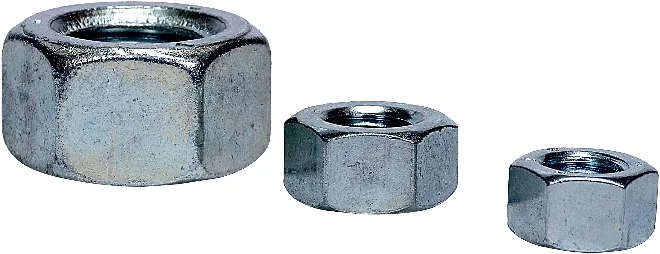
Original grayscale image
Filtered Image
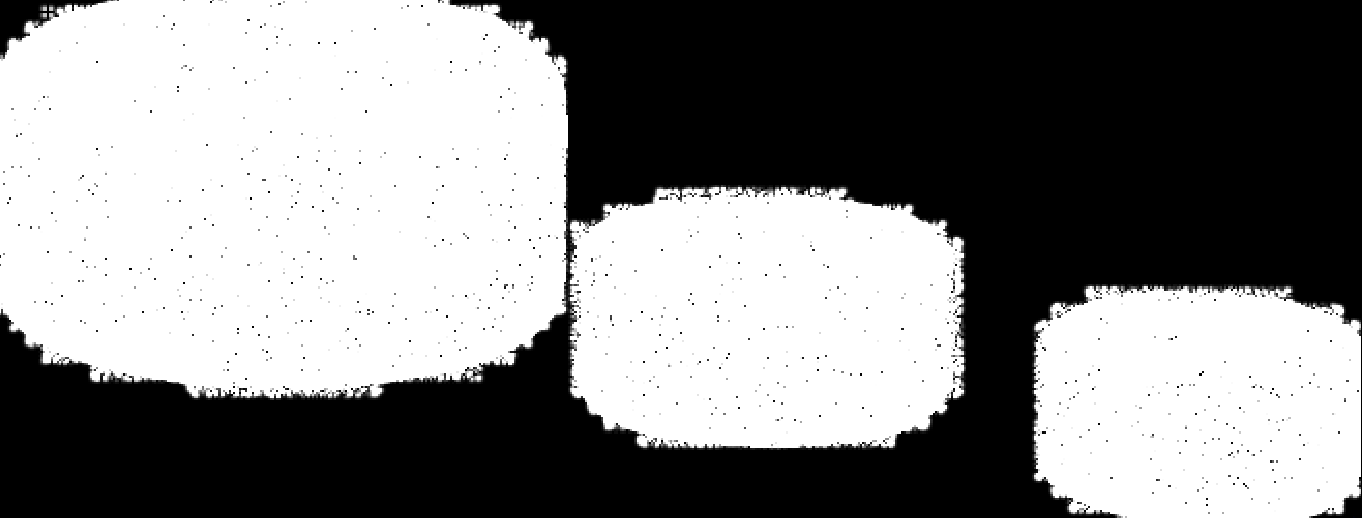
This output shows the raw Sobel response with dx=1 and dy=1, which emphasizes fine texture and diagonal intensity changes rather than clean object edges. This behavior is expected for this configuration.
The Code
from telekinesis import pupil
from datatypes import io
import pathlib
from loguru import logger

DATA_DIR = pathlib.Path("path/to/telekinesis-data")

# Load image
filepath = str(DATA_DIR / "images" / "nuts.jpg")
image = io.load_image(filepath=filepath, as_gray=True)
logger.success(f"Loaded image from {filepath}")

# Apply Sobel filter for edge detection
filtered_image = pupil.filter_image_using_sobel(
    image=image,
    output_format="64bit",
    dx=1,
    dy=1,
    kernel_size=9,
    scale=1.0,
    delta=0.0,
    border_type="default",
)

# Access results
filtered_image_np = filtered_image.to_numpy()
logger.success("Applied Sobel filter. Filtered output image shape: {}", filtered_image_np.shape)
The Explanation of the Code
The code begins by importing the necessary modules: pupil for image processing operations, io for data handling, pathlib for path management, and loguru for logging.
from telekinesis import pupil
from datatypes import io
import pathlib
from loguru import logger
Next, an image is loaded from a .jpg file using the io.load_image function. The image is loaded in grayscale mode using as_gray=True, which is appropriate for edge detection.
DATA_DIR = pathlib.Path("path/to/telekinesis-data")

# Load the grayscale image
filepath = str(DATA_DIR / "images" / "nuts.jpg")
image = io.load_image(filepath=filepath, as_gray=True)
The main operation uses the filter_image_using_sobel Skill from the pupil module. This Skill computes first-order image gradients in X and Y directions, producing both edge magnitude and orientation. The parameters can be tuned to control edge scale, sensitivity, and border handling.
filtered_image = pupil.filter_image_using_sobel(
    image=image,
    dx=1,
    dy=1,
    kernel_size=9,
    scale=1.0,
    delta=0.0,
    output_format="64bit",
    border_type="default",
)
logger.success(f"Applied Sobel filter with gradient image shape as {filtered_image.to_numpy().shape}")
Finally, the filtered image is converted to a NumPy array using to_numpy() for further processing, visualization, or downstream tasks.
filtered_image_np = filtered_image.to_numpy()
logger.success(f"Output image shape: {filtered_image_np.shape}")
This operation is particularly useful in robotics and vision pipelines for edge detection, gradient computation, feature extraction, and flow estimation, where directional edge information is required.
Running the Example
Runnable examples are available in the Telekinesis examples repository. Follow the README in that repository to set up the environment. Once set up, you can run this specific example with:
cd telekinesis-examples
python examples/pupil_examples.py --example filter_image_using_sobel
How to Tune the Parameters
The filter_image_using_sobel Skill has 7 parameters that control edge detection and gradient computation:
dx (default: 1): Controls the order of the derivative in the X direction.
- Units: Derivative order (0, 1, or 2)
- Increase for higher-order derivatives; Decrease (0) to ignore X direction
- Typical range: 0–2
- Use 1 for horizontal edges, 0 to ignore X direction
dy (default: 0): Controls the order of the derivative in the Y direction.
- Units: Derivative order (0, 1, or 2)
- Increase for higher-order derivatives; Decrease (0) to ignore Y direction
- Typical range: 0–2
- Use 1 for vertical edges, 0 to ignore Y direction
kernel_size (default: 3): Controls the size of the Sobel convolution kernel.
- Units: Pixels (must be 1, 3, 5, 7, or 9)
- Increase to detect larger-scale edges; Decrease for finer details
- Typical range: 1–9
- Use 3 for standard edge detection, 5–7 for larger features
scale (default: 1.0): Controls the scale factor for computed gradient values.
- Units: Dimensionless multiplier
- Increase to amplify edge responses; Decrease for subtler detection
- Typical range: 0.1–10.0
- Use 1.0 for standard scaling
delta (default: 0.0): Controls the offset added to the output.
- Units: Intensity offset
- Typical range: -128.0 to 128.0
- Use 0.0 for most cases; add offset for 8-bit visualization
output_format (default: "same as input"): Specifies the numerical precision of the output image.
- Options:
8bit- 8-bit unsigned16bit- 16-bit32bit- 32-bit64bit- 64-bit (recommended for accuracy)
- Use
64bitfor accuracy;8bitfor display
border_type (default: "default"): Determines how image borders are handled during convolution.
- Options:
default- Uses reflect 101 padding (recommended)constant- Pads borders with a constant valuereplicate- Repeats the nearest edge pixelreflect- Mirrors the border pixelswrap- Wraps around
- Use
defaultfor most cases
TIP
Best practice: Use (dx=1, dy=0) for horizontal edges, (0, 1) for vertical edges. Combine separate X and Y gradient images using: magnitude = sqrt(Gx² + Gy²).
Where to Use the Skill
Filter Using Sobel is commonly used in the following pipelines:
- Edge detection - Detect edges with direction information
- Gradient computation - Calculate image gradients for feature extraction
- Image sharpening - Enhance edges using gradient information
- Flow estimation - Compute spatial gradients for optical flow
- Feature detection - Find corner and edge features
Related skills to build such a pipeline:
filter_image_using_gaussian_blur: Pre-smooth for noise reductionfilter_image_using_scharr: Higher accuracy gradient estimation
Alternative Skills
| Skill | vs. Filter Using Sobel |
|---|---|
| filter_image_using_scharr | Scharr has better rotation invariance and accuracy. Use Scharr for precise gradients, Sobel for standard edge detection. |
| filter_image_using_laplacian | Laplacian computes second derivatives. Use Laplacian for omnidirectional edges, Sobel for directional gradients. |
When Not to Use the Skill
Do not use Filter Using Sobel when:
- You need the most accurate gradient estimation (Use Scharr instead)
- You need omnidirectional edge detection without direction (Use Laplacian instead)
- You're working with very noisy images (Pre-smooth with Gaussian blur first)
- You need connected edge contours (Use Canny edge detector instead)
- Kernel size is 3 and you need high accuracy (Use Scharr filter instead)