

Filter Image Using Laplacian Filter
SUMMARY
Filter Image Using Laplacian Filter applies Laplacian filter for edge detection using second derivatives.
Laplacian operator detects edges by finding regions where the second derivative is zero or changes sign. This filter is highly sensitive to fine details and edges, making it useful for edge detection, image sharpening, and detecting rapid intensity changes. It's commonly used in computer vision applications that require precise edge localization.
Use this Skill when you want to detect edges and fine details using second-order derivatives.
The Skill
from telekinesis import pupil

edge_image = pupil.filter_image_using_laplacian(
    image=image,
    kernel_size=3,
    scale=1.0,
    delta=0.0,
    output_format="64bit",
    border_type="default",
)Example
Input Image
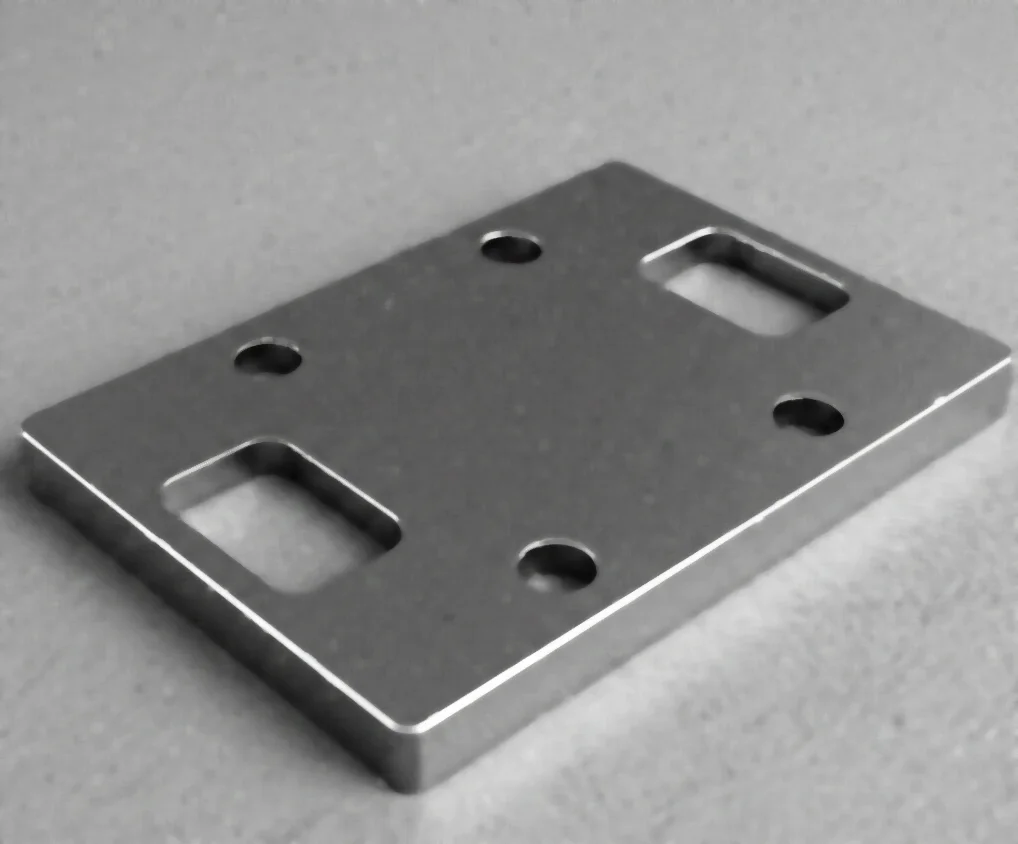
Original grayscale image
Filtered Image
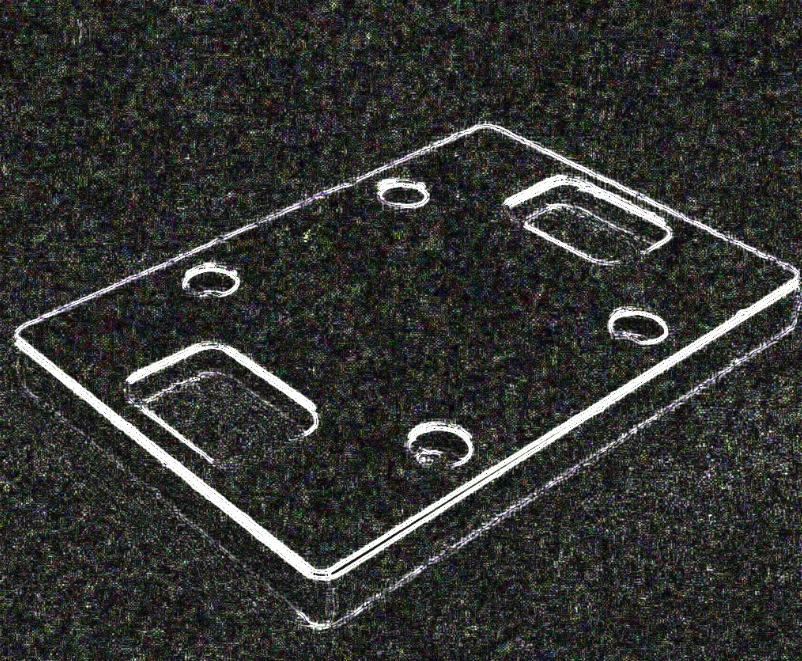
Edge-detected image with kernel_size=3, scale=1.0 - highlights edges and fine details
The Code
from telekinesis import pupil
from datatypes import io
import pathlib
from loguru import logger

DATA_DIR = pathlib.Path("path/to/telekinesis-data")

# Load image
filepath = str(DATA_DIR / "images" / "flat_mechanical_component_denoised.webp")
image = io.load_image(filepath=filepath)
logger.success(f"Loaded image from {filepath}")

# Apply Laplacian filter for edge detection
filtered_image = pupil.filter_image_using_laplacian(
    image=image,
    output_format="32bit",
    kernel_size=5,
    scale=1.0,
    delta=0.0,
    border_type="default",
)

# Access results
filtered_image_np = filtered_image.to_numpy()
logger.success("Applied Laplacian filter. Filtered output image shape: {}", filtered_image_np.shape)
The Explanation of the Code
The code begins by importing the necessary modules: pupil for image processing operations, io for data handling, pathlib for path management, and loguru for logging.
from telekinesis import pupil
from datatypes import io
import pathlib
from loguru import logger
Next, an image is loaded from a .png file using the io.load_image function. The Laplacian filter operates on grayscale or color images; color images are converted to grayscale internally.
DATA_DIR = pathlib.Path("path/to/telekinesis-data")

# Load image
filepath = str(DATA_DIR / "images" / "flat_mechanical_component_denoised.webp")
image = io.load_image(filepath=filepath)
The main operation uses the filter_image_using_laplacian Skill from the pupil module. This Skill detects edges by computing the second-order spatial derivatives, highlighting locations where intensity changes rapidly in any direction. The parameters can be tuned to control edge scale, sensitivity, and border handling.
filtered_image = pupil.filter_image_using_laplacian(
    image=image,
    kernel_size=5,
    scale=1.0,
    delta=0.0,
    output_format="32bit",
    border_type="default",
)
logger.success(f"Applied Laplacian filter with edge image shape as {filtered_image.to_numpy().shape}")
Finally, the filtered image is converted to a NumPy array using to_numpy() for further processing, visualization, or downstream tasks.
filtered_image_np = filtered_image.to_numpy()
logger.success(f"Output image shape: {filtered_image_np.shape}")
This operation is particularly useful in robotics and vision pipelines for edge detection, image sharpening, zero-crossing detection, and focus quality assessment, where second-order edge information is required.
Running the Example
Runnable examples are available in the Telekinesis examples repository. Follow the README in that repository to set up the environment. Once set up, you can run this specific example with:
cd telekinesis-examples
python examples/pupil_examples.py --example filter_image_using_laplacian
How to Tune the Parameters
The filter_image_using_laplacian Skill has 5 parameters:
kernel_size (default: 1): Controls the size of the Laplacian kernel. Must be 1, 3, 5, or 7.
- Units: Pixels
- Increase to detect larger-scale edges; Decrease for finer details
- Typical range: 1–7 (min: 1, max: 7)
- Use 1 or 3 for fine details, 5 or 7 for larger edges
scale (default: 1.0): Controls the scale factor for the computed Laplacian values.
- Units: Dimensionless multiplier
- Increase to amplify edge responses; Decrease for subtle detection
- Typical range: 0.1–10.0 (min: 0.1, max: 10.0)
- Use 0.1–1.0 for subtle edges, 1.0–5.0 for normal, 5.0–10.0 for strong emphasis
delta (default: 0.0): Controls the offset added to the output.
- Units: Intensity offset
- Typical range: -128.0–128.0 (min: -128.0, max: 128.0)
- Use 0.0 for most cases; 128.0 to shift for 8-bit visualization
output_format (default: "same as input"): Specifies the numerical precision of the output image.
- Options:
8bit- 8-bit16bitS- 16-bit signed16bitU- 16-bit unsigned32bit- 32-bit64bit- 64-bit (recommended for accuracy)
- Use
64bitfor accuracy;8bitfor display
border_type (default: "default"): Determines how image borders are handled during convolution.
- Options:
default- Uses reflect 101 padding (recommended)constant- Pads borders with a constant valuereplicate- Repeats the nearest edge pixelreflect- Mirrors the border pixelsreflect 101- Mirror reflection without repeating the border pixel
- Use
defaultorreflectfor most cases
TIP
Best practice: Use kernel_size=1 for fine edge detection. If you need to visualize the output, add delta=128.0 to shift negative values into the visible range for 8-bit images.
Where to Use the Skill
Filter Using Laplacian is commonly used in the following pipelines:
- Edge detection - Find edges with high precision
- Image sharpening - Enhance fine details by subtracting Laplacian from original
- Zero-crossing detection - Locate edges at zero-crossings of second derivative
- Blob detection - Find regions of rapid intensity change
- Focus quality assessment - Measure image sharpness
Related skills to build such a pipeline:
filter_image_using_gaussian_blur: Pre-smooth before edge detectionfilter_image_using_sobel: Alternative gradient-based edge detection
Alternative Skills
| Skill | vs. Filter Using Laplacian |
|---|---|
| filter_image_using_sobel | Sobel computes first derivatives (gradient). Use Sobel for directional edges, Laplacian for omnidirectional edge detection. |
| filter_image_using_scharr | Scharr is similar to Sobel with better rotation invariance. Use Scharr for accurate gradients, Laplacian for second-order features. |
When Not to Use the Skill
Do not use Filter Using Laplacian when:
- You need noise-robust edge detection (Use Canny edge detector or pre-smooth with Gaussian)
- You want directional information about edges (Use Sobel or Scharr which provide gradient direction)
- You're working with noisy images without preprocessing (Laplacian is very noise-sensitive)
- You need thick, connected edges (Use morphological gradient or Canny instead)
- Working with noisy images without preprocessing (Laplacian is highly sensitive to noise; pre-smooth with Gaussian blur first)