

Enhance Image Using White Balance
SUMMARY
Enhance Image Using White Balance applies white balance correction to adjust color temperature.
White balance removes color casts caused by lighting conditions, making images appear more natural. This operation adjusts the relative intensities of color channels to make neutral colors appear truly neutral, compensating for colored lighting. It's essential for correcting images taken under different illumination conditions.
Use this Skill when you want to correct color casts from lighting conditions.
The Skill
from telekinesis import pupil

balanced_image = pupil.enhance_image_using_white_balance(image=image)Example
Input Image
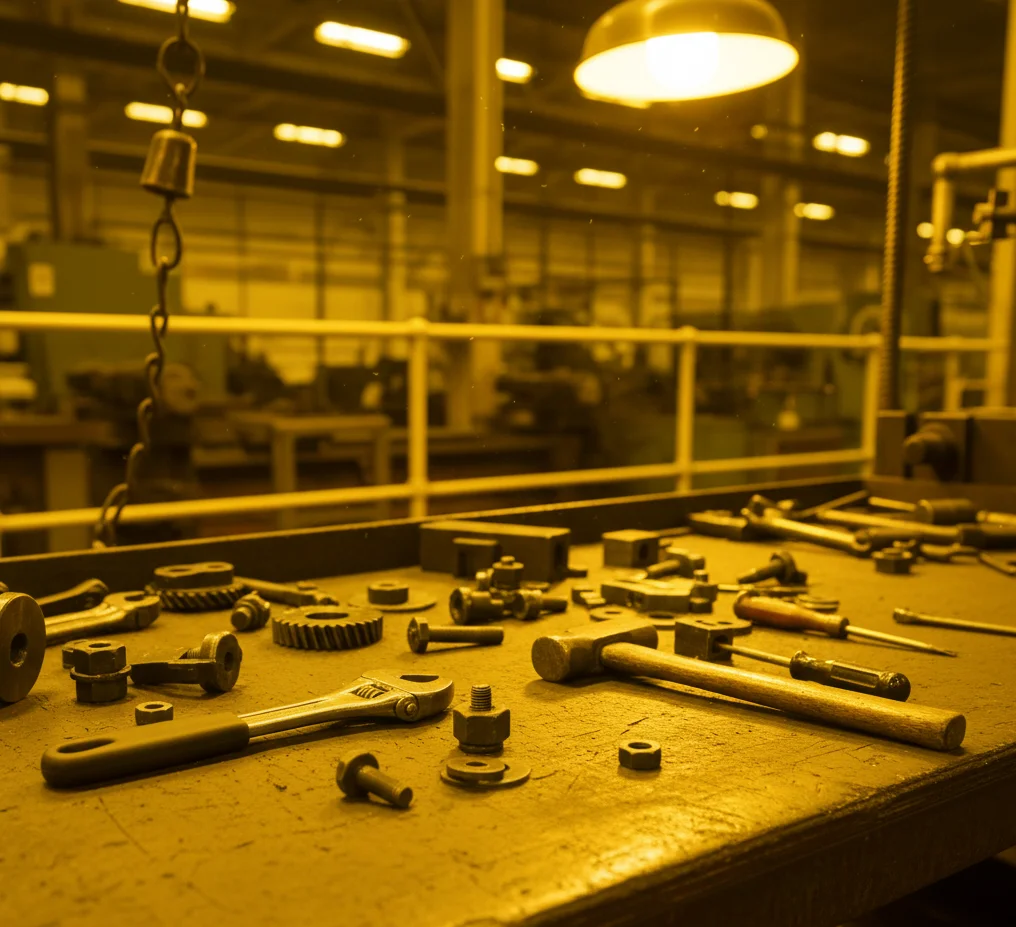
Original image with color cast
Enhanced Image

White-balanced image with neutral colors
The Code
from telekinesis import pupil
from datatypes import io
import pathlib
from loguru import logger

DATA_DIR = pathlib.Path("path/to/telekinesis-data")

# Load image
filepath = str(DATA_DIR / "images" / "hand_tools_yellow_light.webp")
image = io.load_image(filepath=filepath)
logger.success(f"Loaded image from {filepath}")

# Apply white balance for color correction
filtered_image = pupil.enhance_image_using_white_balance(
    image=image,
)

# Access results
filtered_image_np = filtered_image.to_numpy()
logger.success("Applied White Balance. Enhanced output image shape: {}", filtered_image_np.shape)
The Explanation of the Code
The code begins by importing the necessary modules: pupil for image processing operations, io for data handling, pathlib for path management, and loguru for logging.
from telekinesis import pupil
from datatypes import io
import pathlib
from loguru import logger
Next, an image is loaded from a .png file using the io.load_image function. The input image should be color; white balance correction requires color input.
DATA_DIR = pathlib.Path("path/to/telekinesis-data")

# Load image
filepath = str(DATA_DIR / "images" / "hand_tools_yellow_light.webp")
image = io.load_image(filepath=filepath)
The main operation uses the enhance_image_using_white_balance Skill from the pupil module. This Skill applies white balance correction to adjust color temperature and remove color casts caused by lighting conditions. It automatically estimates the scene illuminant and adjusts channel intensities.
filtered_image = pupil.enhance_image_using_white_balance(image=image)Finally, the enhanced image is converted to a NumPy array using to_numpy() for further processing, visualization, or downstream tasks.
filtered_image_np = filtered_image.to_numpy()
logger.success(f"Output image shape: {filtered_image_np.shape}")
This operation is particularly useful in robotics and vision pipelines for color correction, color cast removal, and consistent color appearance, where correcting images taken under different illumination is required.
Running the Example
Runnable examples are available in the Telekinesis examples repository. Follow the README in that repository to set up the environment. Once set up, you can run this specific example with:
cd telekinesis-examples
python examples/pupil_examples.py --example enhance_image_using_white_balance
How to Tune the Parameters
The enhance_image_using_white_balance Skill has no tunable parameters - it automatically estimates the illuminant and corrects accordingly.
TIP
Best practice: White balance is most effective when the image contains neutral colors (grays, whites) that should appear truly neutral. It automatically estimates the illuminant and corrects accordingly.
Where to Use the Skill
- Photo correction - Remove color casts from photos
- Preprocessing - Normalize colors before analysis
- Display normalization - Ensure consistent color appearance
- Color calibration - Correct illumination effects
When Not to Use the Skill
- No color cast present (Unnecessary)
- Artistic color grading desired (White balance removes intentional color tones)
- No neutral colors in scene (Algorithm may not work well)