

Crop Image Using Polygon
SUMMARY
Crop Image Using Polygon crops an image using a polygon mask.
Extracts a region defined by polygon vertices. The polygon is used as a mask; pixels inside are retained, outside are typically set to a background value. Useful for irregular shapes, circular/hexagonal regions, and non-rectangular ROIs.
Use this Skill when you want to crop with an arbitrary polygon shape.
The Skill
from telekinesis import pupil

cropped_image = pupil.crop_image_using_polygon(
    image=image,
    polygon_vertices=polygon_vertices,
)Example
Input Image
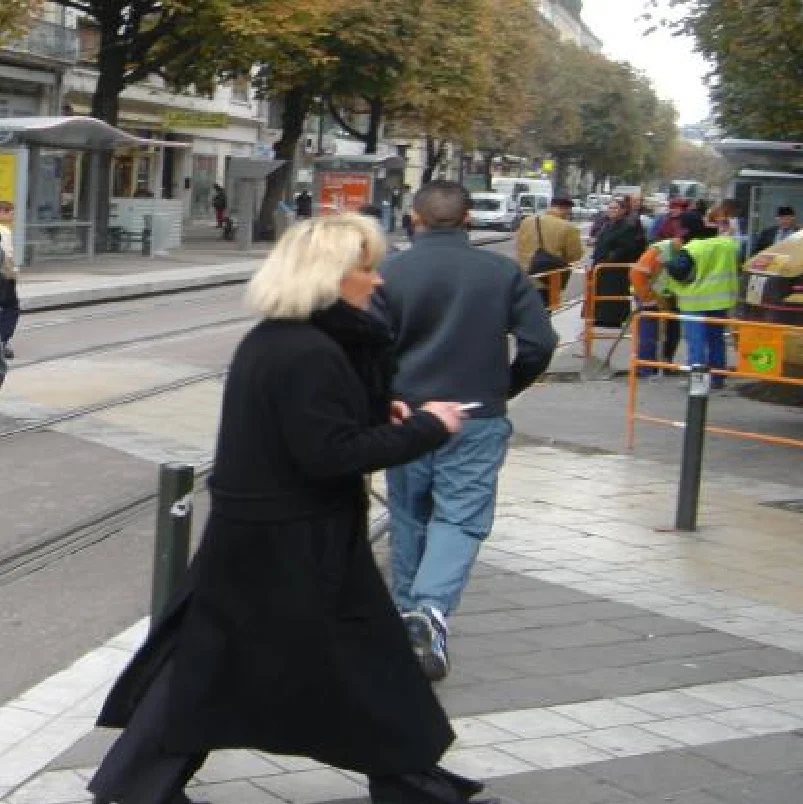
Original image
Cropped Image
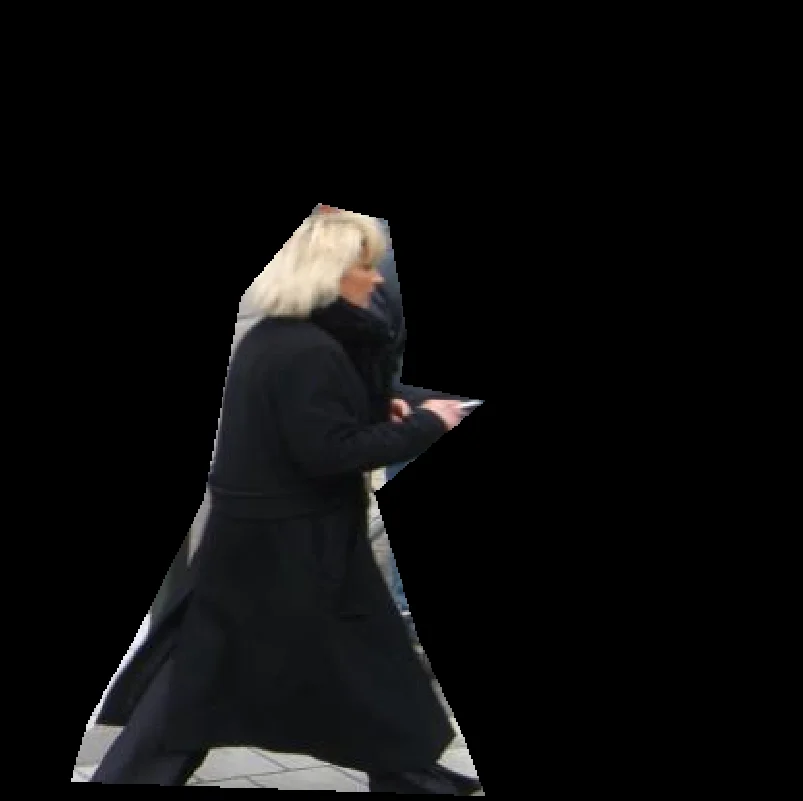
Cropped with hexagon polygon
The Code
from telekinesis import pupil
from datatypes import io
import pathlib
from loguru import logger

DATA_DIR = pathlib.Path("path/to/telekinesis-data")

# Load image
filepath = str(DATA_DIR / "images" / "pedestrians.jpg")
image = io.load_image(filepath=filepath)
logger.success(f"Loaded image from {filepath}")

# Define polygon vertices
polygon_vertices = [
    [37, 404], [46, 373], [74, 323], [106, 258], [125, 154],
    [165, 106], [200, 115], [210, 173], [206, 199], [250, 208],
    [193, 255], [216, 331], [240, 383], [250, 411]
]

# Crop image using polygon mask
cropped_image = pupil.crop_image_using_polygon(
    image=image,
    polygon_vertices=polygon_vertices,
)

# Access results
cropped_image_np = cropped_image.to_numpy()
logger.success("Cropped image (polygon). Output shape: {}", cropped_image_np.shape)
The Explanation of the Code
The code begins by importing the necessary modules: pupil for image processing operations, io for data handling, pathlib for path management, and loguru for logging.
from telekinesis import pupil
from datatypes import io
import pathlib
from loguru import logger
Next, an image is loaded from a .jpg file using the io.load_image function. The polygon vertices define the region to retain; pixels outside are typically masked.
DATA_DIR = pathlib.Path("path/to/telekinesis-data")

# Load image
filepath = str(DATA_DIR / "images" / "pedestrians.jpg")
image = io.load_image(filepath=filepath)

# Define polygon vertices
polygon_vertices = [
    [37, 404], [46, 373], [74, 323], [106, 258], [125, 154],
    [165, 106], [200, 115], [210, 173], [206, 199], [250, 208],
    [193, 255], [216, 331], [240, 383], [250, 411]
]
The main operation uses the crop_image_using_polygon Skill from the pupil module. This Skill crops an image using a polygon mask, retaining pixels inside the polygon and masking those outside. The parameters can be tuned to control the polygon shape depending on the region of interest.
cropped_image = pupil.crop_image_using_polygon(
    image=image,
    polygon_vertices=polygon_vertices,
)
Finally, the cropped image is converted to a NumPy array using to_numpy() for further processing, visualization, or downstream tasks.
cropped_image_np = cropped_image.to_numpy()
logger.success(f"Output image shape: {cropped_image_np.shape}")
This operation is particularly useful in robotics and vision pipelines for irregular region extraction, machine vision fixtures, segmentation masks, and non-rectangular ROIs, where cropping with an arbitrary polygon shape is required.
Running the Example
Runnable examples are available in the Telekinesis examples repository. Follow the README in that repository to set up the environment. Once set up, you can run this specific example with:
cd telekinesis-examples
python examples/pupil_examples.py --example crop_image_using_polygon
How to Tune the Parameters
The crop_image_using_polygon Skill has 1 parameter:
polygon_vertices (no default—required):
- List of [x, y] points defining the polygon boundary
- Units: Pixels (image coordinates)
- Vertices should be ordered (clockwise or counter-clockwise); avoid self-intersecting polygons
- Use for irregular ROIs, circular/hexagonal regions (lenses, fixtures), or segmentation contours
Where to Use the Skill
Crop Image Using Polygon is commonly used in the following pipelines:
- Irregular ROI - Extract non-rectangular regions
- Circular/hexagonal regions - Machine vision fixtures, lenses
- Segmentation masks - Crop using segmentation contour
- Creative cropping - Custom shapes for overlays
Related skills to build such a pipeline:
crop_image_using_bounding_boxes: Rectangular croppingdetect_contours: Get polygon from contours
Alternative Skills
| Skill | vs. Crop Image Using Polygon |
|---|---|
| crop_image_using_bounding_boxes | Use when regions are rectangular; simpler and faster. |
When Not to Use the Skill
Do not use Crop Image Using Polygon when:
- Regions are rectangular (Use crop_image_using_bounding_boxes)
- You need the full image (No cropping needed)
- Polygon is self-intersecting (Ensure valid, non-intersecting polygon)