

Calculate Image Centroid
SUMMARY
Calculate Image Centroid calculates the centroid of non-zero pixels in a binary mask.
The centroid (cx, cy) is the center of mass of all non-zero pixels. Returns a Position2D with the centroid coordinates. Raises ValueError if the mask has no non-zero pixels. Useful when you need only the center point without PCA visualization.
Use this Skill when you want to get the center of mass of a binary mask.
The Skill
from telekinesis import pupil

centroid = pupil.calculate_image_centroid(mask=mask)Example
Input

Centroid is the geometric center of non-zero pixels.
Output
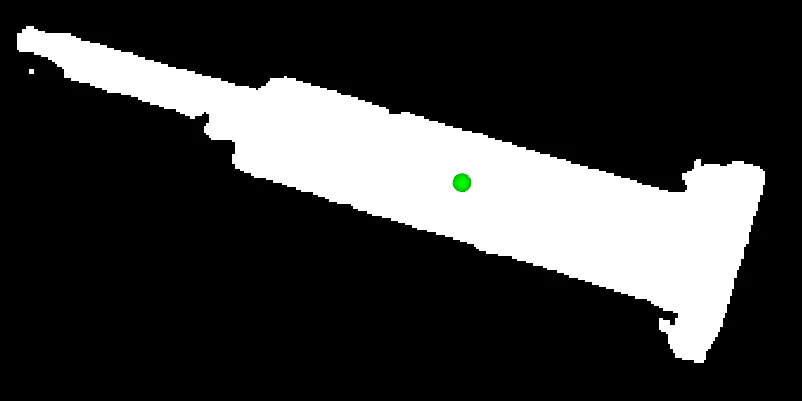
Centroid is the geometric center of non-zero pixels.
The Code
from telekinesis import pupil
from datatypes import io
import pathlib
from loguru import logger

DATA_DIR = pathlib.Path("path/to/telekinesis-data")

# Load binary mask
filepath = str(DATA_DIR / "images" / "metal_part_mask.webp")
mask = io.load_image(filepath=filepath, as_binary=True, binary_method="fixed")
logger.success(f"Loaded mask from {filepath}")

# Calculate centroid of non-zero pixels
centroid = pupil.calculate_image_centroid(mask=mask)

# Access results
centroid_pos = centroid.to_numpy().reshape(-1, 2)
logger.success("Computed centroid. Position: ({}, {})", centroid_pos[0, 0], centroid_pos[0, 1])
The Explanation of the Code
The code begins by importing the necessary modules: pupil for image processing operations, io for data handling, pathlib for path management, and loguru for logging.
from telekinesis import pupil
from datatypes import io
import pathlib
from loguru import logger
Next, a binary mask is loaded from a .png file using the io.load_image function with as_binary=True. The mask should have non-zero values indicating the region of interest.
DATA_DIR = pathlib.Path("path/to/telekinesis-data")

# Load binary mask
filepath = str(DATA_DIR / "images" / "metal_part_mask.webp")
mask = io.load_image(filepath=filepath, as_binary=True, binary_method="fixed")
The main operation uses the calculate_image_centroid Skill from the pupil module. This Skill computes the centroid (center of mass) of all non-zero pixels in the mask. The result is a Position2D object with coordinates (cx, cy).
centroid = pupil.calculate_image_centroid(mask=mask)
logger.success("Centroid: {}", centroid)
Finally, the centroid coordinates are extracted for further use. If the mask has no non-zero pixels, the Skill raises ValueError.
centroid_pos = centroid.to_numpy().reshape(-1, 2)
logger.success("Computed centroid. Position: ({}, {})", centroid_pos[0, 0], centroid_pos[0, 1])
This operation is particularly useful in robotics and vision pipelines for object localization, alignment, picking, and tracking, where the center of mass of a binary mask is required.
Running the Example
Runnable examples are available in the Telekinesis examples repository. Follow the README in that repository to set up the environment. Once set up, you can run this specific example with:
cd telekinesis-examples
python examples/pupil_examples.py --example calculate_image_centroid
How to Tune the Parameters
The calculate_image_centroid Skill has no tunable parameters. It requires a binary mask with at least one non-zero pixel.
TIP
Best practice: Ensure the mask contains at least one non-zero pixel before calling. If the mask may be empty, check the sum of pixel values first. Use calculate_image_pca when you need both the centroid and principal axis visualization.
Where to Use the Skill
Calculate Image Centroid is commonly used in the following pipelines:
- Object localization - Get center of detected region
- Alignment - Center objects for further processing
- Picking - Compute grasp center from segmentation mask
- Tracking - Track centroid of moving object
Related skills to build such a pipeline:
calculate_image_pca: Get centroid plus visualization and principal axisalign_image_circle_center: Align by circle centerscrop_image_using_bounding_boxes: Crop around centroid
Alternative Skills
| Skill | vs. Calculate Image Centroid |
|---|---|
| calculate_image_pca | Use when you need centroid plus principal axis visualization and orientation. |
When Not to Use the Skill
Do not use Calculate Image Centroid when:
- You need principal axis or orientation (Use calculate_image_pca instead)
- The mask has no foreground pixels (Will raise ValueError)
- You're working with grayscale (Use binary mask; threshold first if needed)
- The mask has no non-zero pixels (Will raise ValueError; ensure at least one foreground pixel before calling)