

Capture Single Point Cloud
SUMMARY
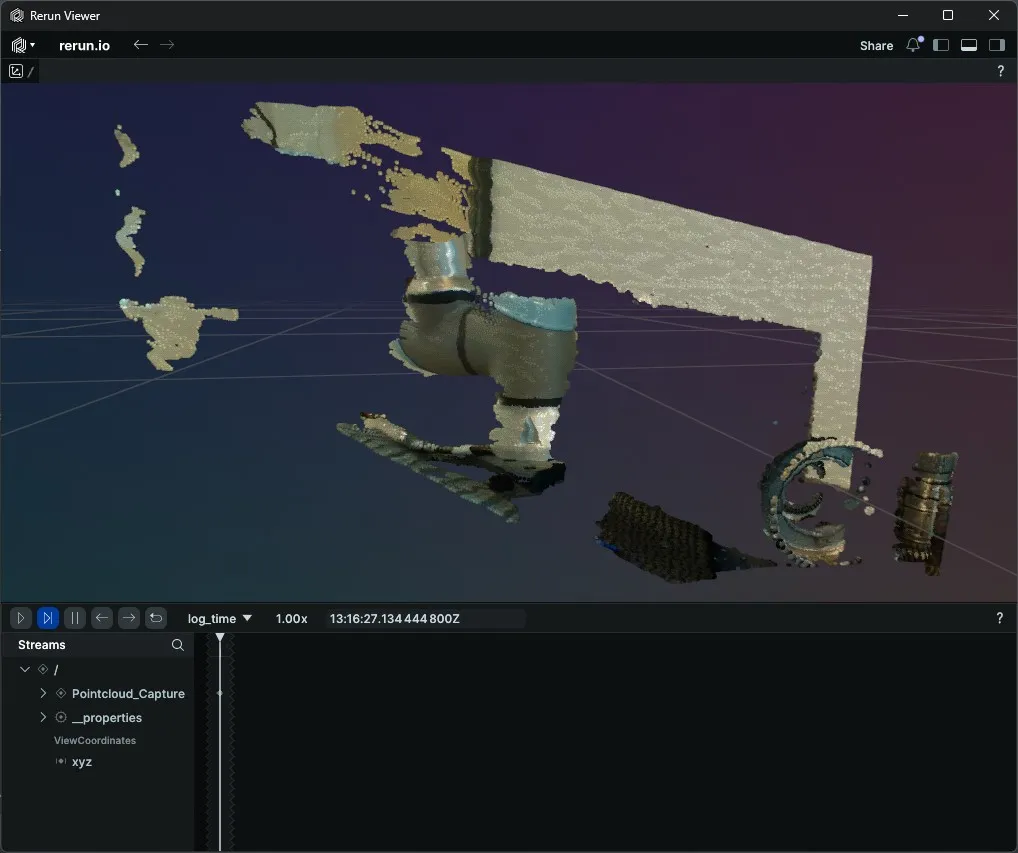
Capture Single Point Cloud fuses one depth frame with one colour frame to produce a colour-mapped 3D point cloud. The returned object has .positions (Nx3 float XYZ) and .colors (Nx3 uint8 RGB) arrays ready to log with rr.Points3D.
Available on: Intel RealSense.
The Skill
point_cloud = camera.capture_single_pointcloud()Example
The Code
"""
Capture a single colour-mapped point cloud from a RealSense camera and
visualise it in Rerun.

Run from a terminal to avoid issues with Rerun's spawn mode.
"""
from loguru import logger
import rerun as rr

from telekinesis.medulla.cameras import realsense


def main():
    camera = realsense.RealSense(name="my_realsense")
    try:
        rr.init("RealSense_Pointcloud_Example", spawn=True)
        rr.log("/", rr.ViewCoordinates.RDF, static=True)
        camera.connect()

        point_cloud = camera.capture_single_pointcloud()
        if point_cloud is None:
            logger.error("Failed to capture point cloud.")
            return

        rr.log(
            "Pointcloud_Capture",
            rr.Points3D(positions=point_cloud.positions, colors=point_cloud.colors),
        )
    except Exception as e:
        logger.error(f"Unable to capture point cloud. {type(e).__name__}: {e}")
    finally:
        camera.disconnect()


if __name__ == "__main__":
    main()
The Explanation of the Code
Before connecting, the Rerun viewer is opened and a world coordinate frame is set. rr.ViewCoordinates.RDF declares Right-Down-Forward axes, matching the RealSense depth sensor's native orientation so the 3D scene renders the right way up. Passing static=True logs this once and never repeats it on subsequent frames.
rr.init("RealSense_Pointcloud_Example", spawn=True)
rr.log("/", rr.ViewCoordinates.RDF, static=True)
connect initializes the RealSense pipeline with default stream settings, enabling both the depth and colour streams needed to build a colour-mapped point cloud.
camera.connect()capture_single_pointcloud fuses one depth frame with one colour frame to produce a point cloud object. Its .positions attribute is an Nx3 float array of XYZ coordinates and its .colors attribute is an Nx3 uint8 array of per-point RGB values. The explicit None check handles the rare case where the depth-colour alignment fails to produce a valid frame.
point_cloud = camera.capture_single_pointcloud()
if point_cloud is None:
    logger.error("Failed to capture point cloud.")
    return
rr.Points3D logs the full coloured cloud to Rerun in a single call. No JPEG encoding is needed — positions and colours are passed as numeric arrays directly.
rr.log(
    "Pointcloud_Capture",
    rr.Points3D(positions=point_cloud.positions, colors=point_cloud.colors),
)
The disconnect call lives in a finally block so the RealSense pipeline and USB resources are released regardless of whether the capture succeeded.
Running the Example
python capture_pointcloud_single_example.pyA Rerun viewer opens automatically. The colour-mapped point cloud appears under Pointcloud_Capture once acquisition completes.
Where to Use the Skill
- Bin picking and grasp planning — feed the point cloud into pose-estimation pipelines.
- Static scene reconstruction — capture a one-shot 3D snapshot before motion planning.
- Sensor diagnostics — verify depth-colour alignment without running a continuous stream.