

IDS: Capture Single Image
SUMMARY
Capture a single color frame, optionally adjust exposure beforehand, and visualize the result with Rerun.
Example
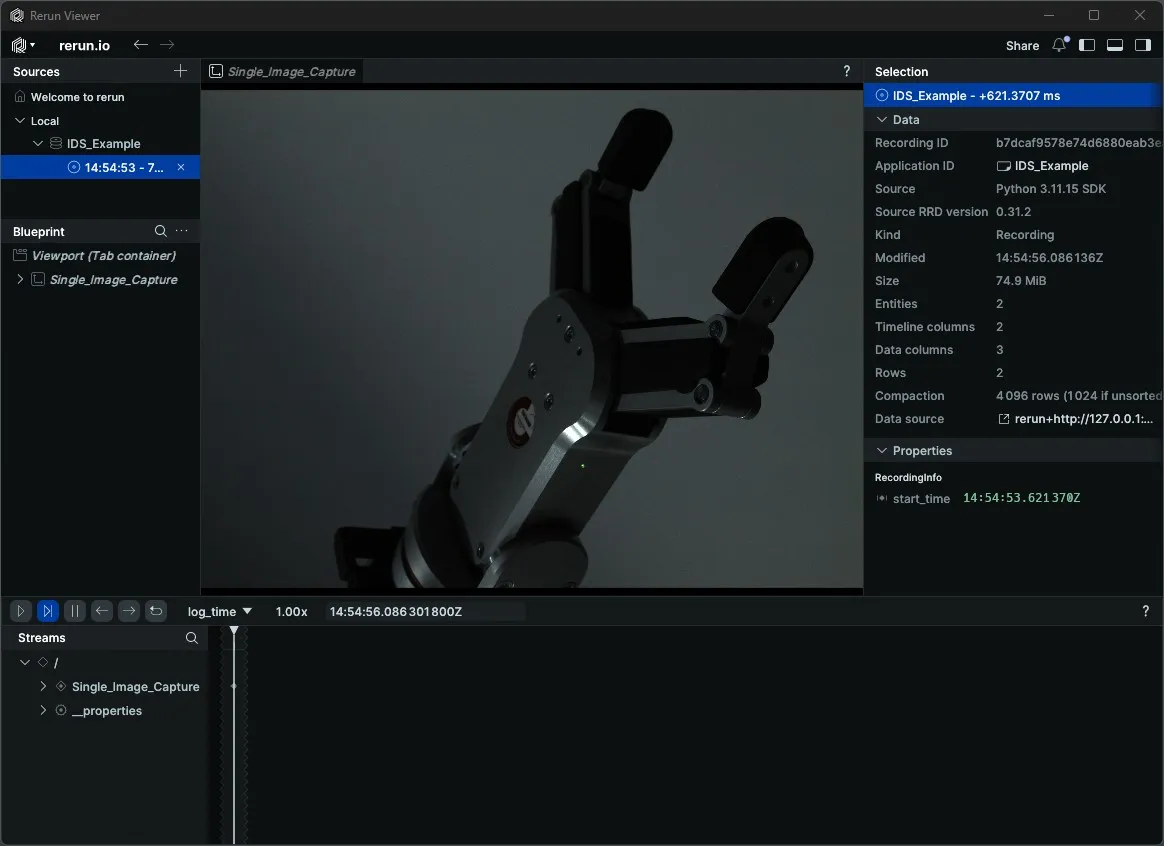
Camera parameters can be set in two ways:
- IDS Peak Cockpit — Connect, adjust settings, then close the app. Parameters persist until the camera is disconnected or the PC restarts.
- Code — Use
get_parameter/set_parameter. Supported parameter names are listed inparameter_name_to_type_mapinmedulla/cameras/ids.py(e.g.AcquisitionFrameRate,ExposureTime,DeviceLinkThroughputLimit).
Code
"""
Connect to an IDS camera, get/set parameters, capture an image, and disconnect.

Run from a terminal to avoid issues with Rerun's spawn mode.
"""
from loguru import logger
import rerun as rr

from medulla.cameras import ids


def main():
    camera = ids.IDS(
        name="my_ids_camera",
        serial_number="4108909352",
        load_factory_defaults=False
    )
    try:
        rr.init("IDS_Example", spawn=True)
        camera.connect()

        logger.info(f"ExposureTime: {camera.get_parameter('ExposureTime')}")
        camera.set_parameter('ExposureTime', 35000.0)

        image = camera.capture_single_color_frame()

        rr.log("Single_Image_Capture", rr.Image(image))
    except Exception as e:
        logger.error(f"Unable to capture image. {type(e).__name__}: {e}")
    finally:
        camera.disconnect()


if __name__ == "__main__":
    main()
Explanation
Now, let’s break down the code piece by piece.
An IDS camera object is created by supplying a unique name and the physical camera's serial_number. Setting load_factory_defaults=False preserves any parameters previously configured in IDS Peak Cockpit, rather than resetting them to factory values on connect.
camera = ids.IDS(
    name="my_ids_camera",
    serial_number="4108909352",
    load_factory_defaults=False
)
A Rerun viewer is opened with rr.init(..., spawn=True), then camera.connect() initializes the IDS Peak library, opens the device by serial number, and allocates the acquisition buffers needed to receive frames from the sensor. All subsequent operations require an active connection.
rr.init("IDS_Example", spawn=True)
camera.connect()
The current ExposureTime is read back with get_parameter so you can verify the starting value before making changes, then set_parameter updates it to 35 ms (35 000 µs). The parameter name must exist in parameter_name_to_type_map in medulla/cameras/ids.py — passing an unknown name raises a KeyError.
logger.info(f"ExposureTime: {camera.get_parameter('ExposureTime')}")
camera.set_parameter('ExposureTime', 35000.0)
capture_single_color_frame sets the camera to SingleFrame acquisition mode, triggers one exposure, waits for the buffer to fill, converts it to a color image, and returns a NumPy array. The frame is then logged to Rerun under the path "Single_Image_Capture" for immediate visual inspection.
image = camera.capture_single_color_frame()

rr.log("Single_Image_Capture", rr.Image(image))
The finally block guarantees that camera.disconnect() is always called — regardless of whether an exception occurred. It stops acquisition, releases all allocated buffers, closes the IDS Peak library, and shuts down any BabyROS nodes registered inside the IDS instance.
finally:
    camera.disconnect()
Run
python capture_image_example.pyA Rerun viewer opens automatically. The captured frame appears under Single_Image_Capture once acquisition completes.