

Conveyor Segmentation From RGB Image
SUMMARY
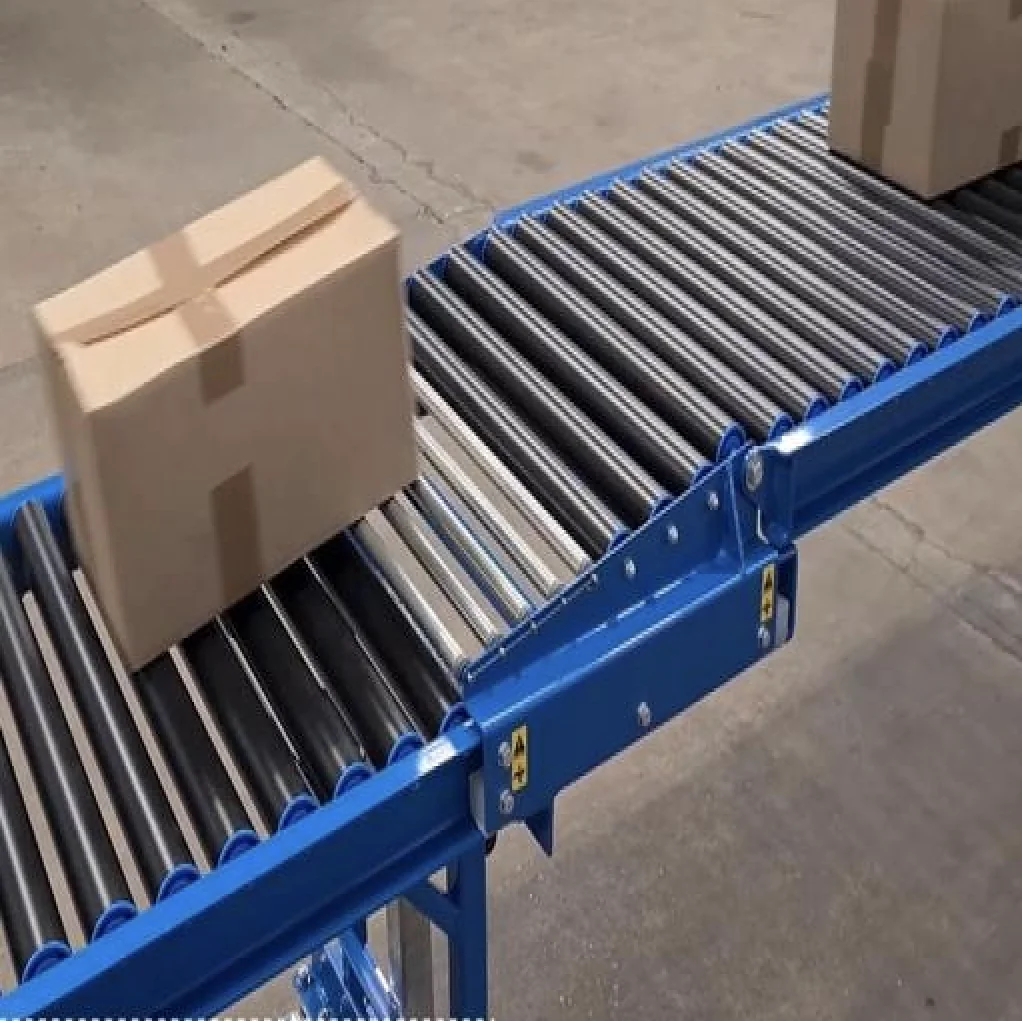
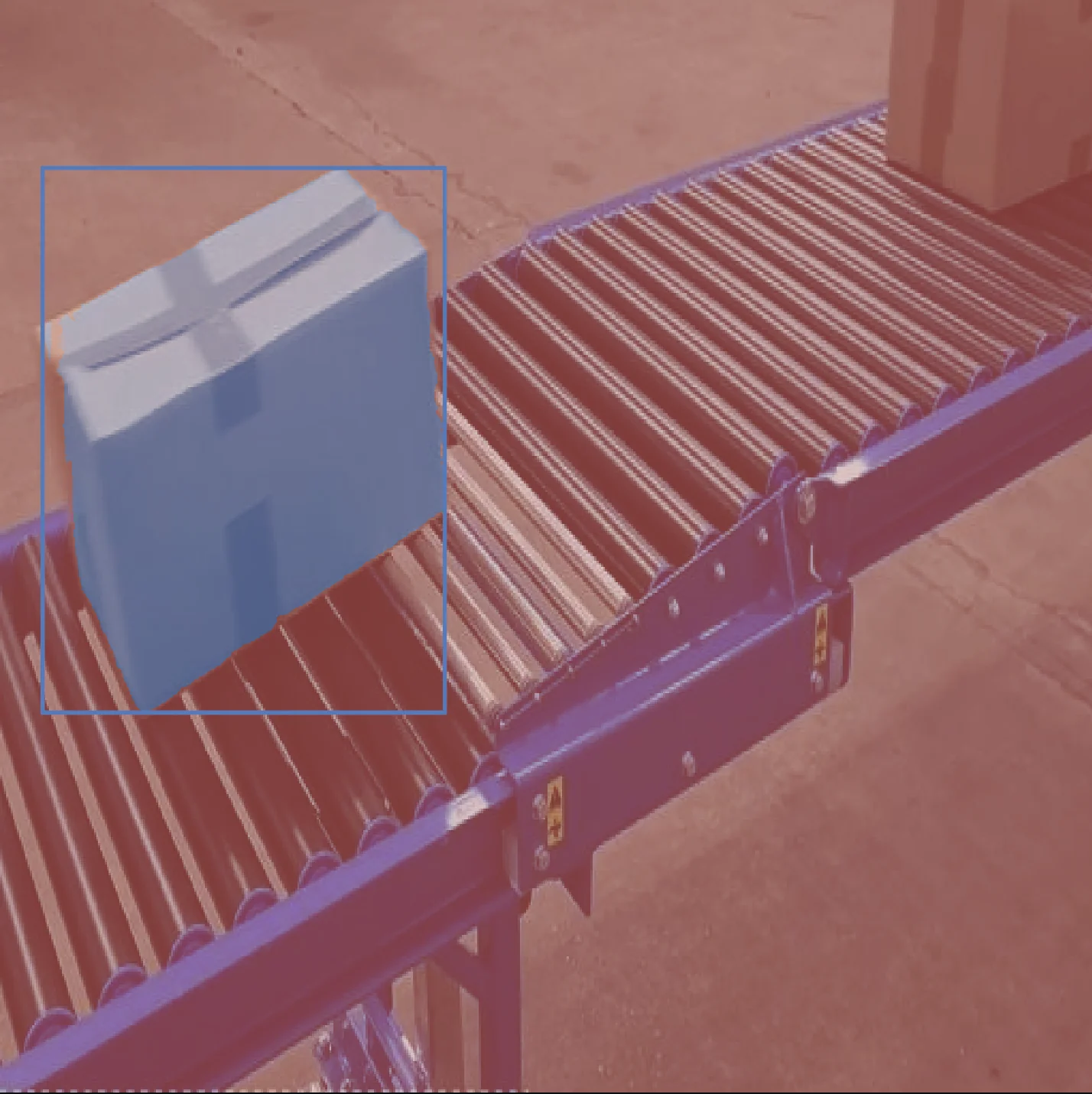
Segment packages or items from a conveyor RGB feed for counting, sorting, or inspection. Uses SAM with a bounding-box prompt to get per-object masks; outputs labeled masks and bounding boxes, with Rerun visualization.
Overview
Conveyor tracking, package counting, sorting, and inspection often require instance segmentation of items on the belt from a single RGB frame or stream. This example shows how to segment one or more regions (e.g. packages) in an RGB image using a bounding box prompt: you provide the image and ROI(s), and the pipeline returns per-object masks and bounding boxes suitable for counting, sorting logic, or downstream inspection.
Inputs
- Single RGB image (e.g. from a fixed camera over the belt)
- Bounding box (one or more) around each item or region of interest as
[x, y, width, height]or[x_min, y_min, x_max, y_max]
Required Telekinesis Skills
- Cornea — Segment Image Using SAM for instance segmentation from bounding box prompts
Optional: Rerun for visualization.
Use Cases
This pipeline segments objects on a conveyor belt in RGB images using SAM with a bounding box prompt.
Typical applications include:
- Package counting — Segment each item to count or validate load.
- Sorting — Use masks and boxes to route items by position or type.
- Inspection — Isolate individual items for defect or presence checks.
- Conveyor tracking — Maintain per-object masks and boxes for downstream logic or visualization.
Input-Output
The Pipeline
The pipeline loads an RGB image, defines one or more bounding box prompts, runs SAM for instance segmentation, then extracts masks and bounding boxes and visualizes with Rerun.
Load RGB Image
        ↓
Define ROI (Bounding Box Prompt)
        ↓
Segment Image Using SAM
        ↓
Postprocess Masks
        ↓
Extract Bounding Boxes
        ↓
Visualize with Rerun- Segment Image Using SAM — Instance segmentation from bounding box prompts; outputs masks and bboxes per instance.
The Code
The script loads an image, defines a bounding box (ROI), runs SAM, extracts masks and bounding boxes from the annotations, and visualizes with Rerun. Image path and ROI are set at the top; the pipeline runs in the main block with no function arguments.
# Load image
image_path = DATA_DIR / "images/conveyor_tracking.png"
image = io.load_image(image_path, keep_alpha=False)
logger.info(f"Loaded image shape: {image.to_numpy().shape}")

# Define a bounding box: (x, y, width, height)
height, width = image.to_numpy().shape[:2]
x_min = width // 12
y_min = height // 10
x_max = width // 1.5
y_max = height // 1.5
bounding_box = [x_min, y_min, x_max, y_max]

# Segment using SAM
result = cornea.segment_image_using_sam(image=image,
                                       bboxes=[bounding_box])
annotations = result.to_list()

# Rerun visualization
rr.init("conveyor_tracking_using_sam", spawn=False)

try:
    rr.connect()
except Exception as e:
    # If connection fails, attempt to spawn a new Rerun viewer window.
    rr.spawn()

# Blueprint
rr.send_blueprint(
    rrb.Blueprint(
            rrb.Horizontal(
                rrb.Spatial2DView(name="Input", origin="input"),
                rrb.Spatial2DView(name="Bboxes & Segments", origin="segmented"),
            ),
        rrb.SelectionPanel(),
        rrb.TimePanel(),
    ),
    make_active=True,
)

# --- Logging images ---
image = image.to_numpy()
rr.log("input/image", rr.Image(image=image))
rr.log("segmented/image", rr.Image(image=image))
h, w = image.shape[:2]
masks = []
masks_with_ids = []
segmentation_img = np.zeros((h, w), dtype=np.uint16)

# --- boxes: extract from annotations (preferred) ---
ann_bboxes = []
class_ids = []

for idx, ann in enumerate(annotations):
    label = idx + 1
    mask_i = np.zeros((h, w), dtype=np.uint8)

    if "mask" in ann and isinstance(ann["mask"], np.ndarray):
        m = ann["mask"]
        # if float prob mask, threshold at 0.5
        if m.dtype.kind in ("f", "b"):
            mask_i = (m > 0.5).astype(np.uint8)
        else:
            mask_i = (m > 0).astype(np.uint8)

    elif "segmentation" in ann and ann["segmentation"]:
        seg = ann["segmentation"]
        if isinstance(seg, dict):
            mask_dec = mask_utils.decode(seg)
            if mask_dec.ndim == 3:
                mask_dec = mask_dec[:, :, 0]
            mask_i = (mask_dec > 0).astype(np.uint8)
        elif isinstance(seg, list) and len(seg) > 0:
            temp = np.zeros((h, w), dtype=np.uint8)
            polys = seg if isinstance(seg[0], list) else [seg]
            for poly in polys:
                pts = np.array(poly).reshape(-1, 2).astype(np.int32)
                cv2.fillPoly(temp, [pts], 1)
            mask_i = (temp > 0).astype(np.uint8)

    # skip empty masks
    if mask_i.sum() == 0:
        print(f"Skipping annotation {idx} with label {label} due to empty mask.")
        continue
    masks.append(mask_i)
    masks_with_ids.append((label, mask_i))
    segmentation_img[mask_i > 0] = label
    bbox = ann.get("bbox", None)

    if bbox is None:
        continue

    ann_bboxes.append(list(bbox))
    class_ids.append(label)


# --- overlay segmentation in segmented view ---
rr.log("segmented/masks", rr.SegmentationImage(segmentation_img))

# --- boxes ---
if ann_bboxes:
    rr.log(
        "segmented/boxes",
        rr.Boxes2D(
            array=np.asarray(ann_bboxes, dtype=np.float32),
            array_format=rr.Box2DFormat.XYWH,
            class_ids=np.asarray(class_ids, dtype=np.int32),
        ),
    )